
HUDAMZKY 26A-S866-130X
HUDAMZKY Ebike Sine Wave Controller 26A with S866 LCD Display/Thumb Throttle and PAS Instruction Manual
Model: 26A-S866-130X | Brand: HUDAMZKY
1. Introduzzjoni
This manual provides essential information for the installation, operation, and maintenance of your HUDAMZKY Ebike Sine Wave Controller kit. This kit includes a 26A sine wave controller, an S866 LCD display, a thumb throttle, and an 8-magnet Pedal Assist Sensor (PAS). Please read this manual thoroughly before use to ensure proper functionality and safety.
2. Kontenut tal-Pakkett
L-oġġetti li ġejjin huma inklużi fil-pakkett tiegħek:
- 1 x Sine Wave Controller (26A)
- 1 x S866 LCD Display
- 1 x Thumb Throttle
- 1 x 8-Magnet PAS (Pedal Assist Sensor)

Immaġni: Fuqview of the HUDAMZKY Ebike Sine Wave Controller kit, showing the controller, S866 LCD display, thumb throttle, and PAS sensor.
3. Setup u Installazzjoni
3.1 Kontrollur Overview
The sine wave controller operates at 24V/36V/48V/52V with a 26A current. It offers quieter operation and improved energy efficiency compared to square wave controllers. It is compatible with both Hall sensor and sensorless motors.

Image: The 26A Sine Wave Controller with approximate dimensions of 122mm length, 61mm width, and 38mm height.
3.2 Dijagramma tal-Wiring
Carefully connect all components according to the wiring diagram. Ensure correct polarity and secure connections to prevent damage.

Image: A comprehensive wiring diagram illustrating connections for battery, phase lines, Hall sensor, display, throttle, PAS, E-brakes, light, and self-study wires.
3.3 Konnessjonijiet tal-Komponenti
Connect the S866 LCD display, thumb throttle, and PAS sensor to the controller using their respective connectors. Ensure the colors of the wires match for each connection.

Image: The S866 LCD Display, showing its compact size (approximately 80mm x 47.6mm) and mounting bracket for handlebar installation.

Image: The thumb throttle, detailing its dimensions (approximately 30mm x 22.7mm) and 3-pin SM plug wiring (signal, battery-, battery +5V).

Image: The 8-magnet PAS sensor, showing its dimensions (approximately 65mm diameter) and 3-pin wiring (signal, battery-, battery +5V).
3.4 Learning Line Connection
If the motor rotation direction is incorrect after initial setup, use the learning lines to adjust it. Connect the two white learning lines on the controller. The motor will rotate forward. Disconnect the learning lines once the correct rotation is achieved.
Video: This video demonstrates the connection process for the controller, S866 display, thumb throttle, and PAS, including how to use the learning lines to correct motor rotation and adjust display parameters.
4. Istruzzjonijiet Operattivi
4.1 S866 LCD Display Functions
The S866 LCD display provides real-time information about your ebike's performance. It shows battery voltage, current speed, assist level, trip mileage, total mileage, and more. Long press the power button to turn the display on/off. Use the '+' and '-' buttons to adjust assist levels.

Image: The S866 LCD Display mounted on an ebike handlebar, showing its clear interface and button layout.
4.2 Parameter Settings (P-Parameters)
To access parameter settings, long press the '+' and '-' buttons simultaneously. Use the power button to cycle through parameters (P01-P20) and the '+' and '-' buttons to adjust values. Long press '+' and '-' again to exit.
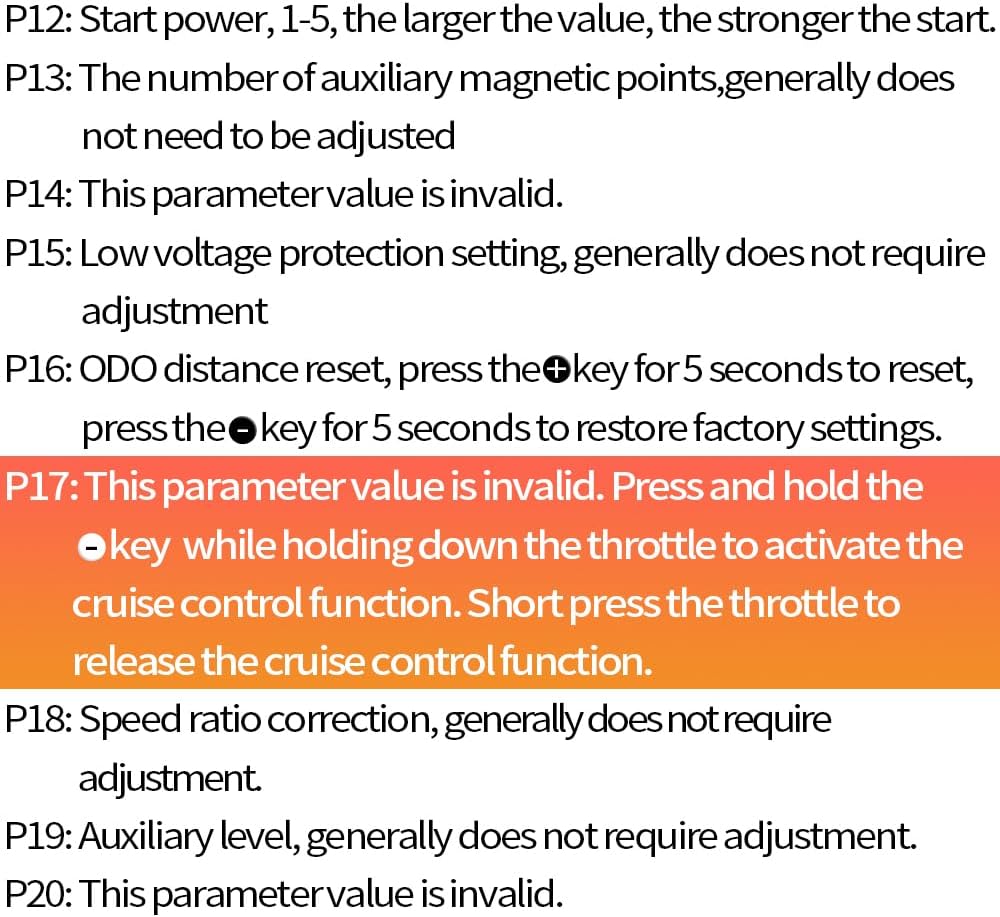
Image: A detailed list of P-parameters (P01-P20) for the S866 LCD Display, explaining each setting such as backlight brightness, voltage adjustment, wheel size, and speed limit.
- P01: Backlight Brightness: Adjusts display brightness (1-3 levels).
- P02: Unit of Measurement: 0 for kilometers, 1 for miles.
- P03: Batterija Voltage Għażla: Issettja l-volum xieraqtage (24V/36V/48V/52V/60V). Default is 36V.
- P04: Device Sleep Mode Time: Sets the time (1-60 minutes) before the display enters sleep mode. 0 disables sleep mode.
- P05: Total Assist Level: Sets the number of assist levels (e.g., 3, 5, 9).
- P06: Wheel Size Setting: Set the wheel diameter in inches (step 0.1).
- P07: Number of Magnets: Calculates the number of magnets (conventional values: 1, 2, 6, 46, 90).
- P08: Speed Limit: Sets the maximum speed (0-100km/h).
- P09: Zero Speed Start: 0 for no initial speed start, 1 for initial speed start (activate motor by turning throttle).
- P10: Driving Mode: 0 for Auxiliary mode, 1 for Electric mode, 2 for Dual mode.
- P11: Auxiliary Sensitivity: 1-24, smaller value means faster motor response.
- P12: Start Power: 1-5, larger value means stronger start.
- P13: Auxiliary Magnetic Points: Generally does not require adjustment.
- P14: This parameter value is invalid.
- P15: Baxx Voltage Setting ta' Protezzjoni: Generally does not require adjustment.
- P16: ODO Distance Reset: Press the '+' key for 5 seconds to reset. Press the '-' key for 5 seconds to restore factory settings.
- P17: Cruise Control: Press and hold the '-' key while holding down the throttle to activate. Short press the throttle to release.
- P18: Speed Ratio Correction: Generally does not require adjustment.
- P19: Auxiliary Level: Generally does not require adjustment.
- P20: This parameter value is invalid.
5. Manutenzjoni
To ensure the longevity and optimal performance of your ebike controller kit, follow these general maintenance guidelines:
- Keep all components clean and dry. Avoid exposure to excessive moisture or extreme temperatures.
- Regularly check all electrical connections for tightness and signs of wear.
- Inspect cables for any damage or fraying and replace if necessary.
- Do not attempt to open or modify the controller or display, as this may void the warranty and cause damage.
6 Issolvi l-problemi
The S866 LCD display can show error codes to help diagnose issues. Refer to the following common error codes:
- E07 Motor Malfunction: This usually indicates an issue with the motor or its connection to the controller. Check if the cable sequence of the motor and controller is consistent. An E07 error may also occur if the motor is not connected.
- E08 Throttle Malfunction: This suggests a problem with the throttle. Check whether the throttle connector is properly connected. An E08 error can also occur if the throttle is not connected.
For other error codes or persistent issues, please refer to the detailed parameter code section in the manual or contact customer support.
7. Speċifikazzjonijiet
| Karatteristika | Valur |
|---|---|
| Brand | HUDAMZKY |
| Mudell | 26A-S866-130X |
| Tip ta' Kontrollur | Sine Wave Brushless DC Motor Controller |
| Limitu kurrenti | 26A |
| VoltagKompatibilità | 24V/36V/48V/52V |
| Tip ta 'Wiri | S866 LCD Display |
| Tip ta' throttle | Throttle Thumb |
| Sensor PAS | 8-Magnet |
| Materjal | Plastic (Display), Aluminum Alloy (Controller) |
| Dimensjonijiet tal-Pakkett tal-Oġġett | 7.64 x 6.02 x 4.41 pulzieri |
| Piż tal-Pakkett | 0.71 Kilogrammi |
8. Garanzija u Appoġġ
For warranty information, technical support, or any questions regarding your HUDAMZKY Ebike Sine Wave Controller kit, please contact the seller or manufacturer directly. Keep your purchase receipt as proof of purchase for any warranty claims.
Ask a question about this manual
Ask about setup, troubleshooting, compatibility, parts, safety, or missing instructions. Manuals+ will review the question and use this page’s manual context to help answer it.