
1. Introduzzjoni
Thank you for choosing the Rettru Q18 4K Wireless WiFi IP Camera. This manual provides detailed instructions for setting up, operating, and maintaining your camera to ensure optimal performance and security. Please read this manual thoroughly before use and retain it for future reference.
Kontenut tal-Pakkett
Iċċekkja li l-oġġetti kollha elenkati hawn taħt huma inklużi fil-pakkett tiegħek:
- 1 x Kamera
- 1 x Manwal għall-Utent
- 1 x Mikro SD Card Reader
- 1 x Bażi manjetika
2. Informazzjoni dwar is-Sigurtà
Biex tevita ħsara lill-prodott jew korriment lilek innifsek jew lil ħaddieħor, jekk jogħġbok osserva l-prekawzjonijiet ta' sigurtà li ġejjin:
- Tesponix il-kamera għal temperaturi estremi, dawl tax-xemx dirett, jew umdità.
- Evita li twaqqa’ l-kamera jew li tissottomettiha għal impatti qawwija.
- Uża biss l-aċċessorji tal-iċċarġjar speċifikati.
- Żomm il-kamera fejn ma tintlaħaqx mit-tfal u l-annimali domestiċi.
- Tippruvax tiżżarma jew timmodifika l-kamera. Dan jannulla l-garanzija.
- Kun żgur li jkun hemm ventilazzjoni xierqa meta tħaddem jew tiċċarġja l-apparat.
3. Prodott Aktarview
The Rettru Q18 is a compact 4K wireless IP camera designed for indoor and outdoor surveillance. It features a high-resolution sensor, long-lasting battery, and advanced detection capabilities.

Figure 3.1: Rettru Q18 Camera and Live View Interface. This image illustrates the compact size of the camera, held between two fingers, alongside a smartphone displaying the camera's live 4K Ultra HD feed.
Karatteristiċi Ewlenin
- Vidjo 4K Ultra HD: Records video at 2560x1440 (2K) resolution for clear imaging.
- Batterija 1800mAh: Provides up to 6 hours of continuous recording and over 100 days of standby time.
- Sejbien tal-Bniedem AI: Advanced motion detection specifically identifies human shapes to reduce false alarms.
- Automatic Night Vision: Equipped with 8 straw hat 940nm infrared lights for clear night vision without a visible red glow, effective up to 28 feet.
- Awdjo f'żewġ direzzjonijiet: Built-in speaker and microphone for real-time voice communication.
- Lenti b'Angolu Wiesa' ta' 160 Grad: Joffri qasam wiesa' ta' view għal kopertura komprensiva.
- Ħażna Lokali: Supports Micro SD cards up to 128GB (card not included).
- Konnettività Wireless: Connects via 2.4G Wi-Fi.
4. Gwida ta' Setup
4.1 Iċċarġjar inizjali
Before first use, fully charge the camera using a standard 5V USB power adapter and the provided charging cable. The charging indicator light will typically change color or turn off once fully charged.

Figure 4.1: Battery Capacity and Endurance. This image highlights the camera's 1800mAh battery, offering 6 hours of continuous recording and 100 days of standby time.
4.2 Installazzjoni tal-App
The Rettru Q18 camera operates with the V380 Pro application. Download the app from your smartphone's app store (iOS App Store or Google Play Store).
- Fittex għal "V380 Pro" in your app store.
- Niżżel u installa l-applikazzjoni.
- Irreġistra għal kont jew idħol jekk diġà għandek wieħed.
4.3 Konnessjoni Wi-Fi
Follow these steps to connect your camera to your home Wi-Fi network. Ensure your Wi-Fi network is 2.4GHz, as 5GHz networks are not supported.
- Ixgħel il-kamera.
- Open the V380 Pro app and tap the "+" icon to add a new device.
- Select the appropriate camera type or scan the QR code on the camera (if available).
- Follow the on-screen instructions to connect the camera to your 2.4GHz Wi-Fi network. This typically involves entering your Wi-Fi password.
- Ladarba tkun konness, tista' tagħti isem lill-kamera tiegħek u tibda live viewing.
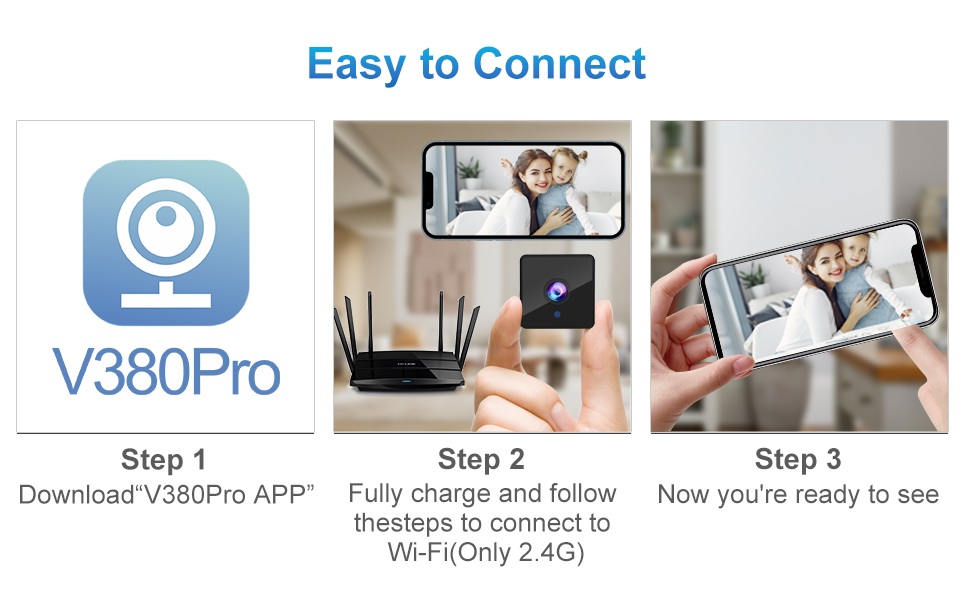
Figure 4.2: Easy Connection Steps. This graphic illustrates the three-step process for connecting the Rettru Q18 camera: downloading the V380 Pro app, charging and connecting to 2.4G Wi-Fi, and then accessing the live view.
5. Operazzjoni
5.1 Ħaj View u Reġistrazzjoni
Once connected, open the V380 Pro app to access the live video feed. You can manually initiate recording or configure continuous recording if a Micro SD card is inserted.
- Tap on the camera feed in the app to enter live view.
- Use the on-screen controls to take snapshots, record video, or access settings.
- Ensure a Micro SD card (up to 128GB) is inserted for local video storage.
5.2 Sejbien tal-Mozzjoni u Twissijiet
The camera features AI human detection to minimize false alarms. When motion is detected, the camera can send alerts to your smartphone and record video.
- Navigate to the camera settings in the V380 Pro app.
- Enable "Motion Detection" and "AI Human Detection."
- Ikkonfigura s-sensittività tal-allerti u l-preferenzi tan-notifika.
- You can also activate the built-in siren (105dB) through the app to deter intruders.
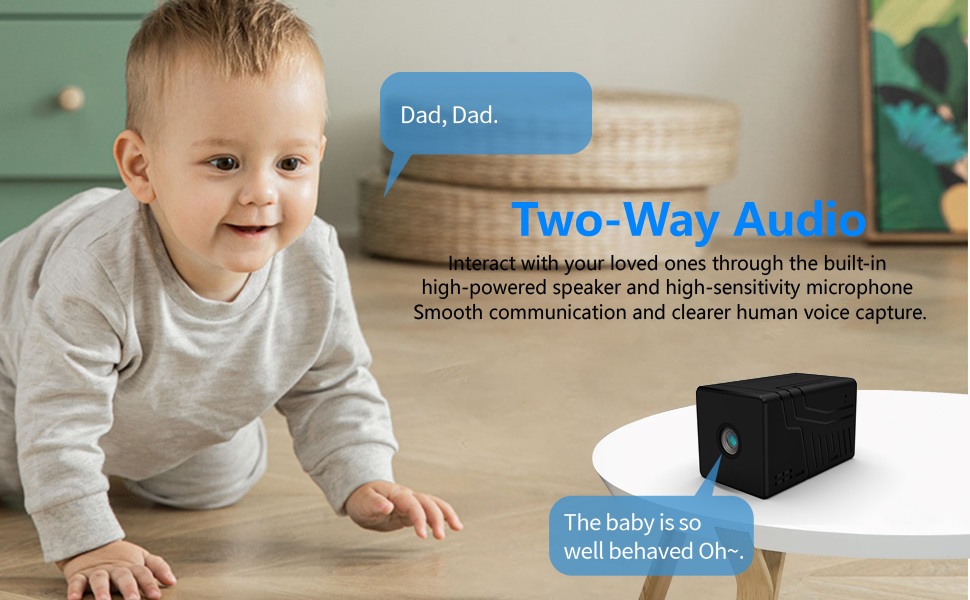
Figure 5.1: AI Motion Detection and Alerts. This image demonstrates the camera's AI motion detection capability, showing a person triggering an alert on a smartphone, with options for notification and video playback.
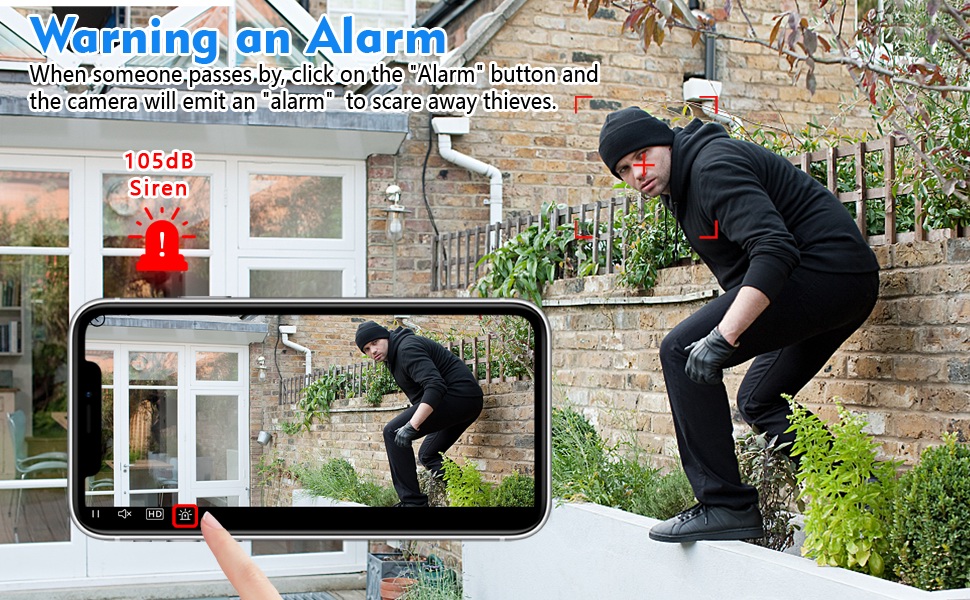
Figure 5.2: Activating the Alarm. This image illustrates the "Warning an Alarm" feature, where a user can click an "Alarm" button on their phone to activate the camera's siren when motion is detected, such as a person climbing a fence.
5.3 Viżjoni bil-lejl
The camera automatically switches to night vision mode in low-light conditions, providing clear black-and-white video without a visible red glow from infrared LEDs.
- Night vision range is approximately 28 feet.
- Ensure no obstructions block the camera's view for optimal night vision performance.
5.4 Awdjo b'żewġ direzzjonijiet
Utilize the built-in speaker and microphone for two-way communication through the V380 Pro app.
- Fil live view, tektek l-ikona tal-mikrofonu biex titkellem permezz tal-kamera.
- Ensure your phone's volume is adjusted to hear audio from the camera.
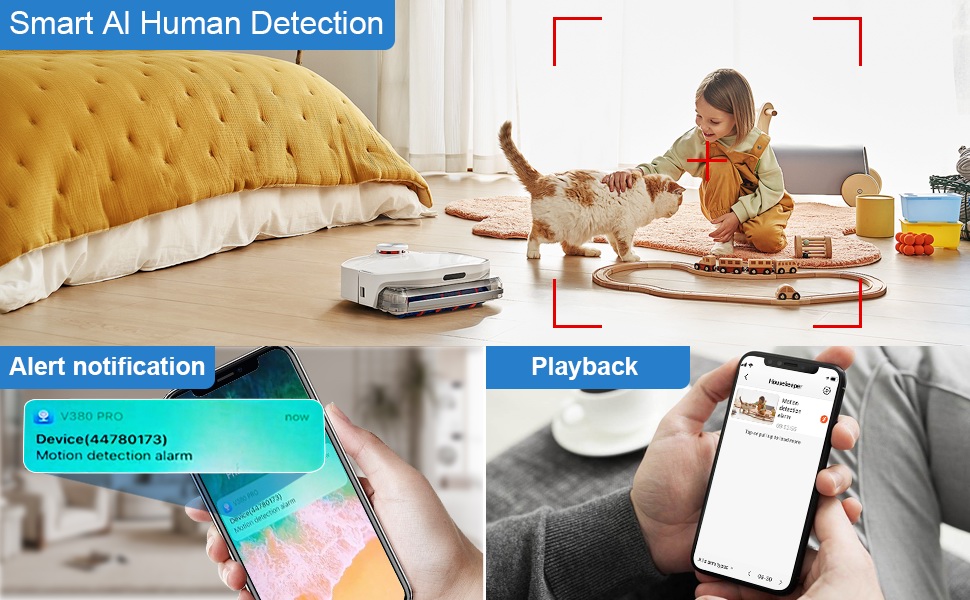
Figure 5.3: Two-Way Audio Communication. This image illustrates the two-way audio functionality, allowing users to interact with individuals near the camera, such as speaking to a baby.
6. Manutenzjoni
6.1 Tindif
To maintain optimal image quality, regularly clean the camera lens. Use a soft, dry, lint-free cloth. Avoid abrasive cleaners or solvents that could damage the lens or camera body.
6.2 Ħażna
When not in use for extended periods, store the camera in a cool, dry place away from direct sunlight and extreme temperatures. Ensure the battery is partially charged (around 50%) before storage to prolong its lifespan.
7 Issolvi l-problemi
If you encounter issues with your Rettru Q18 camera, refer to the following common problems and solutions:
| Problema | Soluzzjoni |
|---|---|
| Il-kamera ma tirnexxilhiex tikkonnettja mal-Wi-Fi. |
|
| L-ebda feed tal-vidjow fl-app. |
|
| Twissijiet ta' skoperta ta' moviment ma jiġux riċevuti. |
|
| Poor audio quality during two-way communication. |
|
| Camera battery drains quickly. |
|
8. Speċifikazzjonijiet
| Karatteristika | Dettall |
|---|---|
| Isem tal-Mudell | Q18 |
| Riżoluzzjoni tal-Qbid tal-Vidjo | HD 4K Resolution (2560x1440) |
| Riżoluzzjoni Għadha Effettiva | 5 MP |
| Teknoloġija tal-Konnettività | Mingħajr fili (Wi-Fi 2.4GHz) |
| Sors tal-Enerġija | Imħaddem bil-batterija (jone tal-litju 1800mAh) |
| Ħajja tal-batterija | Up to 6 hours continuous recording, 100 days standby |
| ViewIng Angolu | 160 Grad |
| Medda tal-Viżjoni Lejl | 28 Saqajn |
| Appoġġ għall-Ħażna | Mikro SD Card sa 128GB (mhux inkluża) |
| Tip ta' Kontrollur | App V380 Pro |
| Karatteristiċi Speċjali | 2-Way Audio, HD 4K Resolution, Motion Sensor, Night Vision, Portable, AI Human Detection, Built-in Siren |
| Użu fuq ġewwa/barra | Indoor, Outdoor (IP65 rating) |
| Tip ta 'Immuntar | Wall-Mounted & Surface-Mounted (with magnetic base) |
| Dimensjonijiet tal-Prodott | 21.6 x 13.3 x 13.3 inches (Note: These are likely packaging dimensions; the camera itself is compact.) |
| Piż tal-oġġett | 2.65 ounces / 75 Grams |
9. Garanzija u Appoġġ
Rettru products are manufactured with quality and reliability in mind. For warranty information or technical support, please contact the manufacturer directly through their official website or the contact information provided with your purchase. Please have your model number (Q18) and purchase details ready when contacting support.