
Keychron Q6P-P1
Manwal tal-Utent tat-Tastiera Mekkanika Keychron Q6 Pro
Model: Q6P-P1
Introduzzjoni
The Keychron Q6 Pro is a full-metal, QMK/VIA compatible, Bluetooth wireless and Type-C wired custom mechanical keyboard featuring a 100% full-size layout. Crafted with high-quality 6063 aluminum, it incorporates a double-gasket design, durable PBT keycaps, and screw-in stabilizers to provide an exceptional typing experience. This manual provides comprehensive instructions for setting up, operating, maintaining, and troubleshooting your Keychron Q6 Pro keyboard.
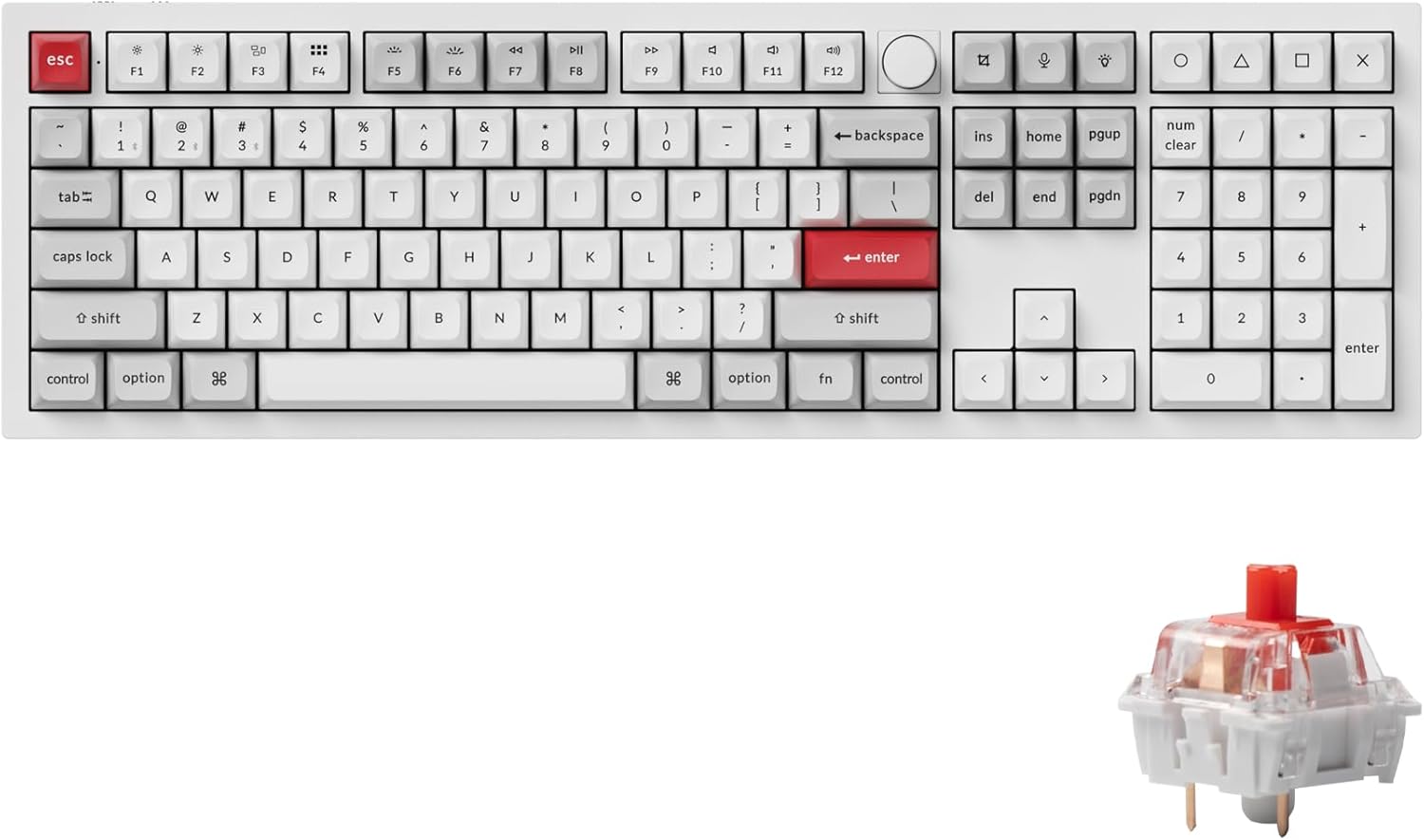
Image: Keychron Q6 Pro Full-Size Mechanical Keyboard with KSA Double-Shot PBT Keycaps and Red Switches.
X'hemm fil-Kaxxa
Upon unboxing your Keychron Q6 Pro, please verify that all the following components are included:
Komponenti tat-Tastiera
- 1x Tastiera Mmuntata bis-sħiħ
- 1x Kawża tal-Aluminju
- 1x PC Plate
- 1x Fowm li jassorbi l-ħoss
- 1x Kawża Fowm
- 16x Gaskets (12 Installed, 4 in box)
- 8 settijiet x Stabbilizzaturi
- 1 set x Keycaps (Double-Shot KSA PBT)
- 1 set x Switches (Keychron K Pro Red Switch)
Cables & Tools
- 1x Kejbil tat-Tip Ċ għal Tip Ċ
- 1x Adapter tat-Tip A għal Tip Ċ
- 1x Iswiċċ Puller
- 1x Keycap Puller
- 1x Tornavit
- 1x Hex Key

Image: Diagram showing all components included in the Keychron Q6 Pro Fully Assembled Version package.
Setup
- Ħoll it-Tastiera: Oħroġ bir-reqqa t-tastiera u l-aċċessorji kollha mill-imballaġġ.
- Connect to Power/Device:
- Modalità bil-Wajer: Connect the keyboard to your computer using the provided Type-C to Type-C cable or Type-A to Type-C adapter. The keyboard will automatically switch to wired mode and begin charging.
- Wireless (Bluetooth) Mode:
- Ensure the mode switch on the back of the keyboard is set to "BT" (Bluetooth).
- On your computer or device, enable Bluetooth.
- Press and hold the "Fn" key and one of the Bluetooth keys (e.g., "Fn" + "1" for Device 1) for 4 seconds until the key starts blinking rapidly. This indicates pairing mode.
- On your device's Bluetooth settings, select "Keychron Q6 Pro" from the list of available devices to pair.
- The key will stop blinking and remain solid once successfully paired. The keyboard can connect to up to 3 devices via Bluetooth.
- Swiċċ tas-Sistema Operattiva: Locate the OS switch on the back of the keyboard. Set it to "Mac" for macOS devices or "Win" for Windows/Linux devices to ensure correct key mapping.
- Ħlas Inizjali: For optimal battery life, it is recommended to fully charge the keyboard before its first wireless use. The charging indicator light will show charging status.

Image: The Keychron Q6 Pro keyboard highlighting its dual connectivity options: Bluetooth 5.1 and Type-C wired.
Istruzzjonijiet Operattivi
Funzjonijiet Ewlenin u Tqassim
The Keychron Q6 Pro features a full-size layout with dedicated function keys, a numeric keypad, and a programmable knob.
Immaġni: Minn fuq view of the Keychron Q6 Pro keyboard, illustrating its full-size layout with a knob.
QMK/VIA Software Customization
The Q6 Pro is fully programmable with QMK/VIA firmware, allowing you to remap any key, create custom macros, shortcuts, and key combinations. This provides extensive personalization for your typing and gaming needs.
- Niżżel is-Softwer VIA: Żur il-Keychron uffiċjali website to download the latest VIA software compatible with your operating system.
- Niżżel il-Keymap JSON: Download the specific keymap JSON file for the Keychron Q6 Pro from the Keychron websit.
- Load Keymap in VIA:
- Open the VIA application.
- Go to the "Settings" tab and enable "Show Design tab".
- Drag and drop the downloaded Q6 Pro keymap JSON file into the "Design" tab within VIA. This will load the keyboard's layout for customization.
- Remap Keys and Create Macros: Use the intuitive interface in VIA to reassign key functions, set up complex macros, and adjust lighting effects. Changes are applied in real-time.
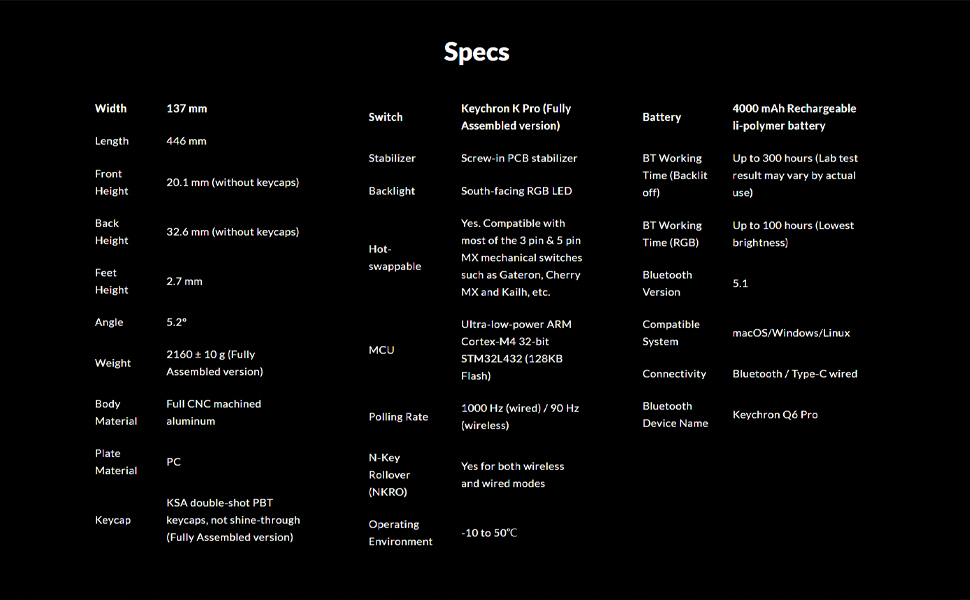
Image: Screenshot of the QMK/VIA software interface, demonstrating its capabilities for programming the Keychron Q6 Pro keyboard.
Swiċċijiet Hot-Swappable
The Keychron Q6 Pro features hot-swappable sockets, allowing you to easily change mechanical switches without soldering. This provides flexibility to customize your typing feel.
- Kompatibilità: The keyboard is compatible with most 3-pin and 5-pin MX style mechanical switches (e.g., Cherry, Gateron, Kailh, Panda).
- Tneħħija tas-Swiċċijiet: Use the provided switch puller tool. Gently grip the switch from the top and bottom, then pull straight up to remove it from the PCB.
- Installazzjoni ta' Swiċċijiet: Allinja l-labar tas-swiċċ il-ġdid mat-toqob fuq il-PCB. Agħfas 'l isfel sew sakemm is-swiċċ jikklikkja f'postu. Kun żgur li l-labar mhumiex mgħawġa.

Immaġni: Close-up view demonstrating the hot-swappable switch feature of the Keychron Q6 Pro, with switches being removed and installed.
Backlighting RGB
The Q6 Pro features south-facing RGB LED backlighting with 22 types of pre-set lighting effects. You can further customize the RGB hue, saturation, brightness, effect speed, and modes through the QMK/VIA software.
Image: The Keychron Q6 Pro keyboard illuminated with its vibrant South-Facing RGB backlighting.
Manutenzjoni
- Tindif tal-Għotjien taċ-Ċwievet: Use a keycap puller to remove keycaps. Clean them with a soft cloth dampLaħlaħ b'sapun ħafif u ilma. Kun żgur li jkunu niexfa għalkollox qabel ma terġa' twaħħalhom.
- Tindif tal-Każ: Wipe the aluminum case with a soft, dry, or slightly damp drapp. Evita prodotti tat-tindif jew solventi li joborxu.
- Switch Lubrication (Optional): For advanced users, switches can be lubricated to enhance smoothness and sound. This requires disassembling the switch.
- Aġġornamenti tal-Firmware: Periodically check the Keychron official websit għal aġġornamenti tal-firmware biex tiġi żgurata prestazzjoni ottimali u aċċess għal karatteristiċi ġodda.

Image: Close-up of keycaps being removed from the keyboard, illustrating the process for cleaning or replacement.
Issolvi l-problemi
| Problema | Kawża Possibbli | Soluzzjoni |
|---|---|---|
| It-tastiera ma tirrispondix (bil-fili) | Loose cable connection, incorrect OS switch setting. | Ensure USB-C cable is securely connected. Check the OS switch on the back of the keyboard (Mac/Win). Try a different USB port or cable. |
| It-tastiera mhux qed tikkonnettja (Bluetooth) | Keyboard not in pairing mode, Bluetooth off on device, interference, low battery. | Ensure keyboard is in "BT" mode. Press Fn + (1/2/3) for 4 seconds to enter pairing mode. Check device's Bluetooth settings. Charge the keyboard. Move closer to the device. |
| Iċ-ċwievet mhux qed jirreġistraw jew qed jittajpjaw darbtejn | Faulty switch, debris under keycap, bent switch pin. | Remove keycap and switch. Check for debris and clean. Inspect switch pins for bends; straighten carefully if bent. Replace faulty switch if necessary. |
| Id-dawl RGB mhux qed jaħdem jew mhux korrett | Software setting, firmware issue. | Adjust RGB settings via QMK/VIA software. Ensure keyboard firmware is up to date. |
| Programmable knob not working | VIA software configuration, physical damage. | Verify knob functions are correctly mapped in VIA. Ensure the knob is securely attached. |
Speċifikazzjonijiet
| Karatteristika | Dettall |
|---|---|
| Mudell | Keychron Q6 Pro (Q6P-P1) |
| Dimensions (Width x Length) | 137 mm x 446 mm |
| Height (Front / Back without keycap) | 20.1 mm / 32.6 mm |
| Feet Height | 2.7 mm |
| Angolu tat-tajpjar | 5.2° |
| Piż | 2160 ± 10 g (Fully Assembled version) |
| Materjal tal-Korp | Full CNC machined aluminum |
| Materjal tal-Pjanċa | PC |
| Tappijiet ewlenin | KSA double-shot PBT (not shine-through) |
| Swiċċijiet | Keychron K Pro Red (Fully Assembled version) |
| Stabbilizzaturi | PCB-mounted screw-in stabilizers |
| Dawl ta' wara | LED RGB li jħares lejn in-Nofsinhar |
| Jiskambjaw bis-sħana | Yes, compatible with most 3-pin & 5-pin MX mechanical switches |
| MCU | Ultra-low-power ARM Cortex-M4 32-bit STM32L432 (128KB Flash) |
| Ir-Rata tal-Votazzjoni | 1000 Hz (wired) / 90 Hz (wireless) |
| Qlib N-Key (NKRO) | Yes (both wireless and wired modes) |
| Ambjent Operattiv | -10 sa 50°C |
| Batterija | 4000 mAh Rechargeable Li-polymer battery |
| Bluetooth Working Time (Backlit off) | Up to 300 hours (Lab test result may vary) |
| Bluetooth Working Time (RGB Lowest brightness) | Sa 100 sigħat |
| Verżjoni Bluetooth | 5.1 |
| Sistema Kompatibbli | macOS, Windows, Linux |
| Konnettività | Bluetooth / Type-C wired |
| Isem tal-Apparat Bluetooth | Keychron Q6 Pro |

Image: Detailed technical specifications for the Keychron Q6 Pro keyboard.
Garanzija u Appoġġ
Keychron products are designed for durability and performance. For detailed warranty information, please refer to the official Keychron webis-sit jew il-karta tal-garanzija inkluża mal-prodott tiegħek.
- Politika ta' Ritorn: This product is eligible for a refund or replacement within 30 days of purchase, subject to the retailer's return policy.
- Gwidi għall-Utent: Additional user guides and manuals in PDF format are available for download:
- Appoġġ onlajn: For further assistance, troubleshooting tips, firmware updates, and software downloads, please visit the official Keychron support page.
Ask a question about this manual
Ask about setup, troubleshooting, compatibility, parts, safety, or missing instructions. Manuals+ will review the question and use this page’s manual context to help answer it.