
1. Introduzzjoni
This manual provides essential instructions for setting up, operating, and maintaining your Tibuta Android 13 Tablet. Please read this guide thoroughly to ensure proper use and to maximize your device's performance.
The Tibuta 10-inch tablet features the Android 13 operating system, an Octa-Core processor, 8GB RAM, 64GB internal storage (expandable up to 1TB), a 7000mAh battery, and a 1280x800 IPS display. It supports Wi-Fi 6, Bluetooth 5.2, and Widevine L1 for enhanced streaming.

Image 1.1: Tibuta Android 13 Tablet overview, highlighting its 8GB+64GB configuration, Android 13 OS, Wi-Fi 6, 7000mAh battery, and Widevine L1 support.
2. Layout tal-Apparat
Familiarize yourself with the physical components and ports of your tablet.

Immaġni 2.1: Minn quddiem u mill-ġenb view of the tablet with numbered components and dimensions.
Identifikazzjoni tal-Komponent:
- Buttuna tal-Qawwa: Użat biex jixgħel/jitfi l-apparat jew biex iqajjem/jorqod l-iskrin.
- Port tat-Tip-C: For charging the tablet and data transfer.
- Buttuni tal-Volum: Aġġusta l-volum tal-awdjo.
- Slott tal-Karta Mikro SD: Insert a Micro SD card for expanded storage.
- Kamera: Kamera li tħares lura.
- Buttuna Irrisettja: A small pinhole button to force restart the device if unresponsive.
- Headphone Terminal: 3.5mm audio jack for headphones.
- Kelliema: Output awdjo.

Immaġni 2.2: Dettaljata view of the tablet's ports and buttons, including front and rear cameras, speakers, and the 3.5mm headphone jack.
3. Nibdew
3.1. Iċċarġjar tal-batterija
Before first use, fully charge the tablet's 7000mAh lithium polymer battery. Connect the provided Type-C cable to the tablet's Type-C port and the other end to the power adapter, then plug the adapter into a wall outlet. The charging indicator will show the charging status.

Image 3.1: Visual representation of the tablet's 7000mAh battery capacity and Type-C charging port.
3.2. Tixgħil / Mitfi
- Biex Tixgħel: Press and hold the Power Button until the Tibuta logo appears on the screen.
- Biex Tifi: Press and hold the Power Button until the power options menu appears, then select 'Power off'.
- Biex Torqod/Tqum: Briefly press the Power Button to put the tablet into sleep mode or wake it up.
3.3. Setup Inizjali
Upon first power-on, the tablet will guide you through an initial setup process. This includes selecting your language, connecting to a Wi-Fi network, and setting up your Google account. Follow the on-screen prompts to complete the setup.
4. Operazzjonijiet Bażiċi
4.1. Ġesti tat-Touchscreen
The tablet's 10.1-inch IPS touchscreen responds to various gestures:
- Tektek: Agħżel oġġett jew attiva buttuna.
- Mess u Żomm: Aċċessa l-menus kuntestwali jew iddreggja l-oġġetti.
- Swipe: Navigate through screens or scroll lists.
- Agħfas biex Tiżżumja: Iżżumja 'l ġewwa jew 'il barra fuq l-immaġnijiet u web paġni.
4.2. Konnessjoni Wi-Fi
Biex tikkonnettja ma' netwerk Wi-Fi:
- Mur fuq Settings > Netwerk u internet > Internet.
- Ixgħel il-Wi-Fi.
- Agħżel in-netwerk mixtieq tiegħek mil-lista u daħħal il-password jekk tintalab.
The tablet supports 2.4G/5G dual-band Wi-Fi 6 for stable and fast connections.
4.3. Tqabbil tal-Bluetooth
Biex tqabbel ma 'apparat Bluetooth:
- Mur fuq Settings > Apparati konnessi > Preferenzi ta' konnessjoni > Bluetooth.
- Ixgħel il-Bluetooth.
- Kun żgur li l-apparat Bluetooth tiegħek jinsab fil-modalità ta' tqabbil.
- Select the device from the 'Available devices' list and follow any on-screen prompts.
4.4. Użu tal-kamera
The tablet is equipped with an 8MP rear camera and a 5MP front camera. Open the Camera application to capture photos and videos.

Immaġni 4.1: Eż.amples of camera usage and the split-screen function for multitasking.
4.5. Ġestjoni tal-Ħażna
The tablet comes with 64GB of internal storage. You can expand this by inserting a Micro SD card (up to 1TB) into the dedicated slot.
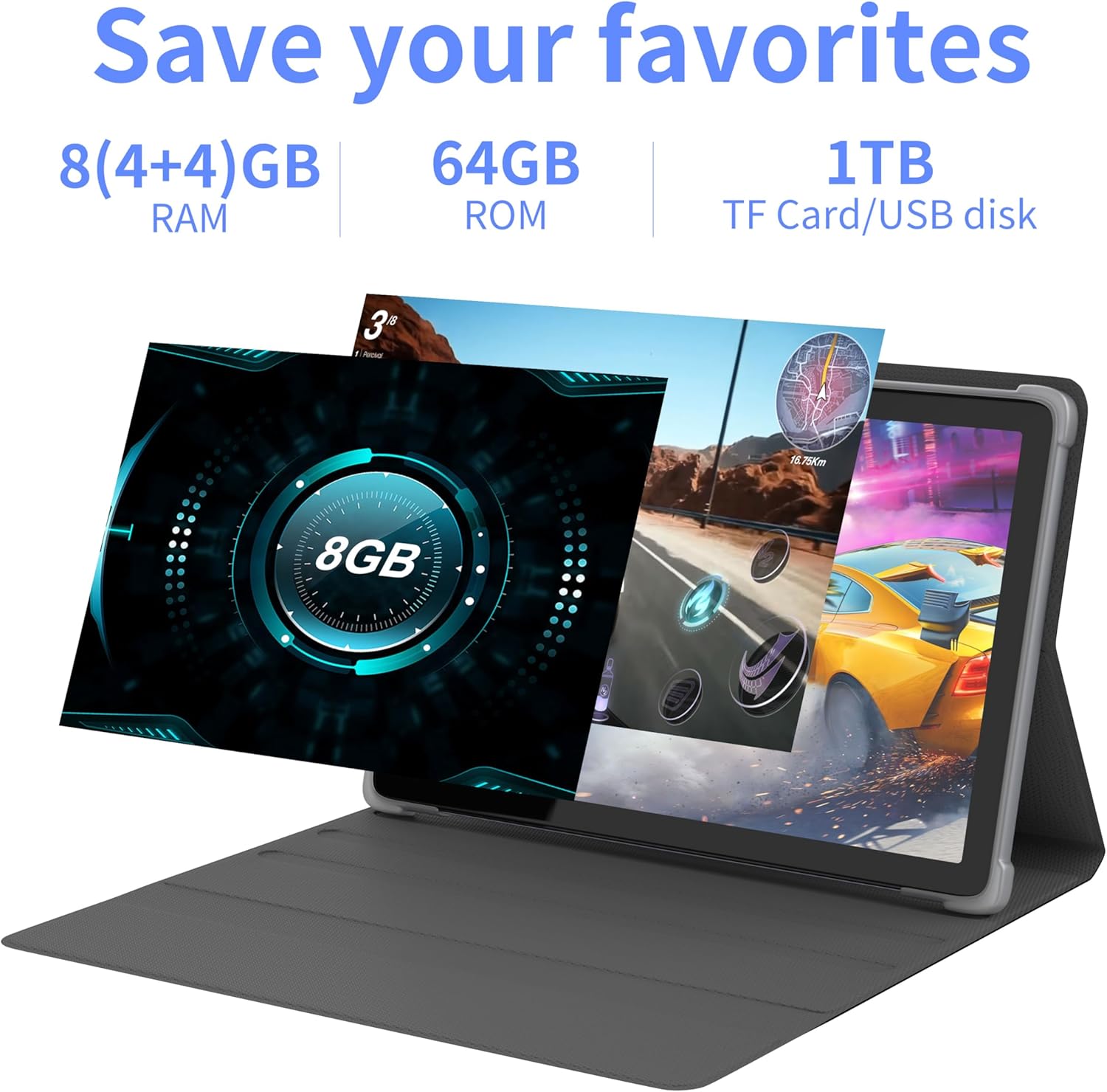
Immaġni 4.2: Fuqview of the tablet's memory and storage capabilities, including RAM, ROM, and expansion options.
4.6. Split-Screen Function
Android 13 allows for split-screen multitasking. To activate, open an app, then swipe up from the bottom of the screen to view recent apps. Touch and hold the app icon at the top of the app's card, then select 'Split screen'. Choose a second app to use simultaneously.
5. Karatteristiċi tal-Wiri
The tablet features a 10.1-inch IPS display with a resolution of 1280 x 800 pixels, providing clear visuals and wide viewangoli.

Image 5.1: The tablet's 10.1-inch HD IPS display, showcasing its resolution and wide-angle viewkapaċitajiet.
5.1. Appoġġ Widevine L1
The tablet supports Widevine L1, enabling high-definition streaming content from compatible services.
6. Manutenzjoni
6.1. Tindif tal-Apparat
Uża drapp artab u mingħajr suf biex tnaddaf l-iskrin u l-qafas tat-tablet. Evita li tuża kimiċi ħarxa jew materjali li joborxu.
6.2. Aġġornamenti tas-Software
Iċċekkja u installa regolarment aġġornamenti tas-sistema biex tiżgura prestazzjoni u sigurtà ottimali. Mur fuq Settings > Sistema > Aġġornament tas-sistema.
6.3. Ottimizzazzjoni tal-Ħażna
Biex iżżomm il-prestazzjoni, neħħi perjodikament affarijiet mhux meħtieġa files u applikazzjonijiet. Mur fuq Settings > Ħażna biex timmaniġġja l-ħażna tat-tagħmir tiegħek.
7 Issolvi l-problemi
Din it-taqsima tindirizza kwistjonijiet komuni li tista’ tiltaqa’ magħhom.
| Problema | Soluzzjoni |
|---|---|
| It-tablet ma jixgħelx. | Ensure the battery is charged. Connect the tablet to the charger for at least 30 minutes before attempting to power on again. |
| Tablet is unresponsive. | Use a thin pin or paperclip to press the Reset Button (refer to Device Layout section) to force a restart. |
| Ma tistax tikkonnettja mal-Wi-Fi. | Check if Wi-Fi is enabled in Settings. Ensure the Wi-Fi password is correct. Restart your router and the tablet. |
| Prestazzjoni bil-mod. | Agħlaq l-applikazzjonijiet mhux użati. Neħħi l-cache u l-applikazzjonijiet temporanji files. Consider performing a factory reset if the issue persists (backup data first). |
8. Speċifikazzjonijiet
Detailed technical specifications for the Tibuta Android 13 Tablet (Model: 8GB+64GB).
| Karatteristika | Dettall |
|---|---|
| Brand | Tibuta |
| Numru tal-Mudell | 8GB + 64GB |
| Sistema Operattiva | Android 13 |
| Proċessur | Octa-Core (Allwinner A523) |
| RAM | 8 GB (4GB + 4GB virtwali) |
| Ħażna Interna | 64 GB |
| Ħażna espansibbli | Up to 1TB (Micro SD card) |
| Daqs tal-Iskrin | 10.1 Pulzier |
| Riżoluzzjoni tal-Iskrin | 1280 x 800 Pixels (IPS) |
| Kamera ta' wara | 8 MP |
| Kamera ta' Quddiem | 5 MP |
| Kapaċità tal-batterija | 7000 mAh Polimer tal-litju |
| Ħajja Medja tal-Batterija | Sa 8-il siegħa (jiddependi mill-użu) |
| Konnettività | Wi-Fi 6 (802.11ac, b, g, n), Bluetooth 5.2 |
| Dimensjonijiet | 24.8 x 16.7 x 1.2 ċm |
| Piż | 539 g |
| Kulur | Griż |
| Karatteristiċi Speċjali | Widevine L1, GMS Certified |
9. Appoġġ
For technical assistance or if you encounter any issues with your Tibuta tablet, please contact our customer service team. Refer to your purchase documentation or the retailer's webis-sit għal dettalji ta' kuntatt speċifiċi.