1. Introduzzjoni
This Generic Electronic Weighing Scale is designed for high-precision measurements in various environments, including kitchens, restaurants, and light industrial settings. It features a maximum capacity of 3kg with an accuracy of 0.1g, offering reliable and consistent results for your weighing needs. This manual provides essential information for the proper setup, operation, and maintenance of your scale.
2. Kontenut tal-Pakkett
Jekk jogħġbok ivverifika li l-oġġetti kollha elenkati hawn taħt huma inklużi fil-pakkett tiegħek:
- 1 x Skala Diġitali
- 1 x Cable tal-Iċċarġjar
- 1 x Manwal għall-Utent
3. Prodott Aktarview
The image below illustrates the Generic Electronic Weighing Scale with its key dimensions and components.
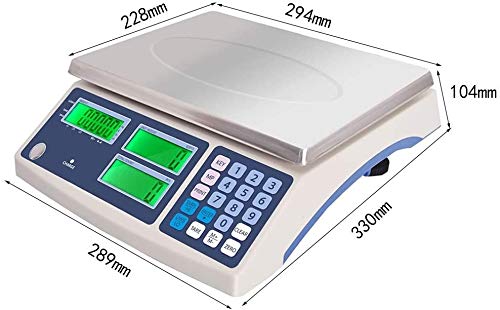
The image displays the Generic Electronic Weighing Scale from an angled perspective, highlighting its physical dimensions. The stainless steel weighing pan is visible on top, with the control panel and LED displays below it. Dimensions are indicated with arrows: 228mm and 294mm for the pan, 289mm for the front width of the base, 330mm for the side depth, and 104mm for the height. The control panel features numerical keys, function buttons like TARE, CLEAR, ZERO, and three green LED display screens.
The scale features a durable ABS plastic case and a stainless steel weighing pan for easy cleaning and longevity. The control panel includes a numerical keypad and dedicated function buttons for various operations, along with clear LED displays for weight readings.
4. Setup
- Spakkjar: Carefully remove the scale and all accessories from the packaging. Retain the packaging for future storage or transport.
- Pjazzament: Place the scale on a stable, flat, and level surface. Uneven surfaces can affect weighing accuracy.
- Invellar: Use the four adjustable non-slip weighing feet located on the bottom of the scale to ensure it is perfectly level. Reference the built-in level indicator (if present) to achieve optimal leveling.
- Konnessjoni tal-Enerġija: Connect the provided charging cable to the scale's power input and then to a standard AC 110-220V power outlet. It is recommended to fully charge the built-in rechargeable battery before the first use. The scale can operate directly from AC power even while charging.
5. Istruzzjonijiet Operattivi
5.1 Power On/Off
Agħfas il- 'MIXXGĦUL/MITFI' button to turn the scale on or off. The display will typically show a self-test sequence and then settle at '0.0g' when ready for use.
5.2 Użin Bażiku
- Ensure the scale is powered on and displays '0.0g'.
- Gently place the item to be weighed onto the center of the stainless steel weighing pan.
- Read the weight displayed on the LED screen.
5.3 Funzjoni tat-tara
The Tare function allows you to subtract the weight of a container, so only the net weight of its contents is measured.
- Place the empty container onto the weighing pan. The scale will display its weight.
- Agħfas il- 'TARA' button. The display will reset to '0.0g'.
- Add the items to be weighed into the container. The scale will now display only the weight of the items.
- To clear the Tare, remove the container from the pan and press 'TARA' again, or turn the scale off and on.
5.4 Funzjoni tal-Għadd
This scale includes a counting function for quickly quantifying multiple items of the same weight.
- Poġġi s magħrufample quantity of items (e.g., 10, 20, 50 pieces) onto the weighing pan.
- Agħfas il- 'COUNT' or 'PCS' button (button label may vary).
- Follow the on-screen prompts to input the sample quantity you just placed. Confirm the sample.
- Neħħi s-sample and then place the bulk quantity of items you wish to count. The display will show the estimated count.
5.5 Kalibrazzjoni
The scale features single-point and multi-point correction functions to ensure accuracy over time. Detailed calibration procedures often involve specific button sequences and the use of known calibration weights. For precise calibration steps, please refer to any specific instructions provided with your device or contact customer support if advanced calibration is required.
6. Karatteristiċi
Your Generic Electronic Weighing Scale is equipped with the following features:
- High-precision sensors with a maximum capacity of 3kg and 0.1g accuracy.
- Multi-function capabilities: Tare, Counting, and Calibration.
- Clear LCD HD display for easy readability, even in low-light conditions.
- Dual power supply: Operates via AC 110-220V or a built-in rechargeable battery.
- Automatic zero adjustment and software filtering for stable and quick readings.
- Cumulative function to display and cancel individual measurements.
- Adjustable non-slip weighing feet and an accurate level for precise measurements on various surfaces.
- Durable construction with an ABS plastic case and a stainless steel weighing pan.
7. Manutenzjoni
Proper care and maintenance will ensure the longevity and accuracy of your scale.
- Tindif: Imsaħ l-iskala b'moxxetta ratba u ħafifaamp cloth. Do not use abrasive cleaners, solvents, or immerse the scale in water. Ensure the scale is completely dry before storage or next use.
- Ħażna: Store the scale in a clean, dry environment away from extreme temperatures, high humidity, and direct sunlight. Avoid placing heavy objects on the weighing pan when not in use.
- Kura tal-batterija: Recharge the built-in battery regularly to maintain its lifespan, especially if the scale will not be used for extended periods. Avoid completely draining the battery frequently.
- Immaniġġjar: Handle the scale with care. Avoid dropping it or subjecting it to strong impacts, as this can damage the internal sensors.
8 Issolvi l-problemi
If you encounter issues with your scale, please refer to the following common troubleshooting steps:
- Scale does not power on:
- Ensure the charging cable is securely connected to both the scale and a working power outlet.
- Check if the built-in battery is charged. If not, allow it to charge for a few hours.
- Ivverifika li s-sokit tal-enerġija jaħdem billi tqabbad apparat ieħor.
- Inaccurate or unstable readings:
- Ensure the scale is placed on a stable, flat, and level surface. Adjust the feet if necessary.
- Make sure no objects are touching the weighing pan or the scale's body.
- Perform a Tare operation before weighing to zero out any residual weight.
- Avoid drafts or vibrations that could affect the reading.
- If issues persist, consider recalibration as described in Section 5.5.
- Display shows 'OVERLOAD' or 'UNSTABLE':
- 'OVERLOAD': The item on the pan exceeds the scale's maximum capacity (3kg). Remove the item immediately to prevent damage.
- 'UNSTABLE': The scale is not stable, or there are external factors (like wind) affecting the reading. Ensure the scale is level and in a calm environment.
- Kodiċijiet oħra ta' żball: If the display shows other error codes, please refer to any specific error code guide that may be included with your product or contact customer support.
9. Speċifikazzjonijiet
- Kapaċità Massima: 3kg
- Eżattezza: 0.1g
- Unitajiet tal-użin: g, kg
- Provvista tal-Enerġija: AC 110-220V, DC Built-in rechargeable battery
- Wiri: LED
- Materjal: ABS plastic case, Stainless steel weighing pan
- Product Size (Body): Approximately 315mm (Length) x 230mm (Width)
- Weighing Pan Size: Madwar 294mm x 228mm
- Għoli ġenerali: Madwar 104mm
- Fond Ġenerali: Madwar 330mm
- Piż: Madwar 5kg
- Temperatura ambjentali: 0℃ sa 40℃
10. Garanzija u Appoġġ
Specific warranty details for this product are not provided in the available information. For any warranty claims, technical support, or further assistance, please contact the seller or manufacturer directly through your purchase platform. Please have your purchase details readily available when contacting support.


