
1. Introduzzjoni
The LENCENT Universal Travel Adapter (Model 635DQ) is designed to provide a versatile charging solution for travelers worldwide. This compact adapter features PD20W fast charging, multiple USB and Type-C ports, and interchangeable plugs compatible with over 200 countries, including USA, UK, EU, and AUS standards. It is engineered with GaN III Technology for efficient and safe power delivery to a wide range of electronic devices.
2. Karatteristiċi ewlenin
- PD 20W Iċċarġjar Mgħaġġel: Delivers optimized and rapid charging for compatible USB devices, including iPhones, iPads, and other smartphones.
- Updated GaN III Technology: Ensures a smaller form factor without compromising power, offering a better low-temperature fast charging experience. Includes integrated double 10A fuses for overload protection and a safety valve to prevent accidental contact with live parts.
- Kompatibilità Universali: Supports PD 3.0, QC3.0+, and PPS protocols for flawless charging speeds across various USB-powered devices such as iPhone 14/13 series, iPad Pro/Air, MacBook Pro/Air, Bluetooth earphones, e-readers, and portable speakers.
- AUTO-ID Technology: Intelligently identifies connected devices to detect and deliver the optimum charging current, ensuring fast and safe charging.
- Ideali għall-Ivvjaġġar: Portable (7.4 x 4.7 x 5.2 cm) and lightweight (139g) design with interchangeable UK / US / EU / AUS plugs. Compatible in over 200 countries, allowing simultaneous charging of multiple devices.
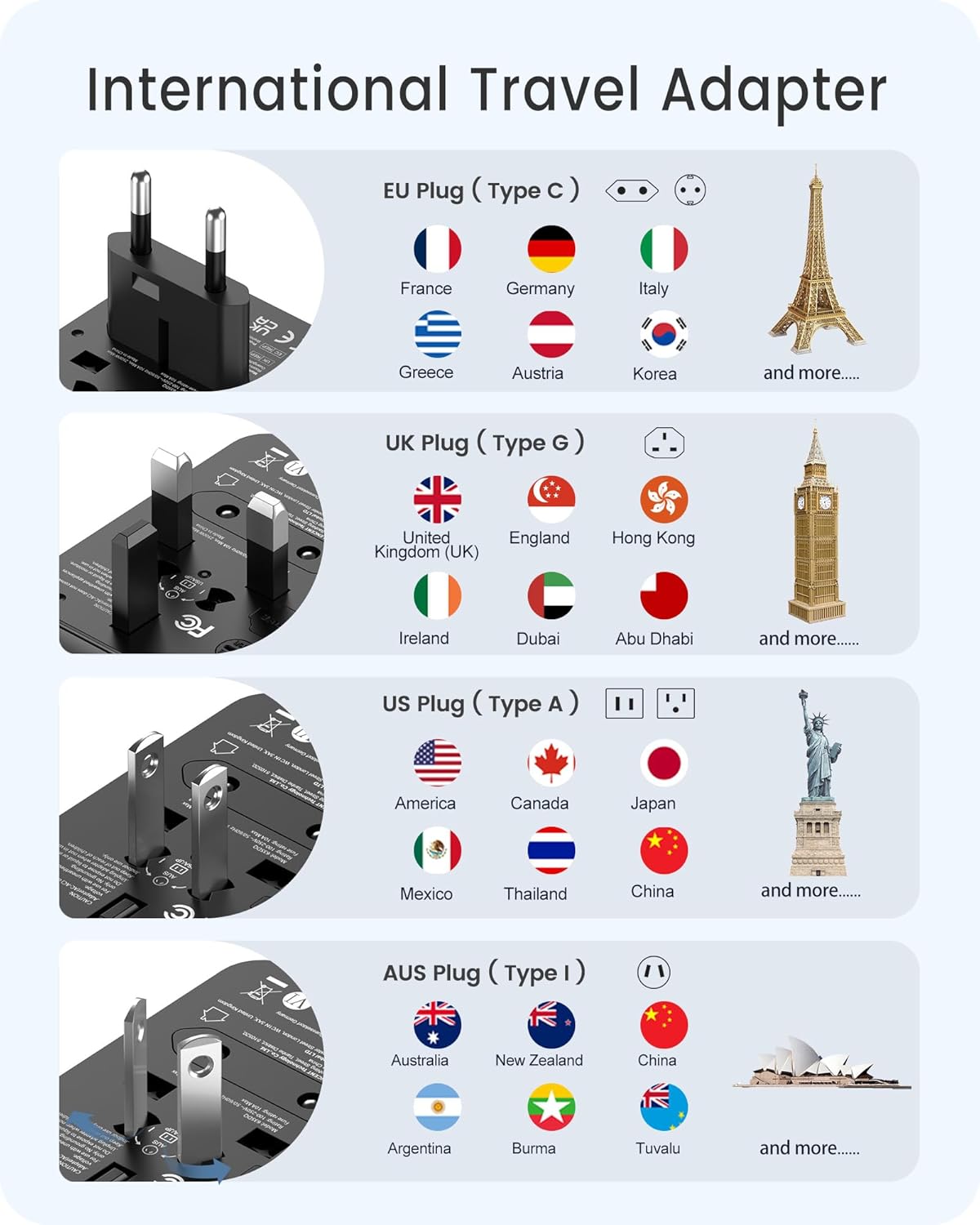
Image: The LENCENT Universal Travel Adapter showcasing its compact design and multiple plug types.
3. Setup and Plug Selection
The LENCENT Universal Travel Adapter features retractable pins for different regional outlets. To select the appropriate plug type:
- Identify the required plug type for your destination (e.g., EU, UK, USA/AUS).
- Locate the corresponding slider on the side of the adapter.
- Slide the lever to extend the correct pins. Ensure the pins are fully extended and locked into place before use.
- To retract the pins, press the release button (if applicable) and slide the lever back.

Image: Illustration of the EU plug (Type C) extended, indicating compatibility with countries like France, Germany, and Italy.

Image: Illustration of the UK plug (Type G) extended, indicating compatibility with countries like the United Kingdom, Singapore, and Hong Kong.

Image: Illustration of the USA/AUS plug (Type A/I) extended, indicating compatibility with countries like America, Canada, and Japan.
Video: An official LENCENT video demonstrating the deployment of various international plug types on the travel adapter.
4. Istruzzjonijiet Operattivi
The adapter allows you to charge multiple devices simultaneously using its AC socket, USB-A ports, and USB-C port.
4.1. Using the AC Socket
The universal AC socket accepts various plug types (Type A, B, C, O, E/F, G, I, J, L, N). Insert your appliance's plug into the front universal socket. Ensure the adapter's pins are correctly configured for the wall outlet you are using.

Image: The LENCENT Universal Travel Adapter plugged into a wall socket, demonstrating its use for charging a smartphone.
4.2. Using the USB Ports
The adapter includes 2 USB-A ports and 1 Type-C port. Connect your USB charging cables directly to the corresponding ports. The AUTO-ID technology will automatically detect your device and deliver the optimal charging current.
- Port USB-C1: Provides up to 20W Max output for fast charging compatible devices.
- Portijiet USB-A: Deliver smart charging for various devices.

Immaġni: Close-up view of the adapter's USB-A and USB-C ports, illustrating how multiple devices can be connected for charging.
4.3. Nota Importanti dwar il-Volumtage Konverżjoni
This adapter does NOT convert voltage. It is compatible with input voltages from 100-250V. Ensure your devices are compatible with the local voltage before plugging them into the AC socket. Using devices that are not voltage compatible may cause damage to the device or the adapter.
5. Speċifikazzjonijiet
| Karatteristika | Dettall |
|---|---|
| Numru tal-Mudell | 635DQ |
| Dimensjonijiet tal-Prodott | 1.77 x 2.05 x 2.76 pulzieri (7.4 x 4.7 x 5.2 ċm) |
| Piż tal-oġġett | 4.9 uqija (139g) |
| Input Voltage | 100-250 Volts AC, 50/60Hz |
| Output AC | 10A Max, 2500W Max |
| Output USB-C1 | PD 20W Max |
| Output USB-A | Smart 2.4A (per port) |
| Output totali tal-USB | 3.5A Max |
| Tipi ta 'Ipplaggja | USA/AUS (Type A/I), UK (Type G), EU (Type C) |
| Karatteristiċi tas-Sigurtà | Double 10A Fuses, Safety Valve, Overload Protection |
6. Manutenzjoni
6.1. Tindif
To clean the adapter, ensure it is unplugged from all power sources and devices. Use a soft, dry cloth to wipe the exterior. Do not use liquid cleaners or immerse the adapter in water.
6.2. Sostituzzjoni tal-fjus
The adapter is equipped with integrated double 10A fuses for overload protection. If the adapter stops functioning, a fuse may have blown. To replace a fuse:
- Ensure the adapter is unplugged from all power sources.
- Locate the fuse compartment (typically on the side or bottom, often marked 'FUSE').
- Carefully open the compartment and replace the blown fuse with a new 10A fuse.
- Agħlaq il-kompartiment sew.

Video: A demonstration of how to access and replace the fuse in the LENCENT Universal Travel Adapter.
7 Issolvi l-problemi
- Apparat mhux qed jiċċarġja: Ensure the adapter is securely plugged into the wall outlet and the correct regional pins are extended. Check that your charging cable is properly connected to both the adapter and your device. Verify that the device is compatible with the adapter's output specifications.
- Iċċarġjar bil-mod: Ensure your device and cable support fast charging protocols (PD, QC) to utilize the adapter's full capabilities. Charging multiple devices simultaneously may distribute power, potentially reducing individual charging speeds.
- Adapter not powering on: Check the wall outlet with another device to ensure it is functional. If the adapter has a replaceable fuse, check and replace it as described in the Maintenance section.
8. Informazzjoni dwar is-Sigurtà
- Dan l-adapter huwa għall-użu fuq ġewwa biss.
- Tesponix għal likwidi jew umdità.
- Żomm fejn ma jintlaħaqx mit-tfal.
- Do not use with ungrounded appliances.
- Dan l-adapter ma jikkonvertix voltage. Always ensure your device's voltage compatibility with the local power supply.
- Do not exceed the maximum load of 10A (2500W).
- The integrated safety valve protects against direct contact with live parts.

Image: The adapter's safety features, including the dual 10A fuse, are highlighted.
9. Garanzija u Appoġġ
For warranty information or customer support, please contact LENCENT directly through their official website or the Amazon chat service. Refer to your purchase documentation for specific warranty terms and conditions.

Image: Icons representing various channels for customer support: Email, Amazon Chat, and Official Websit.