
1. Prodott Aktarview
The Cudy GS108D is an 8-port Gigabit Ethernet Network Switch designed for expanding your network connectivity. It offers high-speed data transfer for devices such as computers, IPTVs, printers, NAS, game consoles, and routers. Featuring a plug-and-play design, fanless operation, and energy-efficient technology, this switch provides a reliable and quiet solution for both home and office networks.

Immaġni: Quddiem view of the Cudy GS108D switch, highlighting its 8 Gigabit Ethernet ports and LED indicators.
Karatteristiċi ewlenin:
- 8 Portijiet Gigabit Ethernet: Provides high-speed wired connections for multiple devices.
- Plug and Play: Requires no software installation or configuration for immediate use.
- Disinn bla fann: Ensures quiet operation, suitable for any environment.
- Effiċjenti fl-Enerġija: Compliant with IEEE802.3az standard, saving power when ports are idle.
- Immuntar versatili: Jappoġġja kemm it-tqegħid fuq id-desktop kif ukoll l-immuntar mal-ħajt.
2. Kontenut tal-Pakkett
Ivverifika li l-pakkett tiegħek fih l-oġġetti li ġejjin:
- Cudy GS108D 8-Port Gigabit Ethernet Network Switch
- Adapter tal-Enerġija
- Manwal ta 'Istruzzjoni (dan id-dokument)
- Ethernet Cable (may vary by region/package)

Image: Contents of the Cudy GS108D package, showing the switch, power adapter, and an Ethernet cable.
3. Deskrizzjoni Fiżika
Panel ta' quddiem:
The front panel features eight 10/100/1000 Mbps RJ45 ports. Each port has an associated LED indicator to show link/activity status.
- LED tal-qawwa: Jindika l-istatus tal-qawwa tas-swiċċ.
- LEDs tal-Konnessjoni/Azzjoni (1-8):
- Aħdar Solidu: A device is connected and the link is active.
- Aħdar li jteptep: Id-dejta qed tiġi trażmessa jew riċevuta fuq il-port.
- Mitfi: No device is connected or the link is inactive.

Immaġni: Dettaljata view of the Cudy GS108D's front panel, showing the 8 RJ45 ports and their corresponding LED indicators.
Panel ta 'wara:
Il-pannell ta' wara tipikament ikun fih il-port tad-dħul tal-enerġija.
Dimensjonijiet:
The compact design of the GS108D allows for flexible placement. Approximate dimensions are 138mm (5.43") L x 61.5mm (2.42") W x 24mm (0.94") H.
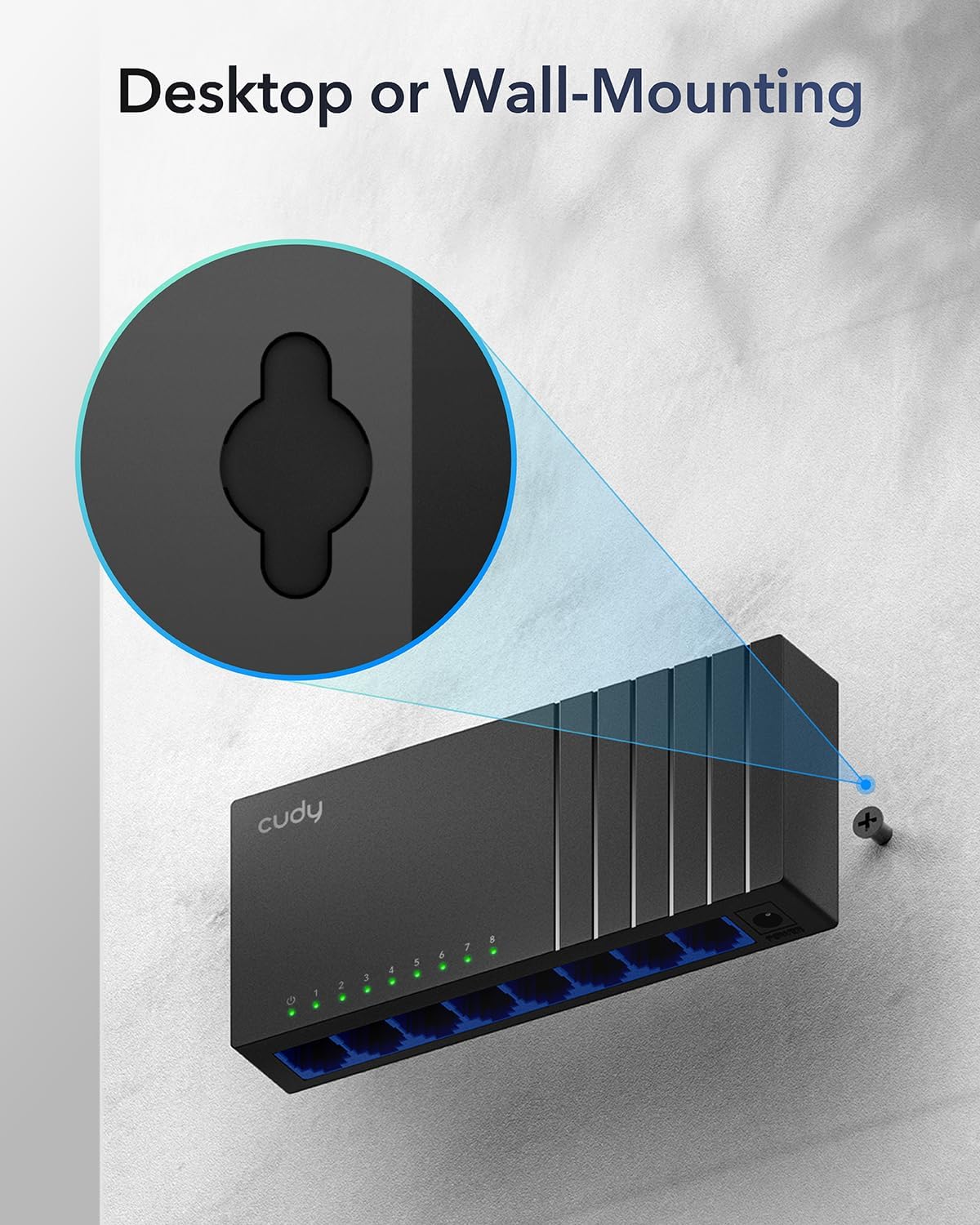
Image: The Cudy GS108D switch with its compact dimensions clearly indicated.
4. Istruzzjonijiet ta' Setup
The Cudy GS108D switch is designed for simple plug-and-play installation. No complex configuration is required.
Pass 1: Konnessjoni tal-Enerġija
- Connect one end of the provided power adapter to the power port on the rear panel of the GS108D switch.
- Ipplaggja t-tarf l-ieħor tal-adapter tal-enerġija f'sokit elettriku standard.
- Ivverifika li l-LED tal-Enerġija fuq il-pannell ta' quddiem jixgħel, u dan jindika li s-swiċċ qed jirċievi l-enerġija.

Image: The Cudy GS108D switch with its power adapter connected and ready for use.
Pass 2: Konnessjoni tal-Apparat
- Connect your network devices (e.g., computer, router, NAS, game console) to any of the 8 RJ45 ports on the front panel using standard Ethernet cables (Cat5e or higher recommended for Gigabit speeds).
- Ensure the Link/Act LED for each connected port illuminates, indicating a successful connection. If the LED is flashing, data is being transmitted.

Image: A laptop being connected to the Cudy GS108D switch with an Ethernet cable, demonstrating a typical setup.
Pass 3: Għażliet ta 'Immuntar
The GS108D supports both desktop placement and wall mounting.
- Poġġiment fuq id-Desktop: Sempliċement poġġi s-swiċċ fuq wiċċ ċatt u stabbli.
- Immuntar tal-ħajt: The switch features mounting slots on its underside. Use appropriate screws (not included) to secure the switch to a wall.

Image: The Cudy GS108D switch shown with its wall-mounting slots, illustrating how it can be securely attached to a wall.
5. Istruzzjonijiet Operattivi
Once connected, the Cudy GS108D operates automatically without further user intervention.
Awto-Negozjar
Each port on the switch automatically detects the network speed (10/100/1000 Mbps) and duplex mode (Half/Full Duplex) of the connected device and adjusts accordingly for optimal performance.
Ottimizzazzjoni tat-Traffiku
The switch features a 4 Mbit packet buffer to ensure stable and efficient data forwarding, reducing packet loss and improving overall network performance, especially during high traffic loads.
Energy Efficiency (IEEE 802.3az)
The GS108D incorporates energy-efficient Ethernet technology. It automatically adjusts power consumption based on cable length and network traffic, reducing energy usage when ports are idle or when connected devices are turned off.

Image: Visual representation of the power-saving feature, showing reduced energy consumption when ports are idle.
Trażmissjoni fuq Distanza twila
The switch supports long-distance Ethernet cable runs, allowing for reliable data transmission up to 170 meters (557 feet) with Cat5e or higher Ethernet cables.

Image: Illustration of the Cudy GS108D's capability for long-distance transmission, up to 170 meters, requiring Cat5e or higher cables.
6. Manutenzjoni
To ensure optimal performance and longevity of your Cudy GS108D switch, follow these maintenance guidelines:
- Pjazzament: Poġġi s-swiċċ f'post frisk u niexef 'il bogħod mix-xemx diretta, sorsi ta' sħana, u umdità eċċessiva. Kun żgur li jkun hemm ventilazzjoni adegwata madwar l-apparat.
- Tindif: Uża drapp artab u niexef biex tnaddaf il-barra tas-swiċċ. Tużax prodotti tat-tindif likwidi jew aerosol.
- Qawwa: Use only the provided power adapter. Disconnect the power adapter during electrical storms or when unused for long periods.
- Kejbils: Ensure all Ethernet cables are securely connected and free from damage.
7 Issolvi l-problemi
If you encounter issues with your Cudy GS108D switch, refer to the following common troubleshooting steps:
Ebda Qawwa
- Kun żgur li l-adapter tal-enerġija huwa konness sew kemm mas-swiċċ kif ukoll ma' sokit elettriku li jaħdem.
- Iċċekkja jekk is-sokit tal-enerġija hux qed jaħdem billi tqabbad apparat ieħor.
- Verify that the Power LED on the switch is illuminated. If not, try a different power outlet.
L-ebda Link/Attività fuq Port
- Ensure the Ethernet cable is securely plugged into both the switch port and the connected device.
- Try using a different Ethernet cable to rule out cable damage.
- Qabbad l-apparat ma' port differenti fuq is-swiċċ.
- Verify that the connected device (e.g., computer, router) is powered on and its network adapter is enabled.
- If connecting to a router, ensure the router's port is active.
Veloċità baxxa tan-Netwerk
- Ensure you are using Cat5e or higher Ethernet cables for Gigabit speeds. Older Cat5 cables may limit speed.
- Check the Link/Act LED for the port. A solid green light indicates a Gigabit connection. If it's amber or off, there might be a speed mismatch or connection issue.
- Verify that the connected devices also support Gigabit Ethernet.
- Reduce network congestion by limiting simultaneous high-bandwidth activities.
8. Speċifikazzjonijiet
| Karatteristika | Deskrizzjoni |
|---|---|
| Brand | Cudy |
| Numru tal-Mudell | GS108D |
| Numru ta' Portijiet | 8 |
| Interface | RJ45 |
| Rata ta' Trasferiment tad-Data | 1000 Megabit Kull Sekonda (Gigabit) |
| Tip ta' Swiċċ | Iswiċċ tal-Ethernet |
| Apparati Kompatibbli | Camera, Desktop, Laptop, Router |
| Voltage | 28 Volts (Input for power adapter) |
| Temperatura operattiva | 40°F sa 104°F (4.4°C sa 40°C) |
| Tip ta' Materjal tal-Kaxxa | Plastik |
| Dimensjonijiet tal-oġġett (L x W x H) | 7.87" x 5.91" x 5.91" (Product packaging dimensions, actual device is smaller) |
| Piż tal-oġġett | 200 Gramm |
9. Garanzija u Appoġġ
Informazzjoni dwar il-garanzija:
The Cudy GS108D 8-Port Gigabit Ethernet Network Switch comes with a 2-Sena Garanzija mid-data tax-xiri. Jekk jogħġbok żomm il-prova tax-xiri tiegħek għal talbiet ta' garanzija. Din il-garanzija tkopri difetti fil-materjali u l-abbilità taħt użu normali.
Appoġġ Tekniku:
For technical assistance, troubleshooting, or further inquiries, please visit the official Cudy website or contact Cudy customer support. Cudy is committed to delivering high-performance, user-friendly communication technology and provides resources to help you with your product.
Spiss tista' ssib riżorsi ta' appoġġ, FAQs, u informazzjoni ta' kuntatt fuq Cudy Store on Amazon or the main Cudy websit.