
Introduzzjoni
This manual provides essential information for the setup, operation, maintenance, and troubleshooting of your Cherry MX 3.0S Wireless Mechanical Gaming Keyboard. Please read these instructions carefully before using the device to ensure optimal performance and longevity.
Informazzjoni dwar is-Sigurtà
- Żomm it-tastiera 'l bogħod minn likwidi u umdità eċċessiva.
- Evita temperaturi estremi.
- Tippruvax tiżżarma jew issewwi t-tastiera int stess. Irreferi għal persunal tas-servizz kwalifikat.
- Uża biss il-kejbil USB provdut għall-iċċarġjar u l-konnessjoni bil-fili.
Setup
Kontenut tal-Pakkett
- Cherry MX 3.0S Wireless Mechanical Gaming Keyboard
- USB-A għal USB-C Cable
- 2.4 GHz USB Dongle
- Manwal ta' Istruzzjoni
- Additional accessories (e.g., replacement feet, keycap puller - contents may vary)
Tqabbad it-Tastiera
The Cherry MX 3.0S supports three connection modes: wired, 2.4 GHz wireless, and Bluetooth.
- Konnessjoni bil-fili: Connect the provided USB-A to USB-C cable from your computer's USB port to the USB-C port on the back of the keyboard. The keyboard will automatically switch to wired mode and begin charging.
- Konnessjoni bla fili ta' 2.4 GHz:
- Locate the 2.4 GHz USB dongle.
- Plug the USB dongle into an available USB-A port on your computer.
- Ixgħel it-tastiera billi tuża l-iswiċċ tal-enerġija li jinsab fuq wara.
- The keyboard should automatically connect to the dongle. An indicator light will confirm the connection.
- Konnessjoni Bluetooth:
- Ixgħel it-tastiera billi tuża s-swiċċ tal-enerġija fuq wara.
- Activate Bluetooth pairing mode on the keyboard (refer to the specific key combination in the included quick start guide, often Fn + a Bluetooth key).
- On your device (computer, tablet, etc.), go to Bluetooth settings and search for new devices.
- Select "Cherry MX 3.0S" from the list of available devices to pair.

Figura 1: Ġenb view of the keyboard with USB-C port and power switch.

Figure 2: Detachable USB-C cable for wired connection and charging.
Iċċarġjar tat-Tastiera
The keyboard features smart charging technology. Connect the USB-A to USB-C cable to the keyboard and a powered USB port on your computer or a USB wall adapter. You can continue to use the keyboard while it charges.
Operazzjoni
Karatteristiċi Ewlenin
- Djar tal-Aluminju: The keyboard is constructed with a sturdy, extruded aluminum housing for durability and a premium feel.
- CHERRY MX Mechanical Switches: Equipped with genuine CHERRY MX mechanical switches (e.g., MX Brown or Red), offering precise actuation and a tactile typing experience.
- Dawl ta' wara RGB: Features RGB backlighting with over 16 million colors and numerous integrated lighting effects.
- CHERRY Advanced Wireless Technology: Provides an incredibly fast gaming mode with less than 1ms latency for responsive performance.
- Rollover Sħiħ tal-N-Key u Anti-Ghosting: Ensures every keystroke is registered accurately, even during rapid, simultaneous key presses.
- Serratura taċ-Ċavetta tar-Rebħa: Prevents accidental activation of the Windows key during gaming sessions.
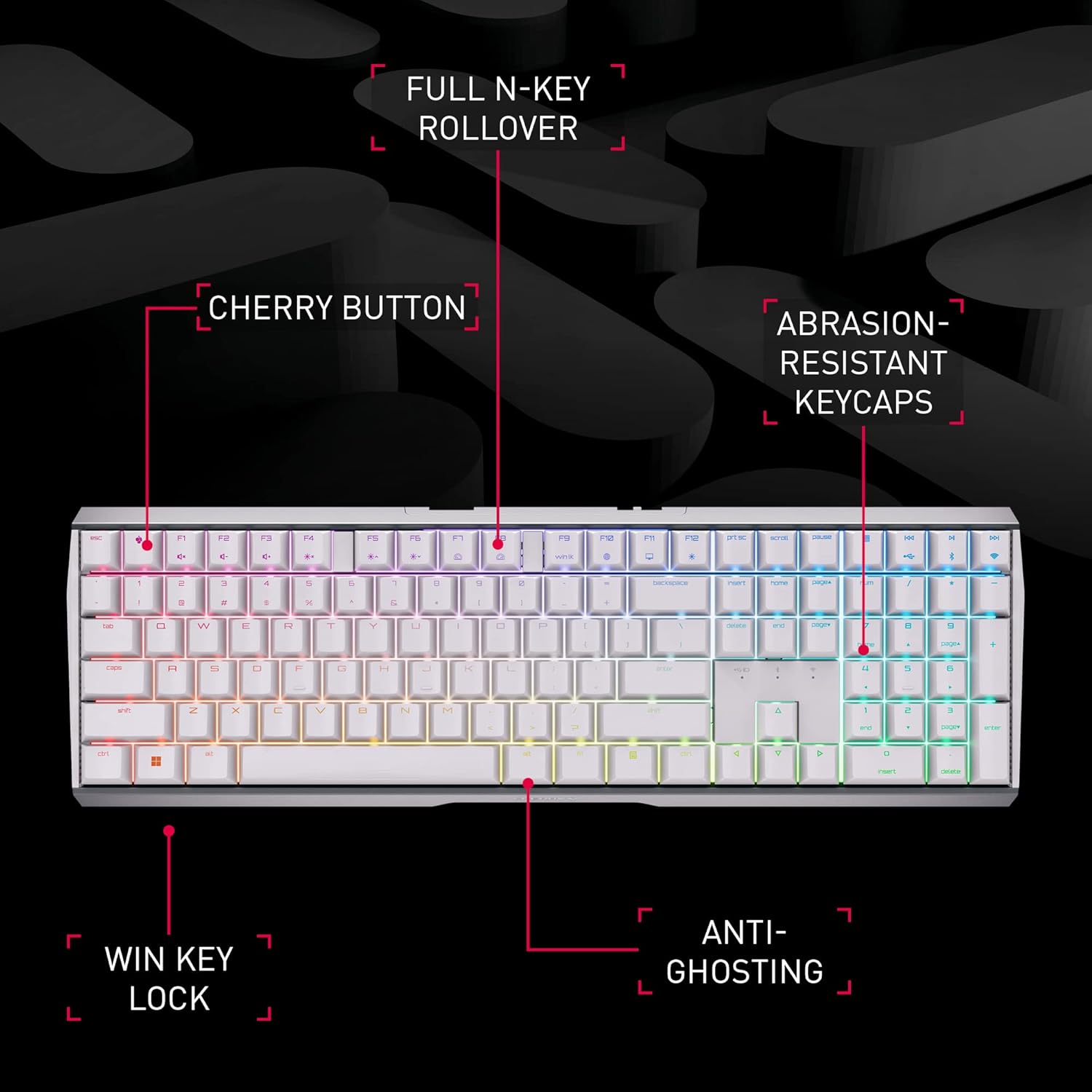
Figure 3: Key features of the Cherry MX 3.0S keyboard.

Figure 4: Cherry MX mechanical keyswitch technology.
Kontroll tad-Dawl RGB
The keyboard's RGB lighting can be customized with 16.8 million colors and various effects. Use the dedicated CHERRY Gaming Software for individual key assignment and fine-tuned lighting control. Refer to the software's interface for detailed customization options.

Figure 5: Cherry MX Gaming Software for lighting and key customization.
Prestazzjoni bla fili
The advanced wireless technology ensures a stable and fast connection, crucial for gaming. The low latency mode (LLM) provides a response time of less than 1ms when using the 2.4 GHz dongle, minimizing input lag.

Figure 6: Cherry Advanced Wireless Technology.
Vidjo 1: Wirja uffiċjali tal-vidjo tal-prodottasing the Cherry MX 3.0S Wireless Mechanical Gaming Keyboard's features and wireless capabilities.
Manutenzjoni
Tindif
- To clean the keyboard, disconnect it from all power sources.
- Uża drapp ratba u mingħajr ħelu ftit dampimdaħħla bl-ilma jew soluzzjoni ħafifa għat-tindif.
- Evita kimiċi ħarxa, prodotti tat-tindif li joborxu, jew solventi.
- Għat-trab u l-fdalijiet bejn iċ-ċwievet, uża arja kkompressata.
Ħażna
When not in use for extended periods, store the keyboard in a cool, dry place away from direct sunlight. Ensure the battery is partially charged (around 50%) before long-term storage to preserve battery health.
Issolvi l-problemi
- It-tastiera ma tirrispondix: Ensure the keyboard is powered on and properly connected (wired, 2.4 GHz dongle, or Bluetooth paired). Check battery level.
- Problemi bil-konnessjoni mingħajr fili: For 2.4 GHz, ensure the dongle is securely plugged in and within range. For Bluetooth, ensure the keyboard is in pairing mode and your device's Bluetooth is enabled. Try re-pairing.
- Keys are sticky or double-typing: This can sometimes be caused by debris under the keycaps. Carefully remove the affected keycap (using a keycap puller if available) and clean the switch area with compressed air. If the issue persists, contact customer support.
- Id-dawl RGB mhux qed jaħdem: Check the CHERRY Gaming Software settings to ensure lighting is enabled and configured correctly. Ensure the keyboard battery has sufficient charge.
- Il-batterija mhix qed tiċċarġja: Verify the USB-C cable is fully inserted into both the keyboard and the power source. Try a different USB port or charging adapter.
Speċifikazzjonijiet
| Karatteristika | Dettall |
|---|---|
| Numru tal-Mudell | G80-3872LXAUS-0 |
| Brand | Ċirasa |
| Teknoloġija tal-Konnettività | Bluetooth, 2.4 GHz Wireless, USB-C Wired |
| Deskrizzjoni tat-Tastiera | Tastiera Mekkanika tal-Logħob |
| Swiċċijiet Mekkaniċi | CHERRY MX (e.g., Brown, Red) |
| Backlighting | RGB (16.8 miljun kulur) |
| Materjal | Djar tal-Aluminju |
| Piż tal-oġġett | 3.89 liri |
| Dimensjonijiet tal-Pakkett | 18.4 x 8.3 x 2.1 pulzieri |
| Apparati Kompatibbli | Konsol tal-Logħob, PC |
Garanzija u Appoġġ
For detailed warranty information, technical support, and additional resources, please visit the official Cherry website or contact their customer service. The manufacturer is CHERRY.
You can visit the Cherry Store on Amazon for more products and information: Cherry Store