
Tkisko TO1
Tkisko TO1 Projector User Manual
Model: TO1 | Brand: Tkisko
1. Prodott Aktarview
The Tkisko TO1 Projector is designed to deliver a high-quality visual experience with native 1080P resolution and 4K support. It features electric focus, 4D/4P keystone correction, and versatile connectivity options including Wi-Fi and Bluetooth.
X'hemm fil-Kaxxa
- Tkisko TO1 Projector
- Kontroll mill-bogħod
- Carrying Backpack
- Korda tal-Enerġija
- AV Cable
- Cable HDMI
- Manwal għall-Utent
Deskrizzjoni tal-Vidjo: Qosor fuqview of the Tkisko TO1 projector, showcasing its compact size and ease of use in a home setting, projecting onto a ceiling.
Deskrizzjoni tal-Vidjo: An unboxing video demonstrating the contents of the Tkisko TO1 projector package, including the projector, remote, and various cables.
2. Gwida ta' Setup
2.1 Initial Placement and Power
Place the projector on a stable, flat surface or mount it securely. Ensure adequate ventilation around the device. Connect the power cord to the projector and then to a power outlet.
2.2 Korrezzjoni tal-Fokus u l-Keystone
The Tkisko TO1 features electric focus and 4D/4P keystone correction for optimal image clarity and shape. Use the remote control to adjust these settings.
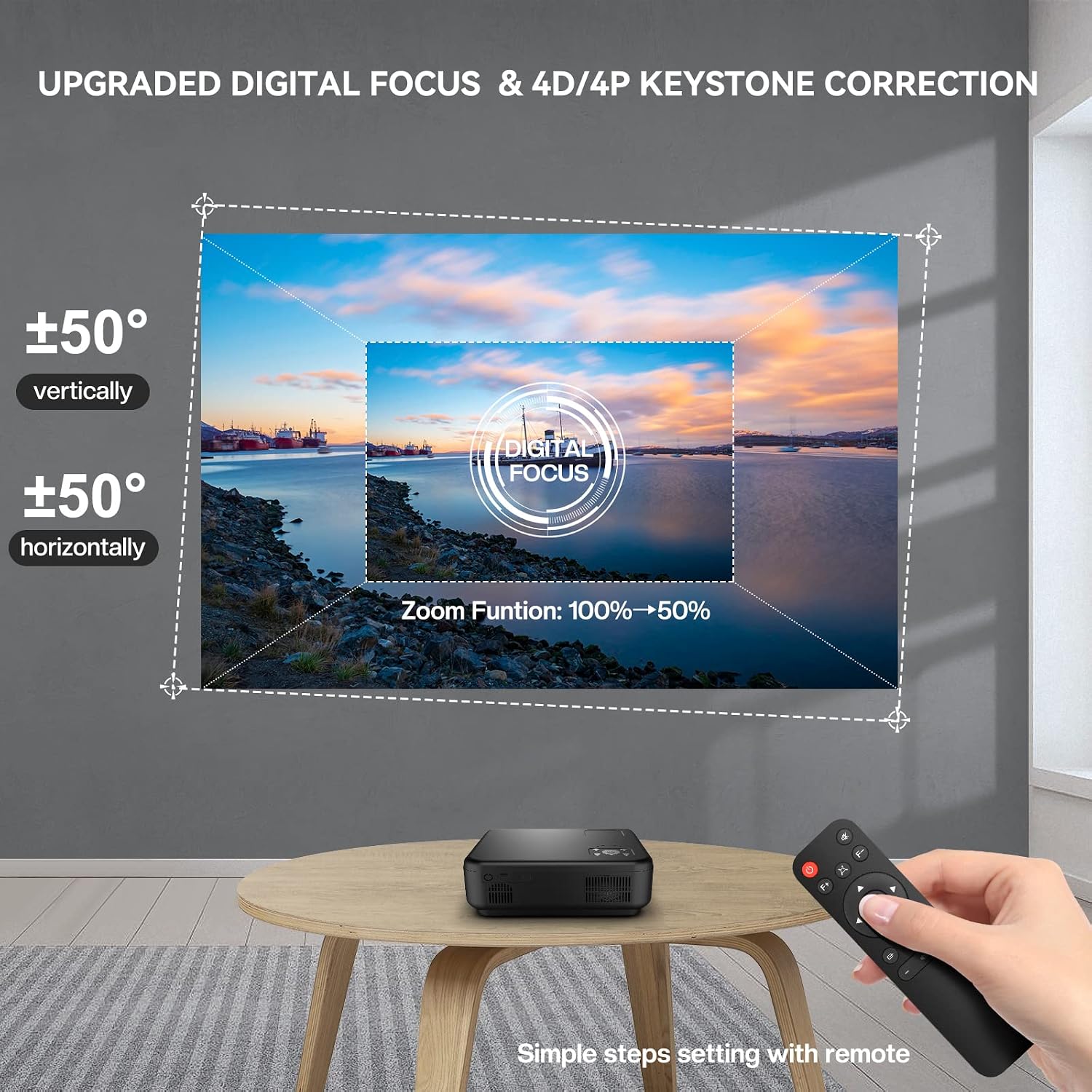
Deskrizzjoni tal-Immaġni: A Tkisko TO1 projector projecting an image onto a wall, with a remote control in hand demonstrating the digital focus and 4D/4P keystone correction features. The projected image shows vertical and horizontal adjustment capabilities and a 50% zoom function.
Deskrizzjoni tal-Vidjo: A demonstration of the Tkisko TO1 projector's menu navigation and projection settings, including adjusting the projection mode and keystone correction.
2.3 Konnettività
Il-proġettur joffri diversi għażliet ta' input:
- HDMI: Connect devices like laptops, gaming consoles, or TV sticks using an HDMI cable.
- USB: Plug in USB drives for media playback.
- TA’: Use the AV cable for older devices.
- Jack Awdjo 3.5mm: Qabbad kelliema jew headphones esterni.

Deskrizzjoni tal-Immaġni: The Tkisko TO1 projector displayed with various connectivity options such as AV, AUX, USB, and HDMI, alongside compatible devices like a smartphone, tablet, gaming controller, and headphones.
3. Istruzzjonijiet Operattivi
3.1 Power On/Off
Agħfas il-buttuna tal-qawwa fuq il-proġettazzjoni jew il-kontroll remot biex tixgħel jew titfi l-apparat.
3.2 Konnessjoni bla Fili (Wi-Fi)
The projector supports 5G+2.4G Wi-Fi for smooth streaming. Navigate to the Wi-Fi settings in the projector's menu, select your network, and enter the password.

Deskrizzjoni tal-Immaġni: A Tkisko TO1 projector projecting a large image onto a wall, demonstrating 5G wireless screening from a smartphone. Icons indicate compatibility with iPhone, Android phones, MacBook, and Windows laptops.
3.3 Awdjo Bluetooth
Connect external Bluetooth speakers or headphones for enhanced audio. The projector features 5.1 bidirectional Bluetooth. Go to Bluetooth settings, enable Bluetooth, and pair with your desired device.

Deskrizzjoni tal-Immaġni: The Tkisko TO1 projector connected via Bluetooth 5.1 to an external speaker, illustrating its bidirectional Bluetooth capability. It also shows the projector being used as a standalone Bluetooth speaker, with a smartphone connected.
3.4 Image Size Adjustment (Zoom)
The projector supports a 50% zoom function, allowing you to reduce the image size from 100% to 50% without moving the projector. This can be adjusted via the remote control.

Deskrizzjoni tal-Immaġni: A visual representation of the Tkisko TO1 projector's adjustable screen size, showing projections of 50, 100, and 300 inches against a scenic backdrop, emphasizing optimal viewdistanza.
Deskrizzjoni tal-Vidjo: A quick demonstration of the Tkisko TO1 projector's initial setup, showing the projected image and basic functionality.
4. Manutenzjoni
Proper maintenance ensures the longevity and optimal performance of your Tkisko TO1 Projector.
4.1 Kura tal-Lentijiet
- Use a soft, lint-free cloth to gently wipe the projector lens.
- For stubborn smudges, use a lens cleaning solution specifically designed for optical surfaces.
- Avoid abrasive materials or harsh chemicals that can scratch the lens.
4.2 Protezzjoni mit-Trab
The Tkisko TO1 features a fully sealed optical engine designed to protect the lens from dust and scratches, contributing to a longer lifespan. However, regular cleaning of the exterior and ensuring the projector is stored in a clean environment is recommended.
4.3 Tindif Ġenerali
- Imsaħ il-parti ta’ barra tal-proġettazzjoni b’ċarruta ratba u niexfa.
- Do not use liquid cleaners or aerosols directly on the projector.
- Kun żgur li l-portijiet tal-ventilazzjoni jkunu ħielsa minn ostakli biex tevita li jisħnu żżejjed.
5 Issolvi l-problemi
If you encounter issues with your Tkisko TO1 Projector, refer to the following common problems and solutions:
5.1 No Image or Blurry Projection
- Iċċekkja l-Fokus: Use the electric focus function via the remote control to sharpen the image.
- Adjust Keystone: If the image is trapezoidal, use the 4D/4P keystone correction to square it.
- Sors tad-dħul: Ensure the correct input source (HDMI, USB, AV) is selected.
- Konnessjoni tal-Cable: Iċċekkja li l-kejbils kollha huma konnessi sew.
5.2 Ebda Ħoss
- Livell tal-Volum: Żid il-volum kemm fuq il-proġettazzjoni kif ukoll fuq l-apparat konness.
- Output Awdjo: Check if external speakers or headphones are properly connected via Bluetooth or the 3.5mm audio jack.
- Sors Awdjo: Ensure the audio is enabled on the source device.
5.3 Remote Control Issues
- Batteriji: Ibdel il-batteriji tal-kontroll mill-bogħod.
- Linja tal-Vista: Kun żgur li m'hemm l-ebda ostaklu bejn ir-remote u r-riċevitur IR tal-proġettazzjoni.
- Distanza: Operate the remote within the recommended range.
5.4 Wireless Connection Problems
- Sinjal Wi-Fi: Ensure the projector is within range of your Wi-Fi router and the signal is strong.
- Password tan-Netwerk: Iċċekkja l-password tal-Wi-Fi darbtejn.
- Kompatibbiltà tal-Apparat: Confirm your device supports the projector's wireless screening protocols (e.g., AirPlay, Miracast).
6. Speċifikazzjonijiet
| Karatteristika | Speċifikazzjoni |
|---|---|
| Brand | Tkisko |
| Isem tal-Mudell | TO1 |
| Riżoluzzjoni Nattiva | 1920 x 1080 |
| Riżoluzzjoni tal-Wiri Massimu | 1920 x 1080 (Appoġġjat għal 4K) |
| Luminożità | 700 ANSI (20000 Lux) |
| Proporzjon ta' Kuntrast | 20000:1 |
| Teknoloġija tal-Konnettività | HDMI, USB, AV, 3.5mm Audio Jack, Wi-Fi (5G+2.4G), Bluetooth 5.1 |
| Tip ta 'Wiri | DLP |
| Fattur tal-Formola | Portabbli |
| Tip ta 'Immuntar | Immonta fuq il-mejda |
| Użi Rakkomandati | Ġewwa |
| Ħajja Operattiva tas-Sors tad-Dawl | 30000 Sigħat |
| Daqs Minimu tal-Immaġni | 40 Pulzier |
| Daqs Massimu tal-Immaġni | 300 Pulzier |
| Dimensjonijiet tal-oġġett L x W x H | 10.24"T x 8.27"W x 4.02"Għ |
| Piż tal-oġġett | 5 Gramm |
7. Garanzija u Appoġġ
The Tkisko TO1 Projector comes with a garanzija ta 'sena. For any technical assistance or product-related inquiries, please contact Tkisko customer support. Our team is ready to help you within 24 hours.
Informazzjoni ta' Kuntatt:
- Email: support_us@tkisko.com
- Websit: Tkisko Official Store