
Flashpoint R2 XPro II
Flashpoint R2 XPro II 2.4GHz TTL Wireless Flash Trigger for Sony Cameras User Manual
Model: R2 XPro II
1. Introduzzjoni
This manual provides comprehensive instructions for the safe and effective use of the Flashpoint R2 XPro II 2.4GHz TTL Wireless Flash Trigger for Sony Cameras. This device is designed to provide reliable wireless control over compatible flash units, offering advanced features such as TTL, Manual, and Multi-flash modes, High-Speed Sync (HSS), and a robust 2.4GHz radio system.
Jekk jogħġbok aqra dan il-manwal bir-reqqa qabel ma tħaddem l-apparat biex tiżgura l-funzjonalità xierqa u biex tevita l-ħsara.
2. Prekawzjonijiet tas-Sigurtà
- Do not disassemble or modify the device. Unauthorized modifications can lead to malfunction or electric shock.
- Żomm l-apparat niexef. Tesponihx għax-xita, għall-umdità, jew għal umdità għolja.
- Avoid strong impacts or vibrations. Dropping the device may cause internal damage.
- Żomm fejn ma jintlaħaqx mit-tfal.
- Use only specified batteries. Incorrect battery types may cause leakage or explosion.
- Do not operate in environments with flammable gases or liquids.
- Turn off the device when not in use or during cleaning.
3. Komponenti u Kontrolli tal-Prodott
The Flashpoint R2 XPro II features an intuitive layout for easy operation. Familiarize yourself with the various parts and controls:
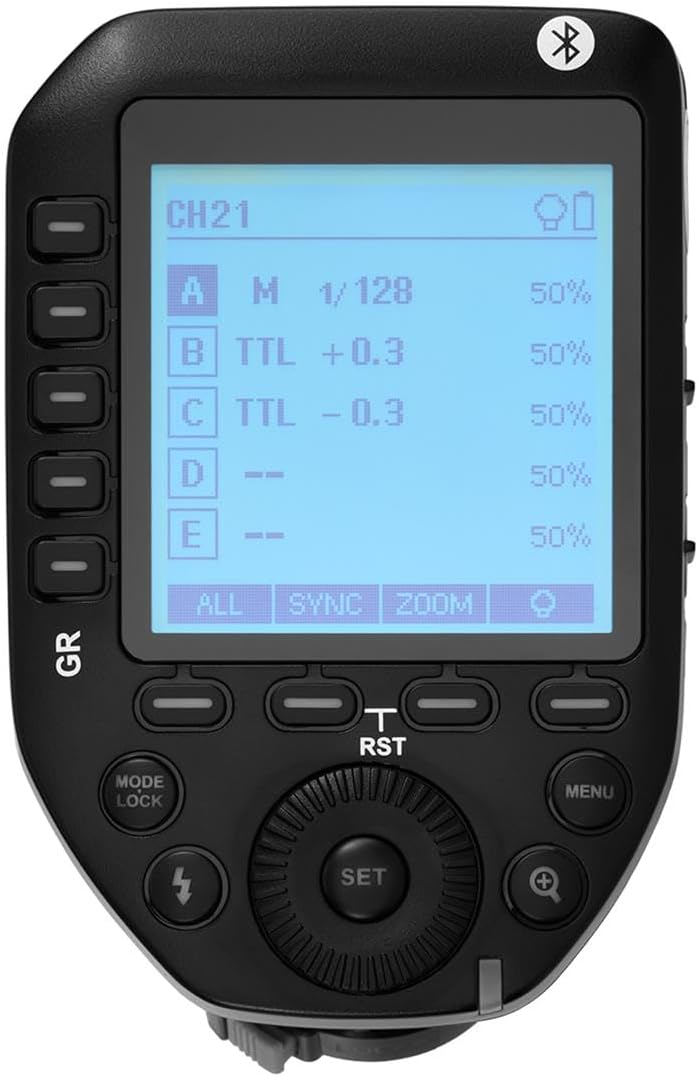
Figura 3.1: Fuq view of the Flashpoint R2 XPro II, highlighting the large dot matrix LCD display and various control buttons including Group (GR), Mode/Lock, Set, Menu, and Zoom.

Figura 3.2: Angolat view of the Flashpoint R2 XPro II, illustrating the hot shoe mount for camera attachment and the power ON/OFF switch located on the side.
Kontrolli Ewlenin:
- Display LCD: Large dot matrix display with adjustable backlight for clear visibility of settings.
- Group (GR) Buttons: Control individual flash groups (A, B, C, D, E).
- Mode/Lock Button: Switches between flash modes (TTL, Manual, Multi) and locks settings.
- Issettja Buttuna: Jikkonferma l-għażliet u jidħol fis-submenus.
- Buttuna tal-menu: Aċċessa s-settings tas-sistema u l-għażliet avvanzati.
- Buttuna Żum: Adjusts flash zoom settings for specific groups.
- Ċempel: Jinnaviga l-menus u jaġġusta l-valuri.
- Swiċċ tal-Enerġija: Dawwar l-unità ON / OFF.
- Immuntar taż-żarbun sħun: Connects the trigger securely to your camera's hot shoe.
4. Setup u Installazzjoni
4.1 Installazzjoni tal-batterija
The R2 XPro II uses two AA batteries (not included). Ensure correct polarity when inserting.

Figure 4.1: The battery compartment of the Flashpoint R2 XPro II, with the cover removed, illustrating the correct orientation for inserting AA batteries.
- Sib l-għatu tal-kompartiment tal-batterija fil-qiegħ tal-unità.
- Żerżaq l-għatu miftuħ.
- Insert two AA batteries, matching the positive (+) and negative (-) indicators inside the compartment.
- Agħlaq l-għatu tal-kompartiment tal-batterija sew.
4.2 Immuntar fuq il-Kamera
Attach the trigger to your Sony camera's hot shoe for seamless integration.

Figura 4.2: Qiegħ view of the Flashpoint R2 XPro II, displaying the hot shoe mount and the instant flip locking mechanism designed for secure camera connection.
- Ensure the trigger is turned OFF.
- Slide the hot shoe mount of the R2 XPro II into your camera's hot shoe.
- Secure the trigger by engaging the locking mechanism (typically a lever or dial) on the hot shoe mount.
- Turn on the trigger and your camera.
5. Istruzzjonijiet Operattivi
The R2 XPro II offers various modes and settings for precise flash control.
5.1 Tixgħel/Jitfi
Use the ON/OFF switch located on the side of the unit to power the trigger.
5.2 Basic Screen Navigation
The large LCD display shows current settings for channels, groups, and flash modes. Use the dial to navigate and adjust values, and the SET button to confirm.
5.3 Flash Modes (TTL / M / Multi)
Agħfas il- Modalità/Lock buttuna biex tiċċikla bejn il-modi tal-flash disponibbli:
- TTL (Minn Ġol-Lenti): Automatic exposure control. The trigger communicates with the camera to determine optimal flash output.
- M (Manwal): Allows manual adjustment of flash power output (e.g., 1/1 to 1/128).
- Multi (Stroboskopiku): Jagħti serje ta' flashes rapidi għal effetti kreattivi.
The R2 XPro II also features TCM (TTL Converted to Manual) fusion, which allows you to capture an exposure in TTL mode and then convert that exposure value to a manual setting for consistent repeat shots.
5.4 Channel and Group Management
The trigger supports 32 channels and multiple groups (A, B, C, D, E) for managing complex lighting setups.
- Uża l- GR (Group) buttons to select and adjust individual flash groups.
- Access the menu to change the wireless channel to avoid interference.
5.5 Sinkronizzazzjoni b'Veloċità Għolja (HSS)
The R2 XPro II supports High-Speed Sync up to 1/8000s, enabling you to use flash with fast shutter speeds, ideal for overpowering ambient light or freezing fast motion.
5.6 Smartphone APP Control (Bluetooth)
The built-in Bluetooth allows for smartphone app control of flash functions. Download the compatible Flashpoint R2 app to manage settings remotely.

Figure 5.1: Illustration of the R2 Wireless System, demonstrating the Flashpoint R2 XPro II's ability to work with a complete family of Flashpoint speedlights, monolights, and strobe lights, and transmit atop any Sony DSLR, MSLR, or M Series body.
6. Manutenzjoni u Kura
- Tindif: Use a soft, dry cloth to clean the exterior of the unit. Do not use solvents or abrasive cleaners.
- Ħażna: Meta ma tkunx qed tużah għal perjodi twal, neħħi l-batteriji biex tevita t-tnixxija. Aħżen l-apparat f'post frisk u niexef, 'il bogħod mix-xemx diretta u minn temperaturi estremi.
- Aġġornamenti tal-Firmware: Iċċekkja perjodikament il-manifattur website for available firmware updates to ensure optimal performance and compatibility. The unit is Mac and PC firmware updatable.
7 Issolvi l-problemi
If you encounter issues with your Flashpoint R2 XPro II, refer to the following common problems and solutions:
| Problema | Kawża Possibbli | Soluzzjoni |
|---|---|---|
| L-apparat ma jixgħelx. | Il-batteriji huma mejta jew imdaħħla ħażin. | Ibdel il-batteriji jew kun żgur li l-polarità hija korretta. |
| Flash unit does not fire. | Incorrect channel/group settings; flash unit not compatible; trigger not securely mounted. | Verify channel and group settings on both trigger and flash; ensure flash is compatible with R2 system; re-mount trigger securely. |
| Inconsistent flash firing. | Interferenza minn apparati oħra mingħajr fili; batterija baxxa. | Change to a different wireless channel; replace batteries. |
| TTL exposure is inaccurate. | Environmental factors; flash unit limitations. | Adjust flash exposure compensation on the trigger or camera; consider switching to Manual mode. |
8. Speċifikazzjonijiet
| Karatteristika | Dettall |
|---|---|
| Mudell | R2 XPro II |
| Sistema Wireless | Flashpoint R2 / Godox X - 2.4GHz Radio System |
| Kompatibilità | Sony Cameras (TTL support) |
| Firxa tat-Trażmissjoni | 300-400 pied (madwar 90-120 metri) |
| Kanali | 32 |
| Gruppi | 5 (A, B, Ċ, D, E) |
| Modi tal-Flash | TTL, Manwali, Multiplu |
| Sinkronizzazzjoni b'Veloċità Għolja (HSS) | Sa 1/8000s |
| Wiri | Large Dot Matrix LCD with Adjustable Backlight |
| Konnettività | Built-in Bluetooth for Smartphone APP Control |
| Aġġornament tal-Firmware | Mac and PC Updatable via USB-C port |
| Sors tal-Enerġija | 2 x Batteriji AA |
| Dimensjonijiet tal-Prodott | 5.15 x 4 x 2.8 pulzieri |
| Piż tal-oġġett | 8.8 uqija |
9. Informazzjoni dwar Garanzija
Flashpoint products are designed and manufactured to the highest quality standards. For specific warranty terms and conditions, please refer to the warranty card included with your product or visit the official Flashpoint websit. Żomm l-irċevuta tax-xiri tiegħek bħala prova tax-xiri għal talbiet ta' garanzija.
10. Appoġġ għall-Klijent
For technical assistance, troubleshooting, or service inquiries, please contact Flashpoint customer support. You can find contact information on the official Flashpoint websit jew permezz tal-bejjiegħ bl-imnut tiegħek.
Riżorsi onlajn: Flashpoint Official Store on Amazon
Ask a question about this manual
Ask about setup, troubleshooting, compatibility, parts, safety, or missing instructions. Manuals+ will review the question and use this page’s manual context to help answer it.