
1. Introduzzjoni
The Dangbei Neo Smart Projector is a compact, portable device designed to deliver a high-quality home theater experience. Featuring official Netflix licensing, 1080P Full HD resolution, HDR10 support, and intelligent adjustment technologies, this projector offers versatile entertainment options with ease of use. This manual provides essential information for setting up, operating, and maintaining your projector.

Figure 1: Dangbei Neo Smart Projector.
2. X'hemm fil-Kaxxa
Upon unboxing your Dangbei Neo Smart Projector, verify that all the following items are included:
- Dangbei Neo Smart Projector
- Kontroll mill-bogħod
- Adapter tal-Enerġija
- Kejbil tal-Enerġija
- Manwal għall-Utent
- Drapp tat-Tindif

Figure 2: Projector and included accessories.
3. Setup
3.1 Tixgħel Inizjali
- Connect the power cable to the power adapter, then plug the adapter into the projector's DC input port.
- Ipplaggja l-kejbil tal-enerġija f'sokit elettriku adattat.
- Agħfas il-buttuna tal-qawwa fuq il-proġekter jew il-kontroll mill-bogħod biex tixgħel l-apparat.
3.2 Konnessjoni tan-Netwerk
The projector supports 5GHz Wi-Fi and Bluetooth 5.0 for seamless connectivity.
- Innaviga lejn il-menù 'Settings' fuq l-iskrin ewlieni tal-proġettazzjoni.
- Select 'Network' and choose your desired Wi-Fi network. Enter the password if prompted.
- For Bluetooth devices, select 'Bluetooth' in the 'Settings' menu and pair your device.
3.3 Intelligent Adjustment Technologies
The Dangbei Neo features 4-in-1 smart adjustment for an optimal viewesperjenza:
- Auto Focus: The projector automatically adjusts for a clear and sharp image.
- Korrezzjoni Auto Keystone: The image is automatically adjusted to a rectangular shape, correcting for angled projections.
- Tajbin Intelliġenti tal-Iskrin: The projector automatically aligns the image with the screen boundaries.
- Evitar ta' Ostakli: The projection automatically adjusts to avoid obstacles in its path.
These features typically activate automatically upon startup or movement of the projector. Manual adjustments are also available in the settings menu.
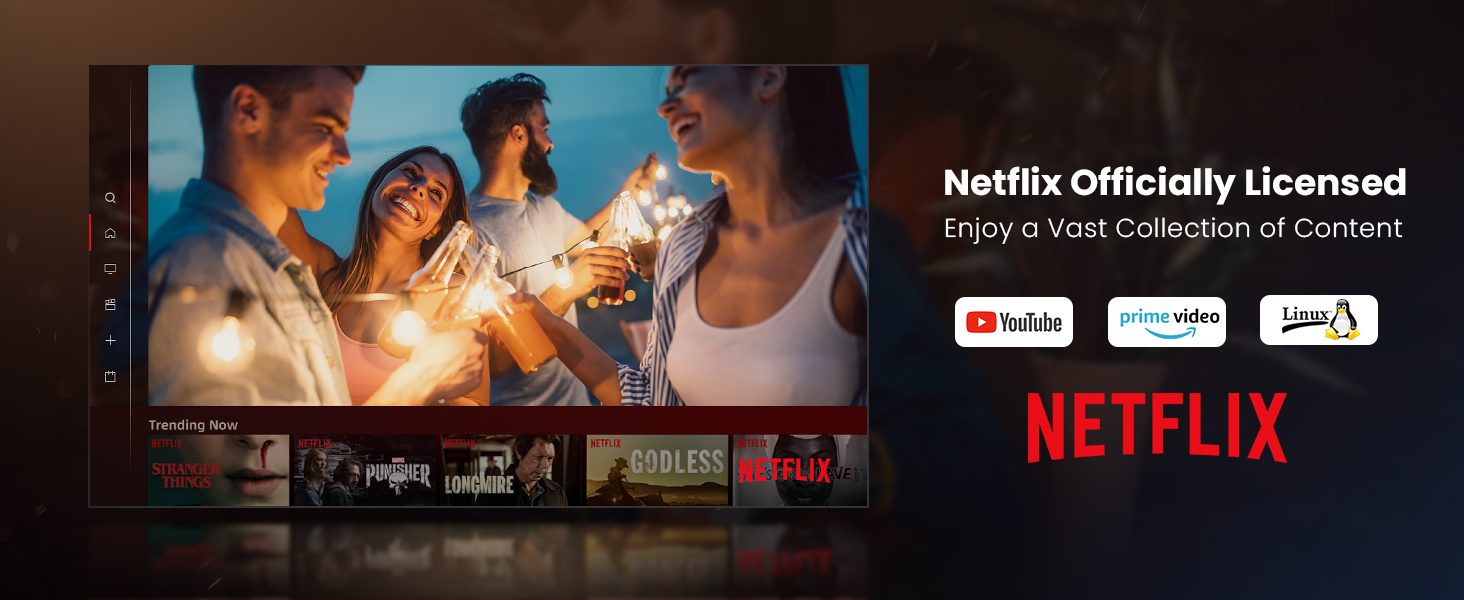
Figure 3: Visual representation of auto-focus and auto-keystone correction.
3.4 Konnessjoni ta' Apparati Esterni
Il-proġettur joffri diversi għażliet ta' konnettività:
- HDMI: Connect gaming consoles, laptops, or other HDMI-enabled devices. One HDMI port supports ARC for enhanced audio return.
- USB: Use the USB ports for multimedia playback from external storage devices.
- SPDIF: For digital audio output to compatible sound systems.
- LAN: Għal konnessjoni tal-internet bil-fili.
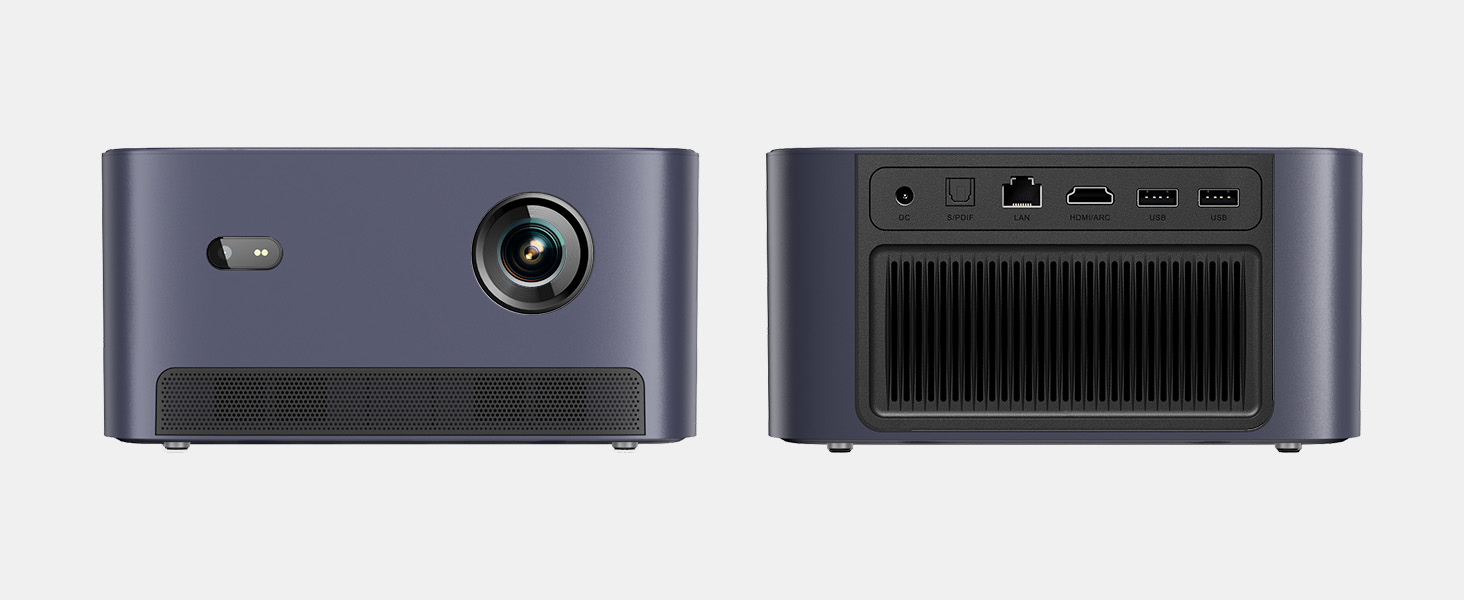
Figura 4: Wara view of the projector showing various input/output ports.
5. Istruzzjonijiet Operattivi
5.1 Navigazzjoni tal-Interfaċċja
The projector runs on a Linux-based operating system with a user-friendly interface. Use the remote control's directional pad and 'OK' button to navigate through menus and select options.
5.2 Applikazzjonijiet Installati minn Qabel
Enjoy a variety of streaming content with pre-installed and officially licensed applications:
- Netflix: Access your Netflix subscription directly.
- YouTube: Stream videos from YouTube.
- Prim Video: Watch content from Amazon Prime Video.
- Additional apps are available through the integrated app store.

Figure 5: Projector displaying the Netflix interface.
5.3 Issettjar tal-Immaġni u l-Awdjo
Ottimizza tiegħek viewesperjenza bil-karatteristiċi li ġejjin:
- Riżoluzzjoni: Native 1080P Full HD with support for HDR10/HLG for sharp, crisp images.
- Daqs tal-Projezzjoni: Up to 120 inches for an immersive cinematic experience.
- Awdjo: Integrated 2x6W speakers with Dolby Audio support provide 360° surround sound.
- AI Brightness Adjustment: Automatically optimizes brightness based on ambient light.

Figure 6: Large projected image from the Dangbei Neo.

Figure 7: Illustration of 360° surround sound from the projector.
6. Manutenzjoni
- Tindif: Use the provided cleaning cloth to gently wipe the lens and exterior surfaces. Avoid abrasive materials or harsh chemicals.
- Ventilazzjoni: Ensure the projector's ventilation ports are clear and unobstructed to prevent overheating.
- Lamp Ħajja: The laser light source has a lifespan of up to 30,000 hours, providing long-term use without frequent lamp sostituzzjoni.
7 Issolvi l-problemi
| Problema | Kawża Possibbli | Soluzzjoni |
|---|---|---|
| No image/blurry image | Power issue, focus/keystone incorrect, lens obstructed | Check power connection. Use auto-focus/keystone or adjust manually. Clean the lens. |
| L-ebda ħoss | Volume too low, audio output settings, external device issue | Increase volume. Check audio settings. Ensure external device audio is working. |
| Problemi ta' konnettività Wi-Fi/Bluetooth | Incorrect password, device out of range, interference | Verify password. Move closer to router/device. Reduce interference. |
| Proġekter iżżejjed | Blocked ventilation, prolonged use | Ensure vents are clear. Allow projector to cool down. |
8. Speċifikazzjonijiet
| Karatteristika | Dettall |
|---|---|
| Brand | Dangbei |
| Mudell | Neo |
| Riżoluzzjoni tal-Wiri | 1920 x 1080 (1080P FHD) |
| Appoġġ HDR | HDR10/HLG |
| Sors tad-Dawl | Laser (ALPD) |
| Lamp Ħajja | Sa 30,000 sigħat |
| Luminożità | 2100 ISO Lumens |
| Proporzjon ta' Kuntrast | 12,000:1 (Dinamika) |
| Sistema Operattiva | OS Linux |
| Apps installati minn qabel | Netflix, YouTube, Prime Video |
| Konnettività | 5GHz Wi-Fi, Bluetooth 5.0, HDMI (ARC), USB, SPDIF, LAN |
| Awdjo | 2x6W Dolby Audio Speakers, 360° Surround Sound |
| Karatteristiċi Intelliġenti | Auto Focus, Auto Keystone Correction, Intelligent Screen Fit, Obstacle Avoidance, AI Brightness Adjustment |
| Dimensjonijiet | 7.87 x 6.18 x 3.94 pulzieri |
| Piż | 0.141 uqija |
9. Garanzija u Appoġġ
The Dangbei Neo Smart Projector comes with a standard manufacturer's warranty. For detailed warranty information, product support, or service inquiries, please refer to the warranty card included in your package or visit the official Dangbei websit.
Appoġġ onlajn: www.dangbei.com
10. Vidjo Uffiċjali tal-Prodott
Ara l-filmat uffiċjali tal-prodott għal viżwali aktar 'il fuqview of the Dangbei Neo Smart Projector's features and capabilities.
Video: Dangbei Neo Netflix Officially-Licensed Smart Projector. This video highlights key features and usage scenarios.