
1. Introduzzjoni
Grazzi tax-xiriasing the Panasonic VL-SE35XLA Video Door Phone. This manual provides essential information for the safe and efficient use of your new device. Please read this manual thoroughly before installation and operation, and retain it for future reference.
Informazzjoni Importanti dwar is-Sigurtà
- Ensure all electrical work is performed by a qualified electrician and complies with local codes.
- Tesponix l-unità ta' barra għal sprej dirett tal-ilma jew tgħaddashiex fl-ilma.
- Uża biss il-provvista tal-enerġija u l-aċċessorji speċifikati.
- Avoid installing the outdoor unit in direct sunlight or where it may be subject to extreme temperatures.
- Keep the indoor monitor unit away from heat sources and moisture.
2. Kontenut tal-Pakkett
Ivverifika li l-oġġetti kollha huma preżenti fil-pakkett:
- Indoor Monitor Unit (VL-ME35)
- Outdoor Camera Unit (VL-V522L)
- Bracket tal-Immuntar tal-Ħajt għal Unità ta' Ġewwa
- Viti u Ankri tal-Immuntar
- Power Adapter for Indoor Unit
- Manwal ta 'Istruzzjoni (dan id-dokument)
3. Prodott Aktarview
The Panasonic VL-SE35XLA is a wireless video door phone system designed for home security and convenience. It features an indoor monitor with an LCD display and an outdoor camera unit.
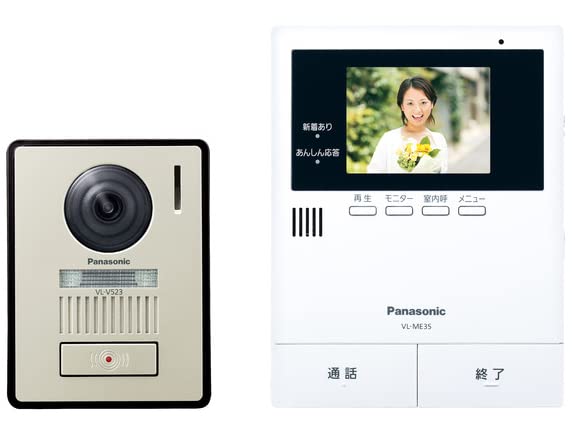
Image: Panasonic VL-SE35XLA Video Door Phone System, showing both indoor monitor and outdoor camera units.
Komponenti Ewlenin:
- Indoor Monitor Unit: Features a color LCD display for viewing visitors, communication buttons, and settings controls.
- Outdoor Camera Unit: Equipped with a camera, microphone, speaker, and call button for two-way communication and video capture.
4. Setup u Installazzjoni
Installazzjoni xierqa hija kruċjali għal prestazzjoni ottimali. Segwi dawn il-passi bir-reqqa.
4.1 Mounting the Outdoor Camera Unit
- Choose a suitable location near your entrance, approximately 1.4 to 1.6 meters (4.6 to 5.2 feet) from the ground, ensuring a clear view tal-viżitaturi.
- Immarka l-punti tat-tħaffir billi tuża l-bracket tal-immuntar bħala mudell.
- Drill toqob u daħħal l-ankri tal-ħajt jekk meħtieġ.
- Waħħal il-bracket tal-immuntar mal-ħajt bil-viti.
- Connect the necessary wiring (e.g., power supply, if not battery-operated, and any existing intercom wiring) to the outdoor unit terminals. Refer to the wiring diagram in the separate installation guide for detailed instructions.
- Attach the outdoor camera unit to the mounting bracket.
4.2 Mounting the Indoor Monitor Unit
- Select a convenient indoor location, such as a hallway or living room, within range of the outdoor unit's wireless signal.
- Secure the indoor unit's wall mounting bracket to the wall.
- Connect the power adapter to the indoor monitor unit and plug it into a standard electrical outlet.
- Attach the indoor monitor unit to its wall mounting bracket.
4.3 L-Ewwel Tixgħel u l-Imqabbad
- Once both units are powered, the indoor monitor unit should automatically attempt to pair with the outdoor camera unit.
- If pairing does not occur automatically, refer to the 'Pairing' section in the detailed installation guide for manual pairing instructions.
- Test the system by pressing the call button on the outdoor unit. The indoor monitor should ring and display the visitor's image.
5. Istruzzjonijiet Operattivi
This section describes the basic functions of your video door phone.
5.1 Tweġiba għal Sejħa
- When a visitor presses the call button on the outdoor unit, the indoor monitor will ring and display the visitor's image.
- Agħfas il- Tkellem button on the indoor monitor to establish two-way communication.
- Biex ittemm il-konversazzjoni, agħfas il- Tmiem Sejħa buttuna.
5.2 Monitoring the Entrance
- Biex view the outdoor camera feed at any time, press the Monitor button on the indoor unit.
- The display will show the live video feed from the outdoor camera.
- Agħfas il- Monitor button again or wait for the automatic timeout to exit monitoring mode.
5.3 Recording Visitors
- The system supports automatic or manual recording of visitors.
- When a visitor calls, the system may automatically record a short video or still image.
- To manually record during a call or monitoring, press the Rekord button on the indoor monitor.
- Recorded images and videos can be reviewed through the menu on the indoor monitor.
5.4 Adjusting Volume and Settings
- Uża l- Volum buttons on the indoor monitor to adjust the ringtone and communication volume.
- Aċċess għall- Menu button to configure various settings, including display brightness, recording preferences, and date/time.
6. Manutenzjoni
Regular maintenance ensures the longevity and optimal performance of your device.
6.1 Tindif
- Wipe the indoor and outdoor units with a soft, dry cloth.
- Għal ħmieġ iebes, neħħi ftitampLaħlaħ id-drapp bl-ilma u deterġent ħafif, imbagħad imsaħ niexef immedjatament.
- Do not use abrasive cleaners, solvents, or alcohol, as these can damage the surfaces.
- Ensure the camera lens on the outdoor unit is clean for clear image quality.
7 Issolvi l-problemi
Jekk tiltaqa' ma' problemi, irreferi għall-problemi u s-soluzzjonijiet komuni li ġejjin.
| Problema | Kawża Possibbli | Soluzzjoni |
|---|---|---|
| L-ebda immaġni fuq il-monitor ta' ġewwa. | Power issue, units not paired, or out of range. | Check power connections. Ensure units are paired. Reduce distance between units or check for interference. |
| No sound during communication. | Volume too low, or microphone/speaker issue. | Adjust volume settings on the indoor monitor. Check for obstructions on microphone/speaker. |
| Outdoor unit not responding. | Power issue to outdoor unit, or wiring problem. | Verify power supply to the outdoor unit. Check wiring connections. |
| Kwalità fqira tal-immaġni. | Dirty camera lens, poor lighting, or interference. | Clean the camera lens. Ensure adequate lighting at the entrance. |
Jekk il-problema tippersisti wara li tipprova dawn is-soluzzjonijiet, jekk jogħġbok ikkuntattja l-appoġġ għall-klijenti.
8. Speċifikazzjonijiet
| Karatteristika | Deskrizzjoni |
|---|---|
| Numru tal-Mudell | VL-SE35XLA |
| Brand | Panasonic |
| Teknoloġija tal-Konnessjoni | Wireless |
| Karatteristika Speċjali | Display LCD |
| Użu fuq ġewwa/barra | Indoor (Monitor Unit) |
| Kulur | Abjad |
| Dimensjonijiet tal-Prodott (LxWxH) | 29.7 x 5.9 x 22.9 ċm (11.7 x 2.3 x 9.0 pulzieri) |
| Piż tal-Prodott | 920 g (2.03 lbs) |
| Użu Rakkomandat | Outdoor Security (as a system) |
9. Garanzija u Appoġġ
Panasonic products are manufactured to high-quality standards and are backed by a limited warranty. Please refer to the warranty card included with your product for specific terms and conditions.
For technical assistance, troubleshooting beyond this manual, or warranty claims, please contact Panasonic customer support through their official webis-sit jew l-informazzjoni ta' kuntatt ipprovduta fl-imballaġġ tal-prodott tiegħek.
- Appoġġ onlajn: Żur l-appoġġ uffiċjali ta' Panasonic websit għal FAQs, aġġornamenti tas-softwer, u riżorsi addizzjonali.
- Servizz tal-Klijent: Irreferi għad-dokumentazzjoni tal-prodott tiegħek għan-numri ta' kuntatt tas-servizz tal-konsumatur reġjonali.