
Victron Energy PSC242553095
Victron Energy Smart IP43 24V 25A 3-Output Battery Charger (Model PSC242553095) User Manual
1. Introduzzjoni
This manual provides comprehensive instructions for the installation, operation, and maintenance of the Victron Energy Smart IP43 24-Volt 25 AMP 120-240 VAC, 3 Output Battery Charger with Bluetooth. Please read this manual thoroughly before using the product to ensure safe and efficient operation.
1.1. Prodott Aktarview
The Victron Energy Smart IP43 Charger is designed for charging up to three independent battery banks. It features built-in Bluetooth Smart for monitoring, control, and firmware updates via the VictronConnect app. The charger also includes automatic voltage compensation to account for voltage drop in DC cabling.
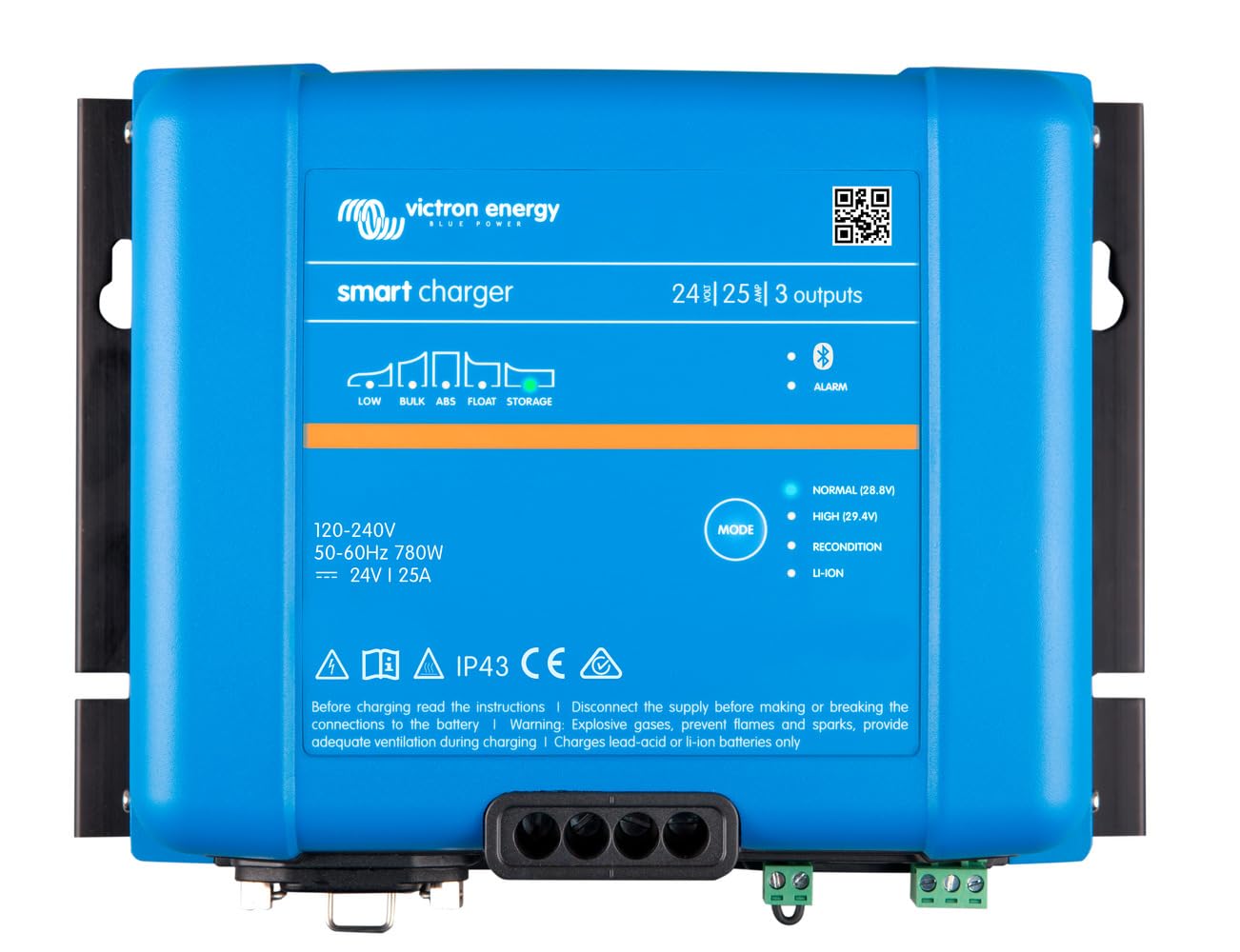
Immaġni: Quddiem view of the Victron Energy Smart IP43 24V 25A 3-Output Battery Charger.
1.2. X'hemm fil-Kaxxa
Meta tiftaħ il-pakkett, ivverifika li l-komponenti kollha huma preżenti:
- Victron Energy Phoenix Smart IP43 24-Volt 25 AMP 120-240 VAC, 3 Output Battery Charger with Bluetooth (Model PSC242553095)
- Manwal għall-Utent (dan id-dokument)
- Ħardwer tal-immuntar (jekk applikabbli)
2. Istruzzjonijiet tas-Sigurtà
TWISSIJA: Dan il-prodott fih kimiċi magħrufa mill-Istat ta’ Kalifornja li jikkawżaw kanċer u difetti fit-twelid jew ħsara riproduttiva oħra. Għal aktar informazzjoni, mur fuq www.P65Warnings.ca.gov.
- Dejjem skonnettja l-enerġija AC qabel ma tagħmel jew tkisser konnessjonijiet DC.
- Żgura ventilazzjoni xierqa madwar il-ċarġer.
- Tesponix il-ċarġer għax-xita jew l-umdità.
- Consult a qualified electrician for installation if you are unsure.
- Use appropriate cable sizes for all connections to prevent overheating.
- This device is designed for indoor use or protected outdoor environments (IP43 rating).
3. Setup u Installazzjoni
3.1. Immuntar tal-Ċarġer
Select a suitable location for mounting the charger. The location should be dry, well-ventilated, and protected from direct sunlight and excessive heat. Ensure there is sufficient space around the unit for air circulation.
- Mount the charger vertically on a non-flammable surface.
- Use appropriate screws and fasteners for the mounting surface.
- Ensure all connections are easily accessible after mounting.
3.2. Konnessjonijiet elettriċi
The charger has three full current outputs designed to charge up to three separate battery banks. The total current drawn across all three outputs combined must not exceed the charger's rated output current (25 Amps).
- Konnessjonijiet tal-Batterija DC:
- Connect the positive (+) terminals of your battery banks to the corresponding positive output terminals on the charger.
- Connect the negative (-) terminals of your battery banks to the common negative terminal on the charger.
- Use marine-style battery connectors (ring terminals or battery clamps) as appropriate for your setup.
- Kun żgur li l-konnessjonijiet kollha tad-DC huma ssikkati u siguri biex jipprevjenu l-vultaġġtagqtar elettroniku u sħana żejda.
- Konnessjoni tal-Input AC:
- Connect the standard AC power cord (5-15P) to a compatible 120-240 VAC power outlet.
- Ivverifika li l-input voltage matches the charger's specifications.
4. Operazzjoni
4.1. L-Inizjali Tixgħel
Once all connections are secure, plug the AC power cord into the wall outlet. The charger will initiate its startup sequence. Status indicators (LEDs) on the unit will provide information on the charging process.
4.2. Bluetooth Connectivity (VictronConnect App)
The charger features built-in Bluetooth Smart for advanced monitoring and control via the VictronConnect app. This app allows you to:
- Monitor real-time charging status and battery voltage.
- Configure charging parameters and battery presets (e.g., Gel, Lithium Iron Phosphate).
- Update the charger's firmware.
- Synchronize with other Victron Energy Smart devices.
Download the VictronConnect app from your device's app store. Follow the in-app instructions to connect to your charger via Bluetooth.

Image: Screenshot of the VictronConnect app interface on a smartphone, showing monitoring and configuration options.
4.3. Awtomatiku Voltage Kumpens
The charger automatically compensates for voltage drop that occurs over the DC cabling. As the DC current increases, the charger slightly increases its output voltage to ensure the batteries receive the correct charging voltage, optimizing charging efficiency and battery life.
4.4. Multi-Output Charging
The three outputs allow for simultaneous charging of up to three battery banks. While each output can deliver the full rated current, the combined total current from all three outputs will not exceed the charger's maximum output of 25 Amps.
Video: This video demonstrates the VictronConnect App for monitoring performance, showing how users can check key monitoring data, see device performance, and use simple controls for configuration and firmware updates.
Video: This video illustrates the Victron Remote Management (VRM) portal, demonstrating how to master remote systems by checking remote systems at a glance, managing devices with simple controls, and monitoring system performance in detail.
5. Speċifikazzjonijiet
| Karatteristika | Speċifikazzjoni |
|---|---|
| Brand | Enerġija Victron |
| Numru tal-Mudell | PSC242553095 |
| Dimensjonijiet tal-Prodott | 4.6"D x 9.8"W x 7.1"H |
| Piż tal-oġġett | 2.6 Kilogrammi |
| Ħruġ Voltage | 24 Volts (DC) |
| Input Voltage | 120-240 Volt (AC) |
| Klassifikazzjoni kurrenti | 25 Amps |
| Numru ta' Outputs | 3 |
| Tip ta' Konnettur | Marine-style battery connectors (ring terminals or battery clamps) and standard AC power cord (5-15P) |
| Bluetooth | Built-in Bluetooth Smart for VictronConnect app |
| Ċertifikazzjonijiet | CE, FCC |
6. Manutenzjoni
- Spezzjoni regolari: Periodically inspect the charger and its connections for any signs of damage, corrosion, or loose wiring.
- Tindif: Keep the charger clean and free from dust and debris. Use a dry cloth for cleaning. Do not use liquid cleaners or solvents.
- Ventilazzjoni: Kun żgur li l-fetħiet tal-ventilazzjoni ma jkunux imblukkati biex tevita sħana żejda.
- Aġġornamenti tal-Firmware: Regularly check for and install firmware updates via the VictronConnect app to ensure optimal performance and access to new features.
7 Issolvi l-problemi
If you encounter issues with your Victron Energy Smart IP43 charger, refer to the following common problems and solutions:
| Problema | Kawża Possibbli | Soluzzjoni |
|---|---|---|
| Il-ċarġer mhux qed jixgħel | L-ebda enerġija tad-dħul tal-AC | Check AC power cord connection and wall outlet. Ensure circuit breaker is not tripped. |
| L-ebda output ta' ċċarġjar | Loose battery connections; Battery voltage too low for detection | Verify all DC battery connections are secure. If battery voltage is extremely low, try a different charging method to bring it to a detectable level. |
| Is-sħana żejda | Insufficient ventilation; Blocked air vents | Ensure adequate airflow around the charger. Clear any obstructions from the air vents. Reduce load if possible. |
| Kwistjonijiet ta 'konnessjoni Bluetooth | Distance from device; Interference; App issues | Move closer to the charger. Restart the VictronConnect app and your mobile device. Ensure Bluetooth is enabled. |
If the problem persists after attempting these solutions, please contact Victron Energy customer support.
8. Garanzija u Appoġġ
8.1. Informazzjoni dwar Garanzija
This product comes with a manufacturer's warranty. Please refer to the "Warranty Description" provided with your product or visit the official Victron Energy websit għal termini u kundizzjonijiet dettaljati tal-garanzija. Żomm il-prova tax-xiri tiegħek għal talbiet ta' garanzija.
8.2. Appoġġ għall-Klijent
For technical assistance, troubleshooting, or service inquiries, please contact Victron Energy customer support through their official website or authorized service centers. You can also find additional resources and FAQs on the Victron Energy websit.
Ask a question about this manual
Ask about setup, troubleshooting, compatibility, parts, safety, or missing instructions. Manuals+ will review the question and use this page’s manual context to help answer it.