
Introduzzjoni
Grazzi tax-xiriasing the Dolphin LX-220 Boombox Bluetooth Speaker. This manual provides essential information for setting up, operating, and maintaining your speaker. Please read it thoroughly before use to ensure optimal performance and safety.
Informazzjoni Importanti dwar is-Sigurtà
- Tesponix l-ispiker għal temperaturi estremi jew dawl tax-xemx dirett għal perjodi twal.
- Keep the speaker away from heat sources, dust, and corrosive materials.
- Tiżżarmax, issewwiex, jew timmodifikax l-ispiker int stess. Ikkuntattja persunal tas-servizz kwalifikat għall-assistenza.
- Ensure all port covers are securely closed when using the speaker near water to maintain its IPX5 waterproof rating.
- Uża biss il-kejbil tal-iċċarġjar provdut jew kejbil USB-C iċċertifikat għall-iċċarġjar.
- Evita li tpoġġi oġġetti tqal fuq l-ispiker.
Kontenut tal-Pakkett
- Dolphin LX-220 Boombox Bluetooth Speaker
- Cable tal-Iċċarġjar tal-USB-C
- Kontroll mill-bogħod Daqs sħiħ
- Manwal għall-Utent (dan id-dokument)
Prodott Overview
The Dolphin LX-220 is a portable Bluetooth speaker designed for robust audio performance and versatility. It features dual bass radiators and dual 3-inch full-range drivers for powerful sound. Its IPX5 waterproof rating makes it suitable for various environments, and the sound-activated ring lights add a dynamic visual element.
Speaker Components and Controls


Tqassim tal-Panew tal-Kontroll
- Buttuna tal-Qawwa: Agħfas u żommha biex tixgħel/itfi l-ispiker.
- Buttuna Bluetooth: Agħfas biex tidħol fil-mod ta 'tqabbil Bluetooth.
- Volum 'l isfel (-): Naqqas il-volum.
- Buttuna Play/Pause: Daqq jew waqqaf id-daqq tal-awdjo.
- Volum 'il fuq (+): Żid il-volum.
- Buttuna tal-Modalità Dawl: Cycle through 10 different sound-activated lighting modes.
- Buttuna tal-Bass Boost: Attiva jew iddiżattiva l-bass imtejjeb.
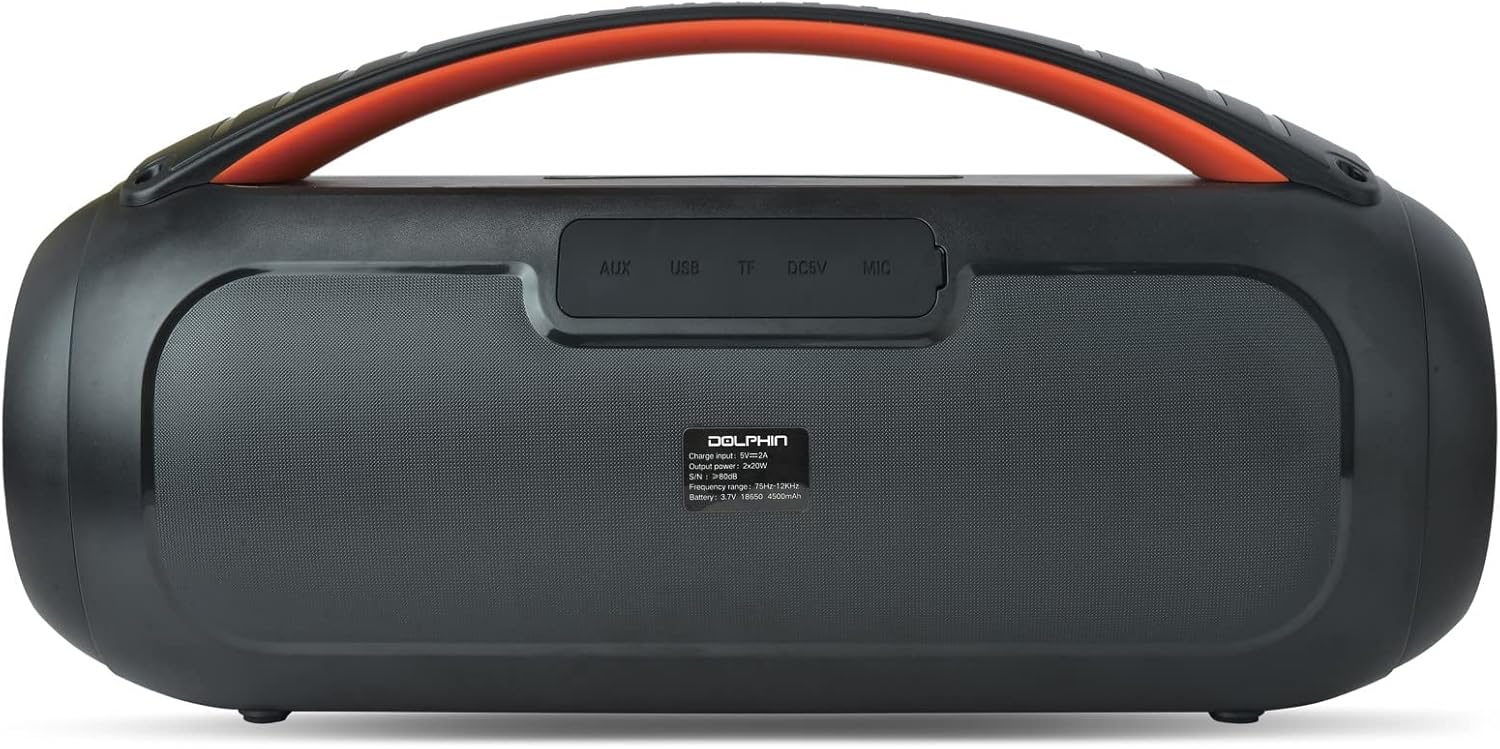
Rear Port Panel (Under Protective Cover)
- Input AUX: Jack ta' 3.5mm għall-konnessjoni ta' apparati awdjo esterni.
- Port USB: For USB drive playback or charging external devices (power bank function).
- Slott tal-Karta TF: Għall-plejbek ta' karta TF (microSD).
- DC 5V (USB-C) Port: Għall-iċċarġjar tal-ispiker.
Setup
Iċċarġjar lill-Ispeaker
- Open the protective rubber cover on the rear panel to access the charging port.
- Connect the provided USB-C charging cable to the DC 5V port on the speaker.
- Qabbad it-tarf l-ieħor tal-kejbil USB-C ma' adapter tal-enerġija USB kompatibbli (mhux inkluż).
- The battery level indicator will show the charging status. Charge until the indicator shows a full charge.
- Once fully charged, disconnect the cable and securely close the protective rubber cover to maintain waterproofing.
Tixgħel/Jitfi
- Biex Tixgħel: Press and hold the Power button on the top panel for approximately 2-3 seconds until the speaker powers on and the lights activate.
- Biex Tifi: Press and hold the Power button again for approximately 2-3 seconds until the speaker powers off.
Tqabbil tal-Bluetooth
- Ensure the speaker is powered on and in Bluetooth mode (indicated by a flashing blue light). If not, press the Bluetooth button to enter pairing mode.
- Fuq l-apparat mobbli tiegħek (smartphone, tablet, eċċ.), attiva l-Bluetooth u fittex apparati disponibbli.
- Select "Dolphin LX-220" from the list of devices.
- Once paired, the speaker will emit an audible confirmation, and the Bluetooth indicator light will become solid blue.
WaveSync Technology (True Wireless Stereo Pairing)
To achieve a stereo sound experience, you can pair two Dolphin LX-220 speakers using WaveSync technology.
- Ensure both LX-220 speakers are powered on and in Bluetooth pairing mode.
- On one of the speakers, press and hold the WaveSync button (often indicated by a chain-link icon).
- The speakers will automatically search for and connect to each other. An audible prompt will confirm successful pairing.
- Once paired, connect your mobile device to one of the speakers via Bluetooth as described above. Audio will now play in stereo across both speakers.
Modi Operattivi
Modalità Bluetooth
After successful Bluetooth pairing, you can control playback (Play/Pause, Volume Up/Down) directly from your connected device or using the speaker's control panel/remote control.
Daqq USB
- Daħħal flash drive USB li fih awdjo MP3 files into the USB port on the rear panel (under the protective cover).
- The speaker will automatically switch to USB mode and begin playing audio.
- Use the Play/Pause and Volume buttons on the speaker or remote to control playback.
Daqq tal-Karta TF
- Daħħal kard TF (microSD) li fiha awdjo MP3 files into the TF card slot on the rear panel.
- The speaker will automatically switch to TF card mode and begin playing audio.
- Use the Play/Pause and Volume buttons on the speaker or remote to control playback.
Modalità tar-Radju FM
- Press the Mode button (often labeled 'M') on the speaker or remote to cycle through modes until FM Radio is selected.
- The speaker will automatically scan and save available FM stations.
- Use the Previous/Next track buttons (often combined with Volume +/-) to navigate between saved stations.
Mod ta 'Input AUX
- Qabbad apparat awdjo estern (eż., MP3 player, laptop) mal-port tad-dħul AUX fuq il-pannell ta' wara billi tuża kejbil awdjo ta' 3.5mm (mhux inkluż).
- L-ispiker jaqleb awtomatikament għall-modalità AUX.
- Control audio playback and volume directly from your connected external device.
Dwal Attivati bil-Ħoss
The Dolphin LX-220 features sound-activated speaker ring lights and side lights with 10 different lighting modes.
- Press the Light Mode button on the speaker or remote to cycle through the available lighting patterns.
- The lights will react to the rhythm and intensity of the music being played.
Speċifikazzjonijiet
| Karatteristika | Dettall |
|---|---|
| Isem tal-Mudell | LX-220 |
| Tip ta' Kelliem | Speaker Bluetooth portabbli |
| Output ta 'Qawwa | 30 RMS Watts |
| Daqs tal-Kelliem | Dual 3" Full Range Drivers |
| Klassifikazzjoni li ma jgħaddix ilma minnha | IPX5 |
| Batterija | Built-In 4500mAh 3.7V Lithium-ion Battery |
| Iċċarġjar | USB-C Chargeable with Battery Level Indicator |
| Konnettività | Bluetooth, USB, TF, FM, AUX (3.5mm Jack) |
| Karatteristiċi Speċjali | Dual Bass Radiator, WaveSync Technology, Sound Activated Speaker Ring Lights & Side Lights (10 modes), Remote Control |
| Dimensjonijiet tal-Prodott | 7.3"H x 14.3"W x 5.5"D (Unit Information) |
| Piż tal-oġġett | 4.5 Liri |
Issolvi l-problemi
- Ebda Qawwa: Kun żgur li l-batterija hija ċċarġjata. Qabbad l-ispiker ma' sors ta' enerġija billi tuża l-kejbil USB-C.
- Ma nistax nikkonnettja l-Bluetooth: Make sure the speaker is in Bluetooth pairing mode (flashing blue light). Ensure your device's Bluetooth is enabled and within range. Try restarting both the speaker and your device.
- Ebda Ħsejjes: Check the volume levels on both the speaker and your connected device. Ensure the correct input mode (Bluetooth, USB, TF, AUX, FM) is selected.
- Kwalità tal-Ħoss Fqira: Ensure the speaker is not too far from the connected Bluetooth device. Check for interference from other wireless devices. For AUX mode, ensure the cable is fully inserted and not damaged.
- Dwal ma Jaħdmux: Press the Light Mode button to ensure lights are enabled and to cycle through modes.
- Il-Kontroll mill-bogħod Mhux Jaħdem: Check the remote control's battery. Ensure there are no obstructions between the remote and the speaker.
Manutenzjoni
- Naddaf il-kelliem b'artab, damp drapp. Tużax tindif jew solventi li joborxu.
- Ensure all port covers are sealed when not in use or when exposed to water.
- Aħżen l-ispiker f'post frisk u niexef 'il bogħod mix-xemx diretta u minn temperaturi estremi.
- Jekk l-ispiker ma jintużax għal perjodu twil ta' żmien, iċċarġjah perjodikament biex iżżomm il-batterija f'kundizzjoni tajba.
Garanzija u Appoġġ
The Dolphin LX-220 Boombox Bluetooth Speaker comes with a limited warranty. For detailed warranty information, please refer to the warranty card included in your package or visit the official Dolphin website. For technical support, troubleshooting assistance, or service inquiries, please contact Dolphin customer service through the contact information provided on our webis-sit jew fid-dokumentazzjoni tal-prodott tiegħek.
Tista 'wkoll iżżur il- Dolphin Store on Amazon għal aktar informazzjoni dwar il-prodott u riżorsi ta' appoġġ.