
1. Introduzzjoni
This manual provides detailed instructions for the operation and maintenance of your MakerHawk TC816 Digital Temperature Controller Thermostat Timer. This versatile device is designed for precise temperature and timing control across various applications, including reptile enclosures, incubators, terrariums, freezers, refrigerators, home brewing, and more. Please read this manual thoroughly before use to ensure safe and optimal performance.
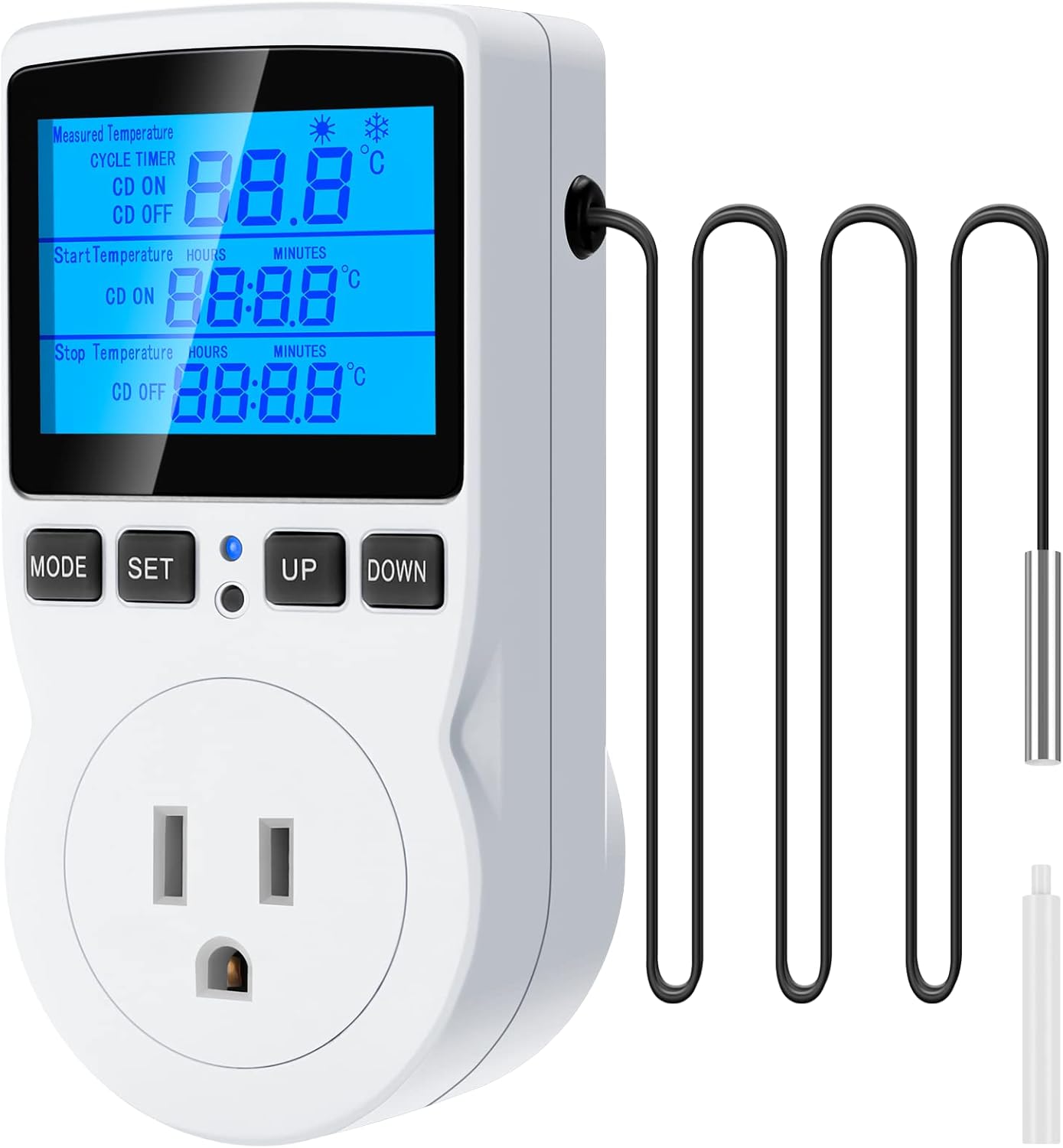
Figure 1: MakerHawk TC816 Digital Temperature Controller with sensor probe.
2. Informazzjoni dwar is-Sigurtà
Biex tiżgura tħaddim sikur u tevita ħsara, osserva l-linji gwida ta' sigurtà li ġejjin:
- Sors tal-Enerġija: Ensure the device is connected to a 120V AC power supply. The maximum load is 15A/1800W. Do not exceed these limits.
- Konnessjoni Sikura: The plug features highly conductive copper plates for efficient power transfer and rust resistance. Ensure it is fully inserted into a compatible outlet.
- Sigurtà tat-Tfal: The safety socket is designed to prevent accidental insertion by children. Keep the device out of reach of young children.
- Sigurtà tal-Materjal: L-apparat ċasing is made from PC flame-retardant material, offering high-temperature flame resistance.
- Kundizzjonijiet Ambjentali: Avoid exposing the device to extreme temperatures, humidity, or direct water contact.
- Poġġiment tas-Sonda: Ensure the temperature sensor probe is correctly placed in the environment you wish to monitor and control.
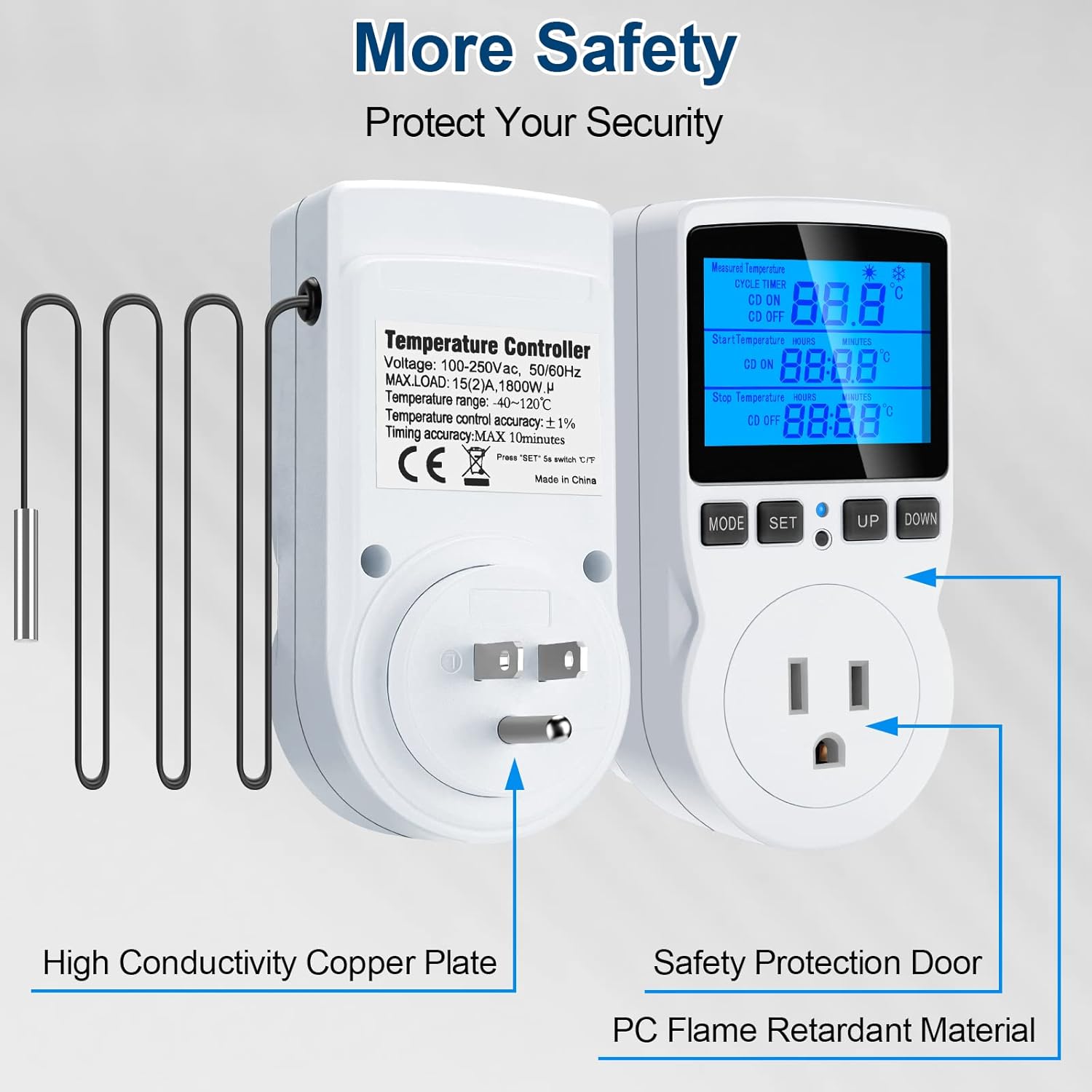
Figure 2: Illustration of safety features including high conductivity copper plate, safety protection door, and strong flame retardant material.
3. Prodott Aktarview
The MakerHawk TC816 features a clear LCD display and intuitive button controls for easy operation. Key components include:
- Display LCD: Shows measured temperature, set temperatures, and timer settings.
- Buttuni tal-Kontroll: MODE, SET, UP, DOWN for navigation and setting adjustments.
- Sensor Probe: 1.7m NTC temperature sensor for accurate readings.
- Plug tal-Istati Uniti: Standard 3-prong plug for power input.
- Controlled Outlet: For connecting heating or cooling devices.
- Buttuna Irrisettja: Small button for factory reset (requires a tool).
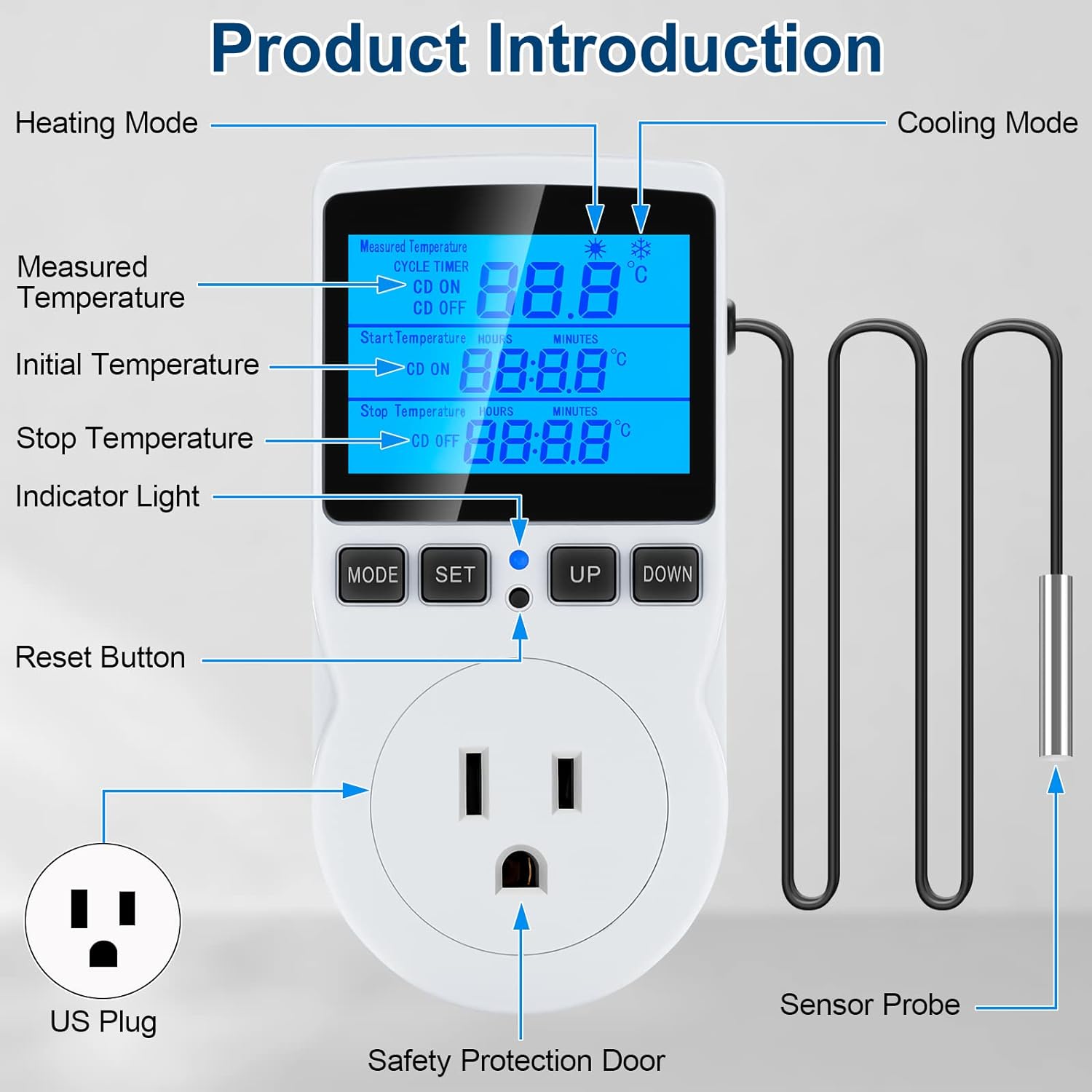
Figure 3: Detailed product diagram highlighting the display, buttons, sensor probe, and power outlet.
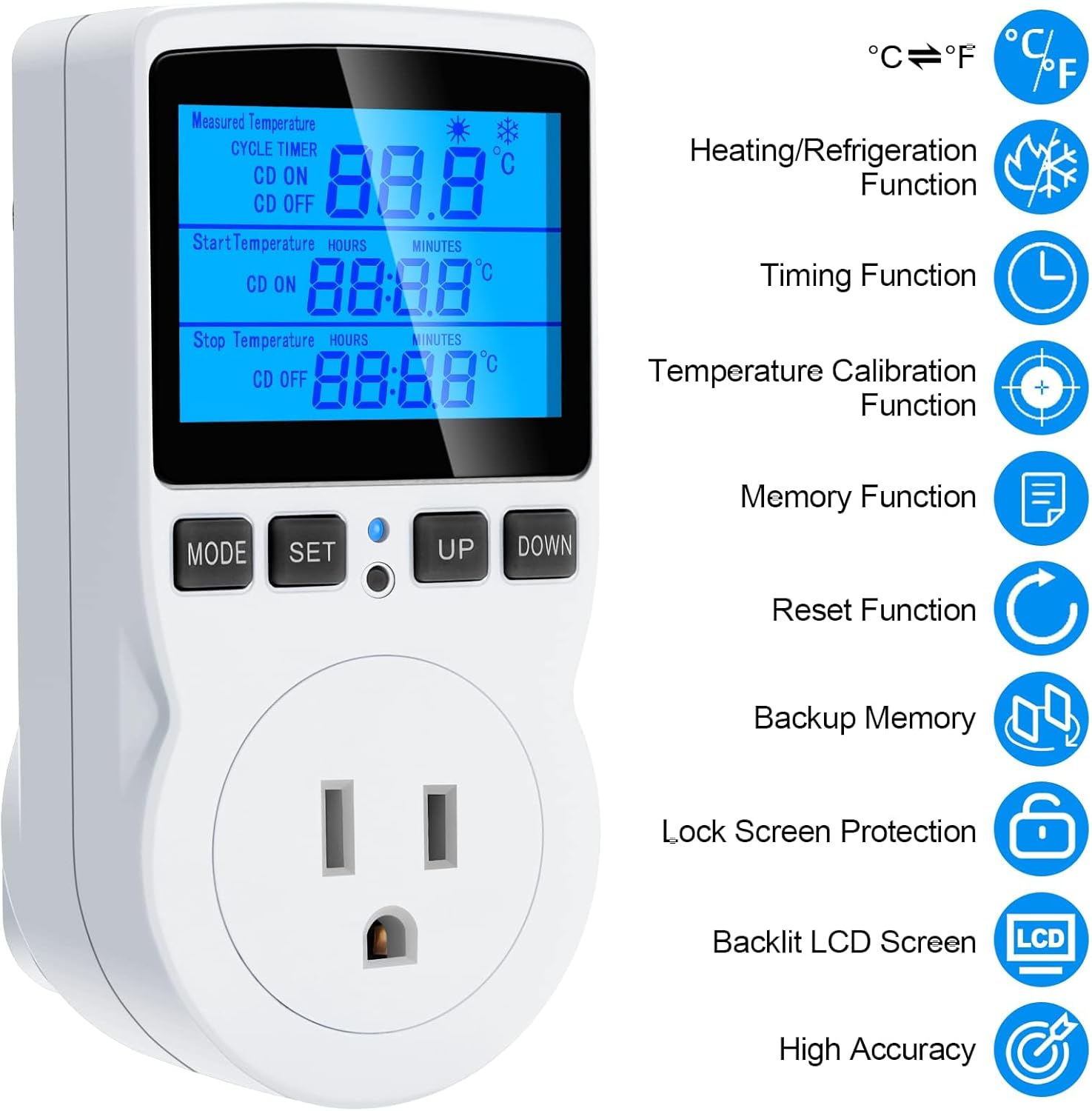
Figura 4: Aktarview of key features including heating/refrigeration, timing, temperature calibration, memory, reset, backup memory, lock screen, backlit LCD, and high accuracy.
4. Setup
Follow these steps to set up your temperature controller:
- Ippakkja: Carefully remove the temperature controller and sensor probe from its packaging.
- Qabbad is-Sonda: Ensure the sensor probe is securely connected to the designated port on the controller.
- Pjazzament: Position the sensor probe in the area where you need to monitor and control the temperature (e.g., inside a terrarium, refrigerator, or greenhouse).
- Qawwa Mixgħul: Plug the temperature controller into a standard 120V AC wall outlet. The display will illuminate.
- Qabbad Apparat: Plug your heating or cooling device (e.g., heater, fan, refrigerator) into the controlled outlet on the front of the thermostat.
Vidjo 1: Overview of the MakerHawk TC816 Digital Temperature Controller, demonstrating its physical features and basic setup. This video shows the device from various angles, highlighting the display, buttons, and the length of the sensor cable (1.7m).
5. Istruzzjonijiet Operattivi
5.1. Tibdil tal-Unitajiet tat-Temperatura (Celsius/Fahrenheit)
Biex taqleb bejn Celsius (°C) u Fahrenheit (°F):
- Press and hold the "SET" button for approximately 2 seconds. The display will change the temperature unit.
5.2. Temperature Control Mode
This mode allows you to set a desired temperature range for heating or cooling.
- Press the "SET" button once to enter temperature control mode.
- Use the "UP" and "DOWN" buttons to adjust the "Start Temperature" (ON).
- Press "SET" again to move to the "Stop Temperature" (OFF).
- Use the "UP" and "DOWN" buttons to adjust the "Stop Temperature".
- Press "SET" once more to confirm and exit the setting.
Operazzjoni tat-Tisħin: If "Start Temperature" is inqas minn "Stop Temperature", the device will operate in heating mode. The connected device will turn on when the temperature drops below the Start Temperature and turn off when it reaches the Stop Temperature.
Operazzjoni tat-tkessiħ: If "Start Temperature" is akbar minn "Stop Temperature", the device will operate in cooling mode. The connected device will turn on when the temperature rises above the Start Temperature and turn off when it drops to the Stop Temperature.
Firxa ta 'Kontroll tat-Temperatura: -40 ° C sa 120 ° C (-72 ° F sa 176 ° F).
5.3. Timing Functions (F01, F02, F03, F04)
The controller offers four distinct timing modes. Press the "MODE" button to cycle through these functions (F01, F02, F03, F04).
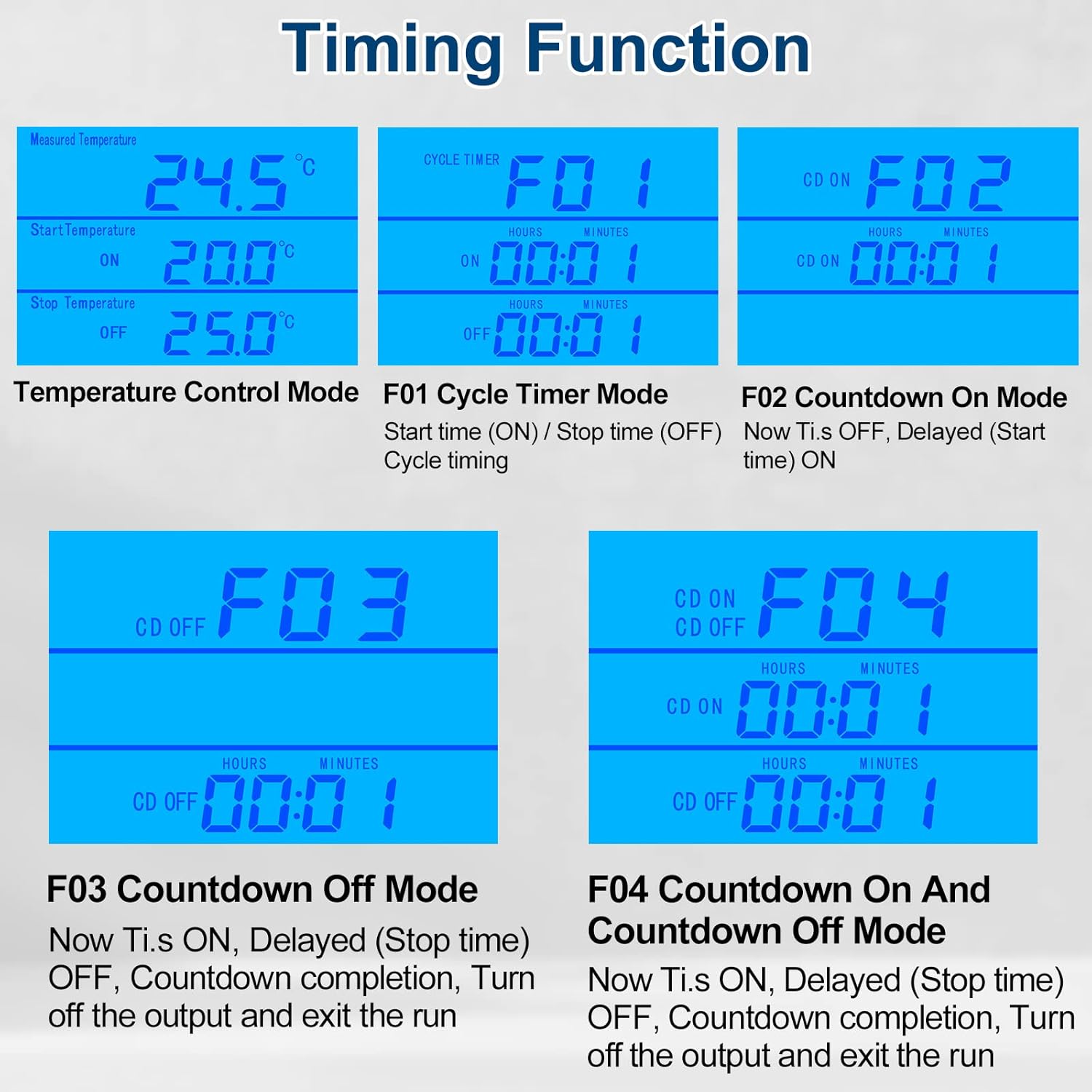
Figure 5: Visual representation of the four timing modes (F01, F02, F03, F04) and temperature control mode.
- F01 Cycle Timer Mode: Sets a repeating ON/OFF cycle.
- Press "MODE" until F01 is displayed.
- Press "SET" to adjust ON time (hours and minutes).
- Press "SET" again to adjust OFF time (hours and minutes).
- Press "SET" to confirm.
- F02 Countdown On Mode: The device remains OFF for a set countdown period, then turns ON.
- Press "MODE" until F02 is displayed.
- Press "SET" to adjust the countdown ON time (hours and minutes).
- Press "SET" to confirm.
- F03 Countdown Off Mode: The device remains ON for a set countdown period, then turns OFF.
- Press "MODE" until F03 is displayed.
- Press "SET" to adjust the countdown OFF time (hours and minutes).
- Press "SET" to confirm.
- F04 Countdown On and Countdown Off Mode: The device turns ON for a set period, then OFF for another set period.
- Press "MODE" until F04 is displayed.
- Press "SET" to adjust the countdown ON time (hours and minutes).
- Press "SET" again to adjust the countdown OFF time (hours and minutes).
- Press "SET" to confirm.
Setting Range for Timing Modes: 0 to 99 hours and 59 minutes.
5.4. Kalibrazzjoni tat-Temperatura
If you need to fine-tune the temperature reading for accuracy:
- Plug in the device. Within 2 seconds of powering on, press and hold the "MODE" button for 2 seconds until "CALIBRATE" appears on the screen.
- Use the "UP" and "DOWN" buttons to adjust the temperature offset. The calibration range is -9.9°C to 9.9°C.
- Press and hold the "MODE" button for 2 seconds to save the calibration offset and exit. If you do not save, changes will not be applied.
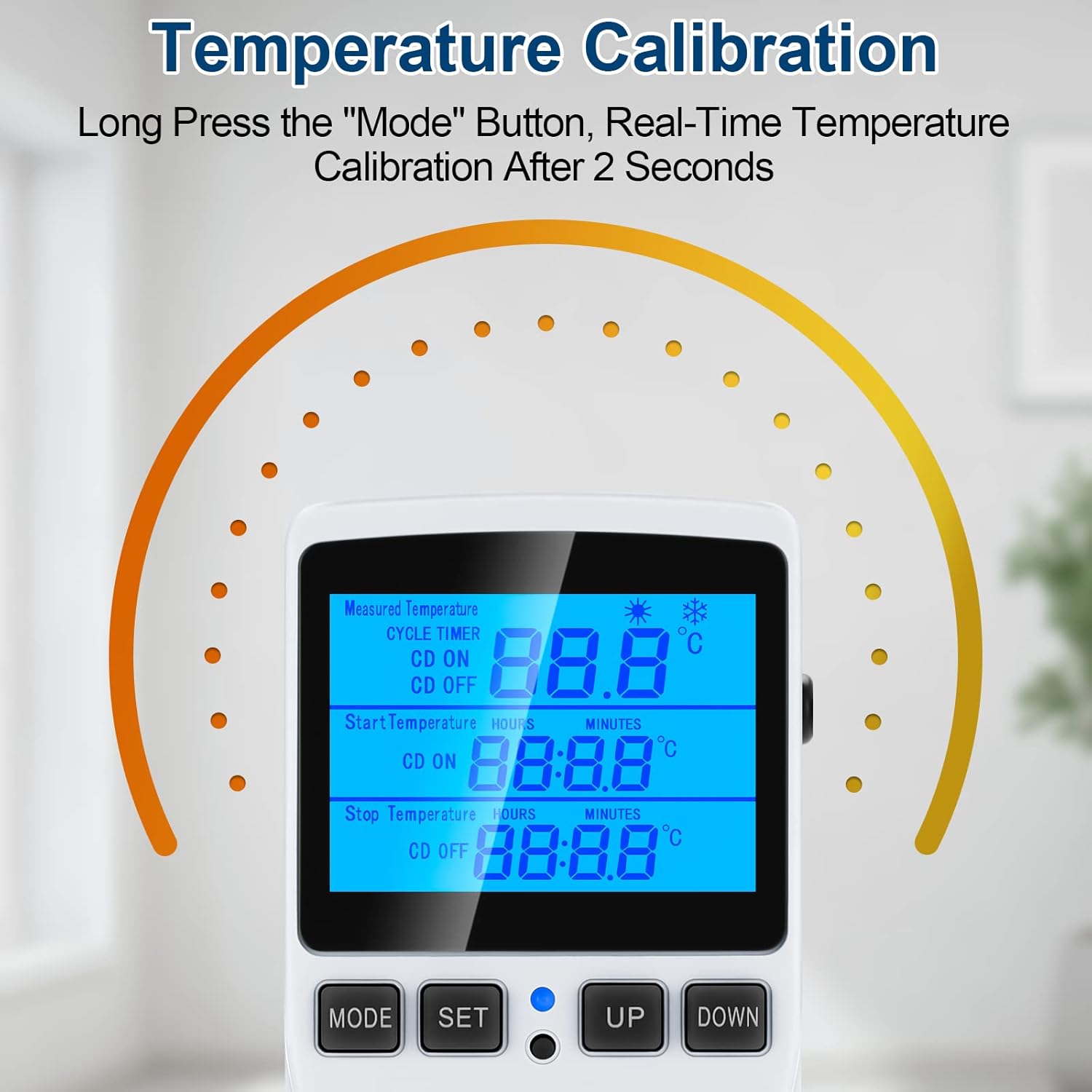
Figure 6: Visual guide for temperature calibration by long-pressing the MODE button.
5.5. Lock Screen Protection
Biex tevita bidliet aċċidentali fis-settings:
- Press and hold the "MODE" and "SET" buttons simultaneously for 5 seconds to lock the thermostat.
- Repeat the process (press and hold "MODE" and "SET" simultaneously for 5 seconds) to unlock the device.
5.6. Backlight Timer Setting
Biex taġġusta t-tul tad-dawl ta' wara:
- Press and hold the "UP" and "DOWN" buttons simultaneously for 5 seconds.
- Use "UP" and "DOWN" to select the desired backlight duration:
- bL-0: 10 minutes
- bL-1: 1 Hour
- bL-2: 4 Hours
- bL-3: 8 Hours
- bL-4: Always On
- Press "MODE" to save the setting.
6. Manutenzjoni
Regular maintenance ensures the longevity and accuracy of your temperature controller:
- Tindif: Imsaħ l-apparat b'ċarruta ratba u niexfa. Tużax prodotti tat-tindif li joborxu jew tgħaddasx l-apparat fl-ilma.
- Kura tas-Sensor: Keep the temperature sensor probe clean and free from debris. Avoid bending or damaging the probe cable.
- Ħażna: Meta ma tkunx qed tuża, aħżen l-apparat f'post frisk u niexef 'il bogħod mid-dawl tax-xemx dirett u temperaturi estremi.
- Ħażna tad-Data: The device has a data storage function that saves all set parameters even after power is off.
7 Issolvi l-problemi
If you encounter issues with your MakerHawk TC816, refer to the following common problems and solutions:
| Problema | Kawża Possibbli | Soluzzjoni |
|---|---|---|
| Id-displej huwa vojt jew mhux jixgħel. | Bla enerġija, konnessjoni maħlula. | Ensure the device is securely plugged into a live 120V outlet. Check the outlet with another device. |
| Il-qari tat-temperatura mhux preċiż. | Sensor probe dirty or misplaced, calibration needed. | Clean the sensor probe. Ensure the probe is correctly positioned. Perform a temperature calibration (see Section 5.4). |
| Device not switching ON/OFF as expected. | Incorrect temperature settings, timing mode active, locked screen. | Verify your "Start Temperature" and "Stop Temperature" settings. Ensure you are in the correct operating mode (temperature control or timing). Check if the screen is locked (see Section 5.5). |
| Cannot change settings. | Screen is locked. | Unlock the screen by pressing and holding "MODE" and "SET" simultaneously for 5 seconds. |
| Need to reset to factory settings. | Problema fis-softwer, settings mhux korretti. | Use the included reset tool (or a thin pin) to press the reset button located in the small hole on the device. This will restore all parameters to default. |
8. Speċifikazzjonijiet
| Karatteristika | Dettall |
|---|---|
| Numru tal-Mudell | TC816B |
| Brand | MakerHawk |
| Voltage | 110V - 120V AC, 50/60Hz |
| Tagħbija Massima | 15A / 1800W |
| Firxa ta 'Kontroll tat-Temperatura | -40°C sa 120°C (-72°F sa 176°F) |
| Preċiżjoni tal-Kontroll tat-Temperatura | ±1% |
| Preċiżjoni taż-żmien | Max 10 minuta |
| Tip tas-Sensor | Sensor tat-Temperatura NTC |
| Tul tal-Kejbil tas-Sensor | 1.7 metri (66.93 pulzier) |
| Tip ta 'Wiri | LCD b'lura ta 'wara |
| Dimensjonijiet tal-Prodott | 4.72 x 2.95 x 2.36 pulzieri |
| Piż tal-oġġett | 6.7 uqija |
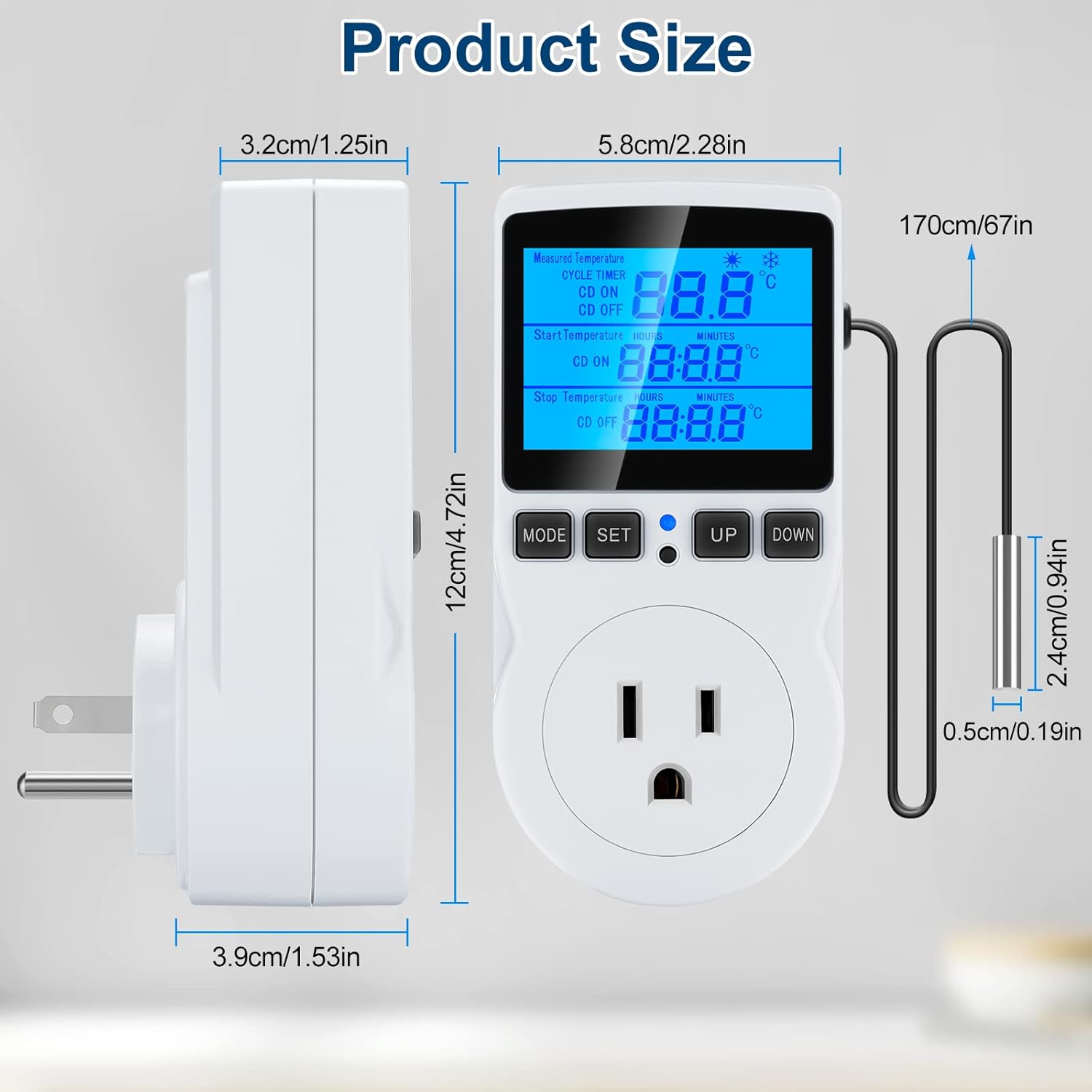
Figure 7: Detailed product dimensions in centimeters and inches.
9. Garanzija u Appoġġ
MakerHawk products are designed for reliability and performance. For warranty information or technical support, please contact MakerHawk customer service through their official website or the platform where you purchased the product. Please have your model number (TC816B) and purchase details ready when contacting support.
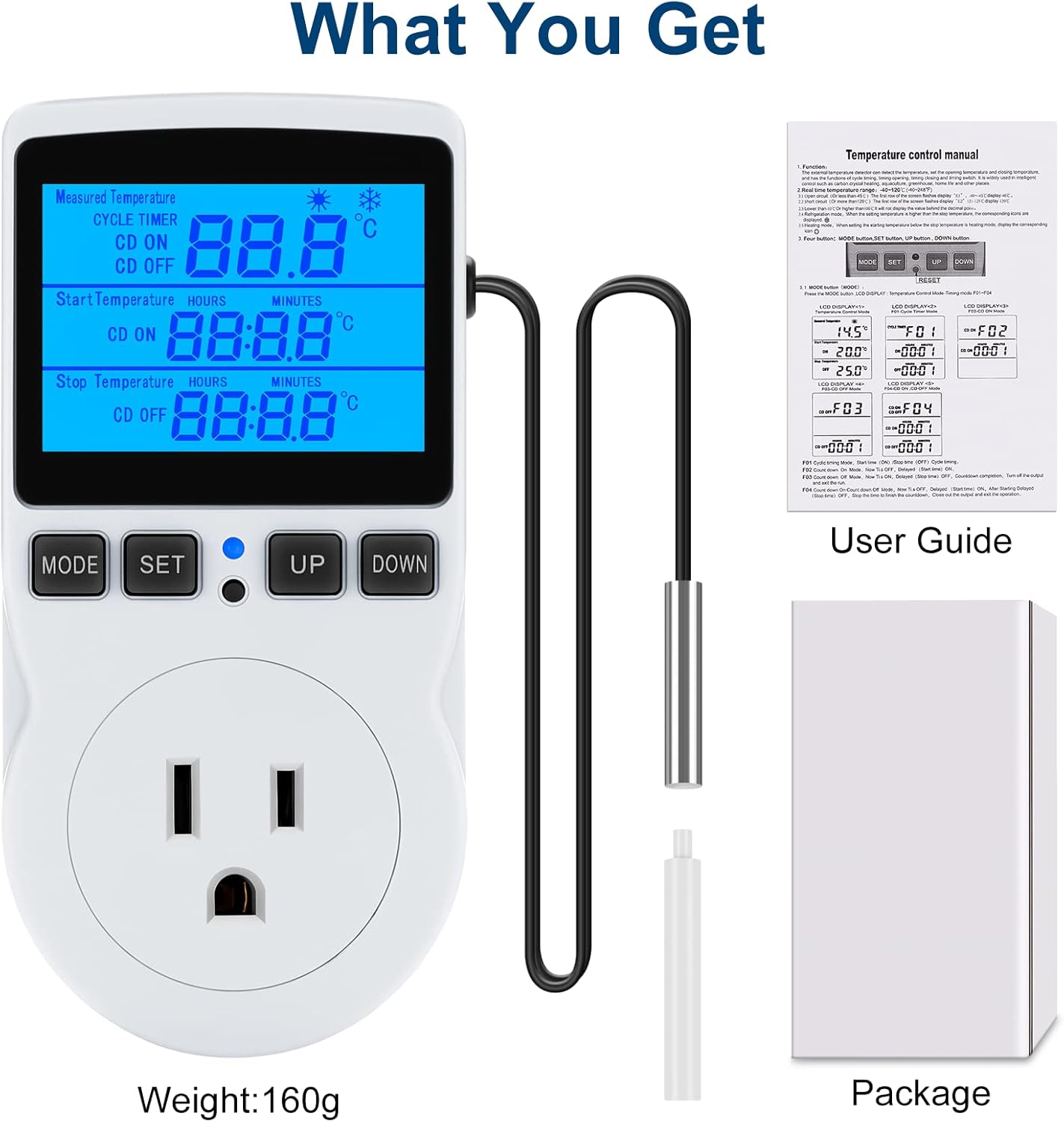
Figure 8: What is included in the package: the temperature controller, sensor probe, user guide, and packaging box.