
1. Introduzzjoni
The Oikabio AT2PW 100A Tuya WIFI Din Rail Meter Smart Switch is a single-phase AC 220V digital energy meter designed for monitoring voltage, current, power, and energy consumption (KWH). It integrates smart switch functionality with WIFI connectivity, allowing remote control and data access via the Tuya or Smart Life mobile application. This device is designed for installation on a 35mm DIN rail and provides accurate energy measurement with a 2.4-inch TFT-LCD HD display.
2. Informazzjoni dwar is-Sigurtà
- L-installazzjoni u l-manutenzjoni għandhom jitwettqu biss minn persunal kwalifikat.
- Kun żgur li l-provvista ewlenija tal-enerġija hija skonnettjata qabel l-installazzjoni jew kwalunkwe xogħol ta' wajers.
- Tħaddimx l-apparat fl-imxarrab jew damp kundizzjonijiet.
- Verify all connections are secure and correct to prevent electrical hazards.
- The device is designed for single-phase AC 220V systems. Do not connect to other voltagsistemi e.
3. Prodott Aktarview
The AT2PW smart meter combines energy measurement with remote control capabilities. Key features include:
- Wirja Diġitali: 2.4-inch TFT-LCD HD screen for clear data visualization.
- Kejl: Monitoraġġ f'ħin reali tal-volumtage, current, power, and total KWH.
- Konnettività WIFI: Connects to 2.4GHz Wi-Fi networks for remote access via mobile app.
- Swiċċ intelliġenti: Integrated 100A relay for remote power ON/OFF control.
- Installazzjoni tal-Ferrovija DIN: Designed for easy mounting on a standard 35mm DIN rail.
- Memorja tad-Dejta: Retains energy data upon power loss.

Figura 1: Quddiem view of the Oikabio AT2PW 100A Tuya WIFI Din Rail Meter Smart Switch.
The device dimensions are approximately 12 x 8 x 5 cm, with specific measurements for the display and rail mounting as shown below.

Figure 2: Detailed dimensions of the AT2PW device, showing 46.0mm display height, 70.0mm depth, 36mm width, and 90.8mm overall height.
4. Setup
4.1 Installazzjoni Fiżika
- Ensure the main power supply is turned OFF at the circuit breaker.
- Mount the AT2PW device onto a standard 35mm DIN rail.
- Connect the incoming live (L-IN) and neutral (N-IN) wires to the corresponding input terminals on the device.
- Connect the outgoing live (L-OUT) and neutral (N-OUT) wires to the load.
- Double-check all wiring for secure connections and correct polarity.
- Restore power to the circuit. The device display should illuminate.
4.2 Tniżżil tal-App u Tqabbil tal-Apparat
The AT2PW device connects to your smartphone via the Tuya Smart or Smart Life application. Ensure your phone is connected to a 2.4GHz Wi-Fi network, as 5GHz networks are not supported.
- Download the "Smart Life" or "Tuya Smart" application from Google Play Store (Android) or Apple App Store (iOS).
- Irreġistra jew idħol fil-kont tiegħek.
- On the device, when the meter power is on, press and hold the SET button for 5 seconds until the WIFI indicator flashes rapidly, indicating pairing mode.
- Iftaħ l-app, agħfas "Żid Apparat" jew l-ikona "+".
- The app should automatically discover the device. If not, manually select "Electrical Engineering" > "Energy Meter (Wi-Fi)" or similar.
- Confirm your 2.4GHz Wi-Fi network and enter the password.
- Follow the on-screen instructions to complete the pairing process. Once successful, the WIFI indicator on the device will stop flashing and remain solid.
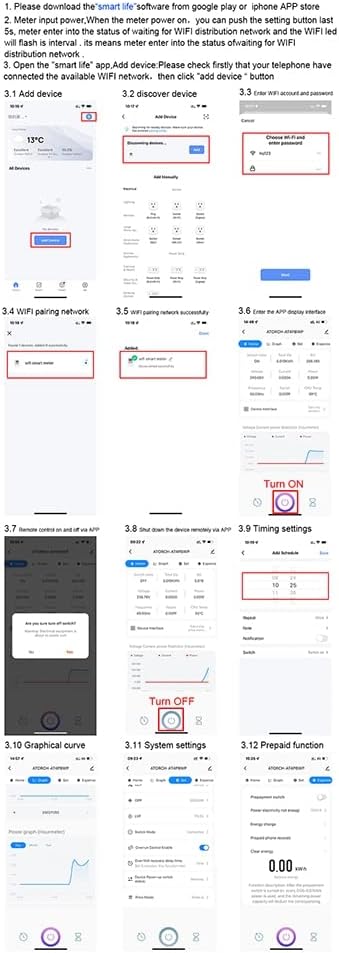
Figure 3: Step-by-step guide for connecting the device to the Smart Life app, including adding the device, entering Wi-Fi credentials, and accessing various functions like remote control, timing, and prepaid features.

Figura 4: Aktarview of the mobile app interface for remote control, showing the startup screen, successful networking, and measurement interface.
5. Istruzzjonijiet Operattivi
5.1 Kontroll mill-Bogħod
Once paired, you can control and monitor the AT2PW device from anywhere using the mobile app, provided your phone has internet access.
- Open the Smart Life/Tuya Smart app and select your AT2PW device.
- The main screen will display real-time data such as voltage, current, power, and total KWH.
- Use the ON/OFF button within the app to remotely switch the connected load.

Figure 5: The mobile app interface showing remote control options including ON/OFF switch, timing settings, and countdown function.
5.2 Advanced Functions via App
The app provides several advanced features for energy management:
- Issettjar tal-Ħin: Schedule the device to turn ON or OFF at specific times.
- Graphical Curve: View historical data for voltage, current, and power in graphical format.
- Issettjar tas-Sistema: Configure device parameters and update firmware.
- Prepaid Function: Manage prepaid electricity usage (if applicable).
- Settings ta' Notifika: Set up alerts for specific events, such as over-voltage allarmi.

Figure 6: Initial steps for setting up notifications within the app, including selecting conditions like 'When device status changes' and 'Fault'.

Figure 7: Continuation of notification setup, showing options to select notification methods such as 'Message Center'.
6. Manutenzjoni
- Żomm l-apparat nadif u ħieles mit-trab. Uża drapp niexef u artab għat-tindif.
- Tużax tindif jew solventi li joborxu.
- Iċċekkja l-konnessjonijiet tal-wajers regolarment għal issikkar u sinjali ta' użu.
- Ensure the operating environment temperature remains within -10°C to +60°C.
- Periodically check the app for firmware updates to ensure optimal performance and security.
7 Issolvi l-problemi
- Apparat mhux mixgħul: Iċċekkja l-provvista tal-enerġija prinċipali u l-konnessjonijiet tal-wajers kollha. Kun żgur li l-volumtage huwa AC 220V.
- WIFI indicator not flashing/pairing failed:
- Ensure your router is broadcasting a 2.4GHz Wi-Fi signal. 5GHz networks are not supported.
- Iċċekkja li l-password tal-Wi-Fi hija korretta.
- Mexxi l-apparat eqreb lejn ir-router tal-Wi-Fi.
- Reset the device by pressing and holding the SET button until the WIFI indicator flashes rapidly, then attempt pairing again.
- Il-kontroll mill-bogħod ma jaħdimx:
- Check if the device is connected to Wi-Fi (solid WIFI indicator).
- Kun żgur li l-ismartphone tiegħek għandu konnessjoni tal-internet attiva.
- Iċċekkja li l-app hija aġġornata għall-aħħar verżjoni.
- Data not updating: Check Wi-Fi connection. If the connection is stable, restart the app.
- Relay behavior after power outage: The device's data memory retains energy readings. However, the switch state (ON/OFF) does not have power-off memory. Upon power restoration, the relay will close, and the screen will display normally.
8. Speċifikazzjonijiet
| Numru tal-Mudell | AT2PW (Internal Reference: 500336665) |
| Vol ikklassifikattage | AC 220V |
| Kurrent Operattiv Massimu | 80A - 99A (Integrated 100A shunt) |
| Medda ta' Kejl | 0 - 99999 KWH |
| Klassi ta' Preċiżjoni | 1% |
| Tip ta 'Wiri | 2.4-inch TFT-LCD HD (240x320 RGB Dot-Matrix) |
| Tip bla fili | 2.4 GHz 802.11b/g (Does not support 5G) |
| Temperatura operattiva | -10°C ~ +60°C |
| Installazzjoni | Ferrovija DIN ta '35mm |
| Dimensjonijiet (L x W x H) | 12 x 8 x 5 ċm (madwar) |
| Firxa tal-Qawwa | Max 26.5 kW |
9. Garanzija u Appoġġ
For warranty information and technical support, please refer to the product packaging or contact your retailer. Keep your purchase receipt as proof of purchase.
For app-related issues, refer to the help section within the Tuya Smart or Smart Life application.