
1. Introduzzjoni
Grazzi tax-xiriasing the Andoer Digital Camera. This manual provides detailed instructions on how to set up, operate, and maintain your camera to ensure optimal performance and longevity. Please read this manual thoroughly before using the camera and keep it for future reference.
This compact and lightweight digital camera is designed to capture high-quality photos and videos, featuring 2.7K video resolution, 48MP picture resolution, 16X digital zoom, and a 2.88-inch IPS screen. It includes various functions such as anti-shake, face detection, smile capture, and a built-in LED fill light.
2. Informazzjoni dwar is-Sigurtà
- Tesponix il-kamera għal temperaturi estremi, dawl tax-xemx dirett, jew umdità għolja.
- Evita li twaqqa’ l-kamera jew li tissottomettiha għal impatti qawwija.
- Żomm il-kamera 'l bogħod mill-ilma u likwidi oħra.
- Do not attempt to disassemble or modify the camera. Repairs should only be performed by qualified personnel.
- Use only the specified battery and charging cable provided with the camera.
- Żomm il-batteriji fejn ma jintlaħaqx mit-tfal.
- Clean the camera lens and screen with a soft, lint-free cloth.
3. Kontenut tal-Pakkett
Jekk jogħġbok iċċekkja l-kontenut tal-pakkett meta tiftaħ il-kaxxa biex tiżgura li l-oġġetti kollha huma preżenti:
- 1 x Andoer Digital Camera
- 2 x Lithium Batteries (3.7V 700mAh)
- 1 x USB Charge Cable
- 1 x Strap tal-polz
- 1 x Carry Bag
- 1 x Users' Manual (English)
4. Prodott Aktarview
The Andoer Digital Camera is designed for ease of use, featuring a compact body and intuitive controls.

Figura 4.1: Quddiem u lura view of the Andoer Digital Camera, showing the lens, screen, and control buttons. Two rechargeable batteries are also shown.

Figura 4.2: The compact size of the Andoer Digital Camera, with dimensions of 9.4cm (length), 5.6cm (height), and 1.9cm (thickness) indicated.
The camera features a 2.88-inch IPS screen for clear viewing and playback, a powerful 16X digital zoom lens, and an integrated LED fill light for low-light conditions.
5. Setup
5.1. Installazzjoni tal-batterija
- Sib l-għatu tal-kompartiment tal-batterija fil-qiegħ jew fil-ġenb tal-kamera.
- Żerżaq l-għatu miftuħ.
- Insert the provided lithium battery (3.7V 700mAh) into the compartment, ensuring the correct polarity as indicated inside.
- Agħlaq l-għatu tal-kompartiment tal-batterija sew.

Figura 5.1: The camera with its battery compartment open, showing the removable 700mAh rechargeable lithium battery.
5.2. Iċċarġjar tal-batterija
The camera is powered by a rechargeable lithium battery. To charge:
- Connect the USB charge cable to the camera's USB port.
- Qabbad it-tarf l-ieħor tal-kejbil USB ma' adapter tal-enerġija USB (mhux inkluż) jew mal-port USB tal-kompjuter.
- Id-dawl indikatur tal-iċċarġjar se jixgħel. Se jintefa jew jibdel il-kulur ladarba l-iċċarġjar ikun komplut.
5.3. Daħħal Kard tal-Memorja
The camera requires an external memory card (not included) to store photos and videos. It supports Class-10 external memory cards up to 128GB.
- Sib is-slott tal-karta tal-memorja, ġeneralment ħdejn il-kompartiment tal-batterija.
- Insert the memory card with the metal contacts facing the correct direction (refer to the diagram near the slot).
- Push the card in until it clicks into place. To remove, push it in again until it springs out.
6. Istruzzjonijiet Operattivi
6.1. Tixgħil / Mitfi
- To power on: Press and hold the Power button (usually marked with a power symbol) until the screen illuminates.
- Biex titfi: Agħfas u żomm il-buttuna tal-Enerġija mill-ġdid sakemm l-iskrin jintefa.
- The camera also features an Auto Power Off function (1min/3min/5min) to conserve battery.
6.2. Qbid Bażiku ta' Ritratti u Vidjows
After powering on, the camera typically defaults to photo mode.
- Nieħdu Ritratti: Frame your shot using the IPS screen. Press the Shutter button (usually on top of the camera) halfway down to focus, then press fully to capture the image.
- Vidjos ta 'Reġistrazzjoni: Press the Mode button to switch to video recording mode. Press the Shutter button to start recording, and press it again to stop.

Figura 6.1: The 2.88-inch IPS screen of the camera displaying a scene, highlighting its size and clarity for viewing.
6.3. L-użu taż-Zoom Diġitali
The camera supports 16X digital zoom.
- Use the 'W' (Wide) and 'T' (Telephoto) buttons, typically located near the shutter button or on the directional pad, to zoom out and zoom in, respectively.

Figura 6.2: A visual representation of the camera's 16X digital zoom, showing progressive magnification of a subject.
6.4. Konnessjoni ma' Kompjuter
You can connect the camera to a computer to transfer photos and videos.
- Qabbad il-kamera mal-kompjuter tiegħek billi tuża l-kejbil USB ipprovdut.
- The camera should appear as a removable disk drive.
- Supported Operating Systems: Windows XP/ Vista/ 7/ 8/ 10, Mac 10.2 and above.
7. Functions and Modes
The Andoer Digital Camera offers a variety of functions and shooting modes to enhance your photography experience.
7.1. Modi ta 'Sparar
The camera includes various scene modes to optimize settings for different environments:
- Auto: Standard mode for general shooting.
- Ritratt: Optimizes for capturing people.
- Lejl: Għal kundizzjonijiet ta' dawl baxx.
- Pajsaġġ: Ideal for wide outdoor scenes.
- Dawl ta' wara: Adjusts for subjects with strong light behind them.
- Parti: For indoor events with mixed lighting.
- Bajja: For bright, reflective environments.
- Sports: For capturing fast-moving subjects.
7.2. Funzjonijiet Speċjali
- Kontra t-Tħawwad: Helps reduce blur caused by camera movement, especially in low light or with zoom.
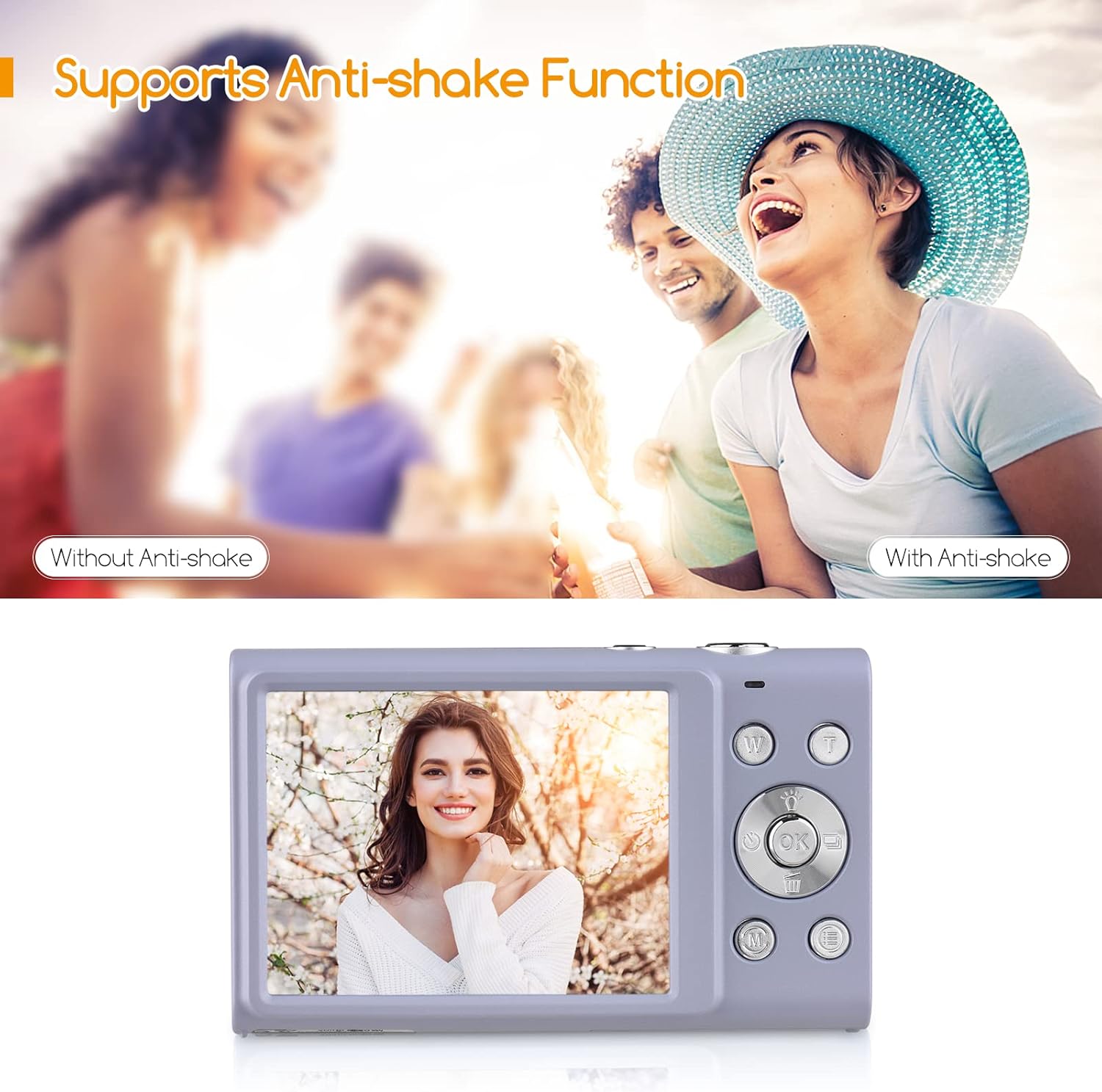
Figura 7.1: A visual comparison demonstrating the effectiveness of the anti-shake function, showing a blurry image without it and a clear image with it enabled.
- Face Detect & Smile Capture: Automatically detects faces and can trigger the shutter when a smile is detected.
- Beauty Face: Enhances facial features for more flattering portraits.

Figura 7.2: Icons representing key camera features: Face Detection, Smile Capture, Beauty Face, and Auto Focus, indicating their availability.
- Continuous Photography: Captures a series of photos in quick succession.
- Self-Timer: Allows for a delay before the shutter fires (Off/ 2 sec/ 5 sec/ 10 sec).
- Built-in LED Fill Light: Provides additional illumination for photos in dark conditions.

Figura 7.3: A collage illustrating various camera functions: Self-Timer options (2s, 5s, 10s), Continuous Shooting, the effect of the LED Fill Light in low light, and Face Detection & Smile Capture in action.
8. Manutenzjoni u Kura
- Tindif: Use a soft, dry, lint-free cloth to clean the camera body. For the lens and screen, use a specialized lens cleaning cloth and solution if necessary. Avoid abrasive materials.
- Kura tal-batterija: Store batteries in a cool, dry place. If not using the camera for an extended period, remove the battery. Do not expose batteries to high temperatures or dispose of them in fire.
- Ħażna: When not in use, store the camera in its carry bag or a protective case to prevent dust and scratches. Avoid storing in areas with extreme temperature fluctuations or high humidity.
9 Issolvi l-problemi
Jekk tiltaqa' ma' problemi bil-kamera tiegħek, jekk jogħġbok irreferi għall-problemi u s-soluzzjonijiet komuni li ġejjin:
| Problema | Kawża Possibbli | Soluzzjoni |
|---|---|---|
| Il-kamera ma tixgħelx. | Il-batterija hija baxxa jew mhux imdaħħla sew. | Iċċarġja l-batterija kompletament. Kun żgur li l-batterija tkun imdaħħla bil-polarità korretta. |
| Ma nistax nieħu ritratti/vidjows. | Il-karta tal-memorja hija mimlija, mhux imdaħħla, jew korrotta. | Insert a memory card. Delete unnecessary files or format the card (this will erase all data). Try a different memory card. |
| L-immaġini huma mċajpra. | Camera shake, dirty lens, or out of focus. | Hold the camera steady. Clean the lens. Ensure the camera has focused before pressing the shutter fully. Use Anti-Shake function. |
| L-iskrin huwa vojt jew iffriżat. | Żball tas-sistema. | Neħħi u erġa' daħħal il-batterija biex tirrisettja l-kamera. |
10. Speċifikazzjonijiet
Detailed technical specifications for the Andoer Digital Camera:
| Karatteristika | Speċifikazzjoni |
|---|---|
| Numru tal-Mudell | PKZ8856093261786YD |
| Għażliet tal-Kulur | Pink/ Black/ Purple/ Green (optional) |
| Sensor tal-Immaġni | Sensor CMOS |
| Tul Fokali | f=7.36mm |
| Apertura | F/3.2 |
| Wiri | Skrin IPS ta '2.88 Pulzier |
| File Format | JPG (Picture) / AVI (Video) |
| Riżoluzzjoni tal-Istampa | 48MP/ 44MP/ 36MP/ 24MP/ 20MP/ 16MP/ 12MP/ 10MP, etc. |
| Riżoluzzjoni tal-vidjo | 2.7K (2688x1520), 1080P (1920x1080), 720P (1280x720), VGA (640x480) |
| Modi ta' Sparar | Auto/ Portrait/ Night/ Landscape/ Backlight/ Party/ Beach/ Sports |
| Self-Timer | Off/ 2 sec/ 5 sec/ 10 sec |
| Zoom Diġitali | Żum diġitali 16X |
| Auto Power Mitfi | 1min/ 3min/ 5min |
| Espożizzjoni | EV-3 għal EV+3 |
| Rekwiżit tas-Sistema Operattiva | Windows XP/ Vista/ 7/ 8/ 10, Mac 10.2 |
| Provvista tal-Enerġija | 1 * Lithium battery (3.7V 700mAh) |
| Daqs tal-Oġġett | 9.4 * 5.6 * 1.9cm / 3.7 * 2.2 * 0.7in |
| Piż tal-oġġett | 115g / 4.1oz (bil-batterija) |
| Mount Universali | 1/4" Screw Hole at the Bottom |

Figura 10.1: The camera's bottom view, highlighting the universal 1/4" screw hole for tripod compatibility.
11. Garanzija u Appoġġ
Informazzjoni dwar il-garanzija: Specific warranty terms and conditions are typically provided with your purchase documentation. Please refer to the warranty card or contact your retailer for details regarding coverage and duration.
Appoġġ għall-Klijent: For technical assistance, troubleshooting beyond this manual, or warranty claims, please contact Andoer customer support through the official webis-sit jew l-informazzjoni ta' kuntatt ipprovduta mal-imballaġġ tal-prodott tiegħek.