
1. Setup u Installazzjoni
1.1 Lista ta 'Kontroll ta' Qabel l-Installazzjoni
- Kompatibilità tas-Sistema: Ensure your motherboard has an available PCI Express 4.0 x16 slot.
- Provvista tal-Enerġija: Ivverifika li l-unità tal-provvista tal-enerġija (PSU) tiegħek tissodisfa l-minimu ta' wattstage requirements for the RTX 3060 Ti and has the necessary PCIe power connectors. Consult your PSU manual for details.
- Clearance: Confirm your PC case has adequate space for the graphics card dimensions.
- Sewwieqa: Niżżel l-aħħar sewwieqa NVIDIA mill-websajt uffiċjali ta' NVIDIA websit qabel l-installazzjoni.
1.2 Installazzjoni Fiżika
- Itfi: Shut down your computer completely and disconnect the power cable.
- Kawża Miftuħa: Iftaħ il-kaxxa tal-kompjuter tiegħek biex taċċessa l-motherboard.
- Sib is-Slott tal-PCIe: Identify an available PCI Express 4.0 x16 slot. Remove any expansion slot covers if necessary.
- Daħħal il-Karta tal-Grafika: Allinja bir-reqqa l-karta grafika mas-slott tal-PCIe u agħfas 'l isfel sew sakemm tkun imwaħħla sew. Għandek tisma' klikk mill-klipp taż-żamma tas-slott.
- Karta Sikura: Fasten the graphics card to the case using the screw or latch mechanism.
- Qabbad l-Enerġija: Connect the appropriate PCIe power cables from your PSU to the graphics card. The PNY GeForce RTX 3060 Ti typically requires one 8-pin PCIe power connector. Ensure all pins are fully seated.
- Agħlaq il-Każ: Agħlaq il-kaxxa tal-kompjuter tiegħek u erġa' qabbad il-kejbil tal-enerġija.
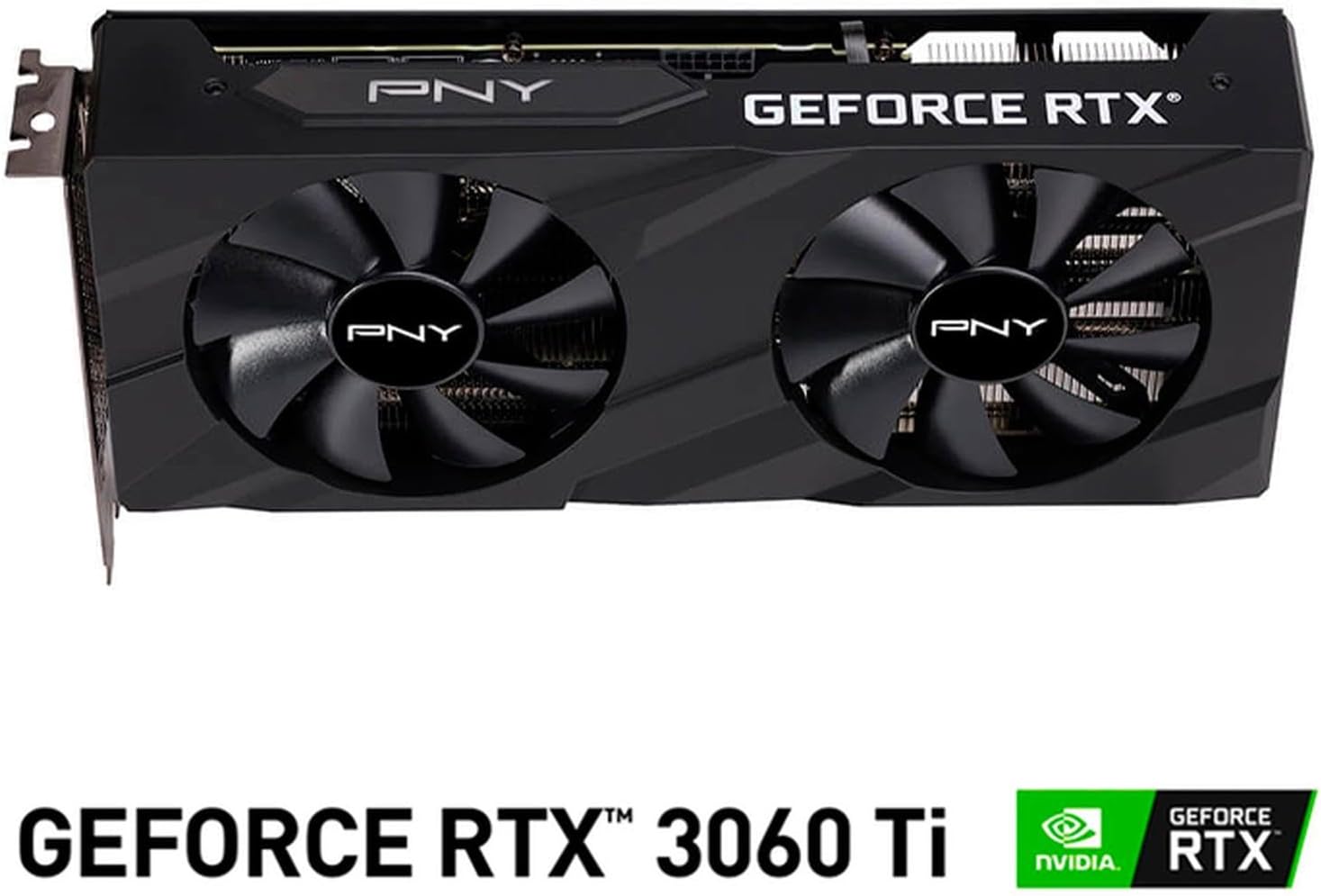
Immaġni: Quddiem view of the PNY GeForce RTX 3060 Ti Verto Dual Fan Graphics Card, showing the dual fans and PNY branding.
1.3 Installazzjoni tas-sewwieq
- Sistema tal-Ibbutjar: Power on your computer. It may boot into a lower resolution or use generic display drivers initially.
- Installa Sewwieqa: Run the NVIDIA driver installer downloaded earlier. Follow the on-screen prompts to complete the installation. A restart may be required.
- Ivverifika l-Installazzjoni: After restarting, open NVIDIA GeForce Experience or the NVIDIA Control Panel to confirm the graphics card is recognized and drivers are up to date.
2. Operazzjoni
2.1 Konnessjoni tad-Displays
The PNY GeForce RTX 3060 Ti features multiple video output interfaces for connecting displays:
- DisplayPort 1.4a: Għal monitors b'riżoluzzjoni għolja u rata għolja ta' aġġornament.
- HDMI 2.1: For connecting to TVs or monitors supporting 4K at higher refresh rates.
Connect your display cables to the appropriate ports on the graphics card. The card supports a maximum display resolution of 7680 x 4320 @60Hz.

Immaġni: Angolata view of the PNY GeForce RTX 3060 Ti Verto Dual Fan Graphics Card, highlighting the cooling solution and overall design.
2.2 Esperjenza NVIDIA GeForce
NVIDIA GeForce Experience is a companion application for your graphics card. It allows you to:
- Optimize Game Settings: Automatically configure game settings for the best experience.
- Keep Drivers Up to Date: Receive notifications and easily install the latest NVIDIA Game Ready Drivers.
- Capture & Share: Record gameplay, take screenshots, and livestream with friends using features like ShadowPlay.
2.3 Prestazzjoni 'l fuqview
The GeForce RTX 3060 Ti is built on NVIDIA’s 2nd generation RTX architecture (Ampere), featuring enhanced Ray Tracing Cores and Tensor Cores for advanced graphics and AI acceleration. Key performance specifications include:
- Arloġġ tal-qalba: 1410MHz
- Arloġġ ta' Spinta: 1665MHz
- Memorja: 8GB GDDR6X (256-bit) with up to 608GB/sec bandwidth.
- Qlub CUDA: 4864
3. Manutenzjoni
3.1 Cleaning Your Graphics Card
Regular cleaning helps maintain optimal performance and extends the lifespan of your graphics card. Always power off your computer and disconnect the power cable before cleaning.
- Tneħħija tat-Trab: Use compressed air to gently blow dust from the fans and heatsink fins. Hold the fans to prevent them from spinning rapidly during cleaning.
- Tindif tal-wiċċ: Imsaħ l-uċuħ ta’ barra b’ċarruta ratba, niexfa u mingħajr suf. Evita li tuża prodotti tat-tindif likwidi direttament fuq il-kard.
3.2 Aġġornamenti tas-Sewwieqa
Keep your graphics drivers updated to ensure compatibility with the latest games and applications, and to benefit from performance improvements and bug fixes. Use NVIDIA GeForce Experience or visit the official NVIDIA websit biex tniżżel u tinstalla l-aħħar sewwieqa.
4 Issolvi l-problemi
4.1 Kwistjonijiet Komuni u Soluzzjonijiet
- L-ebda Output tal-Wiri:
- Ensure display cables are securely connected to both the graphics card and the monitor.
- Verify the graphics card is fully seated in the PCIe slot and all power connectors are attached.
- Ittestja b'kejbil tad-displej jew monitor differenti jekk possibbli.
- Instabbiltà jew Ħabtiet tas-Sistema:
- Kun żgur li l-provvista tal-enerġija tiegħek tissodisfa l-qawwa rakkomandatatage.
- Check for overheating. Monitor GPU temperatures using software like MSI Afterburner or HWMonitor.
- Agħmel installazzjoni nadifa tal-aħħar sewwieqa tal-grafika.
- Prestazzjoni Fqira fil-Logħob:
- Kun żgur li għandek l-aħħar sewwieqa tal-grafika installati.
- Iċċekkja s-settings fil-logħba; naqqas ir-riżoluzzjoni jew il-kwalità tal-grafika jekk meħtieġ.
- Verify that your system is not bottlenecked by other components (CPU, RAM).

Immaġni: Ġenb view of the PNY GeForce RTX 3060 Ti Verto Dual Fan Graphics Card, showing the heatsink fins and power connectors.
5. Speċifikazzjonijiet
Below are the detailed technical specifications for the PNY GeForce RTX 3060 Ti 8GB GDDR6X Verto Dual Fan Graphics Card:
| Karatteristika | Speċifikazzjoni |
|---|---|
| Koproċessur tal-Grafika | NVIDIA GeForce RTX 3060 Ti |
| Brand | PNY |
| Daqs tar-RAM tal-Grafika | 8 GB |
| Tip ta' RAM tal-Grafika | GDDR6X |
| Veloċità tal-Arloġġ tal-GPU | 1410 MHz |
| Veloċità tal-Arloġġ tal-Memorja | 1410 MHz (Effective 19000 MHz) |
| Interface tal-Output tal-Vidjo | DisplayPort, HDMI |
| Interface tal-Kard Grafika | PCI-Express x16 |
| Numru ta 'Fannijiet | 2 |
| Riżoluzzjoni tal-Wiri Massimu | 7680 x 4320 @ 60Hz |
| Apparati Kompatibbli | Desktop |
| Isem tal-Mudell | VERTO Dual Fan |
| Numru tal-Mudell | VCG3061T8LDFBPB1 |
| UPC | 751492767314 |
| Piż tal-oġġett | 1 Kilogramma |

Immaġni: Wara view of the PNY GeForce RTX 3060 Ti Verto Dual Fan Graphics Card, showing the backplate and PCB.
6. Garanzija u Appoġġ
6.1 Garanzija tal-Prodott
This PNY GeForce RTX 3060 Ti Graphics Card comes with a garanzija ta 'sena. For specific terms and conditions, please refer to the warranty documentation included with your product or visit the official PNY websit.
6.2 Appoġġ Tekniku
If you encounter any issues not covered in this manual or require further assistance, please contact PNY Technical Support. You can typically find support contact information, FAQs, and driver downloads on the official PNY websit: