
ASUS G713PV-DS94
Manwal tal-Utent tal-Laptop tal-Logħob ASUS ROG Strix G17 (2023)
Model: G713PV-DS94
1. Introduzzjoni
This manual provides essential information for setting up, operating, maintaining, and troubleshooting your ASUS ROG Strix G17 (2023) Gaming Laptop. Please read this manual thoroughly to ensure optimal performance and longevity of your device.

Figura 1: Quddiem view of the ASUS ROG Strix G17 Gaming Laptop, showcasing its display and keyboard with customizable RGB lighting.
2. X'hemm fil-Kaxxa
Upon unboxing your ASUS ROG Strix G17, verify that all the following items are included:
- ASUS ROG Strix G17 Laptop (Model: G713PV-DS94)
- Korda tal-Enerġija u Adapter
- Manwal għall-Utent (dan id-dokument)
Vidjo 1: Wirja uffiċjali tal-vidjo tal-prodottasing the ASUS ROG Strix G17 laptop and its features.
3. Gwida ta' Setup
3.1 Tixgħel Inizjali
- Qabbad l-adapter tal-enerġija mal-port tad-dħul tal-enerġija tal-laptop.
- Ipplaggja l-korda tad-dawl fi żbokk elettriku ertjat.
- Open the laptop lid and press the power button located on the keyboard deck.
- Follow the on-screen instructions to complete the initial Windows 11 setup.
3.2 Sistema Operattiva
Your ASUS ROG Strix G17 comes pre-installed with Windows 11 Home, offering a streamlined interface and enhanced gaming features. Ensure your operating system is regularly updated for optimal performance and security.
Vidjo 2: Ħarsa fil-qosorview of the ASUS ROG Strix G17's capabilities, highlighting its performance for gaming, editing, and multitasking.
4. Key Features & Performance
4.1 Processor & Graphics
The laptop is equipped with an AMD Ryzen 9 7945HX processor and an NVIDIA GeForce RTX 4060 Laptop GPU with a 140W Max TGP, providing robust performance for demanding applications and games.

Figure 2: Illustration of the AMD Ryzen 9 7945HX CPU and NVIDIA GeForce RTX 4060 Laptop GPU, highlighting their roles in delivering high performance.
4.2 Memory & Storage
Experience swift multitasking with 16GB of DDR5-4800MHz memory and rapid loading times thanks to the 1TB PCIe 4x4 SSD.
4.3 Wiri
The 17.3-inch QHD (2560 x 1440 pixels) 240Hz/3ms panel offers a smooth and immersive visual experience. It covers 100% of the DCI-P3 color space and supports Dolby Vision and Adaptive-Sync for stellar viewing.

Figure 3: The laptop's QHD 240Hz/3ms display, ideal for competitive gaming, with Dolby Vision and NVIDIA G-SYNC support.
4.4 Tkessiħ Intelliġenti ROG
The Strix G17 features an advanced cooling solution, including Thermal Grizzly’s Conductonaut Extreme liquid metal on the CPU and Arc Flow Fans, ensuring sustained performance during long gaming sessions. Four fan outlets provide 43.3% thermal coverage.

Figura 4: Dettaljat view of the ROG Intelligent Cooling system, featuring Conductonaut Extreme liquid metal, Arc Flow Fans, and anti-dust tunnels for optimal thermal management.
Swiċċ MUX 4.5 b'Optimus Avvanzat
A MUX Switch enhances laptop gaming performance by 5-10% by routing frames directly from the dGPU to the display, bypassing the iGPU. With Advanced Optimus, the switch between iGPU and dGPU is automatic, optimizing battery life based on the task.

Figure 5: Visual explanation of the MUX Switch and Advanced Optimus technology, detailing how it optimizes graphics performance and battery life.
5. Konnettività
The ASUS ROG Strix G17 offers comprehensive connectivity options for all your peripherals and networking needs.
- Wireless: Wi-Fi 6E (802.11ax) for high-speed, low-latency wireless connections.
- Wajer: LAN RJ45 jack for stable wired network access.
- Portijiet USB: USB 3.2 Gen2 Type-C with DisplayPort 1.4 and USB Power Delivery, multiple USB 3.2 Gen1 Type-A ports.
- Output tal-vidjo: HDMI (2.1) for external displays.
- Awdjo: Audio combo jack.

Figura 6: Ġenb view of the laptop illustrating the comprehensive connectivity options, including USB, HDMI, LAN, and audio ports.
6. Karatteristiċi tal-Awdjo
Immerse yourself in rich, clear audio with the laptop's advanced sound capabilities.
- 5.1.2 Channel Virtual Surround Sound: Provides an expansive audio landscape.
- Kanċellazzjoni tal-Istorbju bl-AI f'Żewġ Direzzjonijiet: Enhances clarity for voice communication.
- Dolby Atmos & Hi-Res Audio Support: Delivers high-fidelity sound for an immersive experience.

Figure 7: The laptop's display showing a visual representation of its studio-quality sound, featuring 5.1.2 channel virtual surround sound, AI noise cancellation, Dolby Atmos, and Hi-Res Audio support.
7. Keyboard & Input
The full-size keyboard is designed for precision and comfort during both typing and gaming.
- Aura Sync RGB Customization: Personalize your keyboard's 4-Zone RGB lighting with millions of colors via Armoury Crate.
- Tastiera ta 'daqs sħiħ: Features 1.9mm travel distance and Overstroke technology for improved responsiveness.
- Gaming Hotkeys: Dedicated hotkeys for quick access to essential commands.
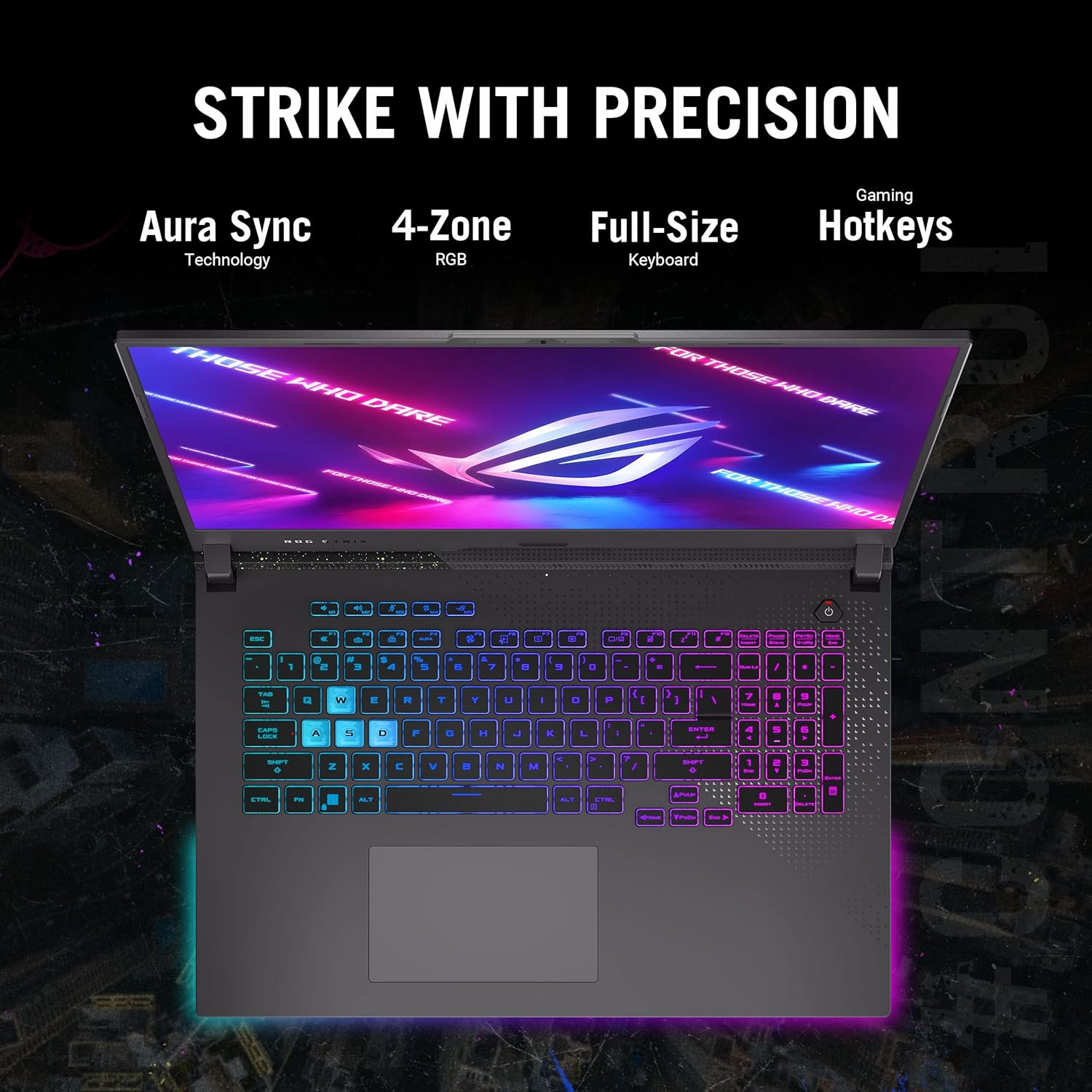
Figure 8: Close-up of the laptop's keyboard, highlighting its 4-Zone RGB lighting, full-size layout, and gaming hotkeys for precise input.
8. Ġestjoni tal-Enerġija
The laptop is equipped with a 90W battery and supports rapid Type-C charging for quick power replenishment.

Figura 9: Wara view of the laptop, emphasizing its 90W battery and rapid Type-C charging capabilities.
9. Durability & Quality Testing
ASUS ROG laptops undergo rigorous testing to ensure durability and reliability under various conditions.
- Test tal-Vibrazzjoni: Rattles the device from all angles to ensure structural integrity.
- Panel Pressure Test: Applies 25kg of force across multiple points on the lid.
- Twisting Test: Torques the laptop chassis with 50,000 twist cycles.
- Mechanical Shock Test: Simulates accidental drops with high G-force impact.
- Keyboard Durability Test: Torture tests keys with 20 million presses.
- Port Plugging Test: Cycles port usage 5,000 times.
- Hinge Rotation Test: Opens and closes the lid 20,000 times.
- Drop tat-test: Tests durability against scuffs and scratches.
- Test akustiku: Low noise testing at full load.
- Humidity Test: Confirms stability in humid environments.
- Extreme Temperature Test: Subjects the laptop to drastic temperature fluctuations.
- High Altitude Test: Simulates in-flight use and low-pressure scenarios.
Video 3: ROG Quality Test Video, demonstrating various durability tests performed on ASUS ROG laptops to ensure their robustness.
10. Speċifikazzjonijiet
| Karatteristika | Dettall |
|---|---|
| Brand | ASUS |
| Serje | ROG Strix G17 |
| Numru tal-Mudell | G713PV-DS94 |
| Sistema Operattiva | Windows 11 Home |
| Daqs tal-Iskrin | 17.3 Pulzier |
| Riżoluzzjoni tal-Iskrin | 2560 x 1440 pixel (QHD) |
| Riffriskar Rata | 240Hz |
| Proċessur | AMD Ryzen 9 7945HX (5.4 GHz) |
| Numru ta' Proċessuri | 16 |
| Koproċessur tal-Grafika | NVIDIA GeForce RTX 4060 |
| Daqs tar-RAM tal-Karta tal-Grafika | 8 GB |
| Daqs tal-Memorja RAM Installata | 16 GB DDR5 |
| Veloċità tal-Memorja | 4800 MHz |
| Hard Drive | SSD ta' 1 TB (PCIe 4x4) |
| Tip bla fili | 802.11ax (Wi-Fi 6E) |
| Kulur | Eclipse Gray |
| Piż tal-oġġett | 5.9 liri |
| Dimensjonijiet tal-Prodott | 15.55 x 1.21 x 11.1 pulzieri |
| Sors tal-Enerġija | Mħaddma bil-batterija |
| Batteriji | 1 batteriji tal-jone tal-litju meħtieġa (inklużi) |
11 Issolvi l-problemi
If you encounter issues with your laptop, consider the following common troubleshooting steps:
- Ebda Qawwa: Kun żgur li l-adapter tal-enerġija huwa konness sew kemm mal-laptop kif ukoll ma' sokit tal-enerġija li jaħdem. Iċċekkja d-dawl indikatur tal-enerġija.
- Kwistjonijiet tal-Wiri: If the screen is black, try connecting an external monitor to verify if the issue is with the laptop's display. Update graphics drivers.
- Prestazzjoni Lag: Close unnecessary applications. Check for background processes consuming high CPU/RAM. Ensure drivers are up to date.
- Is-sħana żejda: Ensure ventilation vents are clear and not obstructed. Consider using a cooling pad during intensive use.
- Problemi ta' Konnettività: Għall-Wi-Fi, erġa' ibda r-router u l-laptop tiegħek. Għal konnessjonijiet bil-wajer, iċċekkja l-kejbil tal-Ethernet.
For more detailed troubleshooting, refer to the official User Manual PDF linked in the 'Warranty & Support' section.
12. Manutenzjoni
Proper maintenance can extend the life and performance of your laptop:
- Tindif: Use a soft, lint-free cloth to clean the screen and chassis. Avoid harsh chemicals. Use compressed air to clear dust from vents.
- Aġġornamenti tas-Software: Regularly update Windows, drivers (especially graphics drivers), and ASUS utilities (e.g., Armoury Crate) to ensure stability and performance.
- Kura tal-batterija: Avoid completely discharging the battery frequently. For prolonged storage, keep the battery charged to around 50-60%.
- Ħażna: Keep the laptop in a cool, dry place away from direct sunlight and extreme temperatures.
13. Garanzija u Appoġġ
For warranty information, technical support, and additional resources, please refer to the official ASUS support channels. A detailed User Manual in PDF format is also available for download:
Ask a question about this manual
Ask about setup, troubleshooting, compatibility, parts, safety, or missing instructions. Manuals+ will review the question and use this page’s manual context to help answer it.