
Introduzzjoni
This manual provides instructions for the RETROSUN AA59-00600A replacement remote control, designed for various Samsung TV models. This remote offers a direct replacement solution, requiring no programming or pairing for immediate use.

Image: The AA59-00600A remote control shown alongside a Samsung television, illustrating its intended use as a replacement.
Setup
Installazzjoni tal-batterija
The AA59-00600A remote control requires two (2) AAA batteries (not included) for operation. Follow these steps to install the batteries:
- Sib l-għatu tal-kompartiment tal-batterija fuq wara tal-kontroll remot.
- Agħfas 'l isfel fuq it-tab u żżerżaq l-għatu 'l barra.
- Insert two new AAA batteries, ensuring the positive (+) and negative (-) terminals align correctly with the markings inside the compartment.
- Żerżaq l-għatu tal-kompartiment tal-batterija lura f'postu sakemm tikklikkja sew.

Image: A diagram showing the correct orientation for inserting two AAA batteries into the remote control's battery compartment.
Użu Inizjali
This remote control is designed to work immediately with compatible Samsung TV models without any programming or pairing. Once batteries are installed, point the remote at your TV and begin using it.

Image: The remote control shown with a TV screen, indicating that no programming or pairing is required after battery installation.
Istruzzjonijiet Operattivi
The AA59-00600A remote control provides standard functions for your Samsung TV. Ensure a clear line of sight between the remote's infrared emitter and your TV's IR receiver for optimal performance.
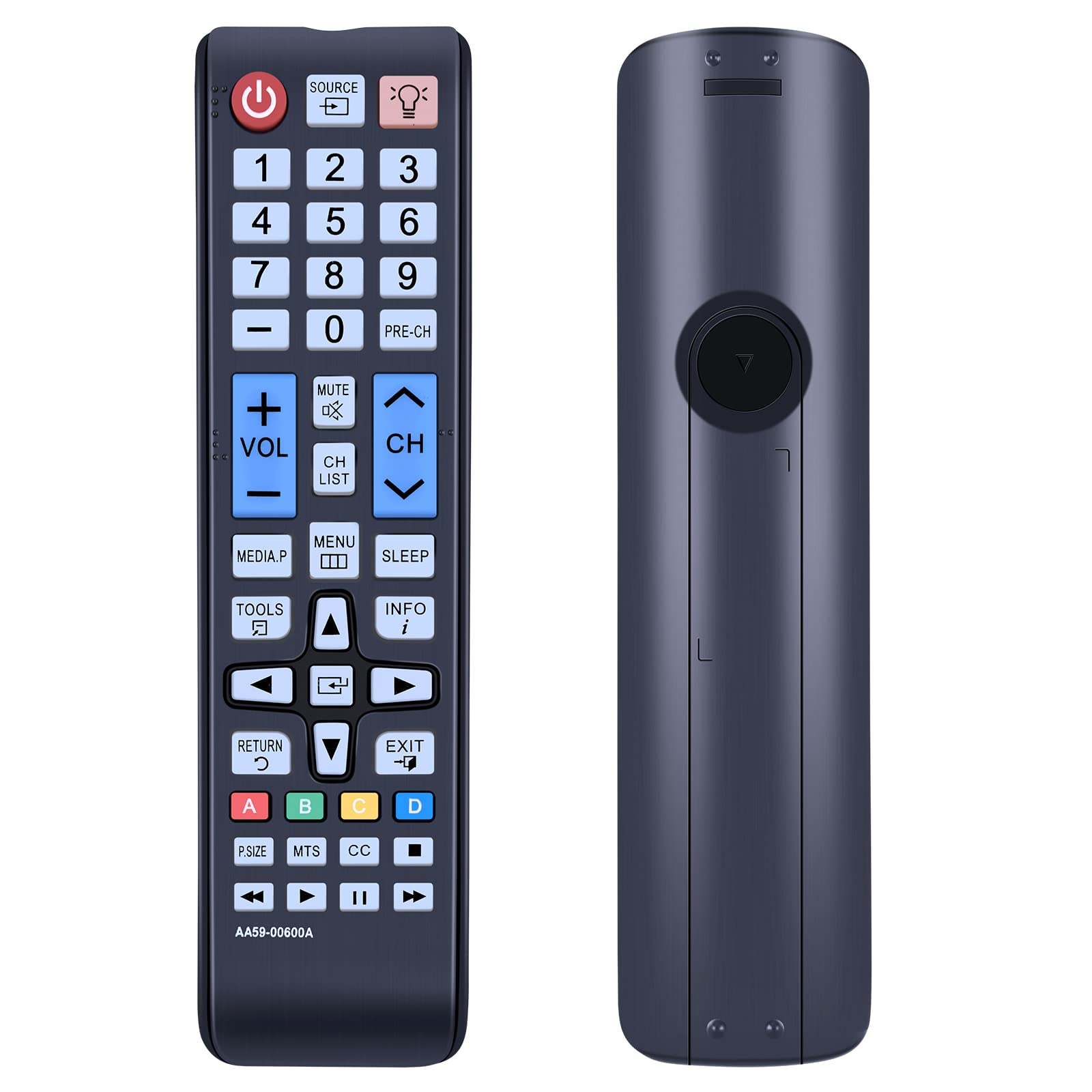
Immaġni: Ċara view of the AA59-00600A remote control, highlighting its button layout and ergonomic design.
Funzjonijiet ewlenin:
- Qawwa (⏻): Jixgħel jew jitfi t-TV.
- Sors: Jagħżel sorsi ta' input (HDMI, AV, eċċ.).
- Buttuni tan-Numri (0-9): Għażla diretta tal-kanal.
- VOL (+/-): Adjusts volume up or down.
- CH (' l fuq/' l isfel): Tibdil fil-kanali.
- Mute: Mutes or unmutes TV audio.
- Menu: Jaċċessa l-menù prinċipali tat-TV.
- Għodda: Opens a quick menu for common functions.
- Info: Juri informazzjoni dwar il-programm kurrenti.
- Irqad: Sets the TV sleep timer.
- Directional Pad (Up, Down, Left, Right) & EnterJinnaviga l-menus u jikkonferma l-għażliet.
- Ritorn: Tmur lura għall-iskrin jew il-menù ta' qabel.
- Ħruġ: Joħroġ mill-menù jew mill-funzjoni kurrenti.
- Buttuni tal-Kulur (A, B, Ċ, D): Used for specific functions within certain TV applications or menus.
- P.SIZE, MTS, CC: Picture size, Multi-Track Sound, Closed Captioning.
- Play, Pause, Stop, Fast Forward, Rewind: Media playback controls.
The remote utilizes infrared technology for long-distance and precise control, effective up to 10 meters (33 feet).

Image: The remote control being used to operate a TV from a distance, demonstrating its long-range infrared capability.
Manutenzjoni
Tindif
Biex iżżomm il-prestazzjoni u d-dehra tal-kontroll remot:
- Imsaħ il-wiċċ b'ċarruta ratba u niexfa.
- Għal ħmieġ iebsa, ħafif dampmt id-drapp bl-ilma jew cleaner ħafif u li ma jobrox.
- Avoid using harsh chemicals, solvents, or abrasive cleaning materials, as these can damage the remote's finish or internal components.
Sostituzzjoni tal-batterija
Replace batteries when the remote's response becomes sluggish or stops working. Always replace both batteries at the same time with new AAA batteries. Do not mix old and new batteries, or different types of batteries, as this can lead to leakage or malfunction.
Ħażna
Jekk il-kontroll remot ma jkunx se jintuża għal perjodu twil ta' żmien, neħħi l-batteriji biex tevita tnixxija u ħsara potenzjali.
Issolvi l-problemi
- Ir-remote mhux qed jirrispondi:
- Kun żgur li l-batteriji huma installati b'mod korrett bil-polarità korretta (+/-).
- Ibdel il-batteriji qodma b'batteriji AAA ġodda.
- Iċċekkja għal xi ostakli bejn ir-remote u r-riċevitur IR tat-TV.
- Iċċekkja li r-remote huwa ppuntat direttament lejn it-TV.
- Buttuni speċifiċi ma jaħdmux:
- This may indicate a faulty button or low battery power. Try replacing batteries.
- Ensure the remote is clean and there is no debris obstructing the buttons.
- Jaħdem mill-bogħod b'mod intermittenti:
- Dan spiss jindika qawwa baxxa tal-batterija. Ibdel il-batteriji.
- Ensure there are no strong light sources (like direct sunlight or fluorescent lights) interfering with the IR signal.
- Remote does not control TV:
- Confirm your Samsung TV model is listed as compatible with the AA59-00600A remote control. While this remote is widely compatible, some specific models may require a different remote.
- If your TV model is listed as compatible and the remote still does not work after battery replacement, contact customer support.
Speċifikazzjonijiet
| Isem tal-Mudell | AA59-00600A |
| Brand | RETROSUN |
| Apparati Kompatibbli | Samsung Televisions (Specific models listed in introduction) |
| Teknoloġija tal-Konnettività | Infra-aħmar (IR) |
| Sors tal-Enerġija | 2 x Batteriji AAA (mhux inklużi) |
| Materjal | Plastic ABS |
| Karatteristika Speċjali | Ergonomic design, No programming required |
| Kwantità tal-Buttuni | 25 |

Immaġni: Stampa ħdejn xulxin view of the remote control, displaying its approximate length (6.88 inches), width (1.77 inches), and thickness (0.94 inches).
Informazzjoni dwar Garanzija
Specific warranty details for the RETROSUN AA59-00600A remote control are not provided in the product information. Please refer to your purchase documentation or contact the seller directly for warranty terms and conditions.
Appoġġ għall-Klijent
If you encounter any issues or have questions regarding your RETROSUN AA59-00600A replacement remote control, please contact us through the Amazon messenger tool. Our support team is available to assist you.