
Introduzzjoni
Grazzi tax-xiriasing the DAGROD DV56MP 4K Digital Video Camera. This manual provides essential information for the safe and effective operation of your new device. Please read it thoroughly before use and retain it for future reference.
The DAGROD DV56MP is a high-performance 4K camcorder featuring 56MP photo resolution, 18X digital zoom, a 3.0-inch IPS touchscreen, Wi-Fi connectivity, IR night vision, and anti-vibration technology. It is designed to capture high-quality videos and photos in various environments.

Figure 1: The DAGROD DV56MP 4K Digital Video Camera demonstrating its 4K Ultra High Definition capability, offering superior clarity compared to 1080p resolution.
Kontenut tal-Pakkett
Jekk jogħġbok iċċekkja l-kontenut tal-pakkett meta tiftaħ il-kaxxa biex tiżgura li l-oġġetti kollha huma preżenti:
- DAGROD DV56MP 4K Digital Video Camera
- Batteriji Riċarġabbli (x2)
- Kontroll mill-bogħod
- Cable USB
- Cable HDMI
- Borża tal-Ġarr
- Manwal għall-Utent (dan id-dokument)
Prodott Overview
Iffamiljarizza ruħek mal-komponenti u l-kontrolli tal-kamera.

Figure 2: DAGROD DV56MP 4K Digital Video Camera with an overview of its main features including 4K 56MP resolution, 18X Digital Zoom, Face Detection, Night Vision, Dual Outputs, Digital Anti-shake, IPS Touchscreen, WiFi Connection, and Built-in Microphone.
Komponenti tal-Kamera:
- Lenti: Jaqbad vidjows u ritratti.
- Skrin tattili IPS ta' 3.0 pulzieri: Għal viewing, menu navigation, and playback. Rotates 270 degrees.
- Buttuna tal-Qawwa: Jixgħel/jitfi l-kamera.
- Record/Photo Button: Jibda/jwaqqaf ir-reġistrazzjoni tal-vidjow jew jieħu ritratt.
- Lieva taż-Żum: Controls the 18X digital zoom.
- Buttuna tal-Modalità: Jaqleb bejn il-modi tal-vidjow, tar-ritratti, u tal-plejbek.
- Buttuna tal-menu: Jaċċessa s-settings tal-kamera.
- Dawl IR: For night vision functionality.
- Immuntar taż-żarbun sħun: For attaching external accessories like microphones or LED lights.
- Kompartiment tal-batterija: Iżomm il-batterija rikarikabbli.
- Slot tal-Kard SD: For inserting a memory card (not included).
- Port USB: Għall-iċċarġjar u t-trasferiment tad-dejta.
- Port HDMI: For connecting to a TV or monitor.

Figure 3: The DAGROD DV56MP camera featuring a hot shoe mount, designed for easy installation of external accessories such as microphones or LED fill lights.
Setup
1. Iċċarġjar tal-batterija
- Iftaħ l-għatu tal-kompartiment tal-batterija.
- Insert a fully charged battery, ensuring correct polarity.
- Agħlaq l-għatu tal-kompartiment tal-batterija sew.
- To charge, connect the camera to a power adapter or computer using the provided USB cable. The charging indicator light will illuminate.
2. Installazzjoni ta 'Kard tal-Memorja
The camera supports SD cards (not included). A Class 10 or higher SD card is recommended for 4K video recording.
- Sib is-slott tal-kard SD fuq il-ġenb tal-kamera.
- Daħħal il-kard SD bil-kuntatti tal-metall iħarsu lejn quddiem il-kamera sakemm tikklikkja f'postha.
- To remove, gently press the card until it pops out.
3. L-Ewwel Tixgħil
- Open the LCD screen. The camera may power on automatically.
- If not, press and hold the Qawwa buttuna għal ftit sekondi.
- Segwi l-istruzzjonijiet fuq l-iskrin biex tissettja l-lingwa, id-data u l-ħin.
Istruzzjonijiet Operattivi
1. Basic Video Recording and Photo Capture
- Modalità Video: Ensure the camera is in video mode (indicated by an icon on the screen). Press the Rekord/Ritratt buttuna biex tibda r-reġistrazzjoni. Agħfas mill-ġdid biex twaqqaf.
- Modalità tar-Ritratti: Agħfas il- Modalità button to switch to photo mode. Press the Rekord/Ritratt buttuna biex tieħu stampa.
2. Using the 3.0-inch IPS Touchscreen
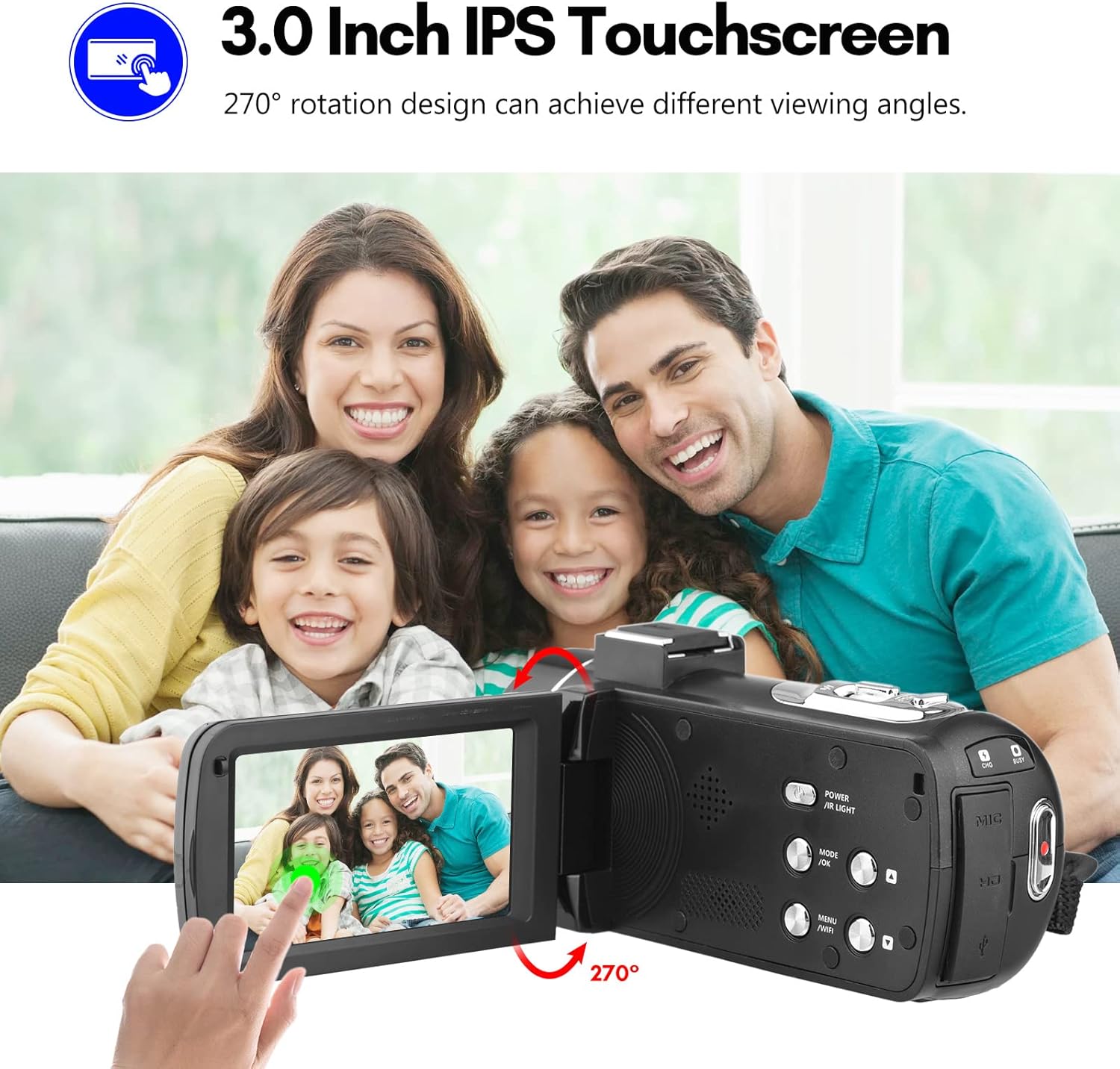
Figure 4: The 3.0-inch IPS touchscreen of the DAGROD DV56MP camera, demonstrating its 270-degree rotation capability for various viewing angles and easy interaction.
The touchscreen allows for intuitive navigation of menus, settings, and playback. Simply tap on icons or options to select them. The screen can be rotated up to 270 degrees for flexible viewangoli.
3. Digital Zoom (18X)

Figure 5: The DAGROD DV56MP camera showcasing its 18X digital zoom capability, allowing users to bring distant scenes closer and capture more detail.
Use the zoom lever located near the lens to zoom in or out. Push the lever forward to zoom in and pull it backward to zoom out. The 18X digital zoom allows you to magnify distant subjects.
4. Konnessjoni Wi-Fi

Figure 6: The DAGROD DV56MP camera demonstrating its WiFi connectivity, enabling convenient download and sharing of videos and photos directly to a smartphone.
The camera supports Wi-Fi connectivity for easy transfer of photos and videos to your smartphone or tablet. Download the dedicated app (refer to the camera's on-screen instructions or included quick start guide for app name) from your device's app store. Enable Wi-Fi on the camera via the menu, then connect your smart device to the camera's Wi-Fi network.
5. Viżjoni bil-Lejl IR
To record in low-light conditions, activate the IR Night Vision feature through the camera's menu settings. This will enable the infrared lights to capture clear footage anki fid-dlam sħiħ.
6. Sejbien tal-wiċċ
The camera can automatically detect and focus on faces within the frame. Enable Face Detection in the camera settings to optimize focus and exposure for portraits and group shots.
7. Bl-użu tal-Kontroll mill-bogħod

Figure 7: The DAGROD DV56MP camera mounted on a tripod, demonstrating control via the included remote control for flexible operation.
The included remote control allows for convenient operation from a distance, especially when the camera is mounted on a tripod. Functions typically include power on/off, record/photo, zoom, and menu navigation. Ensure the remote control has a clear line of sight to the camera's IR receiver.
8. Connecting to a Computer or TV
- Konnessjoni USB (Kompjuter): Connect the camera to your computer using the USB cable. The camera will appear as a removable disk, allowing you to transfer files.
- HDMI Connection (TV): Use an HDMI cable (not included) to connect the camera to an HDMI-enabled TV or monitor for direct playback of your videos and photos.
Manutenzjoni
Tindif tal-Kamera
- Uża drapp artab u mingħajr suf biex tnaddaf il-korp tal-kamera.
- Għal-lenti, uża drapp u soluzzjoni speċjalizzati għat-tindif tal-lentijiet. Evita li tmiss il-wiċċ tal-lenti b'subgħajk.
- Do not use strong detergents or solvents, as they may damage the camera's finish.
Ħażna
- When not in use, store the camera in a cool, dry place, away from direct sunlight and extreme temperatures.
- Remove the battery if the camera will not be used for an extended period to prevent leakage.
- Use the provided carrying bag for protection during transport.
Issolvi l-problemi
| Problema | Kawża Possibbli | Soluzzjoni |
|---|---|---|
| Il-kamera ma tixgħelx. | Il-batterija mejta jew imdaħħla ħażin. | Iċċarġja l-batterija jew erġa’ daħħalha b’mod korrett. |
| Ma nistax nirrekordja vidjow/nieħu ritratti. | No SD card, SD card full, or SD card error. | Insert an SD card, delete files, or format the SD card (this will erase all data). |
| Kwalità fqira tal-immaġni/vidjow. | Lens is dirty, insufficient lighting, or incorrect settings. | Clean the lens, use IR night vision in low light, or adjust resolution settings. |
| Problemi bil-konnessjoni tal-Wi-Fi. | Incorrect app, Wi-Fi not enabled, or distance too far. | Ensure correct app is installed, enable Wi-Fi on camera, and stay within range. |
Speċifikazzjonijiet
| Karatteristika | Dettall |
|---|---|
| Riżoluzzjoni tal-Qbid tal-Vidjo | 4K |
| Riżoluzzjoni tal-Immaġni Ftit | 56 MP |
| Zoom Diġitali | 18X |
| Daqs tal-Iskrin | 3.0 Inches IPS Touchscreen (270° Rotation) |
| Teknoloġija tal-Konnettività | USB, Wi-Fi |
| Karatteristiċi Speċjali | IR Night Vision, Face Detection, Anti-vibration, Hot Shoe Mount |
| Tip ta 'Kard tal-Memorja | SD (Class 10 or higher recommended) |
| Format tal-vidjo | MP4 |
| Format tal-Immaġni | JPEG |
| Tip ta 'Focus | Manual and Automatic Focus |
| Komponenti Inklużi | 2 Batteries, Remote Control, Carrying Bag |
Garanzija u Appoġġ
DAGROD products are manufactured to high-quality standards. For information regarding warranty coverage, please refer to the warranty card included in your product packaging or visit the official DAGROD websit.
For technical support, troubleshooting assistance, or inquiries about your DAGROD DV56MP 4K Digital Video Camera, please contact our customer service team. Contact details can typically be found on our webis-sit jew fuq l-imballaġġ tal-prodott.
Please note: Specifications and features are subject to change without prior notice.