
1. Introduzzjoni
The Retekess TD166 Smart Pager System is designed for efficient communication in various environments such as restaurants, warehouses, and logistics centers. This system features a long-range signal, text message display, and smart alert options to streamline operations and improve customer or staff notification processes.

Figure 1.1: Retekess TD166 Smart Pager System components.
Karatteristiċi ewlenin:
- Medda Estiża: Up to 3 miles in open, unobstructed environments, capable of penetrating reinforced concrete walls.
- Adjustable Prompt Levels: Pagers can be set to flash, beep, vibrate, or a combination. Three prompt speeds (fast, medium, slow) and adjustable duration (5-99 seconds) are available.
- Ħin ta' Standby twil: Built-in 3.7V 550mAh battery provides up to 18-20 hours of standby operation.
- Twissija Barra mill-Medda: Triggers a reminder if a pager exceeds signal coverage for a set duration, reducing loss.
- Service Countdown: Configurable countdown timer (1-180 minutes/seconds) with pager alerts to remind users to return the pager.
- Kompatibbiltà tas-Software tal-PC: Allows for advanced settings and text message display.
Applikazzjoni tal-Prodott Overview:
Vidjo 1.1: Fuqview of suitable applications for the Retekess TD166 system, demonstrating its use in a logistics warehouse setting.
2. Kontenut tal-Pakkett
Iċċekkja li l-oġġetti kollha elenkati hawn taħt huma inklużi fil-pakkett tiegħek. Jekk xi oġġetti huma neqsin jew bil-ħsara, jekk jogħġbok ikkuntattja l-appoġġ għall-klijenti.
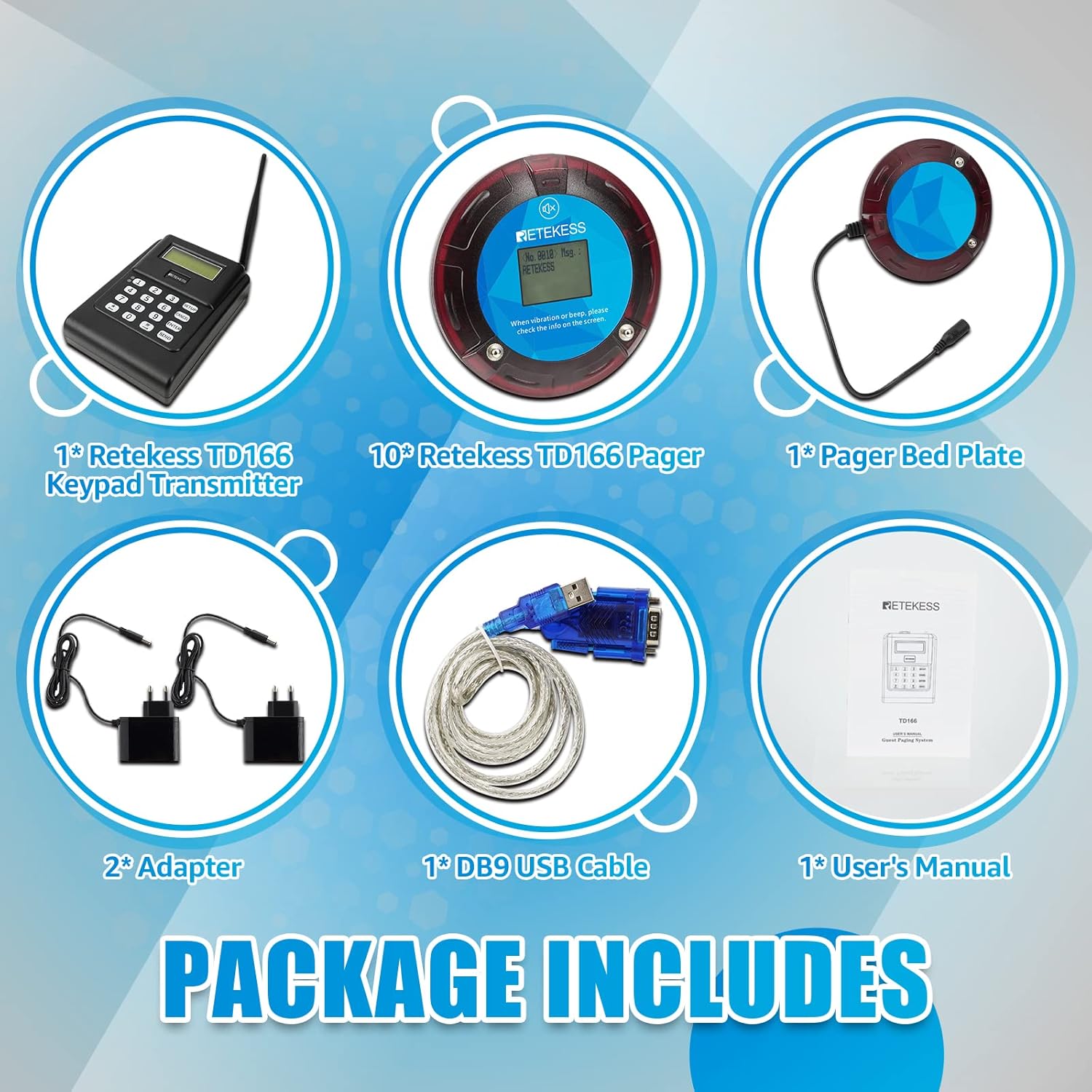
Figure 2.1: Contents of the Retekess TD166 Smart Pager System package.
- 1 x Trasmettitur tat-Tastiera Retekess TD166
- 10 x Retekess TD166 Coaster Pagers
- 1 x Pager Bed Plate (Charging Base)
- 2 x Power Adapters
- 1 x DB9 USB Cable (for PC connection)
- 1 x Manwal tal-Utent
3. Setup
3.1 Iċċarġjar inizjali
Before first use, ensure all pagers are fully charged. Place the pagers on the charging bed plate and connect the power adapter to the charging plate and a power outlet. The pagers will indicate charging status.
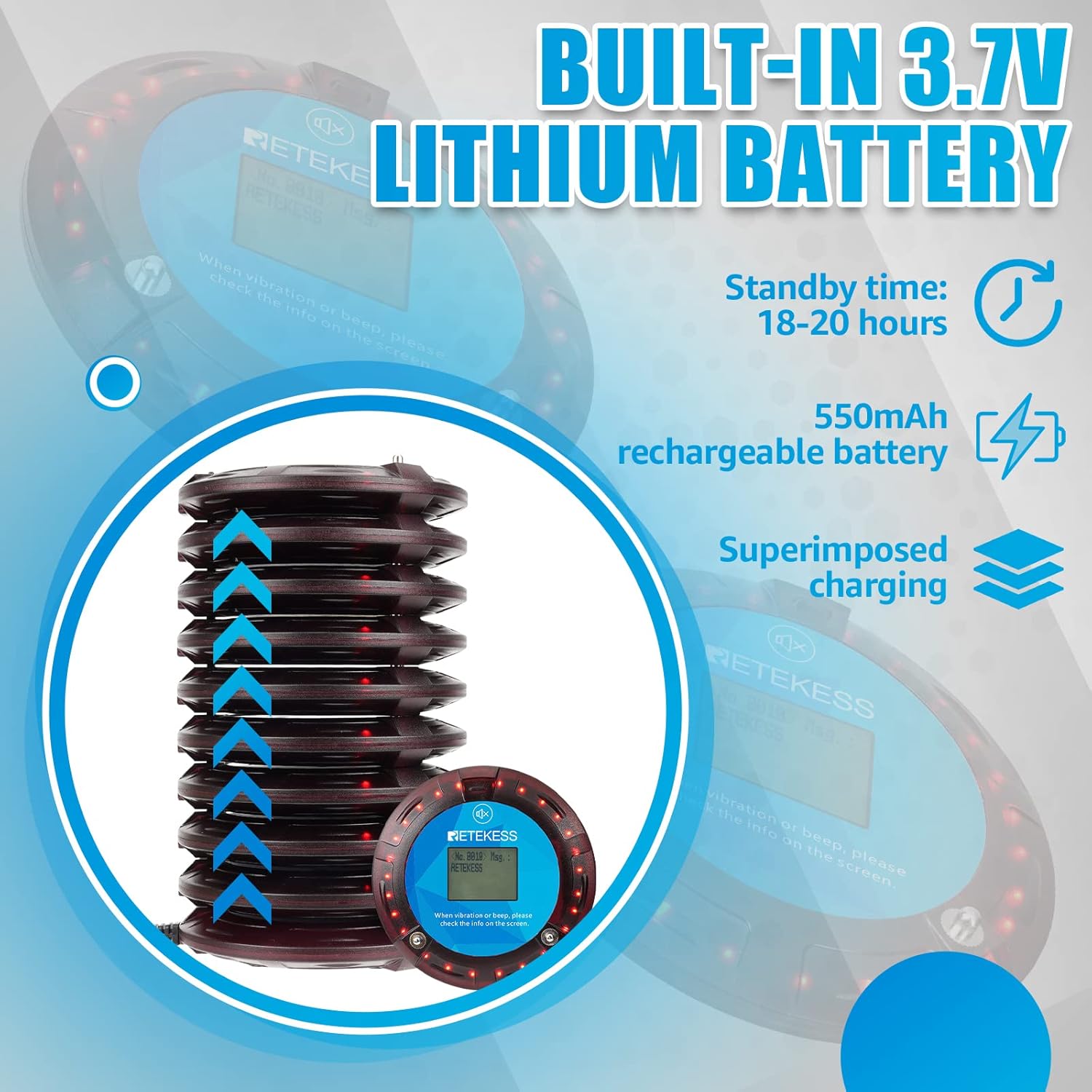
Figure 3.1: Pagers on the charging base, illustrating the built-in battery and charging method.
3.2 Transmitter Connection
Connect the keypad transmitter to its dedicated power adapter and plug it into a power outlet. The transmitter display should power on.
3.3 Pager Pairing
To pair pagers with the transmitter, follow these steps:
- On the transmitter, press the SETUP buttuna.
- The screen will display "PAGER NUMBER". Press DĦUL to enter the pairing state.
- Enter the desired pager number using the keypad (e.g., 001) and press DĦUL.
- While the transmitter is in pairing mode, place the pager you wish to pair on the charging base. The pager should vibrate and display the assigned number, confirming successful pairing.
- Irrepeti għall-pagers kollha.
Video 3.1: Detailed instructions on how to pair the Retekess TD166 pagers with the transmitter.
3.4 Infrared Code Function
The system supports setting pager numbers and parameters via near-infrared communication. Position the pager within 10cm of the transmitter's infrared sensor for programming.
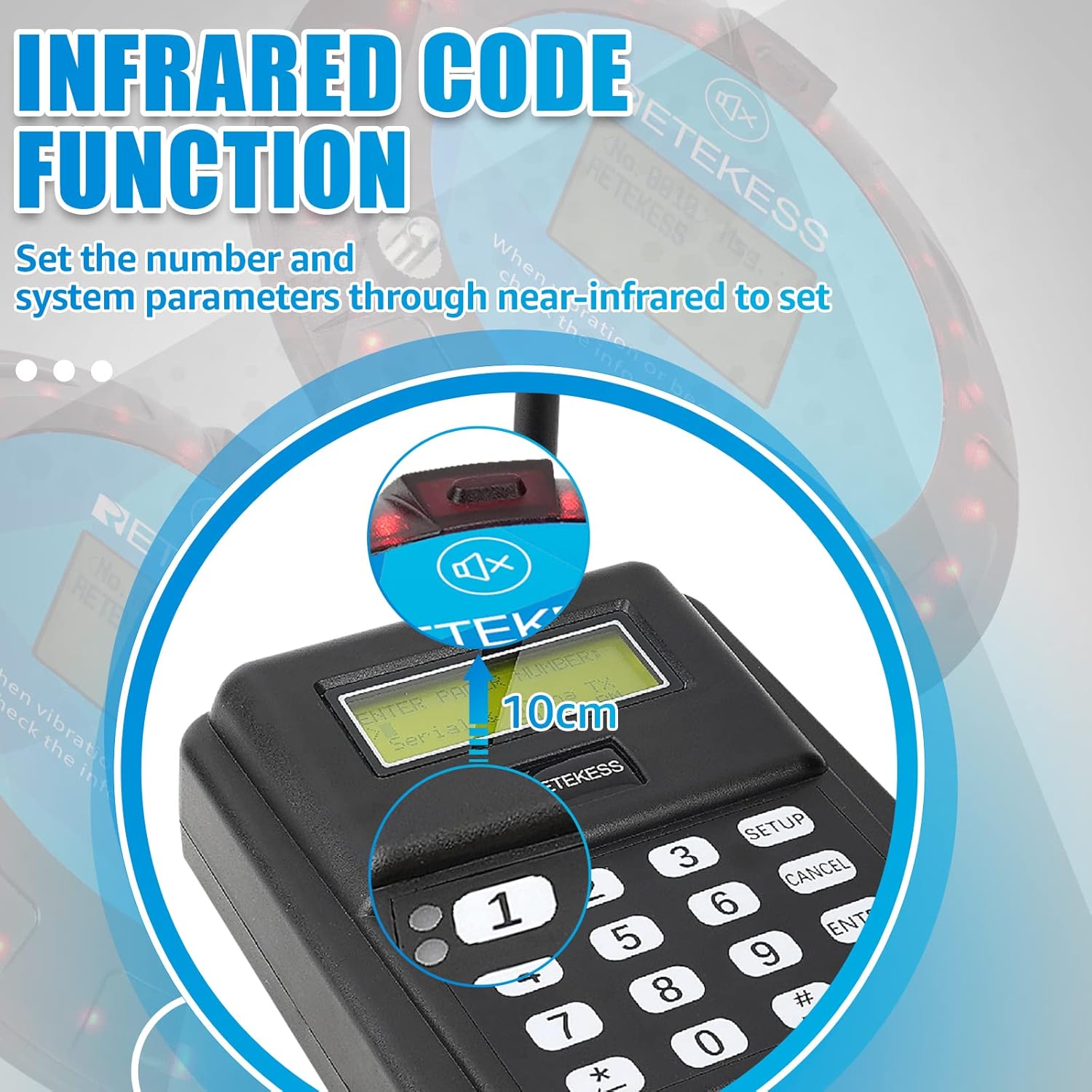
Figure 3.2: Using the infrared code function to set pager parameters.
4. Operazzjoni
4.1 Sending a Call
To call a specific pager, enter its number on the transmitter keypad and press Ibgħat. The pager will activate according to its set prompt mode.

Figure 4.1: General workflow for using the pager system.
4.2 Adjusting Prompt Modes and Speed
The TD166 allows customization of pager alerts. You can set the combination of flash, beep, and vibrate modes, as well as their speed and duration.
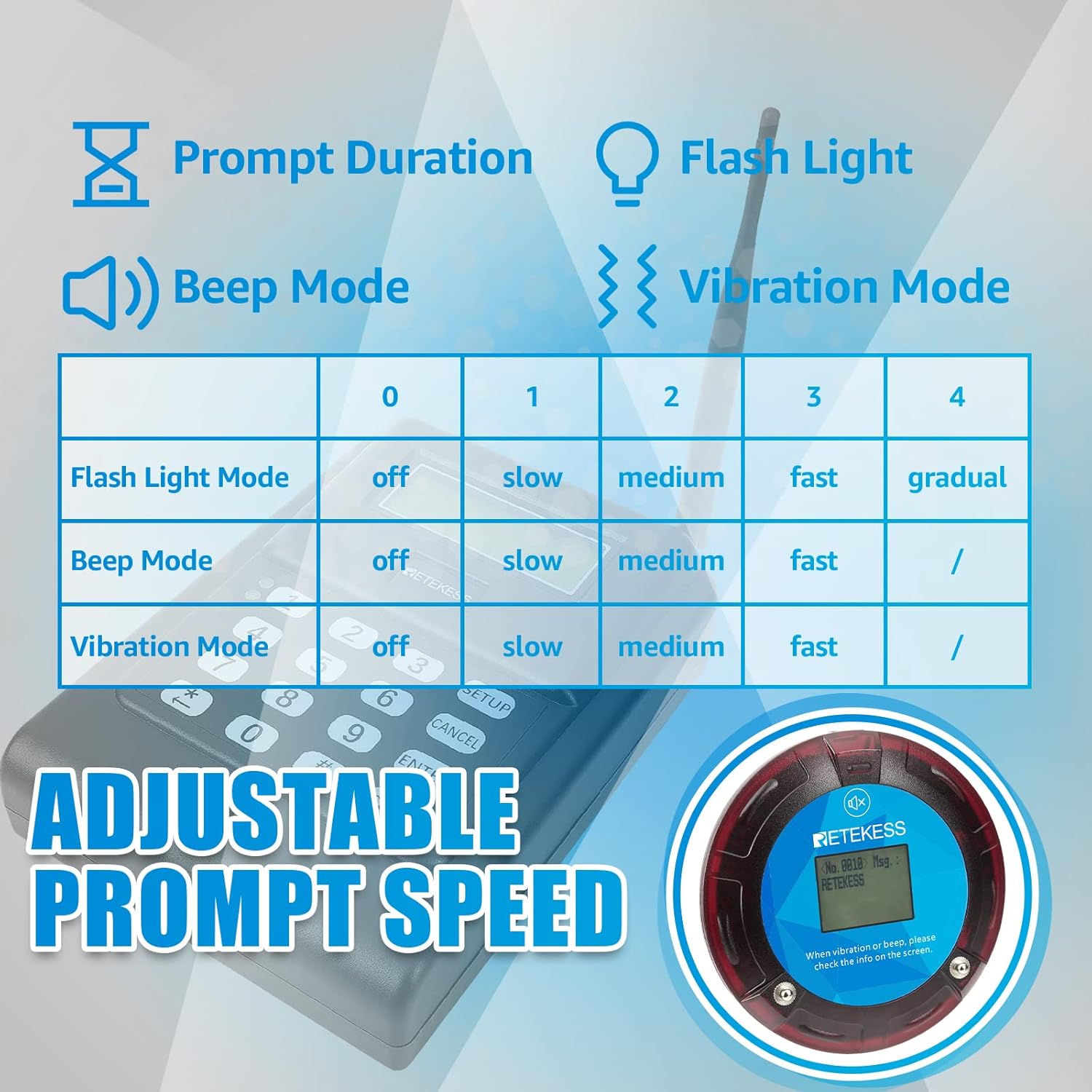
Figure 4.2: Adjustable prompt speed settings for pagers.
4.3 One-Key Group Call
The system supports sending a call to multiple pagers simultaneously using a one-key group call function. Refer to the video for detailed instructions on setting this up.
Video 4.1: Instructions on how to configure and use the one-key group call feature on the Retekess TD166.
4.4 Canceling a Call / Power On/Off
To cancel an active call status on a pager or power it on, perform a short press on the pager's button. To power off a pager, press and hold the button for more than 6 seconds.

Figure 4.3: Pager button functions for call cancellation and power control.
4.5 PC Software Settings
The TD166 system is compatible with PC software for advanced configuration, including setting transmitter beep sounds, prompt mode speeds, and prompt durations. Connect the transmitter to a computer using the provided DB9 USB cable.

Figure 4.4: PC software interface for advanced system settings.
5. Manutenzjoni
5.1 Kura tal-Batterija
The pagers are equipped with 3.7V 550mAh Lithium Ion batteries. To maximize battery life:
- Fully charge pagers before initial use.
- Evita li l-batterija tixxotta kompletament ta' spiss.
- Store pagers in a cool, dry place when not in use for extended periods.
5.2 Tindif
Clean the pagers and transmitter with a soft, dry cloth. Avoid using abrasive cleaners or solvents that could damage the devices.
6 Issolvi l-problemi
- Il-pager mhux qed jirrispondi:
- Ensure the pager is within the transmitter's signal range.
- Iċċekkja jekk il-batterija tal-pager hijiex iċċarġjata.
- Verify the pager is correctly paired with the transmitter (refer to Section 3.3).
- It-trasmettitur mhux qed jixgħel:
- Check the power adapter connection and ensure it is plugged into a working outlet.
- Out-of-range alarm:
- This indicates the pager has moved beyond the effective signal range. Move the pager closer to the transmitter.
- Keyboard function issues:
- If the physical keyboard on the transmitter is unresponsive, ensure no debris is obstructing the keys. If issues persist, contact customer support.
7. Speċifikazzjonijiet
| Karatteristika | Dettall |
|---|---|
| Numru tal-Mudell | TD166 |
| Dimensjonijiet tal-Prodott | 11.42 x 4.72 x 14.96 pulzieri |
| Piż tal-oġġett | 5.28 liri |
| Manifattur | Retekess |
| Batteriji | 10 batteriji tal-jone tal-litju meħtieġa (inklużi) |
| Firxa | Up to 3 miles (in open, unobstructed environments) |
| Kapaċità tal-Batterija tal-Pager | 3.7V 550mAh |
| Ħin ta' Standby tal-Pager | 18-20 sigħat |
8. Garanzija u Appoġġ
8.1 Informazzjoni dwar Garanzija
The Retekess TD166 Smart Pager System comes with a 2-year warranty. Additionally, a 30-day return policy is offered for any reason. Beyond the warranty period, maintenance services are available, with buyers responsible for associated costs.
8.2 Appoġġ għall-Klijent
For any inquiries, technical assistance, or warranty claims, please contact Retekess customer support through the Amazon platform. Responses are typically provided within 12 hours.