
Prodott Overview
The UMLIFE Ultra-mini USB Type C Lithium Battery Charger Board is designed for charging 3.7V lithium batteries. It features a compact design, a Type-C USB input for power supply, and integrated protection circuits to ensure safe charging. This module is compatible with most PD fast charging heads and provides a 1A linear charging current.
Il-karatteristiċi ewlenin jinkludu:
- Ultra-small form factor for integration into various projects.
- USB Type-C input for convenient power connection.
- 1A high current linear charging for 3.7V lithium batteries.
- Integrated protection circuit for over-voltage, over-discharge, and over-current protection.
- LED indicators for charge status.
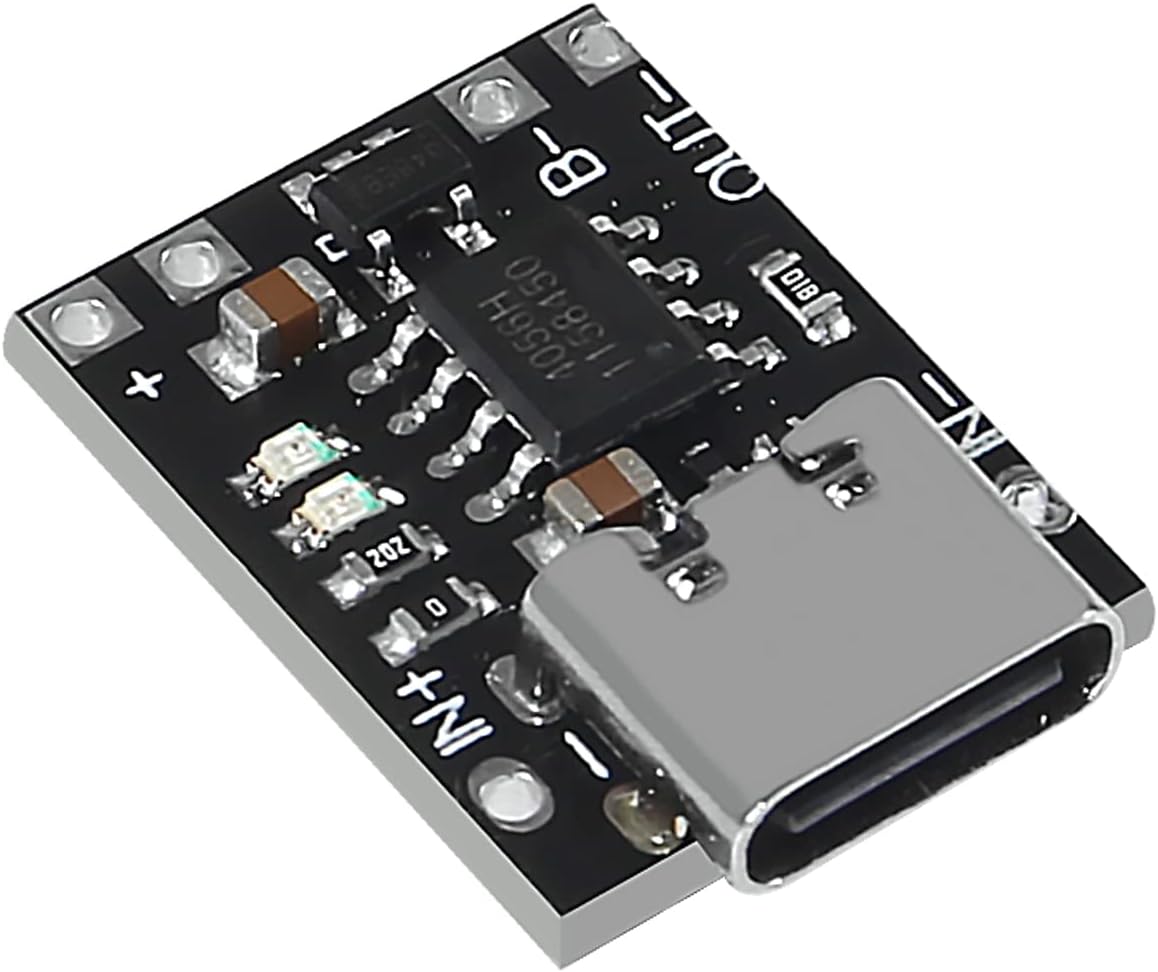
Immaġni: Angolata view of the UMLIFE Ultra-mini USB Type C Lithium Battery Charger Board. This image highlights the compact size and the Type-C USB input port, along with the various electronic components on the board.
Setup Istruzzjonijiet
Follow these steps to set up your UMLIFE charger board:
- Identifika l-Punti ta' Konnessjoni: Locate the IN+, IN-, B+, B-, OUT+, and OUT- pads on the charger board.

Immaġni: Minn fuq għal isfel view of the charger board. This image clearly shows the input (IN+, IN-), battery (B+, B-), and output (OUT+, OUT-) connection points, which are crucial for proper wiring.
- Qabbad il-batterija: Connect your 3.7V lithium battery to the B+ and B- pads. Ensure correct polarity: B+ to the positive terminal of the battery, and B- to the negative terminal.
- Qabbad it-Tagħbija (Mhux obbligatorju): If you intend to power a device directly from the charger board while charging, connect your load to the OUT+ and OUT- pads. Note that the "Battery+" and "Output+" terminals are electrically bonded together. The "Output-" and "Battery-" terminals are electrically isolated.
- Qabbad il-Provvista tal-Enerġija: Insert a USB Type-C cable into the board's Type-C port. Connect the other end of the cable to a 5V to 6V USB power source, such as a mobile phone charger or a compatible PD fast charging head.
- Activate Protection Board: For the first use, it is necessary to connect the power supply to activate the integrated protection board.
Istruzzjonijiet Operattivi
Once connected, the charger board will begin charging the lithium battery. Observe the LED indicators for charge status:
- Indikatur tal-Iċċarġjar: A red LED typically indicates that the battery is currently charging.
- Charged Indicator: A green or blue LED typically indicates that the battery is fully charged.
Charging Cycle Behavior:
- The charging cycle automatically terminates when the charging current drops to 100mA after reaching the final float voltage (4.2V).
- Jekk il-batterija voltage drops below 4.05V (approximately 80% to 90% of capacity), the charging cycle will automatically restart.
- For batteries with voltage below 2.9V, the board initiates a pre-charge phase with a current of 100mA.
Karatteristiċi ta' Protezzjoni:
The board includes an integrated protection circuit to safeguard the battery and the module:
- Vol-żejjedtage Protezzjoni: Jipprevjeni li l-batterija tiġi ċċarġjata lil hinn mill-volum sikur tagħhatage limitu.
- Protezzjoni ta 'skarika żejda: Prevents the battery from discharging below 2.4V, extending battery life.
- Protezzjoni ta' kurrent żejjed: Limits the output current to 4A to prevent damage from excessive load.
Manutenzjoni
To ensure the longevity and proper functioning of your charger board:
- Keep the board clean and free from dust and debris.
- Avoid exposing the board to moisture or extreme temperatures.
- Kun żgur li l-konnessjonijiet kollha huma siguri u iżolati sew biex tevita short circuits.
- Taqbiżx l-input speċifikat voltage range (5V-6V) or output current (1A charging, 4A protection limit).
Issolvi l-problemi
| Problema | Kawża Possibbli | Soluzzjoni |
|---|---|---|
| Battery not charging / No LED indication |
|
|
| Board gets excessively hot |
|
|
| Battery not reaching full charge |
|
|
Speċifikazzjonijiet Tekniċi
| Karatteristika | Speċifikazzjoni |
|---|---|
| Input Voltage Firxa | 5V sa 6V |
| Ħruġ Voltage (Charging) | 4.2V |
| Kurrent tal-Iċċarġjar | 1A (linear) |
| Over-discharge Protection Value | 2.4V |
| Over-current Protection Value | 4A |
| Board Dimensions (L x W x H) | 18mm x 14mm x 5mm (Type-C port protrudes ~1.5mm) |
| Piż | Approximately 0.528 ounces (per 10-pack) |
| Interface | USB Tip-Ċ |
| Ċertifikazzjonijiet | UL, FCC, CE |
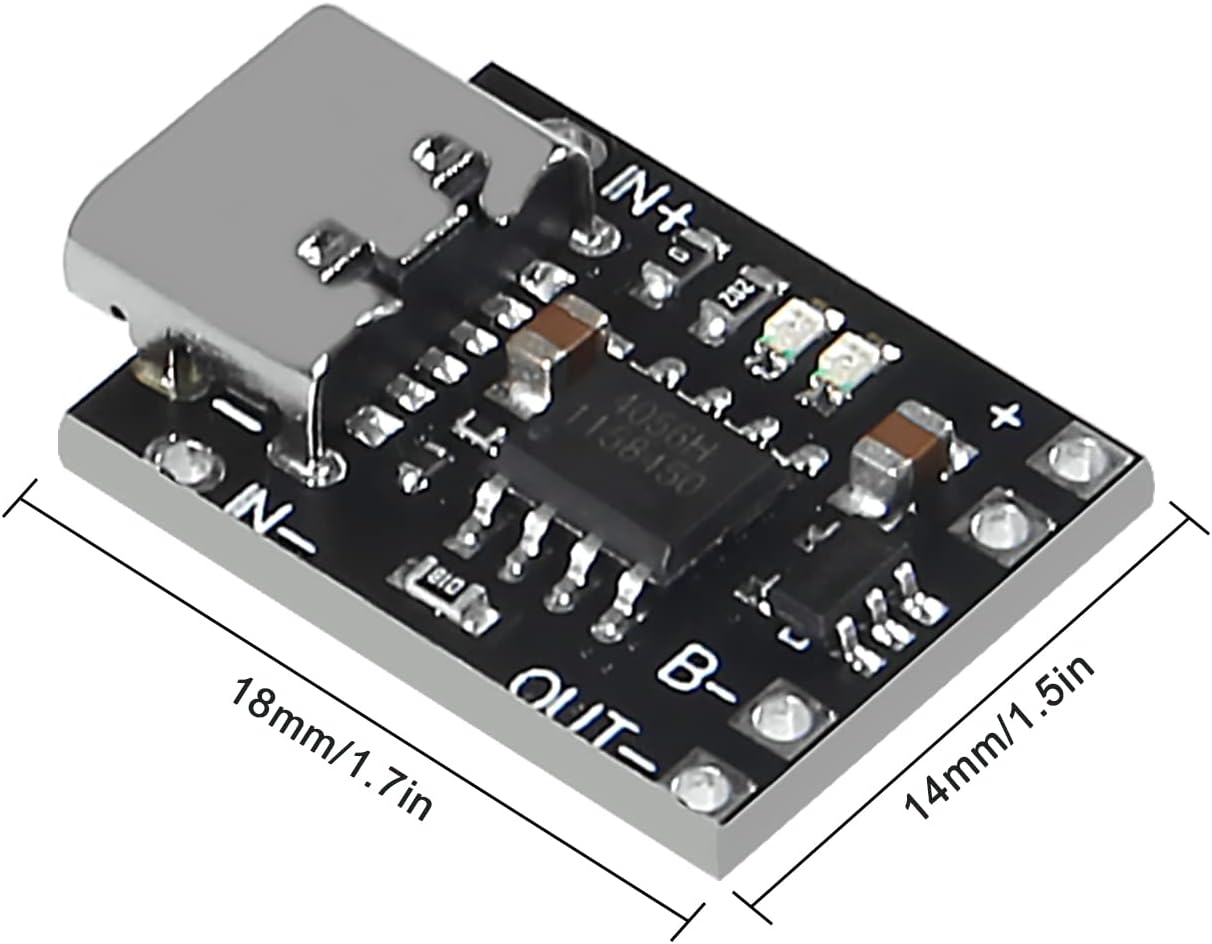
Image: Dimensions of the charger board. This image provides a visual reference for the physical size of the module, indicating its length and width.

Immaġni: Taħt view of the charger board. This view confirms the key electrical specifications printed on the board itself, specifically the 4.2V output voltage and 1A charging current.
Informazzjoni dwar Garanzija
UMLIFE products are manufactured to high-quality standards. For specific warranty details, please refer to the purchase documentation or contact the seller directly. General return policies typically allow for returns or replacements within 30 days of purchase for defective items.
Appoġġ għall-Klijent
For technical assistance, questions, or support regarding your UMLIFE Ultra-mini USB Type C Lithium Battery Charger Board, please contact the manufacturer or seller through the platform where the product was purchased.
You can also visit the official UMLIFE Store for more information: UMLIFE Store on Amazon


