
Introduzzjoni
Thank you for choosing the DELUX GM905 Ergonomic Wireless Keyboard. This manual provides detailed instructions for setting up, operating, and maintaining your keyboard to ensure optimal performance and comfort. Please read this manual thoroughly before using the product.

Karatteristiċi tal-Prodott
- Ergonomic Split and Curved Design: Engineered to promote a natural arm and wrist posture, reducing strain and discomfort during extended typing sessions.
- Konnettività Multi-Apparat: Supports 2.4G wireless (via USB receiver) and Bluetooth 5.0 (BT1 + BT2 channels), allowing connection to up to three devices simultaneously with easy switching.
- Integrated Padded Wrist Rest: Features a skin-friendly synthetic leather wrist rest to provide comfortable support for your palms and wrists.
- Full-Size Layout with Multimedia Keys: Includes a standard 112-key layout with a number pad, 12 FN function keys, and dedicated multimedia controls for enhanced productivity.
- Adjustable Front and Palm Supports: Equipped with four adjustable kickstands to customize the keyboard angle for both seated and standing postures.
- Kompatibilità Wiesgħa tas-Sistema: Compatible with Microsoft Windows (7/8/10/11), Mac OS 10.12 or higher, and Android 4.3 or higher.


Kontenut tal-Pakkett
Jekk jogħġbok iċċekkja l-kontenut tal-pakkett meta tiftaħ il-kaxxa:
- DELUX GM905 Ergonomic Wireless Keyboard
- 2.4G USB Riċevitur
- Cable USB
- Manwal għall-Utent (dan id-dokument)
Setup
1. Installa Batteriji
The keyboard requires two AAA batteries (not included). Locate the battery compartment on the underside of the keyboard. Open the cover, insert two AAA batteries according to the polarity indicators, and close the cover.
2. Qabbad mat-Tagħmir Tiegħek
The DELUX GM905 keyboard offers three connection modes: 2.4G Wireless and two Bluetooth 5.0 channels (BT1, BT2).
2.1. Konnessjoni bla fili 2.4G
- Locate the 2.4G USB receiver, usually stored in a compartment on the keyboard or included in the package.
- Ipplaggja r-riċevitur USB f'port USB disponibbli fuq il-kompjuter tiegħek.
- Fuq it-tastiera, agħfas il- 2.4G key to switch to 2.4G wireless mode. The indicator light will illuminate.
- Your computer should automatically detect and install the keyboard.
2.2. Bluetooth Connection (BT1 / BT2)
- Fuq it-tastiera, agħfas u żomm jew il- BT1 or BT2 key for 3-5 seconds until the corresponding indicator light flashes rapidly. This indicates pairing mode.
- Fuq it-tagħmir tiegħek (kompjuter, tablet, smartphone), mur fis-settings tal-Bluetooth u attiva l-Bluetooth.
- Fittex għal new devices. You should see "DELUX GM905" or a similar name appear in the list.
- Select the keyboard to pair. The indicator light on the keyboard will stop flashing and remain solid once connected.
- Repeat these steps for the other Bluetooth channel (BT2 or BT1) to connect a second device.


3. Adjust Keyboard Angle
The keyboard features adjustable kickstands at the front and palm rest area. You can adjust these to find the most comfortable typing angle for your seated or standing posture. Experiment with different angles to reduce wrist and arm strain.

Istruzzjonijiet Operattivi
Qlib bejn Apparati
Once multiple devices are paired, you can switch between them by simply pressing the corresponding connection key: 2.4G, BT1, jew BT2. The keyboard will connect to the selected device almost instantly.
Using Function (FN) Keys
The keyboard features 12 FN function keys (F1-F12) with secondary multimedia functions. To activate the secondary function, hold down the Fn key (located near the left Ctrl key) and then press the desired F-key.
Common FN key combinations include:
- Fn+F1: Aqta’
- Fn+F2: Kopja
- Fn+F3: Pejst
- Fn+F4: Fittex
- Fn+F5: Track Preċedenti
- Fn+F6: Play/Pawsa
- Fn+F7: Track li jmiss
- Fn+F8: Mute
- Fn+F9: Volum 'l isfel
- Fn+F10: Volum Up
- Fn+F11: Lock Screen
- Fn+F12: Kalkulatur

Kontrolli Multimedjali Dedikati
The central circular dial provides quick access to multimedia functions:
- Buttuna taċ-Ċentru: Play/Pawsa
- Buttuni tax-Xellug/Lemin: Trekk ta 'qabel / li jmiss
- Buttuni 'l fuq /' l isfel: Volum 'il fuq/'l isfel
- Top/Bottom Buttons (Sun icons): Brightness Up/Down (System dependent)

Manutenzjoni
Tindif tat-Tastiera
- Skonnettja t-tastiera mit-tagħmir tiegħek qabel ma tnaddafha.
- Uża drapp ratba u mingħajr ħelu ftit dampLaħlaħ bl-ilma jew b'soluzzjoni ħafifa tat-tindif biex timsaħ il-wiċċ tat-tastiera.
- For stubborn dirt between keys, use compressed air or a soft brush.
- Evita li tuża kimiċi ħarxa, prodotti tat-tindif li joborxu, jew umdità eċċessiva, għax dawn jistgħu jagħmlu ħsara lit-tastiera.
- Clean the wrist rest with a damp cloth and mild soap if necessary, then wipe dry.
Sostituzzjoni tal-batterija
When the keyboard's performance degrades or the connection becomes unstable, it may be time to replace the batteries. Follow the "Install Batteries" steps in the Setup section to replace the two AAA batteries.
Issolvi l-problemi
| Problema | Kawża Possibbli | Soluzzjoni |
|---|---|---|
| It-tastiera ma tirrispondix | Low batteries; Incorrect connection mode; USB receiver not plugged in (2.4G); Bluetooth not paired. | Replace batteries. Ensure the correct connection mode (2.4G, BT1, BT2) is selected. For 2.4G, ensure the USB receiver is securely plugged in. For Bluetooth, re-pair the keyboard. |
| Konnessjoni dewmien jew intermittenti | Interference; Distance from device; Low batteries. | Move closer to your device. Remove potential sources of interference (other wireless devices). Replace batteries. |
| Keys not typing correctly or double typing | Software issue; Keyboard defect; Low batteries. | Restart your computer. Ensure keyboard drivers are up to date. Replace batteries. If the issue persists, contact customer support. |
| Iċ-ċwievet multimedjali ma jaħdmux | System compatibility; Software conflict. | Ensure your operating system supports multimedia key functions. Check for any conflicting software or drivers. |
Speċifikazzjonijiet
- Ditta: DELUX
- Mudell: GM905
- Konnettività: 2.4G Wireless, Bluetooth 5.0 (BT1, BT2)
- Apparati Kompatibbli: PC, Laptop, Smart TV, Smartphone, Tablet
- Tip ta' tastiera: Ergonomic, Split, Wireless, Full-Size
- Numru ta' Ċwievet: 112
- Disinn ewlieni: QWERTY
- Tip ta' swiċċ: Ikklikkja
- Mistrieħ tal-polz: Integrated, Padded (Synthetic Leather)
- Angolu aġġustabbli: Yes (Front and Palm Kickstands)
- Sors tal-Enerġija: 2 x Batteriji AAA
- Materjal: Plastik
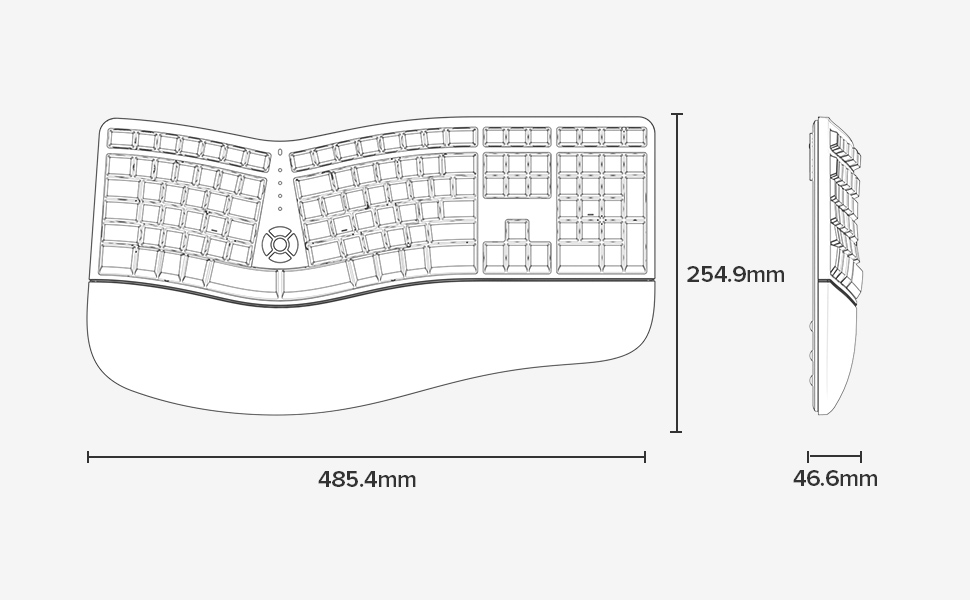
- Dimensjonijiet (L x W x H): 48.5 ċm x 25.5 ċm x 4.7 ċm (19.1 x 10.0 x 1.85 pulzieri)
- Reżistenza għall-Ilma: Mhux reżistenti għall-ilma
- Kontenut tal-Kaxxa: Keyboard, 2.4G USB Receiver, USB Cable


Informazzjoni dwar Garanzija
Specific warranty details for the DELUX GM905 Ergonomic Wireless Keyboard are not provided in the available product data. Please refer to the product packaging or the manufacturer's official website for warranty terms and conditions.
Appoġġ
For further assistance, technical support, or inquiries regarding your DELUX GM905 keyboard, please visit the official DELUX website or contact their customer service department. Contact information is typically found on the product packaging or the manufacturer's websit.
You can also visit the DELUX store on Amazon for more information: DELUX Amazon Store