
iClebo YCR-M07-20
iClebo Omega Robot Vacuum Cleaner & Mop Pad User Manual
Model: YCR-M07-20 | Brand: iClebo
1. Introduzzjoni
The iClebo Omega is an intelligent cleaning robot designed to provide efficient and thorough floor cleaning. This device combines vacuuming and mopping functionalities, utilizing a visionary camera mapping system for optimal navigation. It is equipped with advanced sensors and features to ensure a clean living environment.
This manual provides detailed instructions for the setup, operation, maintenance, and troubleshooting of your iClebo Omega robot vacuum cleaner and mop pad. Please read this manual carefully before using the product to ensure safe and effective operation.
2. Karatteristiċi ewlenin
- Camera Gyroscope Mapping: Finds the most efficient cleaning pathway, avoiding major obstacles.
- Turbo Suction Mode: Automatically boosts power when detecting heavy carpeting or concentrated dirt.
- Automatic Recharging and Resume: Returns to the charging base when battery is low and resumes cleaning from where it left off.
- Anti-Tangling Main Brush: Designed with V6 rubber blades to effectively pick up pet hair and prevent tangles.
- Disinn Slim: At 3.4 inches in height, it can access areas under beds and sofas.
- Deep Corner Cleaning: Side brushes are specifically designed for reaching difficult corners and edges.
- 19 Obstacle Detection Sensors: Comprehensive sensor array to avoid collisions and falls.
- Scheduled Cleanings: Program the robot to automatically power on for daily cleaning tasks.
- Bagless Dust Bin: Easy access for emptying collected dirt and debris.
- Climbing Feature: Capable of moving over thresholds, door seals, and onto thick rugs or carpets.
- Wet Mopping Function: Equipped to mop hard floors, assisting with spills and general floor cleaning.

Figura 2.1: Aktarview of iClebo Omega's 5-step cleaning system components.
3. Setup
3.1 Unpacking the Robot
Carefully remove all components from the packaging. Ensure all packing materials are removed from the robot and its accessories. Verify that all items listed in the packaging contents are present.

Figure 3.1: iClebo Omega robot vacuum cleaner with remote control.
3.2 Pożizzjonament tal-Bażi tal-Iċċarġjar
Place the charging base against a wall in an open, uncluttered area. Ensure there is at least 0.5 meters (1.6 feet) of clear space on either side of the base and 1.5 meters (5 feet) in front of it. Plug the power adapter into the charging base and then into a wall outlet. The indicator light on the charging base will illuminate.

Figura 3.2: Ġenb view of the iClebo Omega, highlighting the charging port area.
3.3 Iċċarġjar inizjali
Place the iClebo Omega onto the charging base, ensuring the charging contacts on the robot align with those on the base. The robot will begin charging, and the display will show the charging status. For first-time use, allow the robot to charge completely, which may take several hours.
4. Istruzzjonijiet Operattivi
4.1 Tibda Ċiklu ta' Tindif
Press the 'Start' button on the robot or the remote control to begin a cleaning cycle. The iClebo Omega will automatically map your home using its camera and sensors, determining the most efficient cleaning path.

Figure 4.1: The iClebo Omega effectively cleaning up debris on a hard floor.
4.2 Modi tat-Tindif
The iClebo Omega offers various cleaning modes:
- Modalità Awtomatika: The robot intelligently cleans the entire accessible area.
- Modalità Spot: For concentrated cleaning of a specific dirty area.
- Modalità Turbo: Automatically activated on carpets or when significant dust/hair is detected, increasinqawwa ta' ġbid ta' g.
- Wet Mopping Mode: Attach the mop pad and water tank for wet cleaning of hard floors.

Figure 4.2: Turbo mode automatically engages on carpets for enhanced cleaning.
4.3 Skedar tat-Tindif
Use the remote control to set a cleaning schedule. This allows the robot to automatically start cleaning at your preferred times, ensuring your home remains clean even when you are away.
4.4 Obstacle Avoidance and Climbing
The 19 built-in detection sensors enable the iClebo Omega to navigate around furniture and avoid falling down stairs. Its climbing feature allows it to easily transition over small obstacles like door thresholds and onto rugs.
Video 4.1: Demonstration of iClebo Omega's navigation, cleaning capabilities, and obstacle avoidance. This video showcases the robot's ability to clean various surfaces and navigate around common household items.
5. Manutenzjoni
Regular maintenance ensures optimal performance and extends the lifespan of your iClebo Omega.
5.1 Tbattil tal-Kontenitur tat-Trab
The bagless dust bin should be emptied after each cleaning cycle or when full. To access, open the top cover of the robot, remove the dust bin, and dispose of the contents. Clean the dust bin with a dry cloth.
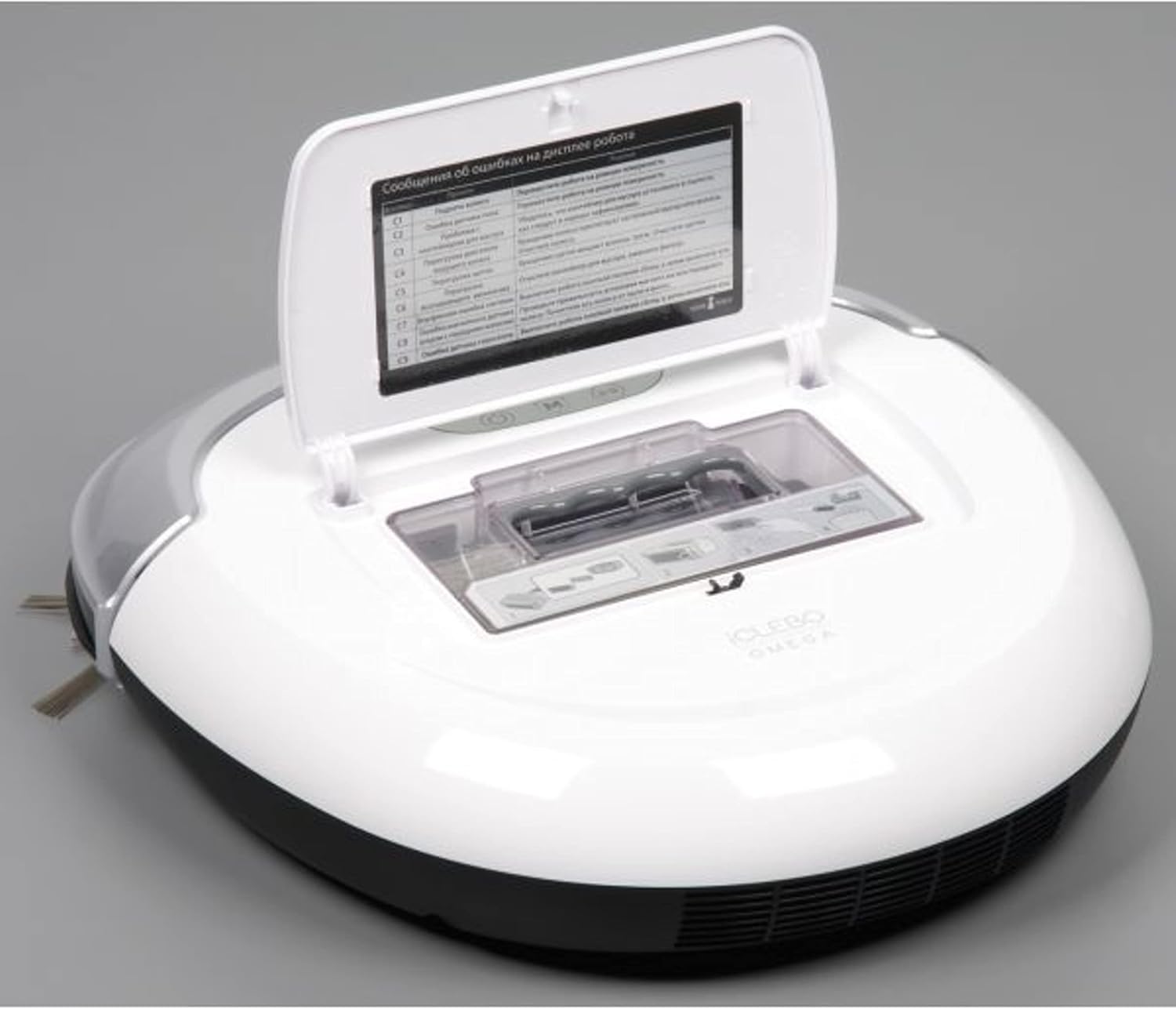
Figure 5.1: Accessing the dust bin for emptying and cleaning.
5.2 Tindif tal-Filtri
The EPA11 filter should be cleaned regularly to maintain suction power. Tap the filter gently to remove dust, or use a small brush. Replace the filter every 3-6 months, depending on usage.
5.3 Tindif ta' Xkupilji u Roti
Periodically check the main brush and side brushes for tangled hair or debris. Use the cleaning tool provided to cut and remove any hair. Clean the wheels to ensure smooth movement.
5.4 Tindif tas-Sensuri u l-Kuntatti tal-Iċċarġjar
Wipe the robot's sensors and charging contacts with a clean, dry cloth to ensure proper functionality and charging.
6 Issolvi l-problemi
| Problema | Kawża Possibbli | Soluzzjoni |
|---|---|---|
| Ir-robot ma jixgħelx. | Batterija baxxa; Swiċċ tal-enerġija mitfi; Robot imwaħħal. | Iċċarġja r-robot; Ixgħel is-swiċċ tal-enerġija; Neħħi kwalunkwe ostaklu. |
| Prestazzjoni fqira tat-tindif. | Full dust bin; Clogged filter; Tangled brushes. | Empty dust bin; Clean/replace filter; Clean main and side brushes. |
| Ir-robot ma jistax isib bażi tal-iċċarġjar. | Il-bażi tal-iċċarġjar hija mblukkata; Ir-robot huwa 'l bogħod wisq mill-bażi. | Ensure clear space around base; Manually place robot near base. |
| Ir-robot jeħel spiss. | Wisq ostakli; Uċuħ irregolari. | Clear small objects from cleaning path; Ensure robot can climb over obstacles. |
7. Speċifikazzjonijiet
- Ditta: iClebo
- Isem tal-Mudell: iCLEBO Omega
- Numru tal-Mudell tal-Oġġett: YCR-M07-20
- Kulur: Abjad
- Dimensjonijiet tal-Prodott: 13.9"T x 13.6"W x 3.4"Għ
- Tip ta' filtru: Disk (EPA11)
- Wisa' tal-Mogħdija tat-Tindif: 14 Pulzier
- Voltage: 120 Volts
- Sors tal-Enerġija: Mħaddma bil-batterija
- Fattur tal-Formola: Robotika
- UPC: 880917229226
- Manifattur: Yujin Robot
8. Garanzija u Appoġġ
For warranty information and technical support, please refer to the warranty card included with your product or visit the official iClebo websit. Żomm l-irċevuta tax-xiri tiegħek bħala prova tax-xiri għal talbiet ta' garanzija.
Manifattur: Yujin Robot
For further assistance, you may contact iClebo customer service through their official channels.
Ask a question about this manual
Ask about setup, troubleshooting, compatibility, parts, safety, or missing instructions. Manuals+ will review the question and use this page’s manual context to help answer it.