
Introduzzjoni
This manual provides instructions for the proper setup, operation, and maintenance of your Comix C-2031 Desk Calculator. This calculator is designed for general arithmetic tasks in home, office, or school environments, featuring a large 12-digit LCD display and dual power sources.

Karatteristiċi Ewlenin
The Comix C-2031 Desk Calculator is equipped with several features designed for ease of use and reliability:
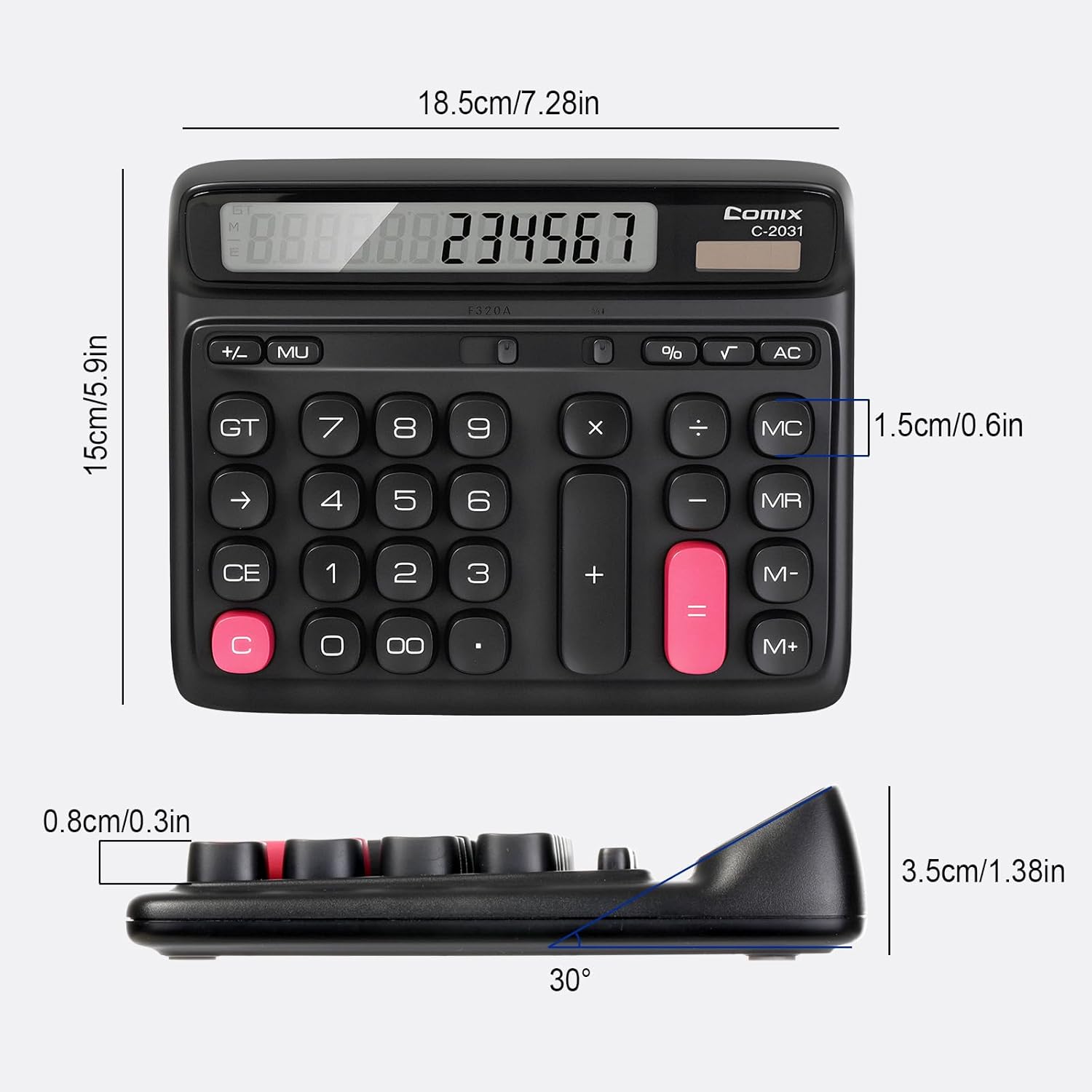
- Display LCD Kbir ta' 12 Diġiti: Provides clear and accurate readings with a 30° tilt for comfortable viewing.
- Ergonomic Computer Key Design: Features round keys for comfortable touch and clear feedback, designed for efficient data entry.
- Sors ta' Enerġija Doppju: Operates on solar energy in well-lit conditions and includes a 1 AA battery for consistent performance, especially in low light.
- Saqajn li ma jiżolqux: Equipped with four non-slip feet to ensure stability on your desk during use.
- Daqs kompatt: Measures 7.28 x 5.9 x 1.38 inches, fitting conveniently on any desk.

Setup
Sors tal-Enerġija
The Comix C-2031 calculator utilizes a dual power system, operating on both solar energy and a single AA battery. For optimal display clarity and consistent operation, especially in environments with varying light conditions, using the AA battery is recommended.
- Enerġija Solari: The calculator will automatically use solar power when sufficient light is available. Ensure the solar panel (located above the display) is exposed to light for operation without battery power.
- Installazzjoni tal-batterija:
- Sib il-kompartiment tal-batterija fuq wara tal-kalkulatur.
- Iftaħ l-għatu tal-kompartiment tal-batterija.
- Daħħal batterija AA waħda, waqt li tiżgura l-polarità korretta (+/-).
- Agħlaq l-għatu tal-kompartiment tal-batterija sew.

Istruzzjonijiet Operattivi
Familiarize yourself with the calculator's key functions for efficient use.

Operazzjonijiet Bażiċi
- Dħul tan-Numru: Press the number keys (0-9) to input digits.
- Punt Deċimali: Press the "." key for decimal values.
- Żieda (+), Tnaqqis (-), Multiplikazzjoni (×), Diviżjoni (÷): Press the corresponding operator key after entering the first number, then enter the second number, and press "=" for the result.
- Ugwali (=): Displays the result of a calculation.
Clear Functions
- C (Clear the Screen): Clears the current entry on the display without affecting memory or ongoing calculations.
- CE (Dħul Ċar): Iħassar l-aħħar numru jew operazzjoni li daħħalt.
- AC (Clear All): Clears all entries, operations, and memory content, resetting the calculator to its initial state.
- Backspace (→): Iħassar l-aħħar ċifra li daħħalt.
Funzjonijiet tal-Memorja
- M+ (Memory Plus): Adds the displayed number to the memory.
- M- (Minus Memorja): Subtracts the displayed number from the memory.
- MR (Memory Recall): Ifakkar il-valur maħżun fil-memorja fuq id-displej.
- MC (Memory Clear): Iħassar il-kontenut tal-memorja.
Funzjonijiet Avvanzati
- % (Perċenttage): Użat għal perċentwalitage kalkoli. Per example, to calculate 10% of 200, enter 200 × 10 %, which will display 20.
- √ (Għerq Kwadru): Jikkalkula l-għerq kwadru tan-numru muri.
- GT (Total Grand): Accumulates the results of all calculations. Pressing GT displays the grand total.
- MU (Mark-Up): Użat għall-kalkoli tal-marġni tal-profitt.
Prodott Overview Video
Manutenzjoni
- Tindif: Wipe the calculator with a soft, dry cloth. Do not use liquid cleaners or abrasive materials.
- Sostituzzjoni tal-batterija: If the display becomes dim or unresponsive, replace the AA battery in the compartment on the back of the unit. Ensure proper polarity.
- Ħażna: Aħżen il-kalkulatur f'post frisk u niexef 'il bogħod mix-xemx diretta u minn temperaturi estremi.
Issolvi l-problemi
| Problema | Kawża Possibbli | Soluzzjoni |
|---|---|---|
| Id-displej huwa vojt jew mudlam. | Dawl insuffiċjenti għall-enerġija solari, jew batterija baxxa. | Move the calculator to a brighter area or replace the AA battery. |
| Iċ-ċwievet ma jirrispondux. | Problema temporanja tas-softwer jew qawwa baxxa. | Press the AC button to reset. If the issue persists, replace the battery. |
| Riżultati tal-kalkolu mhux korretti. | Incorrect key sequence or function usage. | Review the operating instructions for the specific function. Press AC to clear all previous entries and start a new calculation. |
Speċifikazzjonijiet
- Mudell: C-2031
- Wiri: 12-Digit Large LCD Display
- Sors tal-Enerġija: Solar and 1 x AA Battery (included)
- Dimensjonijiet tal-Prodott: 7.28 x 5.9 x 1.38 pulzieri (18.5 x 15 x 3.5 ċm)
- Piż tal-oġġett: 10.5 uqija (297.67 gramma)
- Tip ta 'ċavetta: Ergonomic Computer Keys
- Karatteristiċi: 30° Tilt Display, Non-Slip Feet
Garanzija u Appoġġ
Comix products are manufactured with quality and reliability in mind. For any questions, technical support, or warranty inquiries, please refer to the contact information provided with your purchase or visit the official Comix websit. Jekk jogħġbok żomm il-prova tax-xiri tiegħek għal talbiet ta' garanzija.