
SONICAKE QAP-10
SONICAKE Amphonix Guitar Headphone AmpManwal ta 'l-Utent aktar ħaj
Model: QAP-10 | Brand: SONICAKE
Introduzzjoni
The SONICAKE Amphonix QAP-10 is a portable, rechargeable plug-in headphone amplifier designed for electric guitars. It features multiple built-in effects, including clean, overdrive, distortion, modulation, delay, and reverb, allowing for versatile tone shaping. With Bluetooth audio and an auxiliary input, it provides a convenient solution for silent practice and jamming along with backing tracks.

Figure 1: SONICAKE Amphonix QAP-10 Guitar Headphone Ampaktar ħaj
This image displays the compact, black SONICAKE Amphonix QAP-10 headphone amplifier with its 1/4-inch jack plugged in, showing the illuminated effect indicators.
Setup
Iċċarġjar tal-Apparat
Il- Amphonix QAP-10 is USB-rechargeable and provides up to 5 hours of continuous operation on a full charge. Use the included USB charging cable to connect the device to a standard USB power source (e.g., computer USB port, USB wall adapter).
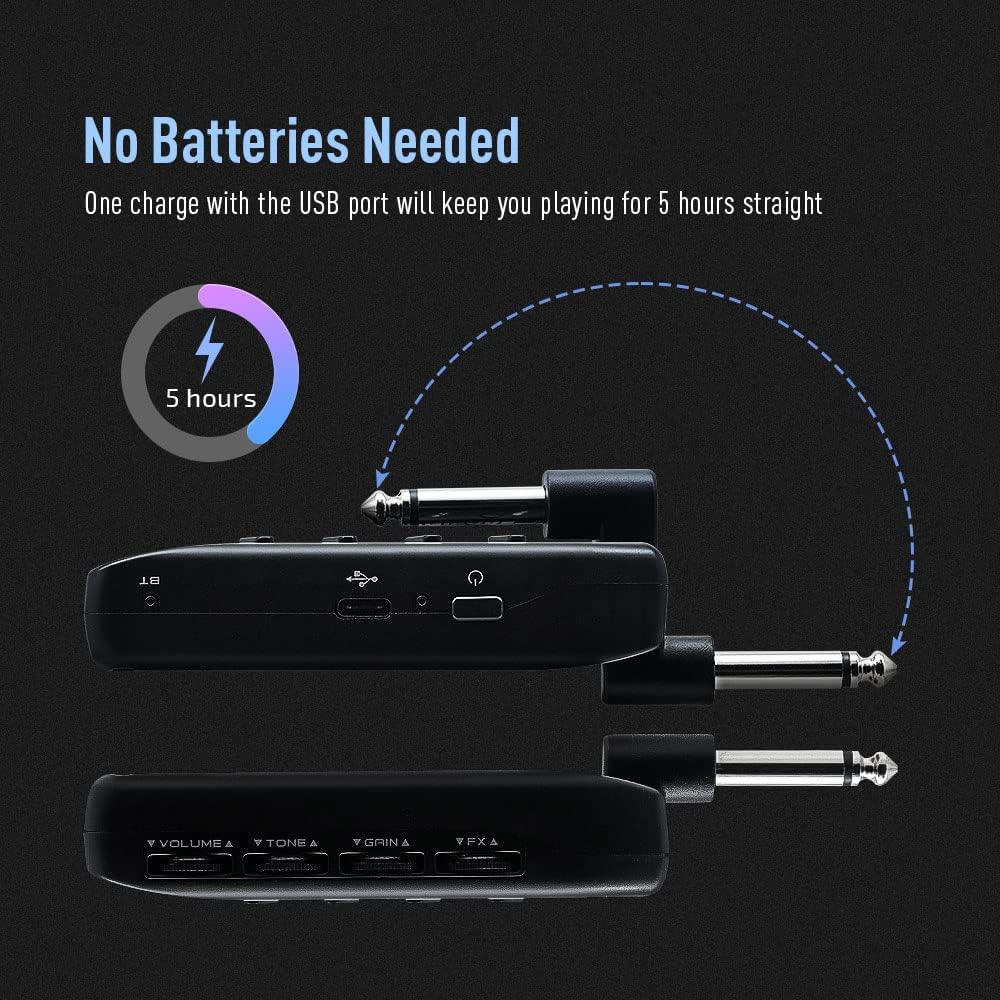
Figure 2: Charging the Amphonix QAP-10
This illustration shows the Amphonix QAP-10 being charged via a USB cable, highlighting its 5-hour battery life.
Connecting to Your Guitar and Headphones
- Ipplaggja l-jack ta' 1/4 pulzier tal- Amphonix QAP-10 directly into your electric guitar's output jack.
- Connect your wired headphones to the headphone output jack on the Amphonix QAP-10.
- To use an external audio source, connect it to the AUX input jack.

Figura 3: Konnessjoni tal- Amphonix QAP-10
This image shows the Amphonix QAP-10 connected to a guitar and headphones, illustrating the various input and output ports.
Tqabbil tal-Bluetooth
Il- Amphonix QAP-10 supports Bluetooth audio input for playing along with backing tracks. To pair:
- Ixgħel il- Amphonix QAP-10. The Bluetooth indicator light will flash.
- On your smartphone or computer, enable Bluetooth and search for available devices.
- Agħżel "Amphonix" from the list to pair. Once paired, the Bluetooth indicator light will become solid.
- Audio from your paired device will now play through your headphones along with your guitar signal.
Video 1: Sonicake Amphonix Bluetooth headphone guitar amplifier fuqview
This video demonstrates the features and connectivity of the Sonicake Amphonix, including its Bluetooth capabilities for playing along with music.
Jopera l- Ampaktar ħaj
Il- Amphonix QAP-10 features intuitive controls for adjusting your tone and effects.
Kontrolli Fuqview

Figura 4: Amphonix QAP-10 Controls
This image highlights the four control dials (Volume, Tone, Gain, FX) and the effect module buttons on the Amphonix QAP-10.
- Volum: Adjusts the overall output volume to your headphones.
- Ton: Shapes the tonal characteristics, from darker to brighter sounds.
- Qligħ: Controls the amount of distortion or overdrive.
- FX: Adjusts the intensity or parameter of the selected effect.
- AMP/MOD/DLY/RVB Buttons: Press these buttons to cycle through the different amplifier models and effect types within each module. The illuminated LEDs indicate the currently selected setting.
Amplifier and Effect Modules
Il- Amphonix QAP-10 features 6 AMP modules and 18 effects across Modulation (MOD), Delay (DLY), and Reverb (RVB) modules. These can be used simultaneously.
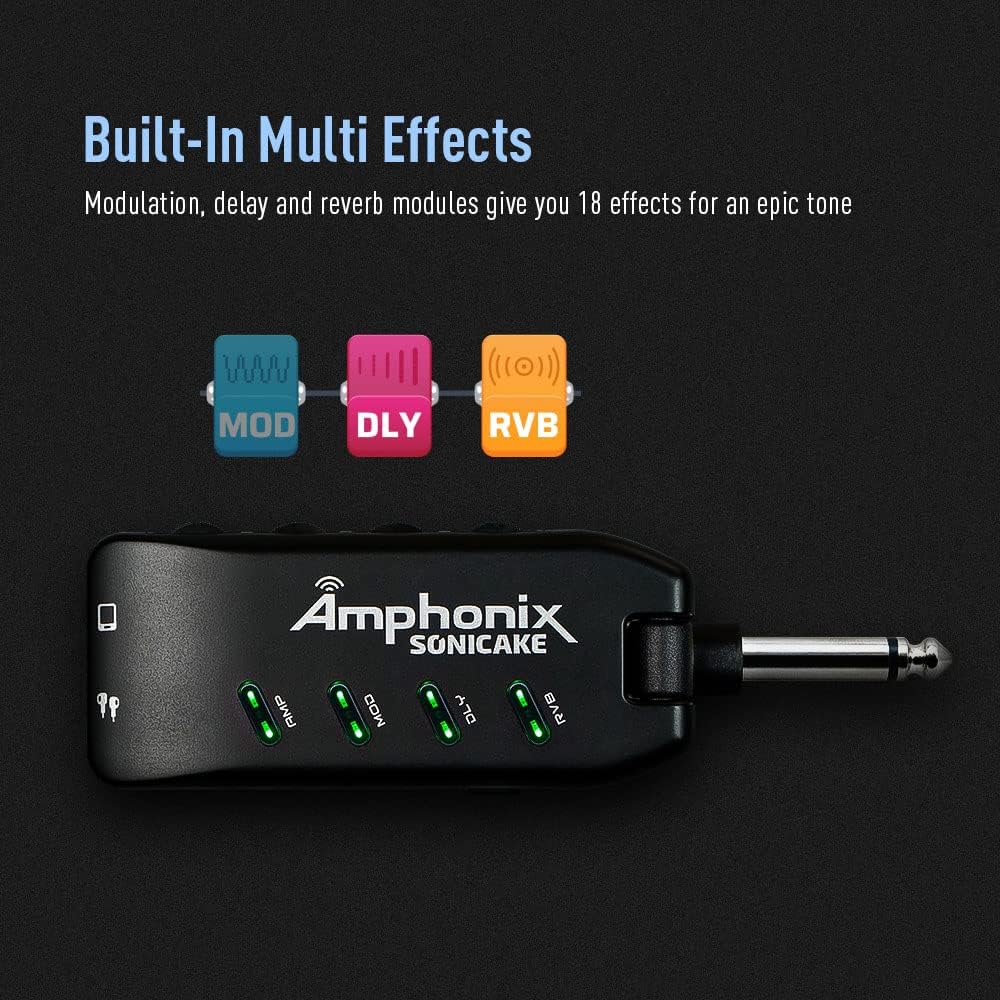
Figure 5: Effect Module Indicators
This image shows the illuminated AMP, MOD, DLY, and RVB indicators on the Amphonix QAP-10, signifying active effect modules.
| Modulu | Kulur | Isem | Description / Based On |
|---|---|---|---|
| AMP | Aħdar | Naddaf 1 | Fender Bassman* |
| Blu | Naddaf 2 | Jazz Leġġendarju Amp* | |
| Aħmar | Overdrive 1 | Orange Rockerverb 50* | |
| Ċjan | Overdrive 2 | Marshall JCM 800* | |
| Isfar | Distorsjoni 1 | Mesa/Boogie Dual Rectifier* | |
| Roża | Distorsjoni 2 | ENGL Powerball II* | |
| MOD | Aħdar | Kor | Produces a vintage chorus sound |
| Blu | Jdur | Produces a rotary speaker sound | |
| Aħmar | Tremolo | Jipproduċi ħoss tremolo ottiku klassiku | |
| Ċjan | Vibrato | Produces a natural vibrato sound | |
| Isfar | Flanger | Jipproduċi ton tal-flanger klassiku | |
| Roża | Phaser | Produces a bright, sharp phasing tone | |
| DLY | Aħdar | Eku sħun | Jipproduċi sħun, vintagE effett ta 'dewmien ta' vuċi analogu |
| Blu | Eku Pura | Jipproduċi effett ta 'dewmien pur u preċiż | |
| Aħmar | Tape Echo | Jissimula t-ton tal-eku minn magna tat-tejp | |
| Ċjan | Mod Echo | Jipproduċi dewmien pur b'effett chorus | |
| Isfar | Eku Skur | Jipproduċi effett ta 'dewmien bla xkiel u mellow | |
| Roża | Slapback | Jissimula t-ton klassiku tal-eku slapback | |
| RVB | Aħdar | Studio | Jissimula l-akustika ta 'studjo |
| Blu | Kamra | Jissimula l-akustika ta 'kamra | |
| Aħmar | Sala B | Jissimula l-akustika ta 'sala b'tħassir isbaħ | |
| Ċjan | Hall D | Jissimula l-akustika ta 'sala b'tħassir aktar skur | |
| Isfar | Knisja | Simulates the acoustics of a church | |
| Roża | Pjanċa | Jissimula reverberator tal-pjanċa |
*Il-manifatturi u l-ismijiet tal-prodotti msemmija hawn fuq huma trademarks jew trademarks reġistrati tas-sidien rispettivi tagħhom. It-trademarks intużaw sempliċement biex jidentifikaw il-karattru sod tal-prodotti.
Video 2: Pocket Guitar Amplifier with Bluetooth Multi-Effects demonstration
This video showcases the various amplifier models and multi-effects available on the SONICAKE Amphonix, demonstrating their sonic capabilities.
Manutenzjoni
- Tindif: Uża drapp artab u niexef biex tnaddaf il-barra tal-apparat. Evita li tuża prodotti tat-tindif jew solventi li joborxu.
- Ħażna: Aħżen il- Amphonix QAP-10 in a cool, dry place away from direct sunlight and extreme temperatures.
- Kura tal-batterija: To prolong battery life, avoid fully discharging the device frequently. Recharge it regularly, even if not in use for extended periods.
Issolvi l-problemi
| Problema | Kawża Possibbli | Soluzzjoni |
|---|---|---|
| L-ebda ħoss mill-headphones. | Headphones not fully plugged in; low battery; incorrect volume setting; device not powered on. | Ensure headphones are securely connected. Charge the device. Increase the Volume knob. Press the power button to turn on. |
| Il-ħoss huwa mgħawġ jew mhux ċar. | Gain or Volume set too high; incorrect effect setting; low battery. | Reduce Gain or Volume. Adjust effect settings. Charge the device. |
| Problemi ta' tqabbil tal-Bluetooth. | Device not in pairing mode; "Amphonix" not selected; interference. | Ensure the Bluetooth indicator is flashing. Re-scan for devices on your phone/computer. Move closer to the device. |
| No sound after turning on (requires gain adjustment). | Specific device behavior or setting. | As noted by some users, try slightly adjusting the Gain knob after powering on to activate the sound. |
| Constant buzzing/hissing sound. | Interference; high gain setting; faulty cable/headphones. | Try different headphones or cables. Reduce the Gain setting. Ensure no strong electromagnetic interference sources are nearby. |
Speċifikazzjonijiet
| Karatteristika | Dettall |
|---|---|
| Brand | SONICAKE |
| Numru tal-Mudell | QAP-10 |
| Piż tal-oġġett | 2.22 uqija |
| Dimensjonijiet tal-Prodott | 1.61 x 5.16 x 4.65 pulzieri |
| Pajjiż ta' Oriġini | Iċ-Ċina |
| Batteriji | 1 Lithium Polymer batterija meħtieġa |
| Kulur | Iswed |
| Apparati Kompatibbli | Kitarra |
| Tip ta' Konnettur | Plug-in |
| Tip ta' Materjal | Metall |
| Output Wattage | 5 Watts |
| Sors tal-Enerġija | Mħaddma bil-batterija |
Garanzija u Appoġġ
For detailed warranty information, please refer to the documentation included with your product or contact SONICAKE customer support directly. Protection plans may be available for purchase separately.
Riżorsi ta' appoġġ addizzjonali:
- Manwal Uffiċjali għall-Utent (PDF): Niżżel PDF
- Visit the SONICAKE Store: SONICAKE Amazon Store
Ask a question about this manual
Ask about setup, troubleshooting, compatibility, parts, safety, or missing instructions. Manuals+ will review the question and use this page’s manual context to help answer it.