
1. Prodott Aktarview
The XIAOVV Solar Wireless Outdoor Security Camera is designed to provide reliable outdoor surveillance with eco-friendly solar power. It features advanced motion detection, night vision capabilities, and remote access for comprehensive home security.

Image 1: XIAOVV Solar Wireless Outdoor Security Camera with integrated solar panel.
2. Kontenut tal-Pakkett
- XIAOVV Solar Wireless Outdoor Security Camera (1 unit)
- Bracket tal-Immuntar u Viti
- Cable tal-Iċċarġjar tal-USB
- Manwal għall-Utent
- (Note: Micro SD card for local storage is not included and must be purchased separately.)
3. Karatteristiċi tal-prodott
- Solar Powered with 10000mAh Battery: Ensures continuous operation by recharging the built-in battery via solar panel.
- PIR Smart Detection: Triggers recording and alerts based on human body temperature, reducing false alarms.
- Spotlight and Voice Siren: Deters intruders with integrated light and sound alarms.
- Disinn Reżistenti għat-Temp (IP65): Built to withstand various outdoor conditions, including rain, snow, and high temperatures.
- Funzjonalità Pan & Tilt: Offers a 355° horizontal and 100° vertical rotation for wide area coverage.
- Viżjoni bil-lejl HD: Provides clear visibility in low-light conditions and complete darkness.
- Traċċar tal-Mozzjoni: Automatically follows detected moving objects within its monitoring range.
- Kriptaġġ Sikur tad-Dejta: Utilizes military-grade encryption to protect user privacy and data.
- Riżoluzzjoni tal-Vidjo 1080p: Jiġbed vidjo ċar u dettaljat footage.
- Konnettività Wireless: Connects via 2.4GHz Wi-Fi for remote access and control.
- Kontroll tal-App mobbli: Compatible with Android and iPhone devices for live viewing, settings adjustment, and alerts.
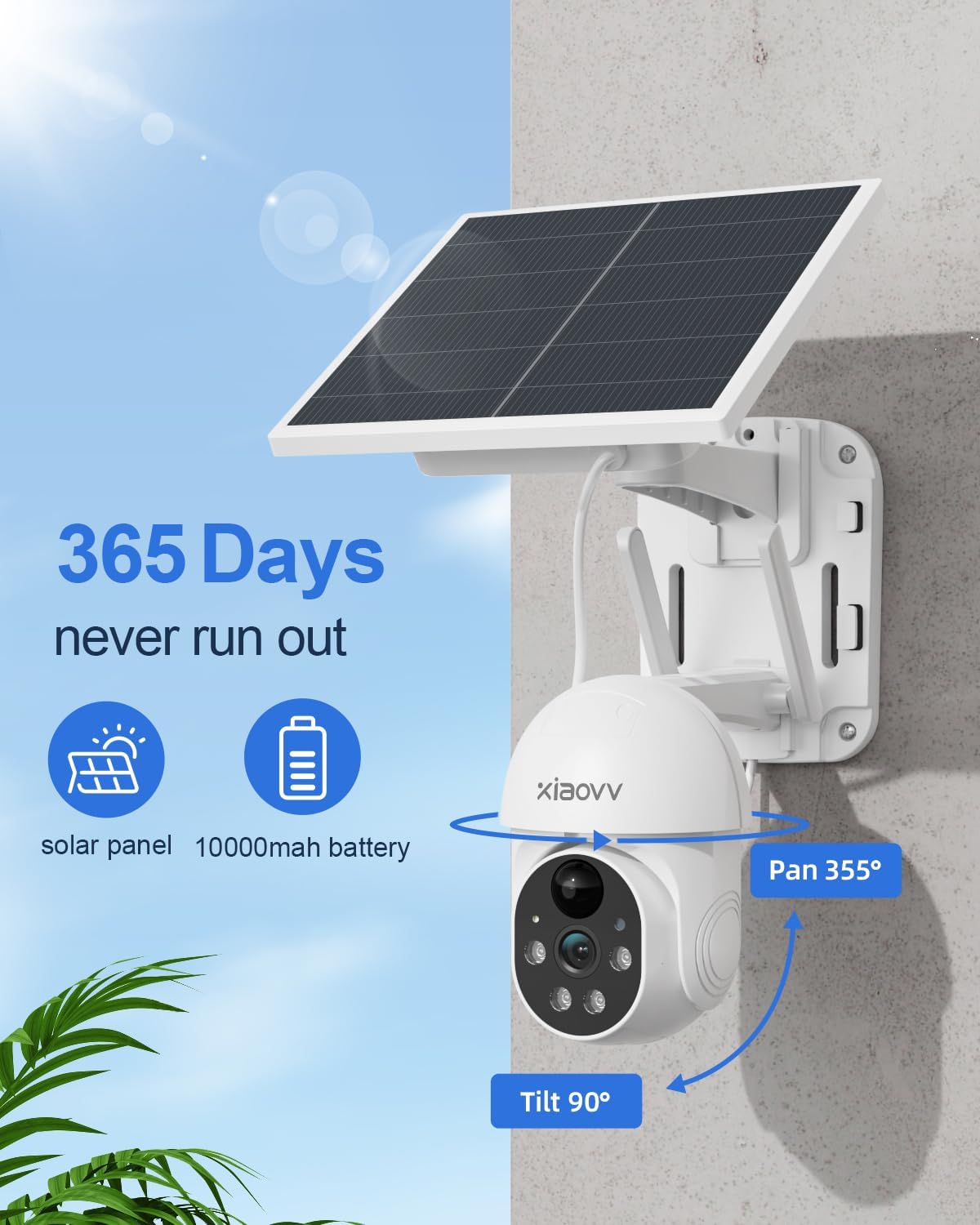
Image 2: Key features including 365-day power, 10000mAh battery, and Pan/Tilt capabilities.

Image 3: Night vision with spotlight and siren for intruder deterrence.
4. Gwida ta' Setup
4.1 Iċċarġjar inizjali
Before first use, fully charge the camera's built-in 10000mAh battery using the provided USB cable and a standard 5V/2A power adapter (not included). A full charge ensures optimal performance and solar charging efficiency.
4.2 Installazzjoni tal-App
- Scan the QR code in the quick start guide or search for the "XIAOVV" app in your mobile device's app store (Google Play Store for Android, Apple App Store for iOS).
- Niżżel u installa l-applikazzjoni.
- Register a new account and log in.
4.3 Tqabbil tal-Kamera
- Ixgħel il-kamera.
- Open the XIAOVV app and follow the on-screen instructions to add a new device.
- Kun żgur li l-apparat mobbli tiegħek huwa konness ma' netwerk Wi-Fi ta' 2.4GHz. Il-kamera ma tappoġġjax Wi-Fi ta' 5GHz.
- Scan the QR code displayed on your phone with the camera lens, or follow alternative pairing methods if prompted.
- Ladarba tkun konness, tista' tagħti isem lill-kamera tiegħek u tikkonfigura s-settings inizjali.
4.4 Installazzjoni Fiżika
Agħżel post bi ample direct sunlight for the solar panel and a clear view of the area you wish to monitor. The camera is designed for wall mounting.
- Mark the drilling positions using the mounting bracket as a template.
- Agħmel toqob u daħħal tappijiet tal-ħajt jekk meħtieġ.
- Waħħal il-bracket tal-immuntar mal-ħajt bil-viti.
- Waħħal il-kamera mal-bracket tal-immuntar.
- Adjust the camera angle to cover the desired area. Ensure the solar panel is positioned to receive maximum sunlight throughout the day.
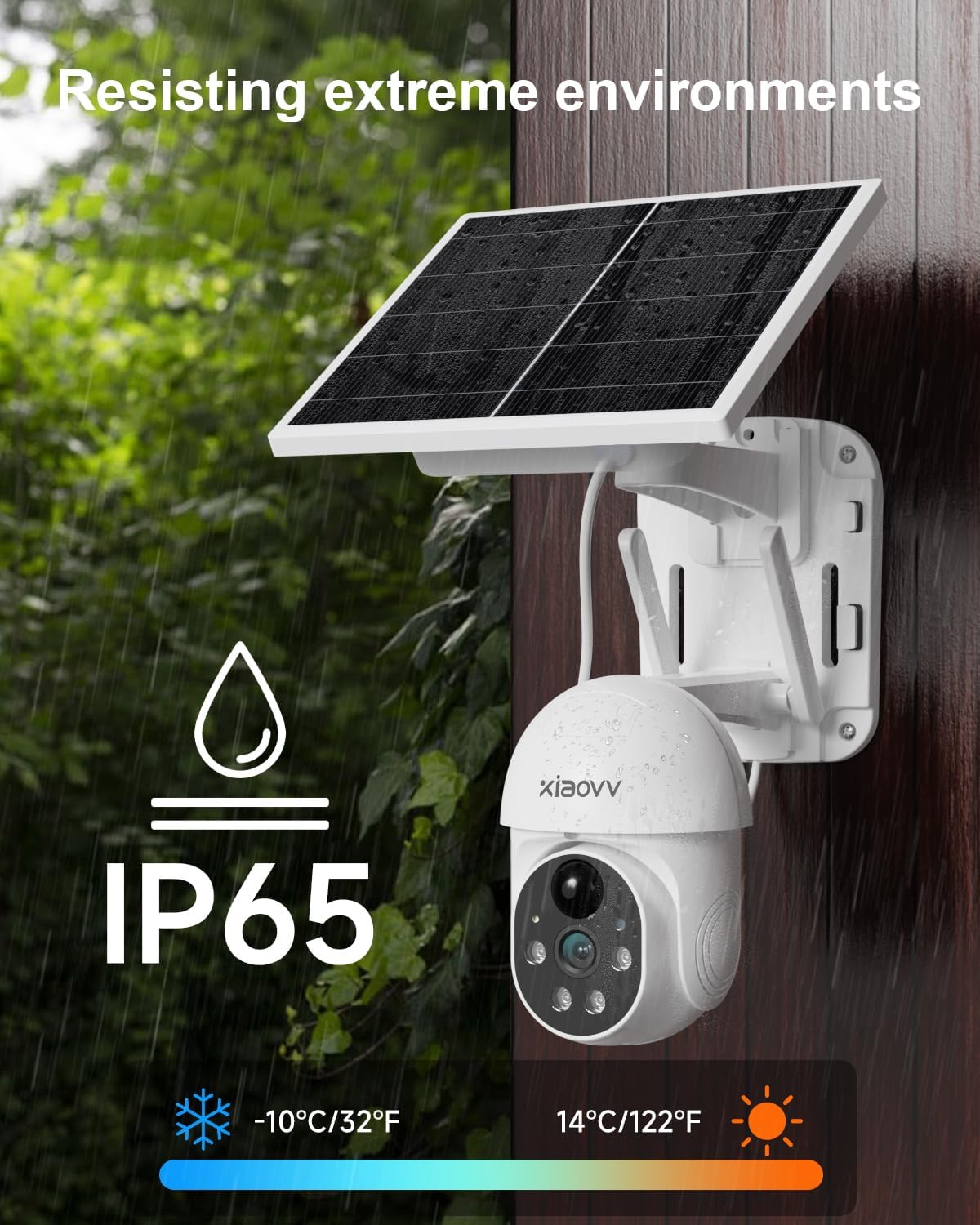
Image 4: Weatherproof design (IP65) for outdoor installation.
5. Istruzzjonijiet Operattivi
5.1 Ħaj View
Open the XIAOVV app and select your camera to view foo ħajtage. You can switch between standard and HD resolution within the app.
5.2 Sejbien tal-Mozzjoni u Twissijiet
The camera uses PIR smart detection to identify human movement. Configure alert settings in the app to receive notifications on your phone when motion is detected. You can also enable the spotlight and voice siren to activate upon detection.

Image 5: PIR motion detection for accurate alerts.
5.3 Kontroll tal-Pan/Tilt
Uża l-kontrolli direzzjonali fl-app biex taġġusta l-kamera mill-bogħod viewing angle (355° horizontal, 100° vertical). The motion tracking feature can automatically follow subjects.
5.4 Viżjoni bil-lejl
The camera automatically switches to HD night vision in low-light conditions, providing clear black and white footage. The integrated spotlight can be activated for color night vision or to deter intruders.
5.5 Għażliet ta' Ħażna
The camera supports local storage via a Micro SD card (up to 128GB, not included) for continuous or event-triggered recording. Cloud storage subscription options may also be available through the app for secure off-site backup.

Image 6: Storage options including encrypted cloud and local SD card recording.
6. Manutenzjoni
- Naddaf il-Lenti: Imsaħ il-lenti tal-kamera regolarment b'ċarruta ratba u niexfa biex tiżgura kwalità ta' immaġni ċara.
- Solar Panel Nadif: Żomm il-pannell solari ħieles mit-trab, il-ħmieġ u l-fdalijiet biex timmassimizza l-effiċjenza tal-iċċarġjar.
- Iċċekkja l-Livell tal-Batterija: Monitor the battery status via the app, especially during prolonged periods of low sunlight.
- Aġġornamenti tal-Firmware: Iċċekkja l-app perjodikament għal aġġornamenti tal-firmware disponibbli biex tiżgura prestazzjoni u sigurtà ottimali.
- Immuntar Sikur: Periodically check that the camera is securely mounted and adjust if necessary.
7 Issolvi l-problemi
| Problema | Soluzzjoni |
|---|---|
| Il-kamera ma tikkonnettjax mal-Wi-Fi | Ensure your Wi-Fi is 2.4GHz. Check Wi-Fi signal strength at the camera's location. Restart your router and camera. Re-attempt pairing through the app. |
| Kwalità ta 'immaġni fqira | Clean the camera lens. Ensure there are no obstructions. Check your Wi-Fi connection speed. Adjust video resolution settings in the app. |
| Il-batterija mhix qed tiċċarġja | Ensure the solar panel is receiving direct sunlight for several hours daily. Clean the solar panel. Check the USB charging cable connection. |
| Twissijiet ta' moviment mhux riċevuti | Check app notification settings on your phone. Ensure motion detection is enabled in the camera settings. Verify the camera has a stable internet connection. |
| Kamera offline | Check Wi-Fi connection and power supply. Restart the camera. If the issue persists, re-pair the camera with the app. |
8. Speċifikazzjonijiet
- Ditta: XIAOVV
- Mudell: Solar Wireless Outdoor Security Camera
- Konnettività: Mingħajr fili (Wi-Fi 2.4GHz)
- Riżoluzzjoni tal-vidjo: 1080p
- Batterija: 10000mAh Jonju tal-litju (inkluż)
- Sors tal-Enerġija: Solar Powered, USB Charger
- Firxa ta' Pan/Tilt: 355° Orizzontali, 100° Vertikali
- Viżjoni bil-lejl: Yes (HD, Infrared, Spotlight)
- Sejbien tal-Moviment: PIR Smart Detection
- Klassifikazzjoni tat-Temp: IP65
- Materjal: Metall
- Apparati Kompatibbli: Smartphone (Android, iPhone), Tablet
- Tip ta 'Immuntar: Mount Wall
- Piż tal-oġġett: 1.63 kg
- Komponenti Inklużi: Charger (USB cable)
9. Garanzija u Appoġġ
This XIAOVV Solar Wireless Outdoor Security Camera comes with a Garanzija ta' 2 snin mill-manifattur. For technical support, warranty claims, or further assistance, please contact XIAOVV customer service through the contact information provided in your product packaging or on the official XIAOVV websit.
Protezzjoni tal-Privatezza: XIAOVV prioritizes user privacy and employs military-grade data encryption to ensure the security of your personal data.

Image 7: Emphasizing encrypted data protection.