
1. Introduzzjoni
This manual provides comprehensive instructions for setting up, operating, and maintaining your ASUS RT-AXE7800 Tri-Band WiFi 6E Router. Please read this manual thoroughly to ensure optimal performance and network security.

Stampa 1: Quddiem view of the ASUS RT-AXE7800 Tri-Band WiFi 6E Router.
2. Prodott Aktarview
The ASUS RT-AXE7800 is a high-performance Tri-Band WiFi 6E router designed to deliver ultra-fast and stable connectivity. It features a new 6 GHz band, advanced security, and flexible parental controls to enhance your home network experience.
Karatteristiċi Ewlenin
- Ultra-fast WiFi 6E Technology: Utilizes the new 6 GHz band for increased network capacity and speeds up to 7800 Mbps.
- One-Tap Safe Browsing: Blocks undesirable content and filters explicit content for enhanced online safety.
- Enhanced Security Anywhere: Includes a free lifetime subscription to AiProtection Pro, powered by Trend Micro, and Instant Guard for a one-click sharable secure VPN.
- Free Parental Controls: Offers flexible customizations for managing children's online access.
- AiMesh Supported: Allows expansion of your wireless network with AiMesh-compatible routers for seamless whole-home WiFi.

Image 2: ASUS RT-AXE7800 highlighting secure connections and superior speed.
Portijiet tal-Konnettività
The RT-AXE7800 router is equipped with various ports for flexible connectivity:
- 3 x portijiet Gigabit LAN
- 1 x 1G WAN/LAN port
- 1 x 2.5G WAN/LAN port
- 1 x USB 3.2 Gen 1 x 1 port

Stampa 3: Wara view of the ASUS RT-AXE7800 showing its multi-gigabit connection ports.
3. Gwida ta' Setup
Setup Inizjali
- Iftaħ ir-Router mill-pakkett: Oħroġ bir-reqqa r-router u l-aċċessorji kollha mill-imballaġġ.
- Qabbad l-antenni: Attach all external antennas to the router.
- Pożizzjona r-Router: Poġġi r-router f'post ċentrali fid-dar tiegħek, 'il bogħod minn ostakli u apparati elettroniċi oħra li jistgħu jikkawżaw interferenza.
- Qabbad mal-Modem: Connect one end of the provided RJ-45 cable to the WAN port (usually blue) on your RT-AXE7800 router and the other end to your modem's LAN port.
- Qawwa Mixgħul: Connect the power adapter to the router's DC-in port and then plug it into a power outlet. Wait for the power LED indicator to turn solid.
- Qabbad Apparat: Connect your computer or mobile device to the router either via Wi-Fi (using the default SSID and password found on the router's label) or via an Ethernet cable to one of the LAN ports.
- Wizard tas-Setup tal-Aċċess: Iftaħ a web browser u naviga għal http://router.asus.com to launch the setup wizard and configure your internet connection and Wi-Fi settings.
Setup ta' AiMesh
The ASUS RT-AXE7800 supports AiMesh, allowing you to create a whole-home mesh WiFi network with other AiMesh-compatible ASUS routers. This extends your WiFi coverage and provides seamless roaming.
Video 1: This video demonstrates how to extend your WiFi network using ASUS AiMesh technology, including preparing routers, adding nodes via the ASUS Router app, and ensuring optimal signal quality.
To set up an AiMesh network, you will need one AiMesh-compatible ASUS router as the main router and one or more additional AiMesh-compatible routers as nodes. Ensure all nodes are restored to factory default settings before starting the setup process. Place the main router and nodes within 1 to 3 meters of each other during the initial setup.
Use the ASUS Router app to add AiMesh nodes. Open the app, click the Plus button, select 'Add AiMesh node', choose the router you want to add, select its location, and click 'Apply'. The system will then synchronize. You can monitor the connectivity quality of each AiMesh node through the app and adjust their placement for better signal.
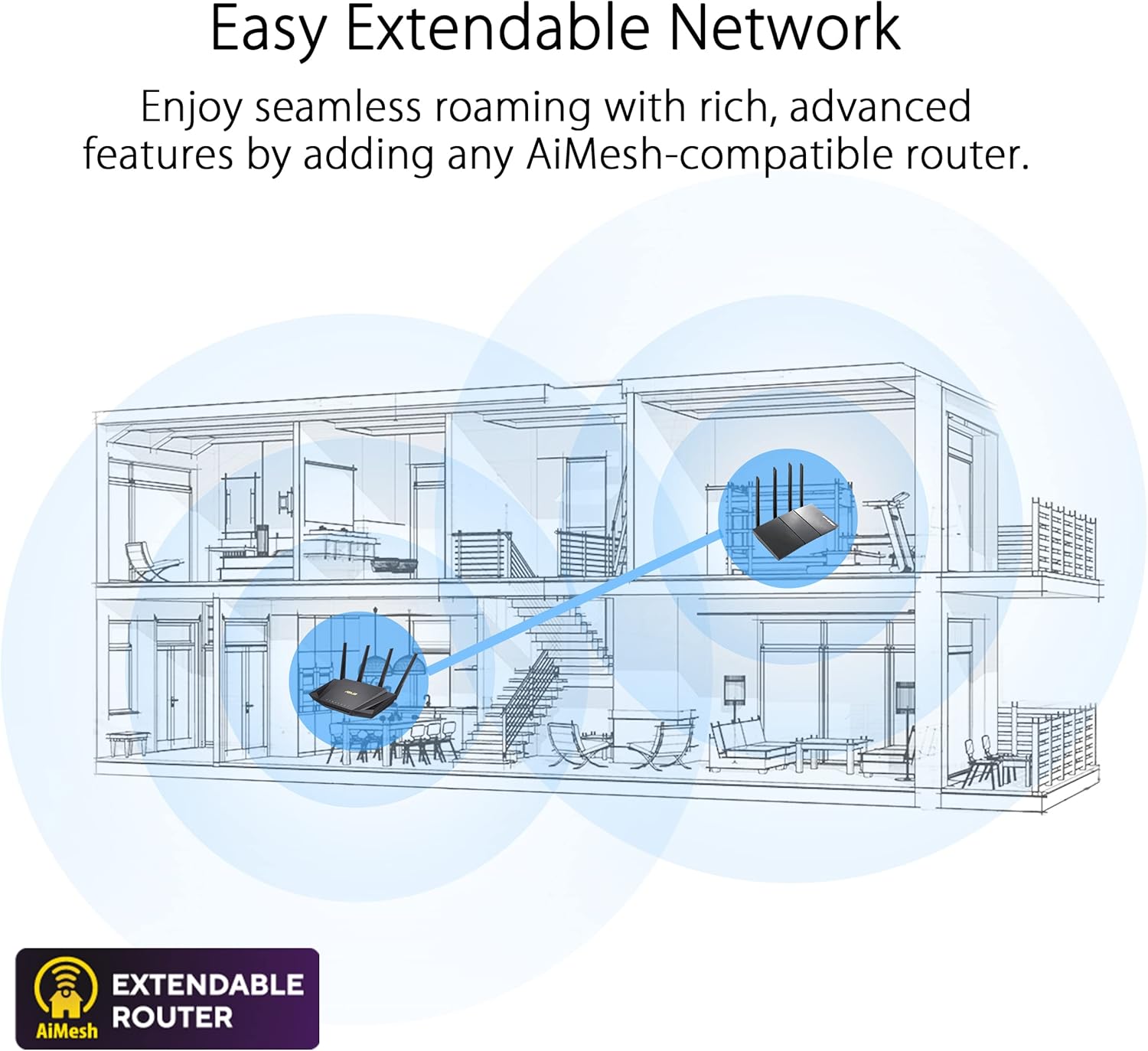
Image 4: Diagram illustrating an easy extendable network using ASUS AiMesh technology to cover multiple rooms.
4. Istruzzjonijiet Operattivi
App Router ASUS
Manage your RT-AXE7800 router conveniently using the ASUS Router mobile app. The app allows you to:
- Immonitorja t-traffiku tan-netwerk u l-apparati konnessi.
- Configure Wi-Fi settings.
- Manage security features.
- Stabbilixxi kontrolli tal-ġenituri.
- Access VPN features.

Image 5: Screenshot of the ASUS Router app displaying the AiMesh WiFi system topology.
Karatteristiċi tas-Sigurtà
The RT-AXE7800 includes robust security features to protect your network:
- AiProtection Pro: A free lifetime subscription powered by Trend Micro, offering commercial-grade network security, including malicious website blocking, two-way IPS, and infected device prevention and blocking.
- ASUS Safe Browsing: Blocks unwanted content with a single tap, helping to protect against malicious websites and inappropriate content.

Image 6: Illustration of the ASUS Safe Browsing feature, showing options to block malicious websites, inappropriate content, and advertisements.
Kontrolli tal-Ġenituri
Manage and monitor your family's internet usage with flexible parental controls:
- Schedule internet access times for specific devices.
- Filter content categories to block inappropriate websiti.
- Grant temporary internet access as a reward.

Image 7: Screenshot of the ASUS Router app showing parental control settings for screen time scheduling.
Karatteristiċi VPN
The RT-AXE7800 offers comprehensive VPN support:
- Instant Guard: Provides a one-click sharable secure VPN for public Wi-Fi, allowing you to protect your data when away from home.
- Supports various VPN protocols including WireGuard, OpenVPN, PPTP, and L2TP/IPsec.

Image 8: Visual representation of the router's VPN capabilities, supporting various protocols.
5. Manutenzjoni
Aġġornamenti tal-Firmware
Regularly check for and install firmware updates to ensure your router has the latest security patches and performance enhancements. Firmware updates can typically be performed through the ASUS Router app or the router's web interface.
Restarting the Router
If you experience network issues, a simple restart of the router can often resolve them. You can schedule automatic restarts through the router's settings for consistent performance.
6 Issolvi l-problemi
If you encounter problems with your ASUS RT-AXE7800 router, consider the following basic troubleshooting steps:
- Ebda Konnessjoni tal-Internet: Check all cable connections (modem to router, router to devices). Restart your modem and router. Verify your internet service provider (ISP) connection.
- Veloċità baxxa tal-Wi-Fi: Ensure your devices are connected to the appropriate band (6GHz for compatible devices, 5GHz for others). Check for interference from other electronic devices. Consider optimizing router placement or adding AiMesh nodes for better coverage.
- Ma nistax naċċessa s-Settings tar-Router: Ensure your device is connected to the router's network. Try clearing your browser's cache or using a different browser. Verify the router's IP address (usually http://router.asus.com jew 192.168.1.1).
- AiMesh Node Connectivity Issues: Ensure nodes are within optimal range of the main router. Check the signal quality in the ASUS Router app and reposition nodes if necessary.
7. Speċifikazzjonijiet
| Karatteristika | Dettall |
|---|---|
| Dimensjonijiet tal-Prodott | 8.27 x 9.49 x 2.44 pulzieri |
| Piż tal-oġġett | 2.28 liri |
| Isem tal-Mudell | RT-AXE7800 |
| Klassi ta' Banda ta' Frekwenza | Tri-Band (2.4 GHz, 5 GHz, 6 GHz) |
| Komunikazzjoni mingħajr fili Standard | 802.11a, 802.11ac, 802.11ax, 802.11g, 802.11n |
| Teknoloġija tal-Konnettività | Ethernet, USB, Wi-Fi |
| Karatteristiċi Speċjali | Alexa Compatible, Guest Mode, Internet Security, Parental Control, QoS |
| Apparati Kompatibbli | Konsol tal-Logħob, Kompjuter Personali, Televiżjoni Intelliġenti, Smartphone, Tablet |
8. X'hemm fil-Kaxxa
Your ASUS RT-AXE7800 package includes:
- ASUS RT-AXE7800 Router
- Kejbil RJ-45
- Adapter tal-Enerġija
- Gwida Quick Start
- Karta ta' Garanzija
9. Garanzija u Appoġġ
The ASUS RT-AXE7800 router comes with a manufacturer's warranty. Please refer to the included Warranty Card for detailed terms and conditions. Registering your product with ASUS allows for faster product support and access to exclusive benefits.
Video 2: This video provides instructions on how to register your ASUS router using the ASUS Router app, enabling quick access to customer support and product services.
Għal assistenza teknika, żur is-sit uffiċjali tal-appoġġ tal-ASUS website or contact ASUS customer service. Ensure you have your product's serial number readily available for support inquiries.