
Andoer 111
Andoer 4K Compact Digital Camera User Manual
Mudell: 111
Introduzzjoni
Grazzi tax-xiriasing the Andoer 4K Compact Digital Camera. This camera is designed for ease of use, offering high-quality photo and video capture in a portable form factor. It features a 48-megapixel image resolution, 4K video recording capabilities, a 2.4-inch IPS screen, 16X digital zoom, anti-shake technology, and a built-in flash. This manual provides detailed instructions to help you get the most out of your new camera.

Immaġni: Fuqview of the Andoer Digital Camera, highlighting features such as strong battery life, 4K video, micro size, 2.4-inch IPS screen, and 16X digital zoom.
X'hemm fil-Kaxxa
Jekk jogħġbok iċċekkja l-kontenut tal-pakkett biex tiżgura li l-oġġetti kollha huma preżenti:
- Andoer 4K Compact Digital Camera
- Ċinga tal-polz
- Borża tal-Ġarr
- Cable USB
- 32GB Memory Card (TF Card)
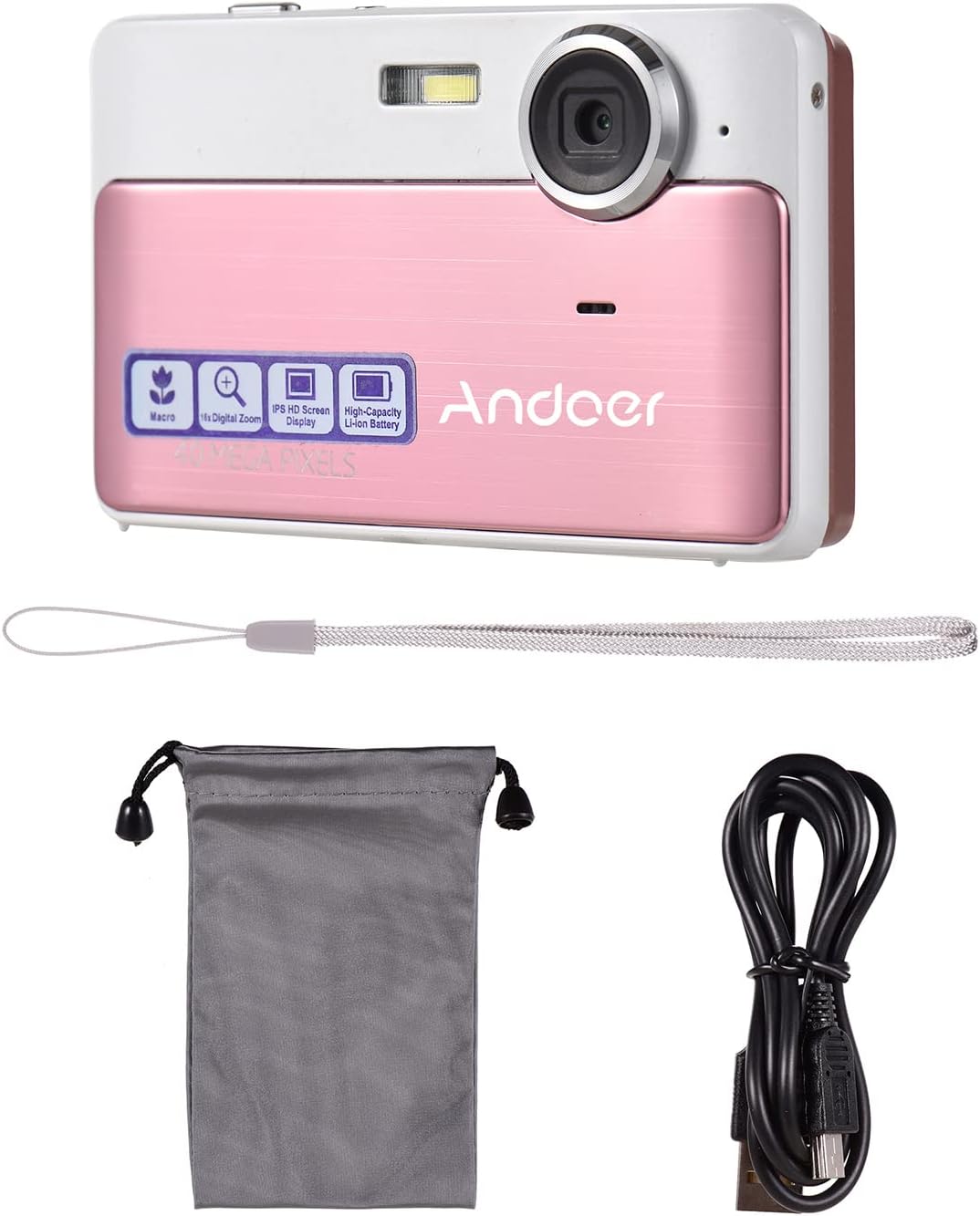
Image: The package contents including the pink digital camera, a grey carrying bag, a white wrist strap, a black USB cable, and a 32GB memory card.
Prodott Overview
Familiarize yourself with the various parts and controls of your Andoer Digital Camera.

Image: Labeled diagrams of the camera's top, back, and bottom views, indicating buttons and ports such as ON/OFF, OK, indicator light, zoom, macro, mode, flash/up, delete/right, self-timer/down, scene/left, flash, lens, plastic cover, tripod nut, and card slot.
Komponenti Ewlenin:
- Lenti: Jiġbor immaġini u vidjows.
- Flash: Jipprovdi dawl f'kundizzjonijiet ta' dawl baxx.
- Skrin IPS ta' 2.4 pulzieri: Wirjiet diretti view, menus, and playback.
- Buttuni tal-Kontroll: Navigate menus, adjust settings, and operate camera functions.
- Port USB: Għall-iċċarġjar u t-trasferiment tad-dejta.
- Slot tal-Karta: For inserting the TF (Micro SD) memory card.
- Tripod Nut: Għall-immuntar tal-kamera fuq tripod.
Setup
1. Iċċarġjar tal-batterija
The camera has a built-in 600mAh lithium battery. Before first use, ensure the battery is fully charged.
- Connect the included USB cable to the camera's USB port.
- Qabbad it-tarf l-ieħor tal-kejbil USB ma' adapter tal-enerġija USB (mhux inkluż) jew mal-port USB tal-kompjuter.
- The indicator light will show charging status. Once fully charged, the light will change or turn off.
2. Daħħal il-Kard tal-Memorja
The camera requires a TF (Micro SD) memory card for storing photos and videos. A 32GB memory card is included.
- Locate the card slot on the side or bottom of the camera (refer to Product Overview dijagramma).
- Gently insert the TF card into the slot with the metal contacts facing the correct direction (usually towards the front of the camera or as indicated by a small icon).
- Push the card in until it clicks into place. To remove, push it in again until it springs out.
Nota: Ensure the camera is turned off before inserting or removing the memory card to prevent data corruption.
Istruzzjonijiet Operattivi
1. Power On/Off
- To turn on the camera, press and hold the ON/OFF buttuna.
- Biex titfi l-kamera, agħfas u żomm il-buttuna ON/OFF buttuna għal darb'oħra.
2. Teħid tar-Ritratti
- Ensure the camera is in photo mode (indicated on the screen). If not, press the MODALITÀ buttuna biex taqleb.
- Ikkwadra r-ritratt tiegħek billi tuża l-iskrin IPS ta' 2.4 pulzieri.
- Uża l- W/T buttons (Zoom In/Out) to adjust the 16X digital zoom.
- Agħfas il- OK button (shutter button) to capture the photo.

Image: A visual representation of the 16X digital zoom function, showing how the camera can enlarge images to capture details.
3. Reġistrar Vidjows
- Agħfas il- MODALITÀ button to switch to video recording mode.
- Agħfas il- OK button to start recording. A timer or indicator will appear on the screen.
- Agħfas il- OK buttuna għal darb'oħra biex tieqaf tirrekordja.
4. L-użu tal-Flash
The camera has a built-in flash for low-light conditions.
- Fil-modalità tar-ritratti, agħfas il-buttuna Flash/Up button to cycle through flash modes (e.g., Auto Flash, Fill-in Flash, Red-eye Reduction, Flash Off).
- Select the appropriate mode for your shooting environment.
5. Scene Settings
Optimize your photos for different environments using scene settings.
- Agħfas il- Scene/Left button to access scene modes.
- Available modes include: Auto, Landscape, Macro, Night Scenery, Portrait, Night Portrait, Beach, Sport, Dinner.
- Use the navigation buttons to select a mode and press OK biex tikkonferma.

Image: A graphic illustrating various scene settings available on the camera, including Auto, Landscape, Night Scenery, Portrait, Night Portrait, Beach, Sport, and Dinner, alongside an image showcasing maximum 48MP photo resolution.
6. Macro and Long Distance Switching
Adjust focus for close-up or distant subjects.
- Agħfas il- Makro button (often integrated with other navigation buttons) to toggle between Macro mode (for close-up shots, typically within 10cm) and normal/long distance mode.
- When Macro mode is active, a macro icon will appear on the screen.

Image: A diagram showing how to switch between Macro and Long Distance focus modes. It explains that in Macro mode, objects within 10cm of the camera appear clearer.
7. Modalità Daqq
- Agħfas il- MODALITÀ button until you enter playback mode.
- Use the navigation buttons (Left/Right) to browse through your captured photos and videos.
- Agħfas OK biex view vidjo.
8. Konnessjoni ma' Kompjuter
- Ixgħel il-kamera.
- Qabbad il-kamera mal-kompjuter tiegħek billi tuża l-kejbil USB fornut.
- The camera should appear as a removable disk drive on your computer, allowing you to transfer files.
Manutenzjoni
Tindif tal-Kamera
- Uża drapp artab u niexef biex tnaddaf il-korp tal-kamera.
- For the lens and screen, use a specialized lens cleaning cloth and solution if necessary. Avoid abrasive materials.
- Do not use organic solvents or strong chemicals to clean the camera.
Kura tal-batterija
- Recharge the battery regularly, even if the camera is not in use, to maintain battery health.
- Avoid exposing the camera to extreme temperatures, which can affect battery performance.
Immaniġġjar tal-Kard tal-Memorja
- Always format a new memory card in the camera before first use.
- Do not remove the memory card while the camera is writing data (e.g., during recording or saving).
- Żomm il-memory cards 'il bogħod minn kampi manjetiċi qawwija.
Issolvi l-problemi
| Problema | Kawża / Soluzzjoni Possibbli |
|---|---|
| Il-kamera ma tixgħelx. | Battery is depleted. Charge the battery fully. |
| Ma nistax nieħu ritratti/nirrekordja vidjows. | Memory card is full or not inserted correctly. Insert/replace memory card or delete files. Ensure camera is in correct mode. |
| L-immaġini huma mċajpra. | Lens is dirty. Clean the lens. Insufficient light (use flash). Camera shake (hold steady or use anti-shake feature). Incorrect focus mode (adjust Macro/Long Distance). |
| Il-kamera tiffriża. | Remove and reinsert the memory card. If issue persists, turn off and on again. |
| Ma tistax tikkonnettja mal-kompjuter. | Ensure USB cable is properly connected. Try a different USB port or cable. Ensure camera is powered on. |
Speċifikazzjonijiet
| Karatteristika | Dettall |
|---|---|
| Isem tal-Mudell | 111 |
| Riżoluzzjoni tal-Immaġni | Up to 48 Megapixels (40MP, 30MP, 24MP, 18MP, 12MP, 8MP, 5MP) |
| Riżoluzzjoni tal-vidjo | 4K, 1080P, 720P |
| Skrin | Skrin IPS ta '2.4 pulzieri |
| Zoom Diġitali | 16X |
| Stabbilizzazzjoni tal-Immaġni | Diġitali Kontra t-Tħawwad |
| Tip ta 'batterija | Mibnija fil-batterija tal-litju 600mAh |
| Ħażna | External, supports up to 32GB TF (Micro SD) Memory Card |
| Format tar-ritratti | JPG |
| Format tal-vidjo | AVI |
| Port | USB 2.0 |
| Daqs tal-Oġġett | 9.5 * 5.8 * 2.2cm / 3.7 * 2.3 * 0.9inch |
| Piż tal-oġġett | 90g / 3.2oz |
| Lingwi Appoġġjati | English, French, Spanish, German, Italian, Portuguese, Japanese, Arabic, Simple Chinese, etc. |

Image: The physical dimensions of the camera, showing a length of 9.5cm, height of 5.8cm, and thickness of 2.2cm.
Garanzija u Appoġġ
Andoer products are manufactured to high quality standards. For any issues or support inquiries, please refer to the seller's return policy or contact Andoer customer service through their official channels. Please retain your proof of purchase for warranty claims.
Għal aktar għajnuna, tista' żżur il- Andoer Store on Amazon.
Ask a question about this manual
Ask about setup, troubleshooting, compatibility, parts, safety, or missing instructions. Manuals+ will review the question and use this page’s manual context to help answer it.