
1. Introduzzjoni
This manual provides detailed instructions for the setup, operation, and maintenance of your XTUGA U-260 Dual Channel UHF Wireless Microphone System. Please read this manual thoroughly before using the product to ensure proper functionality and to maximize its lifespan. Retain this manual for future reference.
2. Prodott Aktarview
The XTUGA U-260 is a professional-grade dual UHF wireless microphone system designed for various applications including church events, karaoke, weddings, and other live events. It features a robust design, adjustable frequencies, and convenient auto-scan and IR pairing functions.
2.1. Komponenti Inklużi
- U-260 UHF Wireless Receiver (1 unit)
- UHF Wireless Handheld Microphones (2 units)
- Antennas (2 units)
- Adapter tal-Enerġija (unità 1)
- Manwal tal-Utent (unità 1)
- Kejbil tal-Awdjo (unità 1)
- Anti-skid Rings (2 units)
- Power Plugs (2 units)
- Kejbils tal-Enerġija (2 unitajiet)

Figure 2.1: All components included with the XTUGA U-260 Wireless Microphone System, including the receiver, two microphones, antennas, power adapter, cables, and anti-skid rings.
2.2. Karatteristiċi ewlenin
- Dual UHF Channels: Two independent channels with 100 selectable frequencies each (Channel 1: 540.1 - 564.85 MHz; Channel 2: 568.1 - 592.85 MHz).
- Auto Scan Function: Automatically searches for the least interference channel.
- IR Synchronization: Seamlessly pairs the receiver and microphones.
- Lock tal-Frekwenza: Prevents accidental frequency changes.
- Long Range Operation: Up to 492ft (150 meters) operating distance.
- Kostruzzjoni Durabbli: Microphones feature sturdy metal construction.
- Kwalità tal-Ħoss Superjuri: High-quality dynamic cartridge designed to limit feedback and interference.
- Rechargeable Microphones: Built-in lithium batteries provide up to 8 hours of use on a 3-hour charge via USB-C.
- Dashboard-Inspired Display: Receiver features a unique display for AF and RF signal indication.

Figure 2.2: The receiver's display screen, featuring a dashboard-inspired design for clear signal indication.
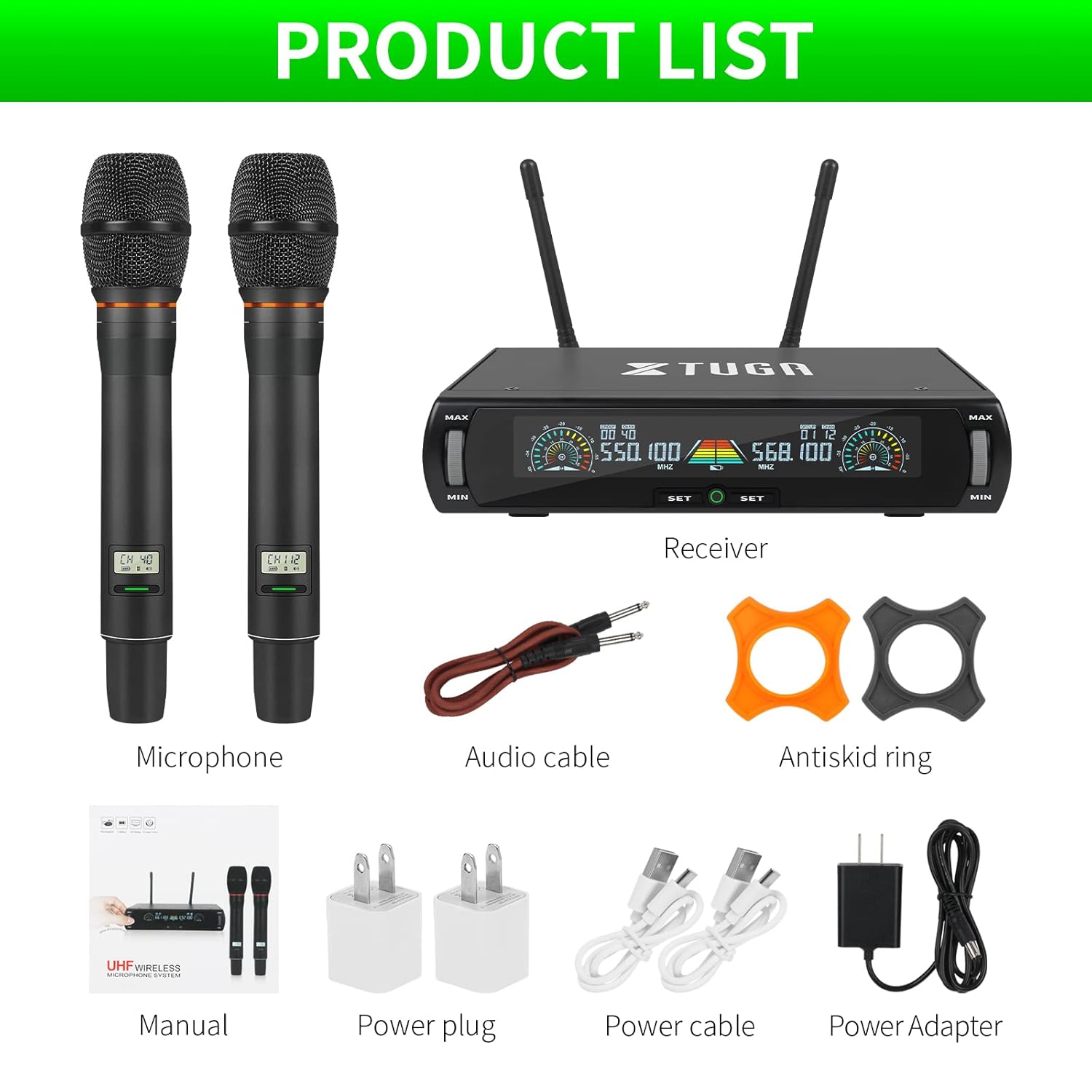
Figure 2.3: Illustration of the microphone's cardioid pickup pattern, designed to reduce noise and capture sound realistically.
2.3. Identifikazzjoni tal-Komponent

Figura 2.4: Dettaljat view of the receiver and microphone components.
- Kontroll tal-volum
- Function settings button
- Switch (Power/Mode)
- Skrin tal-wiri
- Power socket (DC 12V)
- Jack tal-antenna
- Ħruġ XLR
- Audio output (6.35mm/1/4 inch)
- Steel meshed head (Microphone)
- Display screen (Microphone)
- Switch (Microphone Power)
- Type-C charging port (Microphone)
3. Istruzzjonijiet ta' Setup
- Ħoll il-Komponenti: Neħħi bir-reqqa l-oġġetti kollha mill-imballaġġ.
- Qabbad l-antenni: Screw the two antennas into the antenna jacks on the rear of the receiver. Ensure they are securely tightened.
- Konnessjoni tal-Enerġija: Connect the power adapter to the receiver's power socket (DC 12V) and plug it into a suitable power outlet.
- Output Awdjo:
- For balanced output, connect XLR cables from the receiver's XLR outputs to your mixer or ampaktar ħaj.
- For unbalanced output, use the provided 6.35mm (1/4 inch) audio cable to connect the receiver's audio output to your mixer or ampaktar ħaj.
- Qawwa mixgħul ir-riċevitur: Press the power switch on the receiver. The display screen should illuminate.
- Charge Microphones: Before first use, ensure both microphones are fully charged using the provided USB-C cables and power plugs. The microphone display will show charging status.
- Mikrofoni li Jixgħlu: Press and hold the power switch on each microphone until its display illuminates.

Figure 3.1: The XTUGA U-260 system ready for operation, showing the receiver with antennas and two handheld microphones.
4. Istruzzjonijiet Operattivi
4.1. Frequency Selection and IR Pairing
The system features an auto-scan function to find clear frequencies and IR synchronization for easy pairing.

Figure 4.1: Diagram illustrating the IR pairing process between the microphone and receiver.
- Initiate Auto Scan: On the receiver, press the "SET" button three times quickly for the desired microphone channel (left or right). The receiver will scan for the clearest available frequency.
- Select Frequency (Optional): If you wish to manually select a frequency after the scan, rotate the volume knob corresponding to the microphone channel you are adjusting.
- IR Pairing: Once a frequency is displayed on the receiver, hold the front of the microphone (where its display is located) close to the IR sensor on the receiver. The IR sensor is located on the bottom left side of the receiver's screen.
- Ikkonferma l-Imqabbad: While holding the microphone near the IR sensor, press the "SET" button on the receiver once for the corresponding microphone channel. A small indicator light on the receiver should flash, and the microphone's display will update to show the new frequency, confirming successful pairing. This process may require a couple of attempts to ensure proper alignment and timing.
4.2. Frequency Lock Function
To prevent accidental changes to the selected frequency, use the frequency lock function.

Figure 4.2: Visual representation of the frequency lock function, showing a padlock icon.
- Biex Tissakkar: Press and hold the "SET" button on the receiver for the desired microphone channel until a lock icon appears on the display.
- Biex Nisfruttaw: Press and hold the "SET" button again until the lock icon disappears.
4.3. Kontroll tal-Volum
Each microphone channel has an independent volume control knob on the receiver. Rotate the "MIN/MAX" knobs to adjust the output volume for each microphone.
4.4. Microphone Charging
The handheld microphones are equipped with built-in rechargeable lithium batteries.

Figure 4.3: Illustration of microphone battery life (8 hours work) and charging time (3 hours) via USB-C.
- Connect a USB-C cable to the charging port at the bottom of the microphone.
- Connect the other end of the USB-C cable to a power adapter or a USB power source.
- A dim red light on the microphone's display bar indicates charging. The light will turn off or change color when fully charged.
- A full charge typically takes approximately 3 hours and provides up to 8 hours of continuous use.
5. Manutenzjoni
- Tindif: Use a soft, dry cloth to clean the receiver and microphones. Do not use liquid cleaners or solvents.
- Ħażna: Aħżen is-sistema f'post frisk u niexef 'il bogħod mix-xemx diretta u minn temperaturi estremi meta ma tkunx qed tintuża.
- Kura tal-batterija: For optimal battery life, avoid fully discharging the microphones frequently. Recharge them regularly, especially if storing for extended periods.
- Ġestjoni tal-Kejbil: Ensure all cables are connected securely and are not strained or kinked.
6 Issolvi l-problemi
| Problema | Kawża Possibbli | Soluzzjoni |
|---|---|---|
| Ebda output tal-ħoss. |
|
|
| Interferenza jew storbju statiku. |
|
|
| Microphone not pairing. |
|
|
| Microphone battery drains quickly. |
|
|
7. Speċifikazzjonijiet
| Karatteristika | Dettall |
|---|---|
| Mudell | U-260 |
| Brand | XTUGA |
| Fattur tal-Forma tal-Mikrofonu | Sistema ta' Mikrofonu (li tinżamm fl-idejn) |
| Teknoloġija tal-Konnettività | UHF bla fili, XLR |
| Numru ta 'Kanali | 2 (2x100 selectable frequencies) |
| Frequency Range (Channel 1) | 540.1 - 564.85 MHz |
| Frequency Range (Channel 2) | 568.1 - 592.85 MHz |
| Medda Operattiva | Sa 492 pied (150 metru) |
| Mudell Polari | Unidirectional (Cardioid Pickup) |
| Impedenza | 600 Ohm |
| Sinjal-mal-ħoss Ratio | 120 dB |
| Sors tal-Enerġija tal-Mikrofonu | Batterija tal-litju rikarikabbli built-in |
| Ħajja tal-Batterija tal-Mikrofonu | Sa 8 sigħat |
| Ħin tal-Iċċarġjar tal-Mikrofonu | Madwar 3 sigħat (permezz ta' USB-C) |
| Sors tal-Enerġija tar-Riċevitur | Adapter tal-Enerġija DC 12V |
| Materjal | Metal (Microphones) |
| Komponenti Inklużi | Receiver, 2 Handheld Microphones, 2 Antennas, Power Adapter, User Manual, Audio Cable, Anti-skid Rings, Power Plugs, Power Cables |
| Piż tal-oġġett | 2 kg |
8. Garanzija u Appoġġ
XTUGA provides a one-year free warranty period for products with authentic brand logos. For any questions, technical assistance, or warranty claims, please contact XTUGA customer support through your purchase platform or the official XTUGA websit.
Jekk jogħġbok żomm il-prova tax-xiri tiegħek għall-validazzjoni tal-garanzija.