
Andoer d8cfa559-d5d2-443f-9ed4-a8e814a7e410
Andoer 4K Digital Camera Video Camcorder User Manual
Model: d8cfa559-d5d2-443f-9ed4-a8e814a7e410
1. Introduzzjoni
This manual provides essential information for the safe and effective operation of your Andoer 4K Digital Camera Video Camcorder. Please read this manual thoroughly before using the device and retain it for future reference.
2. Informazzjoni dwar is-Sigurtà
Twissija:
- Tesponix il-kamera għall-ilma jew l-umdità.
- Evita li twaqqa’ l-kamera jew li tissottomettiha għal impatti qawwija.
- Żomm fejn ma jintlaħaqx mit-tfal żgħar minħabba l-partijiet żgħar.
- Uża biss il-kejbil tal-iċċarġjar u s-sors tal-enerġija speċifikati.
- Dispose of packaging materials properly to avoid choking hazards.

Image: A warning graphic indicating proper disposal of packaging materials to prevent choking hazards. This emphasizes the importance of safety, especially for children.
3. Kontenut tal-Pakkett
Iċċekkja li l-oġġetti kollha elenkati hawn taħt huma inklużi fil-pakkett tiegħek:
- 1 x Andoer Digital Camera
- 1 x USB Iċċarġjar Cable
- 1 x Strap tal-polz
- 1 x Carry Bag
- Karta tal-Memorja 1 x 32GB
- 1 x Users' Manual (English)
4. Prodott Aktarview
4.1 Komponenti tal-Kamera
Familiarize yourself with the main components of your digital camera.

Immaġni: Quddiem u wara views of the silver Andoer 4K Digital Camera. The front shows the lens and flash, while the back displays the screen and control buttons, including zoom (W/T), OK, menu, and mode buttons.

Immaġni: Naħa waħda view of the Andoer 4K Digital Camera, highlighting the USB port and memory card slot, which are typically covered by a flap.
4.2 Wiri u Kontrolli
The camera features a 2.4-inch IPS screen for clear viewkontrolli intuwittivi.
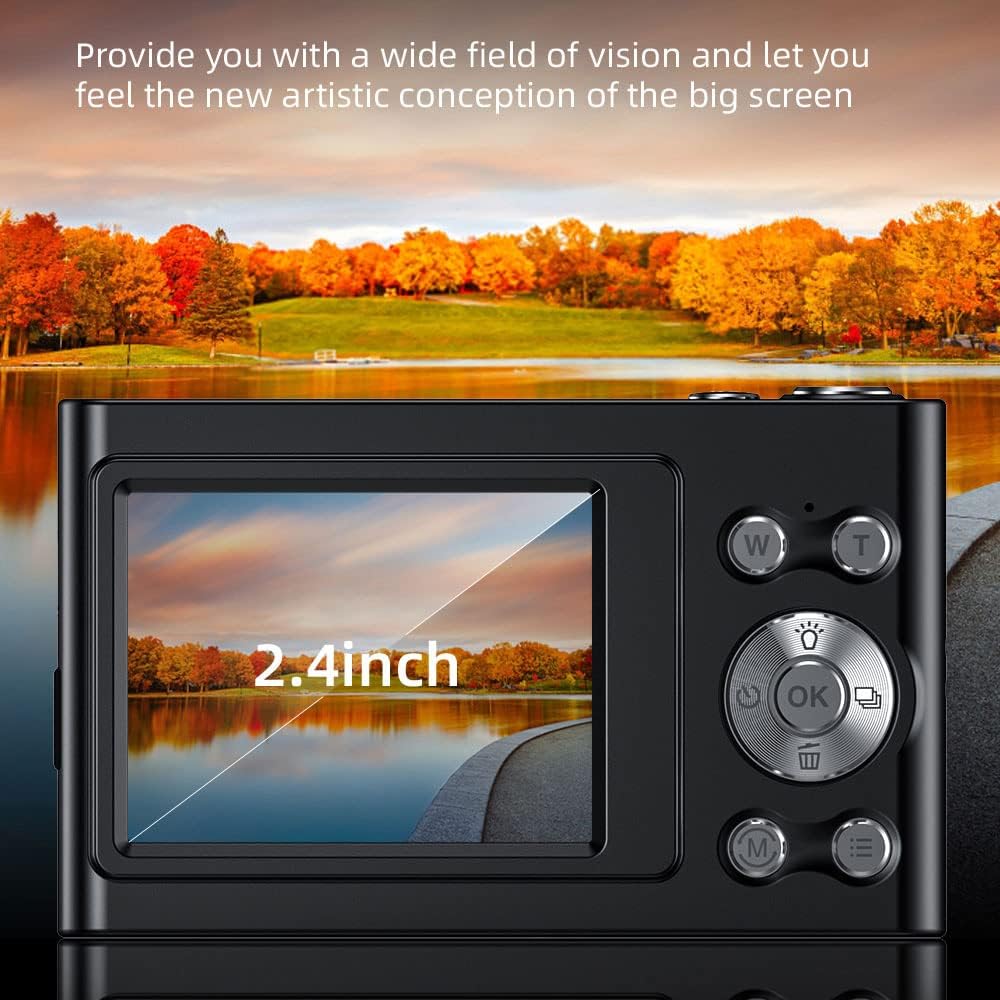
Image: A close-up of the camera's 2.4-inch IPS screen, displaying a landscape scene with a lake and autumn trees, demonstrating the screen's clarity and size.

Image: A hand holding the Andoer camera, with the screen displaying a family on a beach. The image highlights the camera's compact size and the accessibility of its rear controls, including the directional pad and function buttons.
4.3 Dimensjonijiet
The compact design of the camera makes it portable and easy to handle.

Image: A technical diagram illustrating the dimensions of the Andoer 4K Digital Camera. It shows the length (95mm), height (58mm), and thickness (25mm) of the device, along with top, front, and side views.
5. Setup
5.1 Iċċarġjar tal-batterija
The camera has a built-in lithium battery. To charge:
- Connect the camera to a USB power adapter (not included) or a computer using the provided USB charging cable.
- Id-dawl indikatur tal-iċċarġjar se jixgħel.
- Once fully charged, the indicator light will turn off or change color.
Note: Ensure the camera is turned off during charging for optimal battery life.
5.2 Tiddaħħal il-Memory Card
The camera supports Class-10 external TF memory cards up to 128GB. A 32GB memory card is included.
- Locate the memory card slot on the side of the camera (refer to Product Overview immaġini).
- Iftaħ l-għatu protettiv.
- Insert the memory card with the metal contacts facing the correct direction until it clicks into place.
- Agħlaq l-għatu protettiv.
Note: Format the memory card in the camera's settings before first use.
6. Istruzzjonijiet Operattivi
6.1 Power On/Off
Press and hold the power button (usually located on the top or side) to turn the camera on or off.
6.2 Tieħu Ritratti
- Ixgħel il-kamera.
- Select Photo Mode using the Mode button (M).
- Frame your shot using the IPS screen.
- Use the W/T buttons for 16X digital zoom.
- Press the Shutter button (usually the large button on top) to capture the photo.

Image: A visual comparison demonstrating the camera's 16X digital zoom capability. The top image shows a wide shot (1x zoom) of a person on a beach with a hot air balloon, while the bottom image shows a zoomed-in view (16x zoom) of the same person, highlighting the magnification.
6.3 Reġistrar Vidjows
- Ixgħel il-kamera.
- Select Video Mode using the Mode button (M).
- Agħfas il-buttuna tax-Xutter biex tibda tirrekordja.
- Agħfas il-buttuna Shutter għal darb'oħra biex tieqaf tirrekordja.
The camera supports 4K (3840x2160) video resolution.
6.4 Daqq
Biex view ritratti u vidjows maqbuda:
- Enter Playback Mode (often indicated by an icon like a triangle or arrow).
- Uża l-buttuni direzzjonali biex tinnaviga fil-midja tiegħek.
- Press the OK button to play videos.
6.5 Settings tal-Menu
Press the Menu button to access camera settings, including:
- Riżoluzzjoni tal-Istampa: 48M, 36M, 30M, 24M, 20M, 18M, 16M, etc.
- Riżoluzzjoni tal-vidjo: 4K(3840x2160), 2.7K(2688x1520), 1080P(1920x1080), 720P(1280x720)
- Modalità: Auto, Sport, Night, Portrait, Landscape, Backlight, Party, Beach, High Sensitivity
- Bilanċ abjad: Awtomatiku, Dawl tal-Jum, Imsaħħab, Fluworexxenti, Tungstenu
- Self-Timer: Mitfi, 2 sek, 5 sek, 10 sek
- Mitfi Awtomatiku: Mitfi, 1 minuta, 3 minuti, 5 minuti, 10 minuti
- Espożizzjoni: EV-3 għal EV+3
- Anti-ħawwad: Digital image stabilization.
- Face Detect & Smile Capture: Features for improved portrait photography.
- Continuous Photography: For capturing multiple shots in quick succession.

Immaġni: Tnejn views of the Andoer camera demonstrating its ability to support both vertical and horizontal screen shooting. One camera is positioned horizontally, and another is rotated vertically, each displaying a portrait of a woman.
7. Manutenzjoni
7.1 Tindif tal-Kamera
- Uża drapp artab u niexef biex tnaddaf il-korp tal-kamera.
- For the lens and screen, use a specialized lens cleaning cloth and solution.
- Tużax tindif jew solventi li joborxu.
7.2 Ħażna
- Aħżen il-kamera f'post frisk u niexef 'il bogħod mix-xemx diretta u minn temperaturi estremi.
- If storing for an extended period, remove the memory card and ensure the battery is partially charged (not fully charged or fully depleted).
- Use the provided carry bag for protection during transport.
8 Issolvi l-problemi
| Problema | Kawża Possibbli | Soluzzjoni |
|---|---|---|
| Il-kamera ma tixgħelx. | Il-batterija hija eżawrita. | Iċċarġja l-batterija. |
| Ma nistax nieħu ritratti/vidjows. | Memory card is full or not inserted correctly. | Insert/reinsert memory card, delete unnecessary files, or replace with a new card. |
| L-immaġini huma mċajpra. | Lens is dirty; camera shake; subject too close/far. | Clean the lens; use anti-shake feature; ensure proper focus distance. |
| Il-flash mhux qed jaħdem. | Flash mode is off or battery is low. | Check flash settings; charge battery. |
9. Speċifikazzjonijiet
| Karatteristika | Dettall |
|---|---|
| Sensor tal-Immaġni | Sensor CMOS |
| Wiri | Skrin IPS ta '2.4 Pulzier |
| Riżoluzzjoni tal-Istampa | 48M, 36M, 30M, 24M, 20M, 18M, 16M, etc. |
| Riżoluzzjoni tal-vidjo | 4K(3840x2160), 2.7K(2688x1520), 1080P(1920x1080), 720P(1280x720) |
| Zoom Diġitali | 16X |
| Espożizzjoni | EV-3 għal EV+3 |
| Provvista tal-Enerġija | Mibnija fil-batterija tal-litju |
| Daqs tal-Oġġett | 9.5 * 5.8 * 2.5 ċm (3.7 * 2.3 * 1 pulzieri) |
| Piż tal-oġġett | 115g (4.1oz) |
| Appoġġ tal-Kard tal-Memorja | Class-10 TF card, max. 128GB (32GB included) |
| Konnettività | USB |
| Karatteristiċi Speċjali | Anti-shake, Face Detect, Smile Capture, Continuous Photography, Self-timer, Built-in Flash |
10. Garanzija u Appoġġ
This product comes with a standard manufacturer's warranty. For specific warranty terms and conditions, please refer to the documentation provided with your purchase or contact Andoer customer support.
For technical support or service inquiries, please visit the official Andoer webis-sit jew ikkuntattja lid-dipartiment tas-servizz tal-konsumatur tagħhom. L-informazzjoni ta' kuntatt tipikament tista' tinstab fuq l-imballaġġ tal-prodott jew fuq il-preżenza uffiċjali online tal-marka.
Based on product specifications, the warranty type is listed as "No Warranty". Please refer to your purchase documentation for any applicable seller or retailer warranties.
Ask a question about this manual
Ask about setup, troubleshooting, compatibility, parts, safety, or missing instructions. Manuals+ will review the question and use this page’s manual context to help answer it.