
Introduzzjoni
The ASUS ROG Crosshair X670E Extreme is an EATX gaming motherboard designed for AMD Ryzen 7000 Series processors using the AM5 (LGA 1718) socket. It features advanced power delivery, high-speed connectivity, and comprehensive cooling solutions to maximize system performance. This manual provides essential information for setting up, operating, maintaining, and troubleshooting your motherboard.

Image: The ASUS ROG Crosshair X670E Extreme motherboard, its retail packaging, Wi-Fi antenna, and an expansion card.
Setup u Installazzjoni
Proper installation is crucial for optimal performance and system stability. Ensure all components are compatible and installed correctly.
1. Kompatibilità tal-Komponenti
- CPU: Supports AMD Ryzen 7000 Series Desktop Processors (LGA 1718 socket).
- RAM: Supports DDR5 memory modules. Refer to the motherboard's Qualified Vendor List (QVL) for tested and compatible memory kits.
- Ħażna: Supports PCIe 5.0 and PCIe 4.0 M.2 SSDs, and SATA 6Gb/s drives.
2. It-Tqassim tal-Motherboard Fuqview
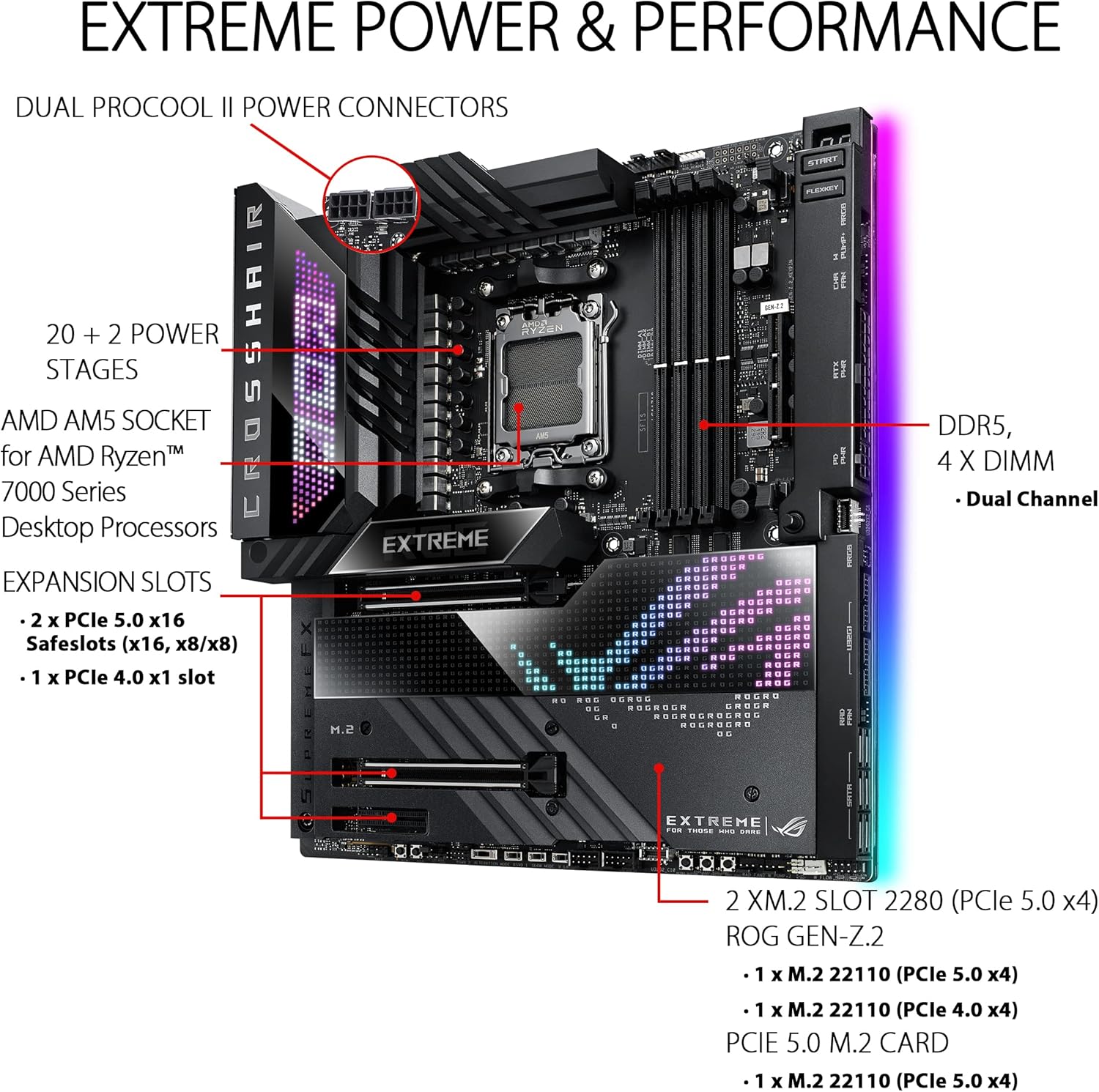
Image: A detailed diagram illustrating the motherboard's key components including the AMD AM5 socket, DDR5 DIMM slots, 20+2 power stages, Dual ProCool II power connectors, and PCIe 5.0 x16 expansion slots.
The motherboard features a robust power solution with 20+2 teamed power stages and ProCool II power connectors. It includes four DDR5 DIMM slots for dual-channel memory configuration and multiple PCIe 5.0 x16 Safeslots for graphics cards and other expansion cards.
3. Cooling System Integration

Immaġni: Dijagramma turiasing the comprehensive cooling design, including large VRM heatsinks, integrated aluminum I/O cover, ROG GEN-Z.2, five M.2 heatsinks, dual M.2 with embedded backplates, and the ROG Water-Cooling Zone.
The motherboard incorporates an optimized thermal design with large VRM heatsinks, an integrated aluminum I/O cover, and multiple M.2 heatsinks to ensure stable operation under heavy loads. The ROG Water-Cooling Zone provides dedicated headers for custom liquid cooling setups.
4. X'hemm fil-Kaxxa
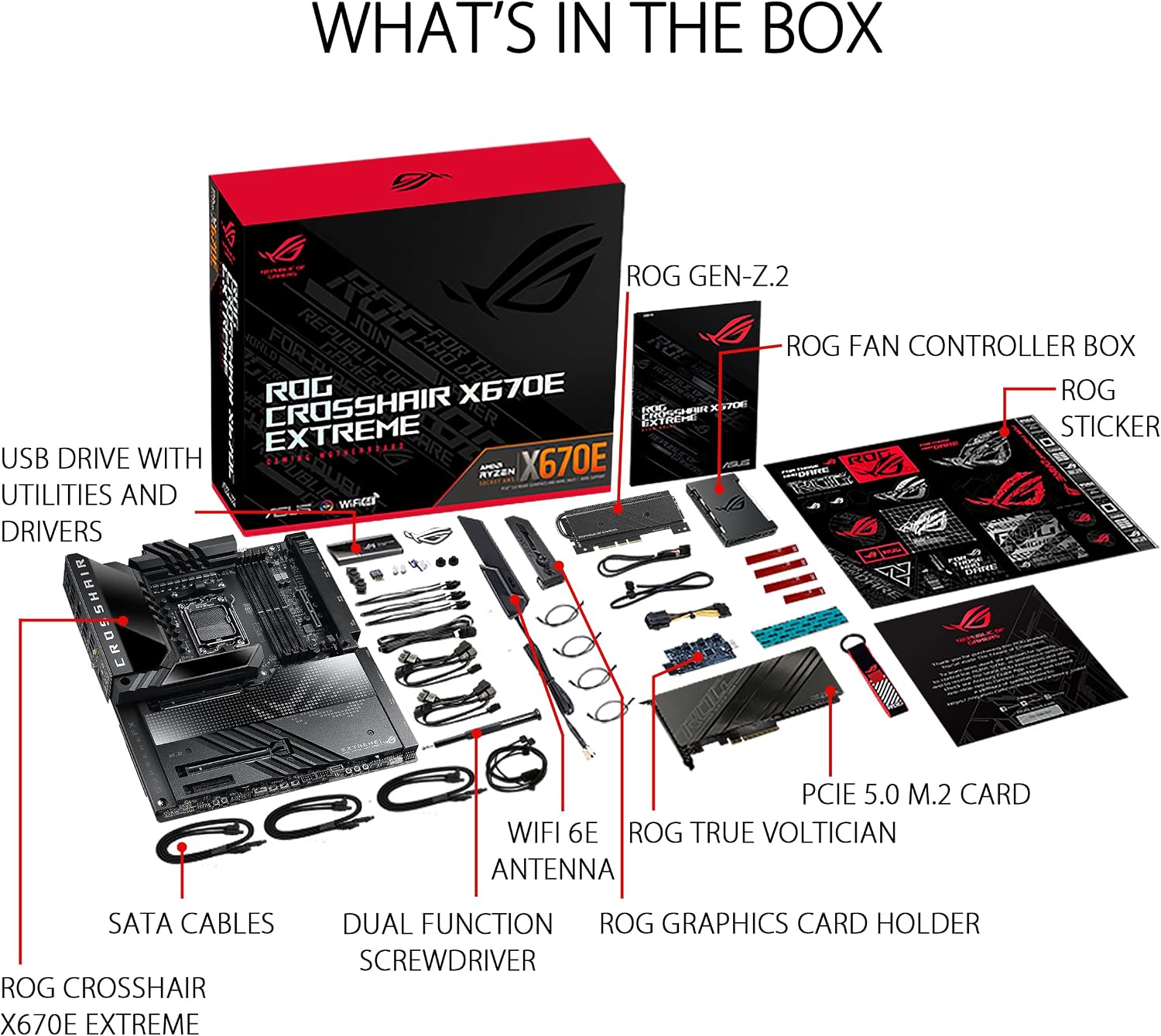
Immaġni: Sploda view of the retail box contents, including the motherboard, ROG GEN-Z.2 card, ROG Fan Controller Box, USB drive with utilities and drivers, SATA cables, WiFi 6E antenna, dual function screwdriver, ROG True Voltician, PCIe 5.0 M.2 card, ROG Graphics Card Holder, and ROG stickers.
The package includes essential accessories for installation and enhanced functionality, such as the ROG GEN-Z.2 card, a USB drive with drivers, SATA cables, a WiFi 6E antenna, and a PCIe 5.0 M.2 card.
Istruzzjonijiet Operattivi
This section covers the primary features and functionalities of your ASUS ROG Crosshair X670E Extreme motherboard.
1. Intelligent Control Features
- Tkessiħ bl-AI II: Optimizes cooling performance and noise levels.
- Netwerking tal-AI: Prioritizes network traffic for gaming and applications.
- Two-Way AI Noise-Cancelation: Ittejjeb iċ-ċarezza tal-awdjo għall-komunikazzjoni.
2. Konnettività

Image: The rear I/O panel showing various ports including USB 3.2 Gen 2, USB4 Type-C, Marvell AQtion 10Gb Ethernet, Intel 2.5Gb Ethernet, WiFi 6E antenna connectors, optical S/PDIF out, and LED-illuminated audio jacks. Also visible are the BIOS FlashBack and Clear CMOS buttons.
The motherboard offers extensive connectivity options including onboard Wi-Fi 6E, Marvell AQtion 10Gb Ethernet, Intel 2.5Gb Ethernet, multiple USB 3.2 Gen 2 ports, and USB4 Type-C ports for high-speed data transfer and networking.
3. Audio and Aesthetics

Immaġni: A view of the motherboard emphasizing the SupremeFX ALC4082 Audio Codec, ESS ES9218 QUAD DAC, 2-inch LiveDash OLED, Anime Matrix LED, Edge Zone Lighting, and ROG Logo Lighting.
Experience immersive audio with the SupremeFX ALC4082 Audio Codec and ESS ES9218 QUAD DAC. The motherboard also features customizable aesthetics with Anime Matrix LED, a 2-inch LiveDash OLED display, Edge Zone Lighting, and ROG Logo Lighting.
Manutenzjoni
Regular maintenance helps prolong the lifespan and ensure stable operation of your motherboard.
- Tneħħija tat-Trab: Naddaf it-trab mill-motherboard u s-heatsinks perjodikament bl-użu ta' arja kkompressata. Kun żgur li s-sistema tkun mitfija u skonnettjata qabel ma tnaddafha.
- Kontrolli tal-Konnessjoni: Verify that all cables (power, data, and peripheral) are securely connected.
- Aġġornamenti tal-BIOS: Keep your BIOS updated to the latest version for improved compatibility, stability, and performance. Refer to the ASUS support websit għall-aħħar verżjonijiet tal-BIOS u struzzjonijiet għall-aġġornament.
- Aġġornamenti tas-Software: Ensure all drivers and utility software (e.g., Armoury Crate) are up-to-date.
Issolvi l-problemi
Din it-taqsima tindirizza kwistjonijiet komuni li tista’ tiltaqa’ magħhom u tipprovdi soluzzjonijiet.
1. System Fails to Boot or POST
- Iċċekkja l-Konnessjonijiet tal-Enerġija: Ensure the 24-pin ATX power connector and 8-pin/4-pin CPU power connectors are firmly seated.
- Kwistjonijiet ta' Memorja: Reseat RAM modules. Try booting with only one RAM stick installed in the recommended slot (refer to your motherboard manual for specific slot recommendations).
- CMOS ċar: Uża l- Buttuna CMOS ċara on the rear I/O panel to reset BIOS settings to default. This can resolve boot issues caused by incorrect settings.
- FlashBack tal-BIOS: If the system does not POST after a BIOS update or if you suspect a corrupted BIOS, use the Buttuna tal-BIOS FlashBack to update the BIOS without a CPU or RAM installed. Refer to the ASUS websit għal struzzjonijiet dettaljati.
- Karta Grafika: Ensure the graphics card is properly seated in its PCIe slot and connected to power. If your CPU has integrated graphics, try booting without a dedicated GPU.
2. L-ebda Output tal-Wiri
- Verify that your monitor is connected to the correct display output on your graphics card or motherboard (if using integrated graphics).
- Ittestja b'kejbil tad-displej jew monitor differenti jekk possibbli.
3. Kwistjonijiet ta' Tisħin Żejjed
- Ensure all case fans and CPU cooler fans are functioning correctly.
- Check for proper airflow within the PC case.
- Verify that the CPU cooler is correctly installed and making good contact with the CPU.
- Naddaf it-trab mill-heatsinks u l-fannijiet.
Speċifikazzjonijiet
| Karatteristika | Dettall |
|---|---|
| Brand | ASUS |
| Isem tal-Mudell | ROG CROSSHAIR X670E EXTREME |
| Socket tas-CPU | LGA 1718 |
| Proċessuri Kompatibbli | Proċessuri tad-Desktop AMD Ryzen 7000 Series |
| Tip ta' Ċipset | AMD X670 |
| Teknoloġija tal-Memorja RAM | DDR5 |
| Veloċità tal-Arloġġ tal-Memorja | Sa 6400 MHz (OC) |
| Daqs Massimu tal-Memorja RAM | 128 GB |
| Interface tal-Kard Grafika | PCI Express 5.0 |
| Total PCIe Ports | 3 (2 x PCIe 5.0 x16, 1 x PCIe 4.0 x1) |
| M.2 Slots | 5 (including ROG GEN-Z.2 and PCIe 5.0 M.2 card) |
| Portijiet SATA Totali | 6 |
| Netwerking | Onboard Wi-Fi 6E, Marvell AQtion 10Gb Ethernet, Intel 2.5Gb Ethernet |
| Portijiet USB | Multiple USB 3.2 Gen 2, USB4 Type-C, USB 2.0 |
| Awdjo | SupremeFX ALC4082 Audio Codec, ESS ES9218 QUAD DAC |
| Dimensjonijiet (L x W x H) | 12.6"L x 5"W x 14.9"H (EATX Form Factor) |
| Piż tal-oġġett | 13.4 Liri |
Garanzija u Appoġġ
1. Informazzjoni dwar Garanzija
The ASUS ROG Crosshair X670E Extreme motherboard comes with a garanzija ta 'sena. Please retain your proof of purchase for warranty claims. For detailed terms and conditions, refer to the warranty card included with your product or visit the official ASUS support websit.
2. Appoġġ Tekniku
For further assistance, driver downloads, BIOS updates, and troubleshooting guides, please visit the official ASUS support websit:
You can also find additional resources and community forums on the Republic of Gamers (ROG) websit.
Vidjows Uffiċjali tal-Prodott
The following video provides additional information and an overview tal-prodott.
Vidjo: Prodott Spiċċatview Video by Amazon Product Imaging. This video provides a general overview of the ASUS ROG Crosshair X670E Extreme motherboard, showcasinid-disinn u l-karatteristiċi ewlenin tiegħu.