
Introduzzjoni
This manual provides detailed instructions for the installation, operation, and maintenance of your podofo 4G+64G Android 13 Car Stereo. This unit is specifically designed for Honda Odyssey models manufactured between 2005 and 2010, offering an upgraded in-car entertainment and navigation experience with a 10.1-inch IPS touchscreen, wireless CarPlay, and Android Auto functionality.
Kompatibbiltà tal-Vettura
This car stereo is compatible with Honda Odyssey models from 2005 to 2010. It is designed for a direct fit and includes a plug-and-play wiring harness for simplified installation.

Image: Comparison of a Honda Odyssey dashboard before and after the installation of the podofo car stereo, showing the integrated 10.1-inch display.
Important Compatibility Note
Dan il-prodott jagħmel le support vehicles equipped with a factory-installed central control unit featuring a large screen or original car navigation system. Please verify your vehicle's dashboard configuration before installation.

Image: Visual guide indicating compatible (standard radio, marked A) and incompatible (large screen navigation, marked B) dashboard types for Honda Odyssey.
X'hemm fil-Kaxxa
Il-pakkett jinkludi l-komponenti li ġejjin:
- Unità Stereo tal-Karozza Android
- Antenna tal-GPS
- Mikrofonu Estern
- HD Backup Camera
- Sett ta' Kejbils RCA
- Cable USB
- Kejbil tal-Enerġija
- Kejbil tal-Input tal-Kamera ta 'wara
- Installation Tool (typically plastic pry tools)

Immaġni: Fuqview of the car stereo dimensions and a visual representation of the included accessories such as cables, antennas, and the backup camera.
Setup u Installazzjoni
Before beginning installation, ensure your vehicle's battery is disconnected to prevent electrical damage. Refer to your vehicle's service manual for specific dashboard removal procedures.
Konnessjonijiet tal-Wiring
- Cable tal-Enerġija: Connect the main power harness to the vehicle's wiring. The included harness is designed for plug-and-play installation for Honda Odyssey 2005-2010.
- Kejbils RCA: Connect audio output (FR, FL, RR, RL), auxiliary input (AUX R IN, AUX L IN), subwoofer output, and video output as needed for external amplifikaturi jew monitors.
- Kejbils USB: Connect the provided USB cables for external USB devices.
- Antenna tar-radju: Qabbad l-antenna tar-radju tal-vettura mal-unità.
- Antenna tal-GPS: Immonta l-antenna tal-GPS f'post b'dawl ċar view tas-sema, bħal fuq id-dashboard jew taħt il-windskrin.
- Mikrofonu Estern: Qabbad il-mikrofonu estern għal kwalità aħjar tas-sejħiet u l-kmandi tal-vuċi. Poġġih ħdejn is-sewwieq għal prestazzjoni ottimali.
- Input tal-Kamera ta' wara: Connect the HD backup camera cable to the designated input. Ensure the camera's power and ground wires are correctly connected, typically to the vehicle's reverse light circuit.
- Kontroll tal-Istering Wheel (SWC): The unit supports steering wheel controls. Connect the SWC wires according to the wiring diagram. The system may require a learning process for the controls to function correctly.
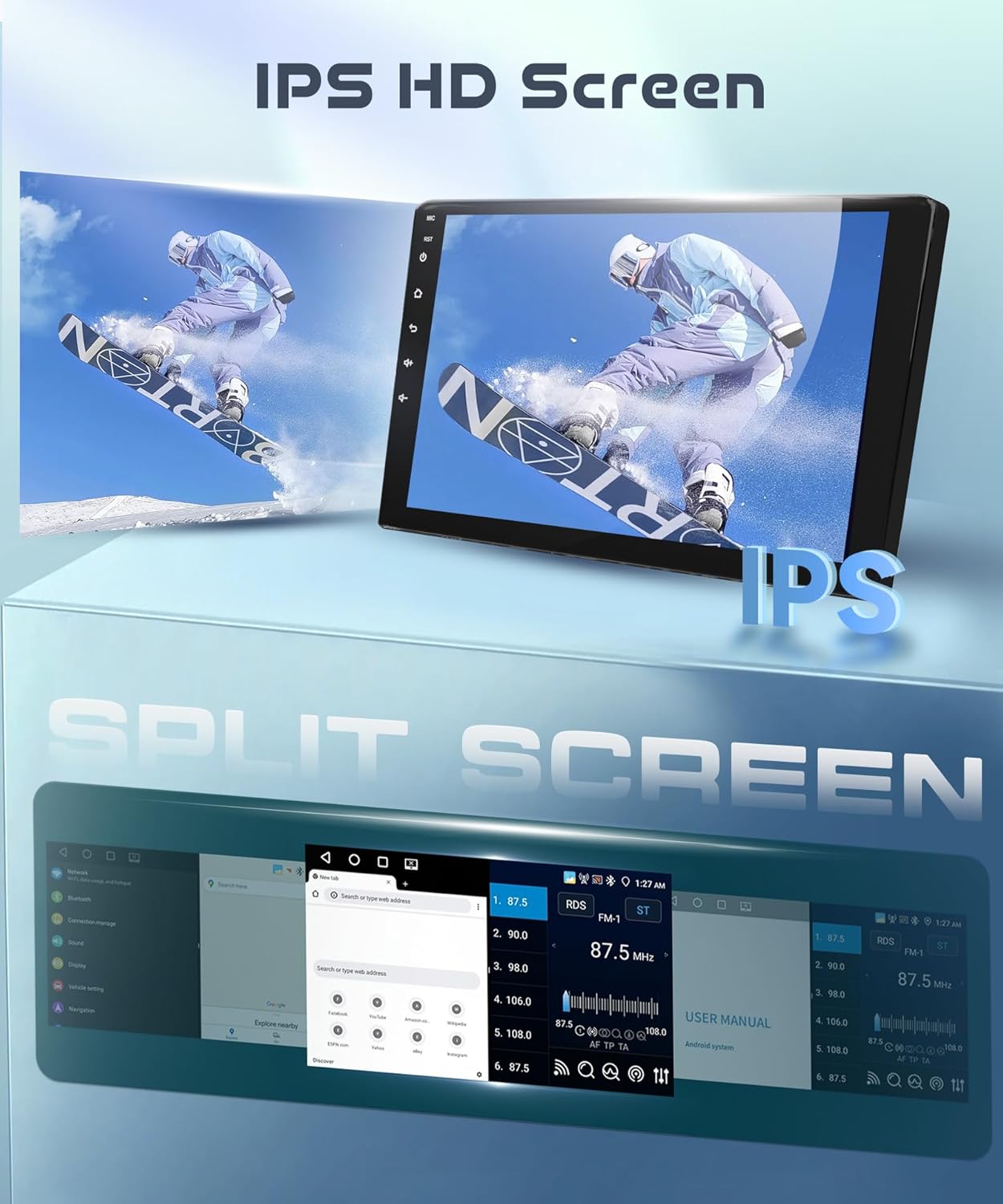
Image: Comprehensive wiring diagram illustrating all necessary connections for the car stereo, including power, audio, video, USB, GPS, and backup camera inputs.
Dashboard Integration
Once all wiring is connected, carefully mount the car stereo unit into the dashboard opening. Secure it using the appropriate mounting brackets and screws. Reassemble the dashboard trim panels.
Istruzzjonijiet Operattivi
Qawwa mixgħul/mitfi
Press and hold the power button (usually located on the front panel or screen) to turn the unit on or off. A short press typically mutes or unmutes the audio.
Interface touchscreen
The unit features a responsive 10.1-inch IPS touchscreen. Navigate through menus and applications by tapping, swiping, and pinching gestures, similar to a smartphone or tablet.

Image: The IPS HD touchscreen displaying vibrant colors and demonstrating the split-screen feature, allowing two applications to run simultaneously.
Wireless CarPlay / Android Auto
Connect your compatible iOS or Android smartphone wirelessly to access navigation, music, calls, and other apps directly on the car stereo display. Follow the on-screen prompts to pair your device via Bluetooth and Wi-Fi.

Image: The car stereo displaying the Wireless CarPlay and Android Auto interfaces, highlighting voice control capabilities for navigation, music, and weather.
Navigazzjoni GPS u WiFi
The unit comes with a built-in offline map application. Connect to a Wi-Fi network or mobile hotspot to use online navigation services and download additional map data. The Wi-Fi connection also enables access to the application store for downloading Android apps.

Image: The car stereo running Android 13, displaying GPS navigation on the main screen and illustrating Wi-Fi connectivity for online content and app downloads.
Funzjonijiet Bluetooth
Pair your phone via Bluetooth 5.0 for hands-free calling and audio streaming. Access your phone's contact list and call history directly from the stereo.
Radju FM/RDS
Tune into your favorite FM radio stations. The RDS (Radio Data System) feature displays station information, song titles, and other relevant data where available.
Daqq Multimedia
Ilgħab awdjo u vidjo files from connected USB devices. The unit supports various formats. The 32-band DSP audio processor allows for precise sound adjustments to optimize your listening experience.

Image: The car stereo's interface showing the 32-band DSP audio equalizer, allowing users to fine-tune sound settings for various music genres.
Backup Camera Display
Meta l-vettura tinbidel fir-reverse, id-displej awtomatikament jinbidel għall- view from the connected HD backup camera, providing parking assistance with guidelines.

Image: The car stereo displaying the wide-angle view from the AHD backup camera, complete with dynamic parking guidelines for safe reversing.
Manutenzjoni
Biex tiżgura l-lonġevità u l-prestazzjoni ottimali tal-istereo tal-karozza tiegħek, segwi dawn il-linji gwida ta' manutenzjoni:
- Tindif tal-iskrin: Uża drapp artab u mingħajr suf biex timsaħ bil-mod it-touchscreen. Għal tbajja' persistenti, nixxef ftit.ampNaddaf id-drapp bl-ilma jew b'tindif li ma jagħmilx ħsara lill-iskrin. Evita kimiċi ħarxa jew materjali li joborxu.
- Aġġornamenti tas-Software: Periodically check for available software updates to ensure the system has the latest features and bug fixes. Updates can typically be performed via Wi-Fi.
- Kundizzjonijiet Ambjentali: Evita li tesponi l-unità għal temperaturi estremi, dawl tax-xemx dirett għal perjodi twal, jew umdità eċċessiva.
- Konnessjonijiet tal-kejbil: Iċċekkja perjodikament il-konnessjonijiet tal-kejbil kollha biex tiżgura li huma sikuri u ħielsa mill-korrużjoni jew ħsara.
Issolvi l-problemi
Jekk tiltaqa' ma' problemi bl-istereo tal-karozza tiegħek, irreferi għall-problemi u s-soluzzjonijiet komuni li ġejjin:
| Problema | Kawża Possibbli | Soluzzjoni |
|---|---|---|
| L-unità ma tixgħelx | Konnessjoni tal-enerġija maħlula, fjus maħruq, problema bil-batterija tal-vettura. | Iċċekkja l-konnessjonijiet tal-kejbil tal-enerġija. Spezzjona l-fjużijiet tal-vettura. Kun żgur li l-batterija tal-vettura hija ċċarġjata. |
| L-ebda ħoss | Volume muted, incorrect audio source, loose speaker wires, ampkwistjoni ta 'lifier. | Check volume and mute settings. Select correct audio source. Verify speaker wire connections. |
| Kamera ta' wara ma turiex | Incorrect camera wiring, faulty camera, reverse signal not detected. | Verify camera power and video signal connections. Ensure the reverse trigger wire is correctly connected. |
| Il-Wi-Fi jiskonnettja spiss | Weak signal, interference, software glitch. | Ensure strong Wi-Fi signal. Try restarting the unit. Check for software updates. |
| Il-kontrolli tal-istering ma jaħdmux | Incorrect wiring, controls not programmed. | Verify SWC wiring. Access the steering wheel control learning function in the unit's settings to program the buttons. |
| Is-sistema hija bil-mod jew ma tirrispondix | Too many apps running, low memory, software issue. | Close unnecessary applications. Restart the unit. Perform a factory reset if issues persist (note: this will erase all data). |
Speċifikazzjonijiet
| Karatteristika | Dettall |
|---|---|
| Brand | podofo |
| Sistema Operattiva | Android 13 |
| RAM | 4GB |
| ROM (Ħażna Interna) | 64GB |
| Daqs tal-Iskrin | 10.1 Pulzier |
| Tip ta 'Wiri | IPS touch screen |
| Riżoluzzjoni | 1280 * 720 |
| Konnettività | Bluetooth 5.0, USB, Wi-Fi |
| Karatteristiċi Speċjali | Wireless CarPlay & Android Auto, GPS Navigation, FM/RDS Radio, DSP Audio, Split Screen, Steering Wheel Control, Backup Camera Support |
| Komponenti Inklużi | Android Car Stereo, External Microphone, GPS Antenna, HD Backup Camera |
| Tip ta 'Immuntar | Dashboard Mount |
Garanzija u Appoġġ
Informazzjoni dwar Garanzija
This podofo car stereo unit comes with a 2-year warranty from the date of purchase. This warranty covers manufacturing defects and malfunctions under normal use. Please retain your proof of purchase for warranty claims.
Appoġġ Tekniku
Podofo offers professional technical support for all its products. If you encounter any issues with compatibility, installation, or usage, please contact our support team. You can typically find contact information through the seller's page on the platform where you purchased the product.

Image: Guide on how to access Podofo's technical support by navigating to the seller's information on the purchase platform.