
EFFYDESK FRAME-VARIATION
EFFYDESK Electric Height Adjustable Standing Desk Frame User Manual
Model: FRAME-VARIATION
1. Introduzzjoni
Thank you for choosing the EFFYDESK Electric Height Adjustable Standing Desk Frame. This manual provides detailed instructions for the assembly, operation, maintenance, and troubleshooting of your new ergonomic desk frame. Please read this manual thoroughly before use to ensure proper function and safety.
2. Informazzjoni Importanti dwar is-Sigurtà
Biex tevita korriment jew ħsara, jekk jogħġbok osserva l-prekawzjonijiet ta' sigurtà li ġejjin:
- Always ensure the desk is properly assembled and anchored to the floor.
- Teċċedix il-limitu massimu tal-piż ta' 265 lbs (120 kg).
- Be cautious when adjusting the desk height to prevent injury from pinching or crushing. Ensure no objects or body parts are in the path of the moving frame.
- Żomm it-tfal u l-annimali domestiċi 'l bogħod mill-iskrivanija waqt l-operazzjoni.
- Tpoġġix jew toqgħodx fuq il-qafas tal-iskrivanija.
- Uża biss l-adapter tal-enerġija u l-komponenti pprovduti.
- Skonnettja l-enerġija qabel ma tnaddaf jew tagħmel manutenzjoni.
3. Kontenut tal-Pakkett
Jekk jogħġbok ivverifika li l-komponenti kollha huma preżenti qabel tibda l-assemblaġġ:
- Saqajn tal-Iskrivanija (2)
- Crossbar/Frame (1)
- Saqajn (2)
- Panel tal-Kontroll (1)
- Adapter tal-Enerġija (1)
- Kejbil tal-Enerġija (1)
- Trej tal-Immaniġġjar tal-Cable (1)
- Ħardwer tal-Assemblaġġ (viti, Allen wrenches)
- Manwal għall-Utent (dan id-dokument)

Image: Main components of the EFFYDESK Electric Height Adjustable Standing Desk Frame, showing the two legs, crossbar, and feet in white finish.
4. Istruzzjonijiet tal-Assemblea
The EFFYDESK frame is designed for quick and easy assembly, typically taking less than 5 minutes. Follow these steps:
- Waħħal is-Saqajn mar-Riġlejn: Securely fasten the two feet to the bottom of each desk leg using the provided screws.
- Qabbad ir-Riġlejn mal-Barra Trasversali: Attach the desk legs to the adjustable crossbar. Ensure the crossbar is extended to your desired width (40” to 70”).
- Installa l-Panel tal-Kontroll: Mount the control panel to the underside of the desk frame using the designated screws.
- Installa t-Trej tal-Ġestjoni tal-Kejbils: Attach the cable management tray to the underside of the desk frame.
- Qabbad Kejbils: Connect the motor cables from the legs to the control panel. Connect the power adapter to the control panel and then to a power outlet.
- Attach Tabletop (Optional): If you have a tabletop, align it with the pre-drilled holes on the frame and secure it with screws.
- Kalibrazzjoni Inizjali: After connecting power, the desk may need an initial calibration. Press and hold the 'Down' button until the desk reaches its lowest point and slightly retracts, then release. This resets the system.
For detailed visual instructions, refer to the quick-install guide included in your package.
5. Istruzzjonijiet Operattivi
Your EFFYDESK frame features an intuitive control panel for easy height adjustment and memory presets.
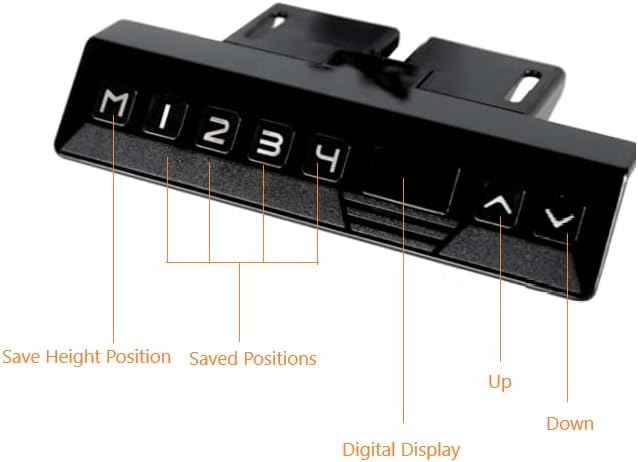
Image: Close-up of the EFFYDESK control panel, showing buttons for Up, Down, Digital Display, Save Height Position (M), and four Saved Positions (1, 2, 3, 4).
5.1. Aġġustament Bażiku tal-Għoli
- Għolli l-Iskrivanija: Agħfas u żomm il- 'Il fuq (▲) buttuna biex tgħolli l-iskrivanija għall-għoli mixtieq.
- Desk t'Isfel: Agħfas u żomm il- 'L isfel (▼) buttuna biex tbaxxi l-iskrivanija għall-għoli mixtieq.
- The digital display will show the current height in inches or centimeters.
5.2. Issettjar ta' Presets tal-Memorja
You can save up to four preferred height positions for quick adjustments:
- Adjust the desk to your desired height using the Up or Down buttons.
- Agħfas il- "M" buttuna. Id-displej se juri "S-".
- Within 3 seconds, press the desired preset number (1, 2, 3, jew 4). The display will show the number, confirming the position is saved.
5.3. Using Memory Presets
To move the desk to a saved position, simply press the corresponding preset number (1, 2, 3, jew 4). The desk will automatically move to that height.
6. Manutenzjoni
Regular maintenance will ensure the longevity and smooth operation of your EFFYDESK frame:
- Tindif: Imsaħ il-qafas tal-iskrivanija b'ċarruta ratba u damp drapp. Evita kimiċi ħarxa jew prodotti tat-tindif li joborxu.
- Ġestjoni tal-Kejbil: Periodically check that all cables are securely connected and not pinched or tangled. Utilize the cable management tray to keep wires tidy.
- Lubrikazzjoni: The lifting columns are generally maintenance-free. Do not apply lubricants unless specifically instructed by EFFYDESK support.
- Distribuzzjoni tal-piż: Distribute weight evenly on the desk surface to prevent strain on the motors.
7 Issolvi l-problemi
If you encounter issues with your desk frame, try the following solutions:
| Problema | Kawża Possibbli | Soluzzjoni |
|---|---|---|
| L-iskrivanija ma tiċċaqlaqx. | No power, loose cable, overload, or motor error. | Check power connection. Ensure all motor cables are securely plugged into the control panel. Reduce weight on the desk. Perform a reset (see below). |
| L-iskrivanija tiċċaqlaq b'mod irregolari. | Uneven weight distribution or calibration issue. | Ensure weight is evenly distributed. Perform a reset. |
| Digital display shows an error code (e.g., E01, E02). | Żball speċifiku tas-sistema. | Unplug the desk for 10 minutes, then plug it back in. Perform a reset. If the error persists, contact customer support. |
| L-iskrivanija tieqaf f'nofs moviment. | Overload protection or thermal protection activated. | Reduce weight. Allow the motor to cool down for 20 minutes before attempting to operate again. |
7.1. Reset Proċedura
If your desk is not functioning correctly, a reset can often resolve the issue:
- Unplug the power cable from the wall outlet.
- Stenna għal mill-inqas 30 sekondi.
- Plug the power cable back into the wall outlet.
- Agħfas u żomm il- 'L isfel (▼) button until the desk reaches its lowest position and slightly retracts, then release. This completes the reset.
8. Speċifikazzjonijiet tal-Prodott
| Karatteristika | Dettall |
|---|---|
| Brand | EFFYDESK |
| Numru tal-Mudell | FRAME-VARIATION |
| UPC | 628176194387 |
| Dimensjonijiet tal-Prodott (P x W x H) | 85"D x 71"W x 50"H (Frame adjustable width 40" to 70") |
| Kulur | Abjad |
| Materjal Bażi | Azzar Liga |
| Mekkaniżmu ta 'rfigħ | Elettriku |
| Rakkomandazzjoni tal-Piż Massimu | 265 Lira (120 kg) |
| Item Weight (Frame) | 78 lbs (35.3 kg) |
| Karatteristiċi Speċjali | Adjustable Height, Ergonomic, Memory Presets |
| Assemblea Meħtieġa | Iva |
9. Informazzjoni dwar Garanzija
EFFYDESK provides an extensive garanzija ta 'sena for your Electric Height Adjustable Standing Desk Frame. This warranty covers defects in materials and workmanship under normal use. Please retain your proof of purchase for warranty claims. For full warranty terms and conditions, please visit the official EFFYDESK websit jew ikkuntattja l-appoġġ tal-klijent.
10. Appoġġ għall-Klijent
If you have any questions, require assistance with assembly, or need troubleshooting support, please contact EFFYDESK customer service:
- Websit: www.effydesk.ca (Jekk jogħġbok innota: Dan huwa terminu riżervat) URL peress li m'hemm l-ebda appoġġ speċifiku URL was provided in the product data. Refer to your product packaging or official brand website for accurate contact information.)
- Email: Refer to brand websit
- Telefon: Refer to brand websit
When contacting support, please have your model number (FRAME-VARIATION) and purchase date available.
Ask a question about this manual
Ask about setup, troubleshooting, compatibility, parts, safety, or missing instructions. Manuals+ will review the question and use this page’s manual context to help answer it.