
1. Introduzzjoni
This manual provides essential information for the safe and efficient use of your ASUS E410MA 14-inch Laptop Computer. Please read this guide thoroughly before operating your device to ensure proper setup, operation, and maintenance. Keep this manual for future reference.
2. Kontenut tal-Pakkett
Upon unpacking your ASUS E410MA laptop, please verify that all items listed below are present and in good condition. If any item is missing or damaged, contact your retailer immediately.
- ASUS E410MA 14-inch Laptop Computer
- Adapter tal-Enerġija AC u Korda tal-Enerġija
- User Documentation (Quick Start Guide, Warranty Card)
3. Laptop Overview
Familiarize yourself with the various components of your ASUS E410MA laptop.
3.1 Quddiem View (Miftuħ)
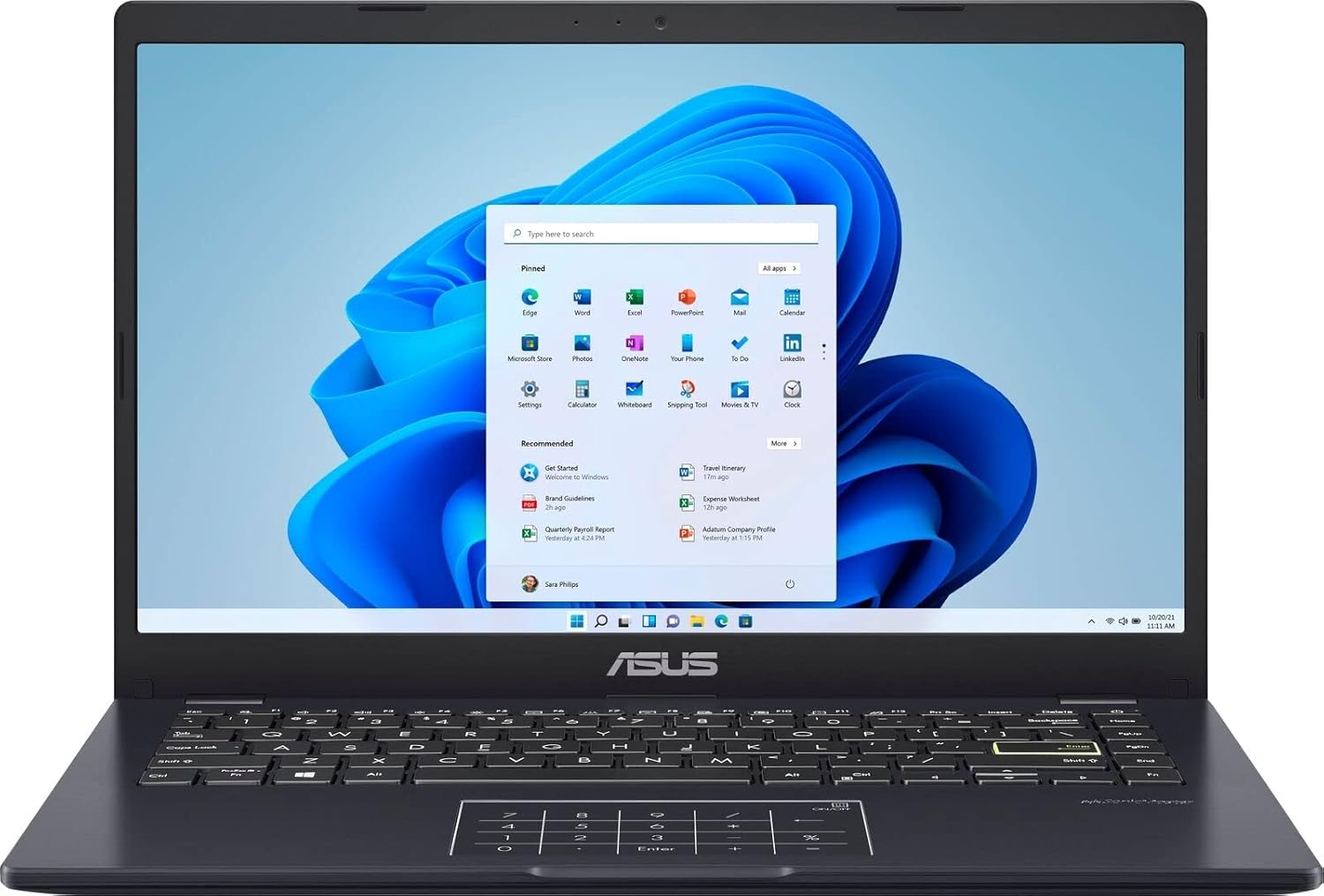
Stampa 3.1: The ASUS E410MA laptop shown open, displaying the Windows 11 operating system interface on its 14-inch screen. The keyboard and touchpad are visible below the screen.
3.2 Tastiera u Touchpad

Stampa 3.2: A top-down perspective of the ASUS E410MA laptop's keyboard and touchpad. The touchpad features an integrated NumberPad, indicated by illuminated numeric keys.
3.3 Ġenb View (Miftuħ)
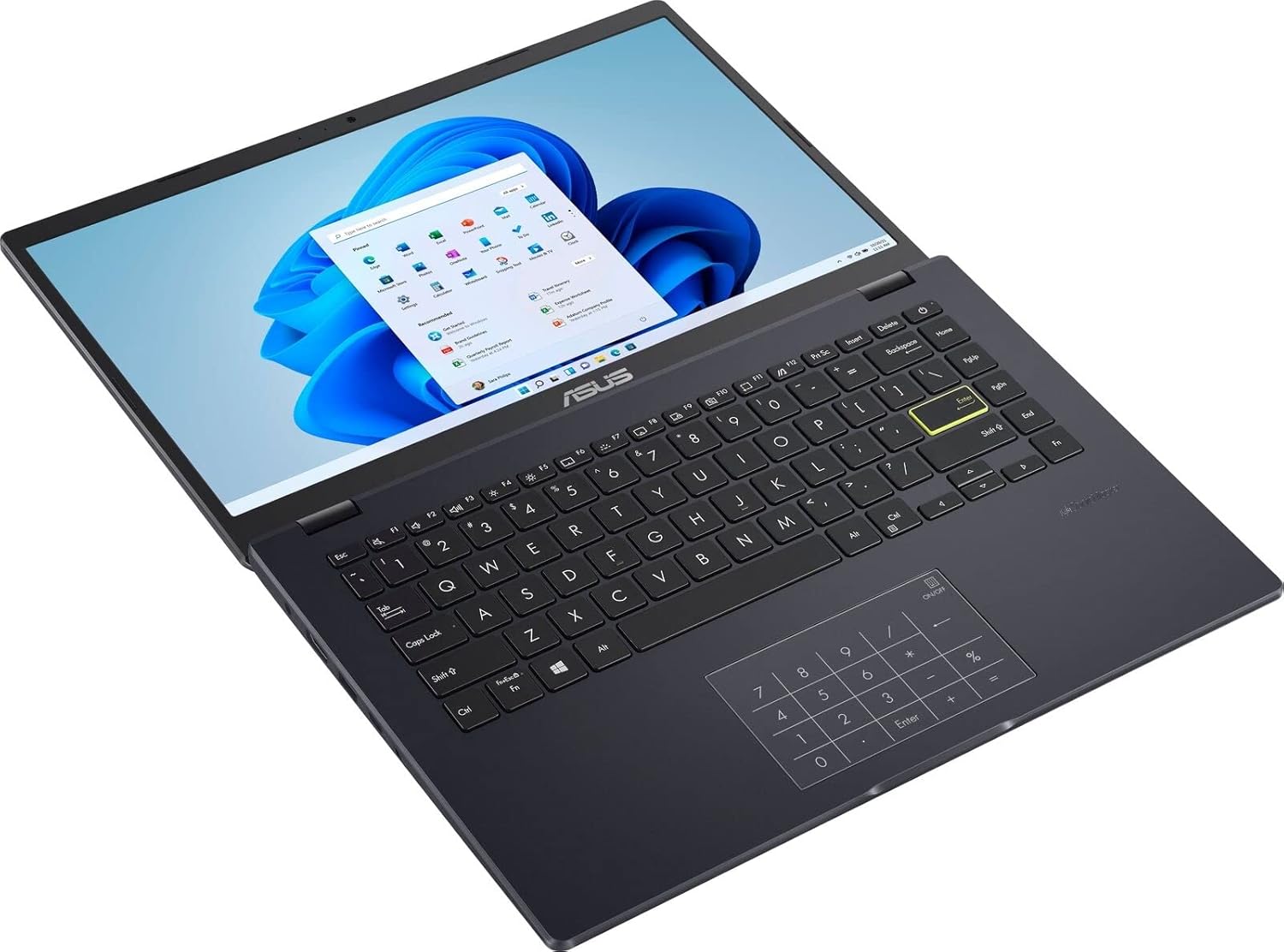
Stampa 3.3: Angolat view of the ASUS E410MA laptop in an open position, highlighting the keyboard layout and the display screen.
3.4 Wara View (Magħluq)

Stampa 3.4: In-naħa ta’ wara view of the ASUS E410MA laptop in a closed state, featuring the ASUS logo prominently on the lid.
3.5 Angled Rear View (Magħluq)

Stampa 3.5: An angled rear view of the ASUS E410MA laptop when closed, showcasing the ASUS logo on the lid and a glimpse of the side ports.
3.6 B'mod ġenerali View (Open and Closed)
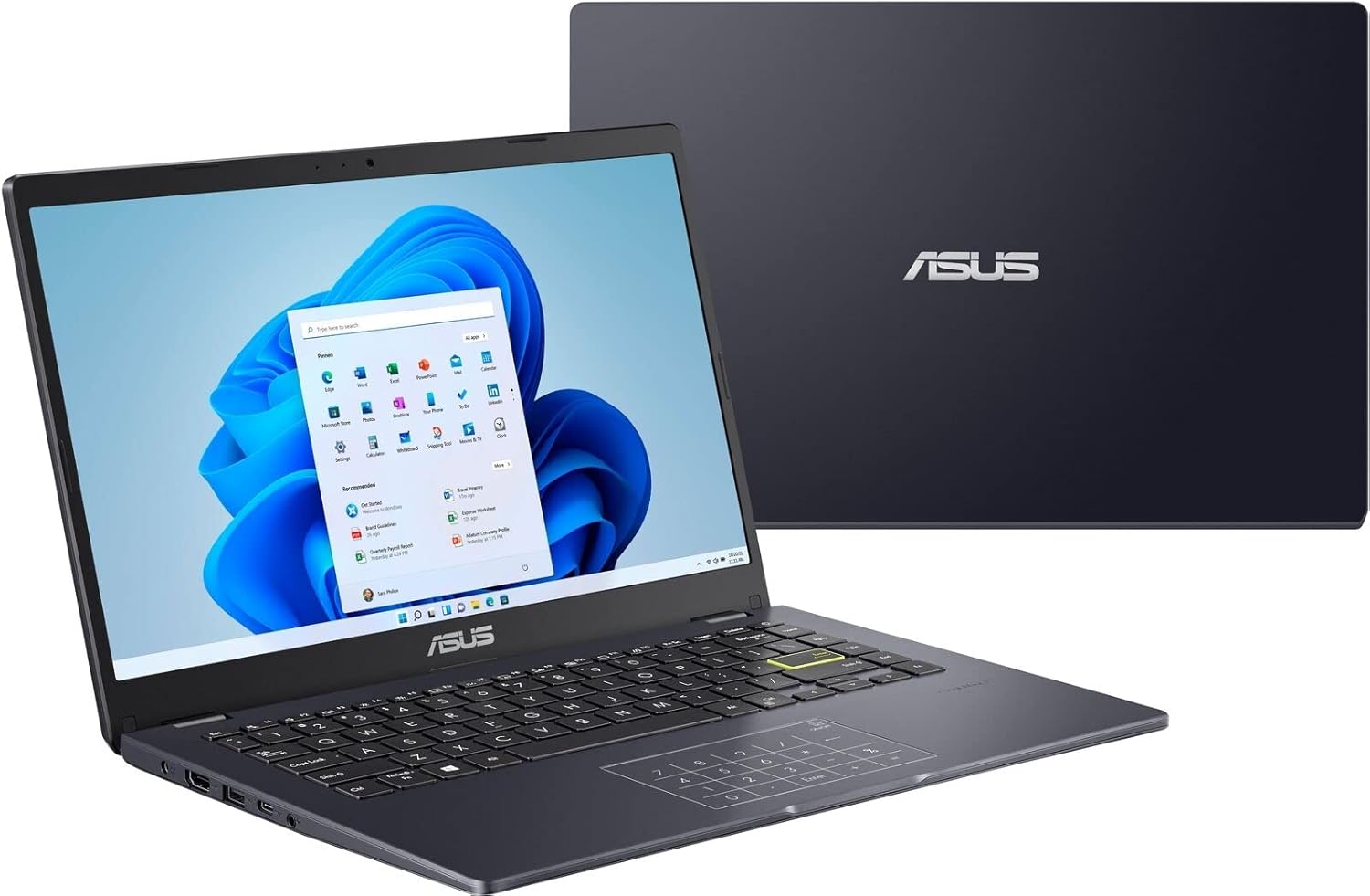
Stampa 3.6: Kompost view showing the ASUS E410MA laptop in an open, operational state in the foreground, with a closed unit visible in the background.
4. Setup
Follow these steps to set up your ASUS E410MA laptop for the first time.
4.1 Iċċarġjar tal-batterija
- Connect the AC power adapter to the laptop's power input port.
- Ipplaggja l-korda tad-dawl ġo żbokk tal-ħajt.
- Allow the battery to charge fully before initial use. The battery indicator light will change to show charging status.
4.2 Tixgħel Inizjali
- Iftaħ l-għatu tal-laptop.
- Agħfas il-buttuna tal-qawwa, li tipikament tinsab fin-naħa ta' fuq tal-lemin tat-tastiera jew fuq il-ġenb.
- The laptop will boot up and guide you through the Windows 11 initial setup process.
4.3 Konfigurazzjoni tal-Windows 11
Follow the on-screen instructions to complete the Windows 11 setup, which includes:
- L-għażla tar-reġjun u d-disinn tat-tastiera tiegħek.
- Konnessjoni ma 'netwerk Wi-Fi.
- Idħol b'kont tal-Microsoft jew toħloq kont wieħed.
- Issettjar tas-settings tal-privatezza.
5. It-Tħaddim tal-Laptop Tiegħek
This section covers basic operations and features of your ASUS E410MA laptop.
5.1 L-Użu tat-Tastiera u t-Touchpad
- Tastiera: The laptop features a full-sized keyboard. Use the Function (Fn) key in combination with the F-keys (F1-F12) for special functions like adjusting brightness, volume, or enabling/disabling Wi-Fi.
- Touchpad: The touchpad supports multi-touch gestures for navigation. Refer to Windows settings for customizing touchpad gestures.
- Tastiera tan-Numri: Your laptop's touchpad integrates an ASUS NumberPad. To activate or deactivate it, press and hold the NumberPad icon on the top-right corner of the touchpad.
5.2 Konnessjoni tal-Periferali
Il-laptop tiegħek huwa mgħammar b'diversi portijiet għall-konnessjoni ta' apparati esterni:
- Portijiet USB: Connect USB devices such as external hard drives, mice, or keyboards.
- Port HDMI: Qabbad ma' monitor estern jew TV għall-output tal-vidjo.
- Awdjo Jack: Qabbad headphones jew kelliema esterni.
5.3 Ġestjoni tal-Enerġija
To conserve battery life and manage performance:
- Aġġusta l-luminożità tal-iskrin.
- Utilize Windows power modes (e.g., Balanced, Power Saver).
- Agħlaq l-applikazzjonijiet li ma tużax.
6. Manutenzjoni
Manutenzjoni xierqa tiżgura l-lonġevità u l-prestazzjoni ottimali tal-laptop tiegħek.
6.1 Tindif tal-Laptop
- Uża drapp ratba u mingħajr ħelu ftit dampMaħsul bl-ilma jew b'tindif tal-iskrin speċjalizzat għall-wiri.
- Għat-tastiera u x-chassis, uża drapp artab. Evita kimiċi ħarxa jew materjali li joborxu.
- Kun żgur li l-laptop ikun mitfi u skonnettjat qabel ma tnaddaf.
6.2 Kura tal-Batterija
- Evita li tiċċarġja l-batterija kompletament ta' spiss.
- Aħżen il-laptop f'post frisk u niexef jekk ma tużahx għal perjodi twal.
- Tesponix il-batterija għal temperaturi estremi.
6.3 Aġġornamenti tas-Software
Regularly update your operating system and drivers to ensure security and performance:
- Aġġornamenti tal-Windows: Mur fuq Settings > Aġġornament tal-Windows biex tiċċekkja u tinstalla aġġornamenti.
- Aġġornamenti tas-sewwieq: Żur l-appoġġ uffiċjali tal-ASUS websit għall-aħħar sewwieqa għall-mudell tiegħek.
6.4 Ġestjoni tal-Ħażna
With 64GB eMMC storage, efficient management is crucial:
- Ħassar regolarment bla bżonn files u applikazzjonijiet.
- Utilize cloud storage services (e.g., OneDrive, Google Drive) for documents and media.
- Consider an external hard drive or USB flash drive for additional storage.
7 Issolvi l-problemi
This section addresses common issues you might encounter with your ASUS E410MA laptop.
7.1 Laptop Will Not Turn On
- Kun żgur li l-adapter tal-AC huwa konness sew kemm mal-laptop kif ukoll ma' sokit tal-enerġija li jaħdem.
- Ivverifika li s-sokit tal-enerġija jaħdem billi tqabbad apparat ieħor.
- Jekk il-batterija tkun ixxotta kompletament, jista' jieħu ftit minuti ta' ċċarġjar qabel ma l-laptop ikun jista' jixgħel.
7.2 Prestazzjoni bil-mod
- Agħlaq l-applikazzjonijiet bla bżonn li jkunu qed jaħdmu fl-isfond.
- Iċċekkja u installa kwalunkwe aġġornament pendenti tal-Windows.
- Ensure you have sufficient free storage space on your eMMC drive.
- Mexxi skennjar tal-virus u l-malware.
7.3 Kwistjonijiet ta' Konnettività tal-Wi-Fi
- Ensure Wi-Fi is enabled on your laptop (check Function key shortcuts).
- Erġa' ibda r-router u l-modem tiegħek.
- Forget the Wi-Fi network in Windows settings and reconnect.
- Update your wireless network adapter drivers from the ASUS support websit.
7.4 Problemi tal-Wiri
- Aġġusta l-luminożità tal-iskrin billi tuża ċ-ċwievet tal-funzjoni tat-tastiera.
- If connected to an external monitor, ensure the display output settings are correct (e.g., duplicate, extend).
- Update your Intel UHD Graphics 600 drivers.
8. Speċifikazzjonijiet
Detailed technical specifications for the ASUS E410MA-TB.CL464 laptop.
| Karatteristika | Speċifikazzjoni |
|---|---|
| Isem tal-Mudell | E410MA-TB.CL464 |
| Daqs tal-Iskrin | 14 pulzieri |
| Riżoluzzjoni tal-Iskrin | 1366 x 768 pixel |
| Proċessur | Intel Celeron N4020 (1.1GHz, up to 2.8GHz burst) |
| RAM | 4 GB DDR4 (Onboard) |
| Veloċità tal-Memorja | 2400 MHz |
| Ħażna | 64 GB eMMC |
| Koproċessur tal-Grafika | Grafika Intel UHD 600 (Integrata) |
| Sistema Operattiva | Windows 11 |
| Tip bla fili | Bluetooth, Wi-Fi (specific standard not detailed, typically 802.11ac or newer) |
| Portijiet USB 2.0 | 1 |
| Portijiet USB 3.0 | 1 |
| Port HDMI | 1 |
| Piż tal-oġġett | 4.64 liri (madwar 2.1 kg) |
| Dimensjonijiet tal-Prodott | 9 x 14 x 0.78 pulzieri (madwar 22.86 x 35.56 x 1.98 ċm) |
| Kulur | Iswed |
| Karatteristika Speċjali | Kisi kontra d-dija |
9. Garanzija u Appoġġ
Your ASUS E410MA laptop comes with a limited warranty. Please refer to the warranty card included in your package for specific terms and conditions, including coverage duration and limitations.
9.1 Appoġġ Tekniku
Għal assistenza teknika, downloads ta' sewwieqa, jew aktar informazzjoni, jekk jogħġbok żur is-sit uffiċjali tal-appoġġ tal-ASUS website. You can typically find support resources by searching for your specific model number (E410MA-TB.CL464).
Before contacting support, ensure you have:
- Your laptop's serial number.
- A clear description of the issue.
- Any troubleshooting steps you have already performed.