
1. Introduzzjoni
This manual provides detailed instructions for the installation, operation, and maintenance of your SOGTICPS BL912-40A-WIFI MPPT Solar Charge Controller. This advanced charge controller is designed for off-grid solar applications, compatible with 12V/24V battery systems, including Gel, Flooded, and Lithium types. It features efficient MPPT tracking, an LCD display, dual USB outputs, and WiFi connectivity for remote monitoring.
Karatteristiċi ewlenin:
- Innovative MPPT (Maximum Power Point Tracking) technology for up to 99% tracking efficiency.
- Volum awtomatiku tas-sistema ta' 12V/24VtagSejbien.
- Integrated LCD display for real-time monitoring of temperature, charge current, discharge current, and power generation.
- Comprehensive system protection: over-temperature, over-current, short-circuit, open-circuit, and reverse polarity.
- Compatibility with Gel, Flooded, and Lithium battery types.
- Dual 5V 2A USB outputs for charging mobile devices.
- WiFi communication for remote parameter adjustment and monitoring via a dedicated application.
- Industrial-grade main control chip with 16AD samppreċiżjoni tal-ling.
- Two-way MOS tube anti-reverse circuit for high-power charging and low heat generation.
2. Istruzzjonijiet tas-Sigurtà
Jekk jogħġbok aqra l-istruzzjonijiet kollha bir-reqqa qabel l-installazzjoni u t-tħaddim. Jekk ma ssegwix dawn l-istruzzjonijiet, tista' ssir ħsara lill-unità, korriment personali, jew ħsara lill-proprjetà.
- Ensure all connections are tight and correct to avoid excessive voltagwaqgħa elettronika u perikli potenzjali.
- Install the controller indoors, away from direct sunlight, high temperatures, and moisture.
- The controller generates heat during operation; ensure adequate ventilation.
- Connect the battery first, then the solar panel, and finally the load. Disconnect in the reverse order: load, solar panel, then battery.
- Do not connect any inverter directly to the load terminals of the controller.
- Ensure the solar panel's open-circuit voltage (Voc) ma jaqbiżx il-volum massimu tad-dħul tal-kontrollurtage.
- Use appropriate circuit breakers or fuses for the battery and solar panel circuits.
- Żomm lit-tfal 'il bogħod mis-sistema tal-enerġija solari.
- Tippruvax tiżżarma jew issewwi l-kontrollur int stess. Ikkuntattja persunal kwalifikat għas-servizz.
3. Prodott Aktarview
The SOGTICPS BL912-40A-WIFI solar charge controller features a robust design with an intuitive LCD display and multiple connection points.

Immaġni: Quddiem view of the SOGTICPS BL912-40A-WIFI Solar Charge Controller, highlighting its security protection features such as short-circuit, overload, overcharge, under-voltage, u over-voltagprotezzjoni.
Komponenti:
- Display LCD: Juri l-istatus u l-parametri tas-sistema f'ħin reali.
- Buttuni tal-Kontroll: For navigating menus and setting parameters.
- Solar Panel Input Terminals: Connect to solar panels.
- Terminali tal-Batterija: Connect to the battery bank.
- Terminali tal-Ħruġ tat-Tagħbija: Connect to DC loads.
- Dual USB Ports (5V 2A): Għall-iċċarġjar ta' apparati esterni.
- Antenna WiFi: Għal komunikazzjoni bla fili.
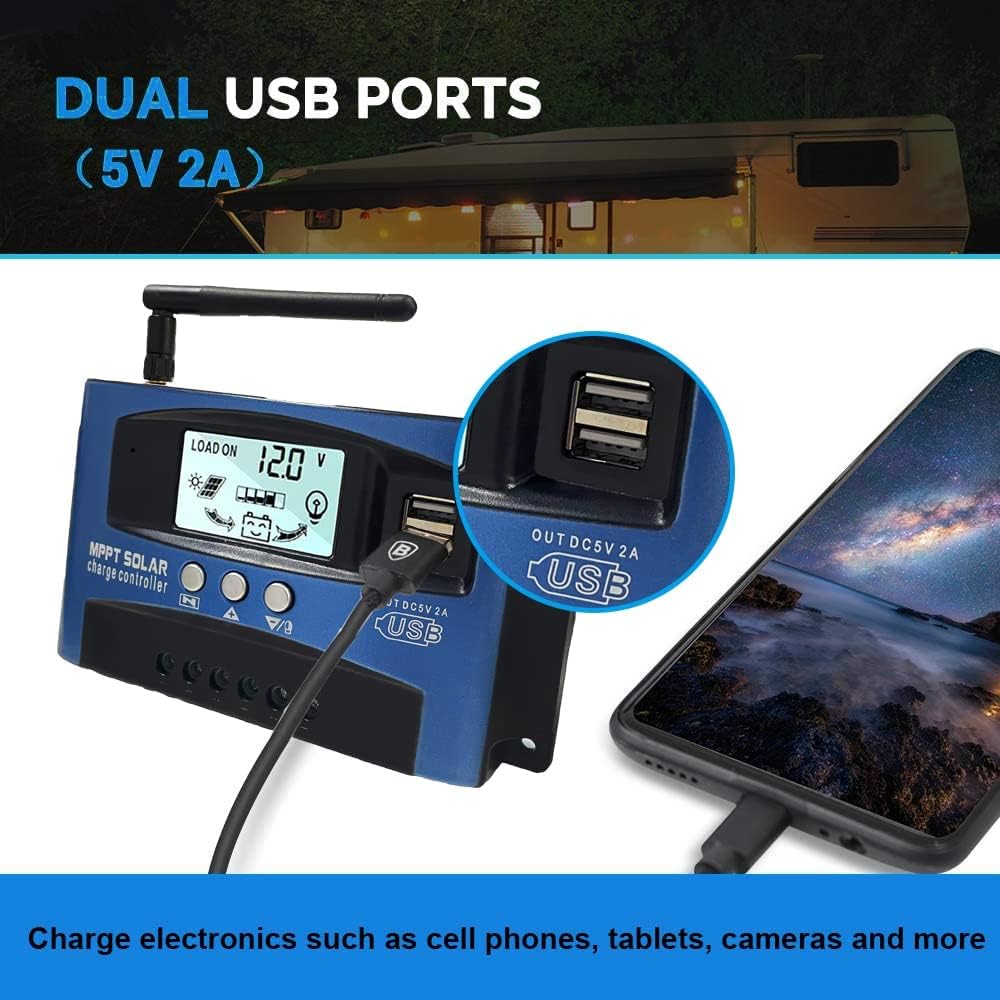
Immaġni: Close-up view of the SOGTICPS BL912-40A-WIFI Solar Charge Controller, showing the dual 5V 2A USB ports in use, charging a smartphone.
4. Konfigurazzjoni u Installazzjoni
Proper installation is critical for the safe and efficient operation of your solar charge controller. Follow the connection order precisely.
Ordni ta' Konnessjoni:
- Connect the Battery First: Connect the battery to the charge controller's battery terminals. Ensure correct polarity (+ to + and - to -). The controller will automatically detect 12V or 24V system voltage.
- Connect Solar Panels: Connect the solar panels to the charge controller's solar input terminals. Again, observe correct polarity.
- Qabbad it-Tagħbija DC (Mhux obbligatorja): Connect your DC loads to the load output terminals.
Importanti: When disconnecting, reverse the order: first disconnect the load, then the solar panels, and finally the battery. Failure to follow this order may damage the controller or other components.
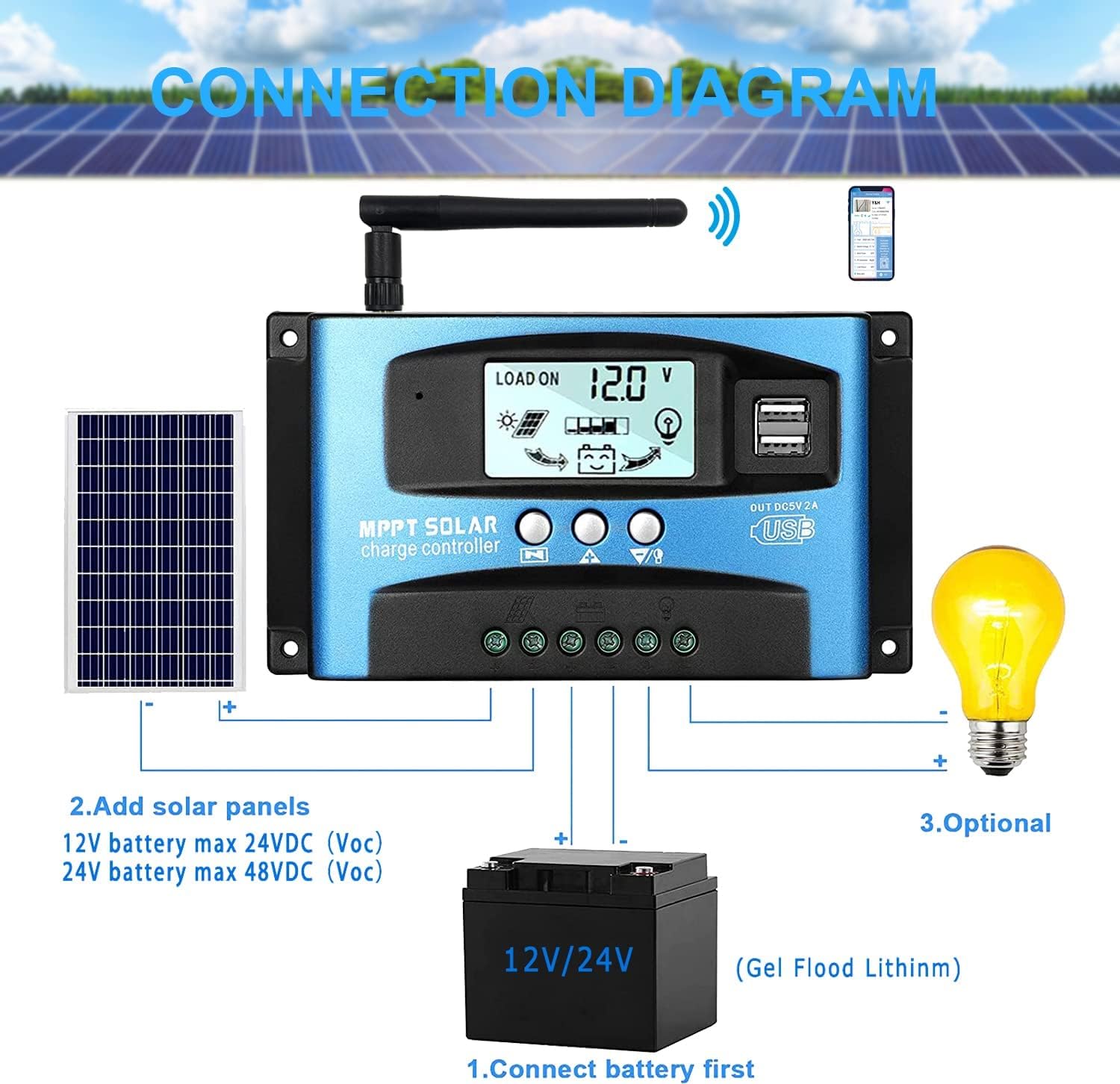
Immaġni: A clear connection diagram illustrating the proper wiring sequence for the solar charge controller, connecting to a battery, solar panels, and an optional DC load. It emphasizes connecting the battery first.
Kompatibilità tal-batterija:
The controller is compatible with various battery types, including Gel, Flooded (Lead-Acid), and Lithium batteries. Ensure the correct battery type is selected in the controller settings for optimal charging.

Immaġni: Visual representation showing the SOGTICPS BL912-40A-WIFI Solar Charge Controller's compatibility with Gel, Flooded, and Lithium battery types, indicated by arrows pointing between battery icons and the controller.
5. Istruzzjonijiet Operattivi
Wiri LCD u Navigazzjoni:
The LCD provides real-time information about your solar system. Use the control buttons to navigate through the display interfaces and adjust parameters.

Immaġni: A series of LCD screen captures demonstrating the browsing interface and parameter setting process for the SOGTICPS BL912-40A-WIFI Solar Charge Controller. It shows main display, float voltage, discharge reconnect, discharge stop, load work mode, battery type, and work parameter display.
- Browsing Interface: Agħfas il- MENU button to cycle through different display interfaces, showing information such as main display, float voltage, discharge reconnect voltage, discharge stop voltage, load work mode, battery type, and other work parameters.
- Parametri tal-issettjar: In interfaces 2-8, press the MENU button to enter the setting mode. Use the UP u 'L isfel buttons to adjust the values. Press MENU għal darb'oħra biex tikkonferma u toħroġ mill-modalità tas-settings.
WiFi Monitoring:
The controller supports WiFi connectivity, allowing you to monitor and control your solar system remotely via a smartphone application.

Immaġni: The SOGTICPS BL912-40A-WIFI Solar Charge Controller shown alongside a smartphone displaying its monitoring application interface. This illustrates the wireless monitoring capability of the PV system.
- Installazzjoni tal-App: Download the dedicated application for your smartphone (Android). Refer to the QR code or instructions provided with the product for app download.
- Konnessjoni: Follow the in-app instructions to connect your controller to your local WiFi network.
- Monitoraġġ mill-bogħod: Ladarba tkun imqabbda, tista ' view real-time data such as temperature, charge current, discharge current, accumulated power generation, battery voltage, and adjust charging modes from anywhere.
6. Manutenzjoni
Manutenzjoni regolari tiżgura l-lonġevità u l-prestazzjoni ottimali tal-kontrollur tal-iċċarġjar solari tiegħek.
- Iċċekkja l-Konnessjonijiet: Periodically inspect all wiring connections to ensure they are tight and free from corrosion.
- Kontrollur Nadif: Żomm il-kontrollur nadif u ħieles mit-trab u l-fdalijiet. Uża drapp niexef għat-tindif.
- Ventilazzjoni: Ensure the installation area has adequate ventilation to prevent overheating.
- Spezzjoni tal-batterija: Regularly check battery terminals for corrosion and ensure battery fluid levels (for flooded batteries) are correct.
- Monitoraġġ tas-Sistema: Use the LCD display or the WiFi app to monitor system performance and identify any anomalies early.
7 Issolvi l-problemi
Jekk tiltaqa' ma' problemi bil-kontrollur tal-iċċarġjar solari tiegħek, irreferi għall-problemi u s-soluzzjonijiet komuni li ġejjin:
| Problema | Kawża Possibbli | Soluzzjoni |
|---|---|---|
| L-ebda wiri fuq l-LCD | Batterija mhux imqabbda jew vultaġġ baxxtage; polarità inversa. | Iċċekkja l-konnessjonijiet tal-batterija u voltage. Kun żgur li l-polarità hija korretta. |
| Il-batterija mhix qed tiċċarġja | Solar panels not connected; insufficient sunlight; faulty solar panel; incorrect battery type setting. | Check solar panel connections and ensure adequate sunlight. Verify solar panel functionality. Confirm battery type setting. |
| It-tagħbija mhux qed taħdem | Tagħbija skonnettjata; vultaġġ baxx tal-batterijatage protection; overload protection. | Check load connections. Charge battery. Reduce load or check for short circuits. |
| WiFi app issues (connection/language) | Incorrect WiFi setup; app region/language settings; firmware issues. | Ensure correct WiFi network and password. Check app settings for language. Contact support if issues persist. |
8. Speċifikazzjonijiet
| Parametru | Valur |
|---|---|
| Mudell | BL912-40A-WIFI |
| Kurrent ta' Ċarġ Rated | 40 A |
| Sistema Voltage | Sejbien awtomatiku ta' 12V/24V |
| Qawwa Massima tad-Dħul PV (12V) | 480 W |
| Qawwa Massima tad-Dħul PV (24V) | 960 W |
| Vol Panel Solari Rakkomandattage | 18V for 12V battery; 36V for 24V battery |
| Awto-Konsum | <10 mA |
| Temperatura operattiva | -14 °F sa 140 °F (-10 °C sa 60 °C) |
| Tip ta 'Wiri | LCD |
| Output USB | Doppju 5V 2A |
| Komunikazzjoni | WiFi |
| Dimensjonijiet (Pakkett) | 18 x 11 x 5 ċm |
| Piż (Pakkett) | 330 gramma |
| Referenza tal-Manifattur | 2-BL912-40A-WIFI-DE |
| UPC | 732246237116 |
9. Garanzija u Appoġġ
For warranty information and technical support, please refer to the documentation included with your purchase or contact SOGTICPS customer service. Keep your purchase receipt as proof of purchase.