
Andoer e417fe28-cba1-49bd-8acb-ddcd73b41592
Andoer 4K Digital Video Camera User Manual
Model: e417fe28-cba1-49bd-8acb-ddcd73b41592
1. Introduzzjoni
This user manual provides detailed instructions for operating your Andoer 4K Digital Video Camera. Please read this manual thoroughly before using the camera to ensure proper operation and to maximize its performance. Keep this manual for future reference.
1.1 Kontenut tal-Pakkett
Malli tiftaħ il-pakkett, jekk jogħġbok ivverifika li l-oġġetti kollha elenkati hawn taħt huma preżenti u f'kundizzjoni tajba:
- 1 x Andoer 4K Digital Video Camera
- 2 x NP-40 Li-ion Battery (one pre-installed)
- 1 x USB Cable
- 1 x Cable tal-vidjo
- 1 x Kontroll mill-bogħod
- 1 x Camera Bag
- 1 x Manwal tal-Utent (bl-Ingliż)

Image: The Andoer 4K Digital Video Camera, remote control, and two NP-40 Li-ion batteries, illustrating the main components included in the package.
2. Karatteristiċi tal-prodott
The Andoer 4K Digital Video Camera is equipped with a range of features designed to enhance your video recording and photography experience:
- 4K Ultra HD Video Recording: Capture stunning videos at 4K/30fps and 2.7K/30fps resolutions.
- 56MP Still Image Capture: Produce high-resolution photos up to 56 megapixels (interpolation).
- 3.0 Inch IPS Touchscreen: A rotatable 270° touchscreen for intuitive control and versatile viewangoli.
- Żum Diġitali 18X: Bring distant subjects closer without compromising image quality.
- Viżjoni Lejl IR: Record clear and natural footage in low-light or dark environments.
- Konnettività WiFi: Easily connect to your smartphone or tablet via the DV-CAM APP for remote control, live view, u file trasferiment.
- Face Detection & Anti-Shake: Enhance focus and stability for clearer shots.
- External Microphone Support: Hot shoe mount for connecting an external microphone for improved audio quality.
- Standard Tripod Mount: 1/4 inch thread for mounting on a tripod or other accessories.

Image: An infographic highlighting the camera's main features including 4K 56MP resolution, 18X Digital Zoom, Face Detection, Night Vision, Dual Outputs, Digital Anti-shake, IPS Touchscreen, WiFi Connection, and Built-in Microphone.
3. Nibdew
3.1 Installazzjoni u Iċċarġjar tal-Batterija
The camera uses NP-40 Li-ion batteries. One battery is typically pre-installed. Ensure batteries are fully charged before first use.
- Iftaħ l-għatu tal-kompartiment tal-batterija li jinsab fil-qiegħ tal-kamera.
- Insert the NP-40 battery, ensuring the correct polarity.
- Agħlaq l-għatu tal-kompartiment tal-batterija sew.
- To charge, connect the camera to a power source using the provided USB cable. The charging indicator light will illuminate.
- L-iċċarġjar jitlesta meta d-dawl indikatur jintefa.
3.2 Installazzjoni tal-Kard SD
The camera supports SD/SDHC cards up to 128GB (Class 6 or above recommended, not included).
- Locate the SD card slot, usually on the side or bottom of the camera.
- Insert the SD card with the metal contacts facing the correct direction (refer to the diagram near the slot). Push until it clicks into place.
- Biex tneħħiha, imbotta l-karta bil-mod 'il ġewwa mill-ġdid sakemm toħroġ 'il barra.
4. Operazzjoni Bażika
4.1 Power On/Off
- Qawwa Mixgħul: Open the LCD screen or press the Power button.
- Itfi: Close the LCD screen or press and hold the Power button.
4.2 Reġistrazzjoni tal-Vidjo
- Ixgħel il-kamera.
- Ensure the camera is in video recording mode (indicated by an icon on the screen). If not, use the Mode button to switch.
- Press the Record button (usually a red circle) to start recording.
- Agħfas il-buttuna Irrekordja mill-ġdid biex tieqaf tirrekordja.
4.3 Tieħu Ritratti
- Ixgħel il-kamera.
- Kun żgur li l-kamera tkun fil-modalità tar-ritratti.
- Ikkwadra r-ritratt tiegħek billi tuża l-iskrin LCD.
- Press the Photo button (often a camera icon or shutter button) to take a picture.
4.4 Funzjoni Zoom
The camera features 18X digital zoom.
- Use the T (Telephoto) button to zoom in.
- Use the W (Wide) button to zoom out.

Image: A visual demonstration of the 18X digital zoom capability, showing how the camera can magnify distant subjects.
4.5 Daqq
- In standby mode, press the Playback button (often an arrow icon) to enter playback mode.
- Use the navigation buttons to browse through your recorded videos and photos.
- Agħfas il-buttuna OK biex tilgħab vidjo jew view ritratt fi skrin sħiħ.
- Press the Playback button again to exit playback mode.
5. Funzjonijiet Avvanzati
5.1 Konnessjoni WiFi
The camera supports WiFi connectivity for remote control and file transfer via the DV-CAM APP.
- Download and install the "DV-CAM" APP on your smartphone or tablet from your device's app store.
- On the camera, navigate to the WiFi settings and enable WiFi. The camera's WiFi network name (SSID) and password will be displayed.
- On your smartphone/tablet, go to WiFi settings and connect to the camera's WiFi network using the provided password.
- Open the DV-CAM APP. You can now view foo ħajtage, control recording, take photos, and download files directly to your mobile device.

Image: A visual representation of the camera's WiFi function, showing a smartphone connected to the camera to view foo ħajtage or transfer files.
Viżjoni bil-Lejl 5.2 IR
The IR Night Vision feature allows you to record in low-light conditions.
- To activate IR Night Vision, locate the IR button or setting in the camera menu.
- When activated, the camera will use infrared light to illuminate the scene, capturing clear black and white footage in darkness.

Image: A side-by-side comparison demonstrating the effectiveness of IR Night Vision, showing a scene in normal light versus the same scene captured in darkness using infrared.
5.3 3.0 Inch IPS Touchscreen
The 3.0-inch IPS touchscreen offers intuitive control and can be rotated 270 degrees for various shooting angles, including self-recording.
- Tap the screen to access menu options or focus.
- Swipe to navigate through playback or menu pages.
- Rotate the screen to face forward for vlogging or self-portraits.
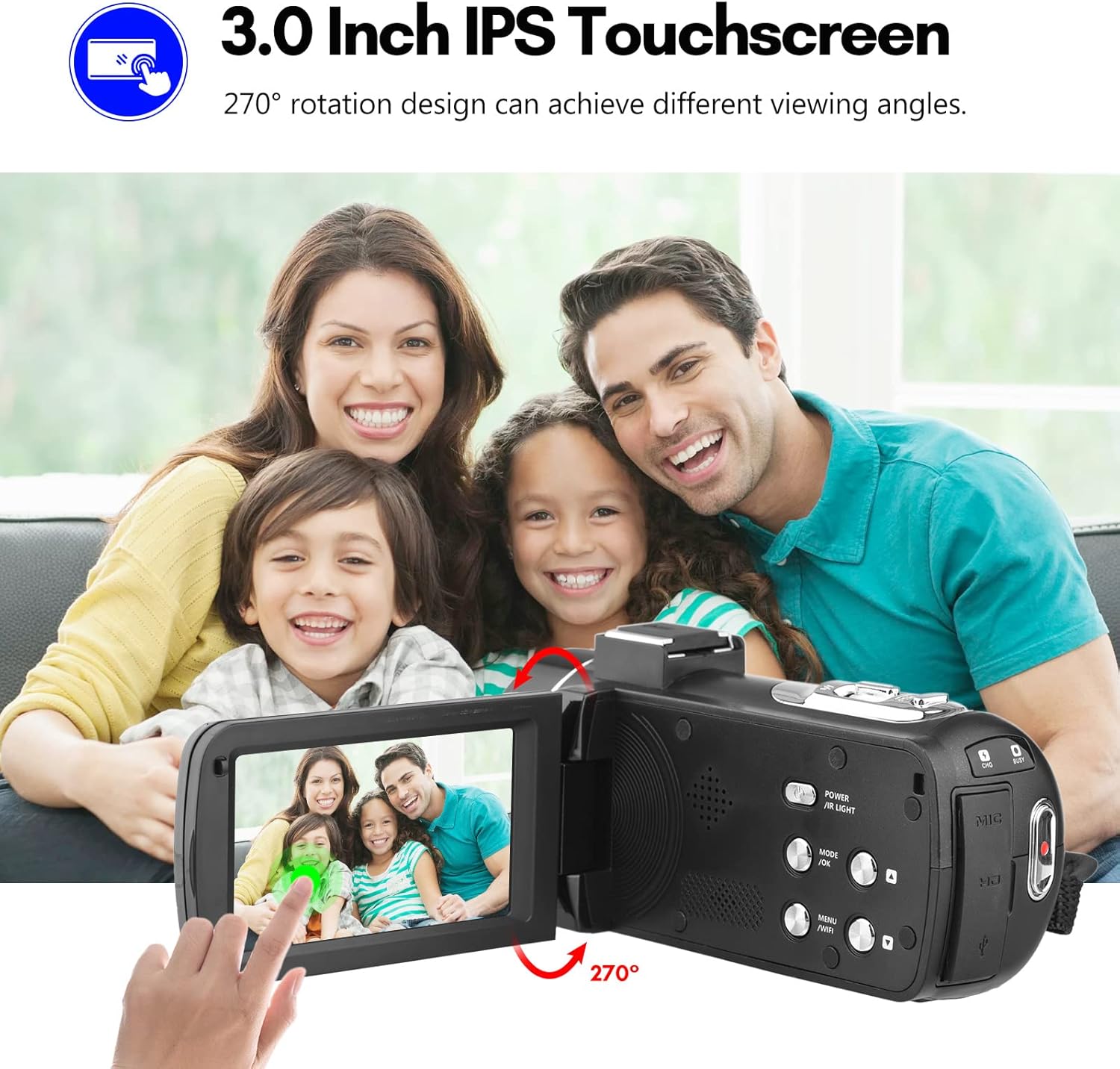
Image: The Andoer camera with its 3.0-inch IPS touchscreen rotated, demonstrating its 270-degree rotation capability for flexible viewing and self-recording.
5.4 Settings tal-Menu
Access the camera's menu to adjust various settings such as video resolution, photo resolution, white balance, exposure, self-timer, and auto power off.
- Agħfas il-buttuna MENU biex tidħol fil-menu tas-settings.
- Use the navigation buttons or touchscreen to select options.
- Agħfas OK biex tikkonferma l-għażliet.
- Agħfas MENU mill-ġdid biex toħroġ.
6. Konnettività
The camera offers multiple connectivity options for viewing and transferring your media.
6.1 Connecting to a TV (HD Multimedia Interface)
- Żgura li l-kamera tkun mitfija.
- Connect one end of the HD multimedia interface cable (not explicitly listed in package contents, but mentioned in description) to the camera's HD port and the other end to an HD input on your TV.
- Turn on the TV and select the correct HD input source.
- Turn on the camera. The camera's display will be mirrored on the TV screen, allowing you to view ritratti u vidjows.
6.2 Konnessjoni ma' Kompjuter (USB)
- Żgura li l-kamera tkun mitfija.
- Qabbad il-kamera mal-kompjuter tiegħek billi tuża l-kejbil USB ipprovdut.
- Turn on the camera. It will typically enter "Mass Storage" or "PC Camera" mode. Select "Mass Storage" to access files.
- The camera will appear as a removable disk drive on your computer, allowing you to transfer files.

Image: An illustration detailing how to connect the Andoer camera to a television via HD multimedia interface and to a computer via USB for viewing and transferring media.
7. Manutenzjoni
7.1 Tindif tal-Kamera
- Uża drapp artab u niexef biex tnaddaf il-korp tal-kamera.
- For the lens, use a specialized lens cleaning cloth and lens cleaning solution. Avoid touching the lens with your fingers.
- Do not use strong detergents or solvents, as they may damage the camera's finish.
7.2 Ħażna
- When not in use for extended periods, remove the battery from the camera.
- Aħżen il-kamera f'post frisk u niexef, 'il bogħod mix-xemx diretta u minn temperaturi estremi.
- Use the provided camera bag to protect it from dust and scratches.
8 Issolvi l-problemi
| Problema | Kawża Possibbli | Soluzzjoni |
|---|---|---|
| Il-kamera ma tixgħelx. | Il-batterija mejta jew imdaħħla ħażin. | Iċċarġja l-batterija jew erġa’ daħħalha b’mod korrett. |
| Ma nistax nirrekordja vidjow/nieħu ritratti. | SD card is full, locked, or not inserted. | Ħassar files, unlock the SD card, or insert an SD card. |
| Kwalità fqira tal-immaġni/vidjow. | Il-lenti hija maħmuġa; dawl insuffiċjenti; settings mhux korretti. | Clean the lens; use IR Night Vision in low light; adjust resolution/exposure settings. |
| Problemi bil-konnessjoni tal-WiFi. | Incorrect password; APP not installed; distance too far. | Verify password; install DV-CAM APP; move closer to camera. |
9. Speċifikazzjonijiet
| Karatteristika | Dettall |
|---|---|
| Sensor tal-Immaġni | CMOS |
| ISO | Awto, 100, 200, 400, 800, 1600 |
| Ħażna | SD/SDHC Card, max. 128GB (Class 6 or above) |
| Lenti | Fixed, f/2.6, f=7.0mm |
| Focus Distanza | 0.5m sa infinità |
| Skrin | 3.0 Inch IPS Touchscreen (270° rotation) |
| Photo Format & Resolution | JPG, 56M/ 48M/ 30M/ 24M/ 20M/ 16M/ 12M/ 8M/ 5M |
| Video Format & Resolution | MP4, 4K/30fps, 2.7K/30fps, 1080P/60fps, 1080P/30fps, 720P/60fps, 720P/30fps |
| Zoom Diġitali | 18X |
| Dawl IR | <1.0M |
| Bilanċ abjad | Auto/ Daylight/ Cloudy/ Tungsten/ Fluorescent |
| Espożizzjoni | ± 3.0EV |
| Self Timer | OFF/2s/ 5s/ 10s |
| Qawwa Awtomatika OFF | OFF/ 1min/3min/ 5min/ 10min |
| Mikrofonu | Built-in, supports external microphone |
| Provvista tal-Enerġija | 1 x NP-40 Li-ion Battery |
| Batterija tal-Kontroll mill-bogħod | 2 x Batteriji AAA (Mhux Inklużi) |
| Daqs tal-Kamera | 12.6 x 5.8 x 5.9cm / 5 x 2.3 x 2.3in |
| Piż tal-Kamera | 318g / 11.2oz |
10. Garanzija u Appoġġ
For warranty information and technical support, please refer to the official Andoer webis-sit jew ikkuntattja s-servizz tal-konsumatur tagħhom. Żomm l-irċevuta tax-xiri tiegħek bħala prova tax-xiri.
You can visit the official Andoer store on Amazon for more information: Andoer Store
11. Informazzjoni dwar is-Sigurtà
Jekk jogħġbok osserva l-prekawzjonijiet ta' sigurtà li ġejjin biex tevita korriment jew ħsara lill-prodott:
- Tesponix il-kamera għal temperaturi estremi, dawl tax-xemx dirett, jew umdità għolja.
- Żomm il-kamera 'l bogħod mill-ilma u likwidi oħra.
- Tippruvax tiżżarma jew timmodifika l-kamera. It-tiswijiet għandhom isiru biss minn persunal tas-servizz awtorizzat.
- Keep plastic bags and packaging materials away from babies and children to avoid suffocation hazards.

Image: A multi-language warning label emphasizing the importance of keeping plastic bags away from children to prevent suffocation.
Ask a question about this manual
Ask about setup, troubleshooting, compatibility, parts, safety, or missing instructions. Manuals+ will review the question and use this page’s manual context to help answer it.