
1. Introduzzjoni
This manual provides detailed instructions for the safe and efficient use of your MECHEN HIFI MP3 Player M30. Please read this manual thoroughly before operating the device and retain it for future reference.
The MECHEN M30 is a dedicated HIFI lossless audio player designed for high-fidelity sound reproduction. It features advanced DSD decoding technology and supports a wide range of audio formats. Please note that this device does not support Bluetooth, FM radio, recording, video playback, e-books, photos, or alarm functions.

Figure 1: MECHEN M30 HIFI MP3 Player Overview
2. Karatteristiċi tal-prodott
- Awdjo ta' fedeltà għolja: Equipped with a high-quality DSP chip and advanced DSD decoding technology for immersive, low-distortion sound.
- Ħażna espansibbli: Comes with a 64GB microSD card and supports expansion up to 256GB, allowing for extensive music libraries.
- Durable Design & Intuitive Controls: Constructed from a high-quality zinc alloy for durability. Features a unique scroll control wheel and simple physical buttons for easy navigation and operation.
- Konnettività versatili: Includes a 3.5mm headphone jack and a line-out port, enabling connection to wired headphones, AUX speakers, and car audio systems.
- Ħajja twila tal-batterija: Built-in 1500mAh battery provides approximately 30 hours of music playback on a 2.5-hour full charge.
- Appoġġ għal Format Wiesa': Compatible with numerous audio formats including MP3, WMA, WAV/PCM, APE, FLAC, AAC, OGG, DSF, AIFF, ALAC, IMA/MS-ADPCM, DFF, and DSD 128. (Note: AAC files play in mono.)

Figure 2: High-Quality DSD and DAC Chips
3. Setup
3.1. Kontenut tal-Pakkett
Ivverifika li l-oġġetti kollha huma preżenti fil-pakkett:
- MECHEN HIFI MP3 Player M30
- 64GB MicroSD Memory Card
- Cable USB
- Manwal għall-Utent (dan id-dokument)

Figura 3: Komponenti Inklużi
3.2. Iċċarġjar tal-Apparat
- Connect the provided USB cable to the player's charging port.
- Qabbad it-tarf l-ieħor tal-kejbil USB ma' adapter tal-enerġija USB (mhux inkluż) jew mal-port USB tal-kompjuter.
- L-indikatur tal-batterija fuq l-iskrin se juri l-istatus tal-iċċarġjar. Iċċarġjar sħiħ jieħu madwar sagħtejn.
3.3. Iddaħħal il-MicroSD Card
- Locate the microSD card slot on the side of the player.
- Gently insert the provided 64GB microSD card (or another compatible card up to 256GB) into the slot until it clicks into place.
- To remove, push the card inward until it clicks, then release, and it will eject.
3.4. Trasferiment tal-Mużika Files
- Qabbad il-plejer mal-kompjuter tiegħek billi tuża l-kejbil USB.
- The player will appear as a removable disk (or prompt you to select 'Mass Storage' mode).
- Iddreggja u qiegħed l-awdjo mixtieq tiegħek files into the appropriate folders on the microSD card. Organizing files into folders (e.g., by Artist, Album) is recommended for easier navigation.
- Safely eject the player from your computer before disconnecting the USB cable.
4. Istruzzjonijiet Operattivi
4.1. Power On/Off
- Qawwa Mixgħul: Agħfas u żomm il-buttuna tal-Qawwa sakemm l-iskrin jixgħel.
- Itfi: Agħfas u żomm il-buttuna tal-Qawwa sakemm l-apparat jintefa.
4.2. Navigazzjoni u Menu
- Scroll Wheel: Rotate the scroll wheel to navigate through menus and lists.
- Buttuna MENU: Press to enter the main menu or confirm a selection.
- Buttuna LURA: Press to return to the previous screen or cancel an action.
- Buttuni tal-Kontroll tal-Daqq: Use the dedicated buttons for Play/Pause, Next Track, Previous Track.
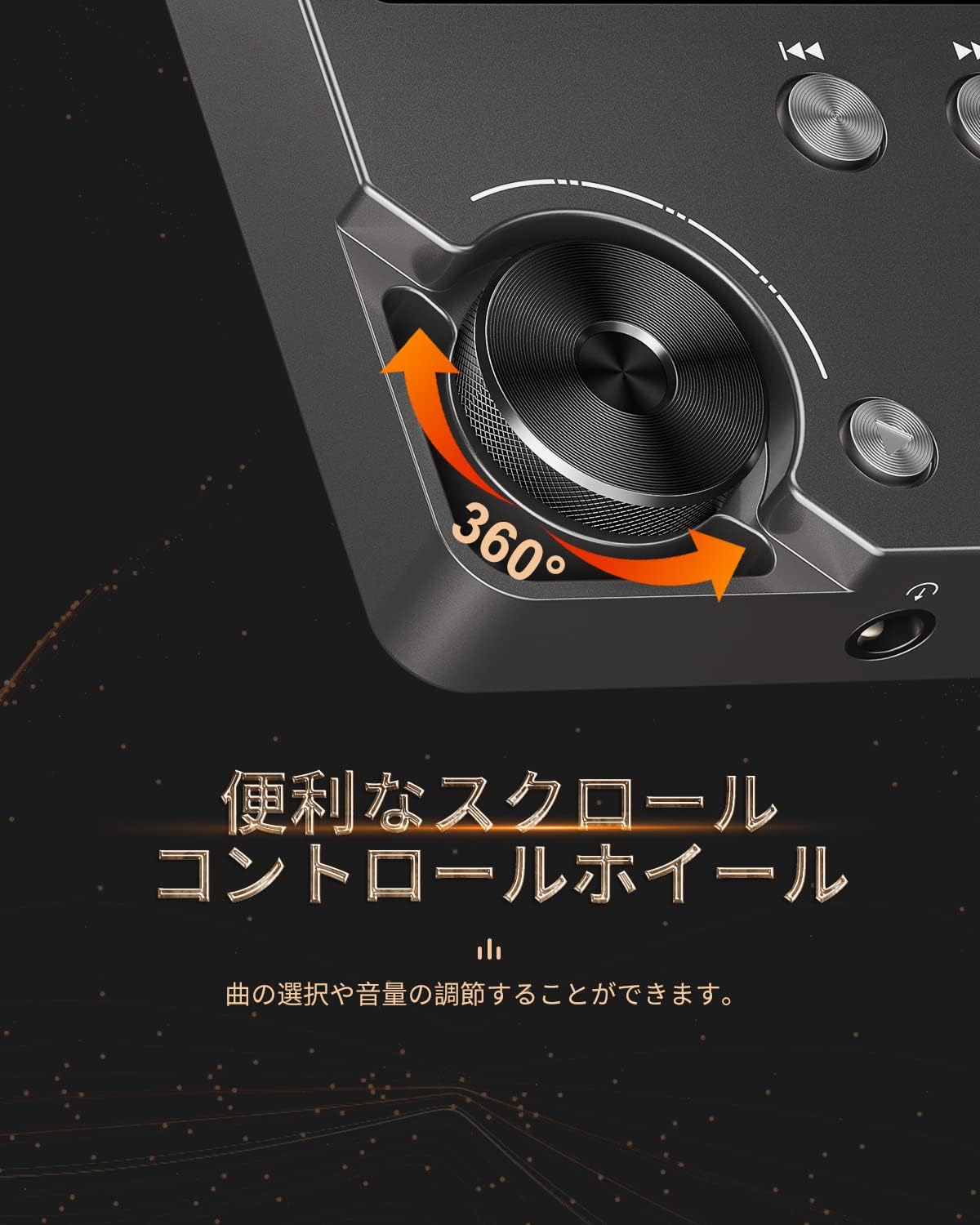
Figure 4: Scroll Control Wheel
4.3. Daqq tal-mużika
- Navigate to the 'Music' section from the main menu.
- Browse your music by folder, artist, album, or all songs.
- Select a track and press the MENU button to start playback.
- Uża l-buttuna Play/Pause biex tikkontrolla l-plejbek.
- Press Next Track or Previous Track buttons to skip songs. Hold these buttons for fast forward or rewind.
4.4. Kontroll tal-Volum
Rotate the scroll wheel during music playback to adjust the volume level. It is recommended to set the initial maximum volume to a low level to prevent sudden loud sounds.
4.5. Settings Equalizer
The player features an equalizer with various presets (e.g., Rock, Pop, Jazz, Classical, Soft, Techno) and a custom setting. Access the equalizer settings from the playback screen or system settings to adjust the sound profile għall-preferenza tiegħek.

Figure 5: Equalizer Function
4.6. Repeat and Shuffle Modes
During playback, access the options menu to select repeat modes (e.g., repeat one, repeat all) or enable shuffle playback for a randomized song order.
4.7. Konnessjoni ma' Apparati Esterni
The MECHEN M30 can connect to various audio output devices:
- Wired Headphones: Plug your 3.5mm headphones into the headphone jack.
- External Speakers/Car Audio: Use an AUX cable (not included) to connect the player's line-out port to your speakers or car's AUX input.

Figure 6: Connecting to Various Devices
5. Manutenzjoni
5.1. Tindif
Wipe the device with a soft, dry cloth. Do not use liquid cleaners or abrasive materials, as they may damage the finish or internal components.
5.2. Kura tal-batterija
To prolong battery life, avoid fully discharging the battery frequently. Charge the device regularly, even if not in use for extended periods. Store the device in a cool, dry place.

Figure 7: Battery Information
5.3. Ħażna
When storing the player for a long time, ensure it is fully charged and then power it off completely. Recharge it every few months to prevent deep discharge.
6 Issolvi l-problemi
- L-apparat mhux se jixgħel: Ensure the battery is charged. Connect the player to a power source using the USB cable and try again. If the issue persists, perform a reset by pressing the reset button (if available) or holding the power button for an extended period.
- Ebda ħoss: Check the volume level. Ensure headphones or external speakers are properly connected. Test with different headphones or speakers if possible.
- Mużika filemhux rikonoxxut: Ivverifika li l-mużika files are in a supported format (refer to Specifications). Ensure the microSD card is properly inserted and the files are not corrupted. Re-transfer the files jekk meħtieġ.
- Screen is unresponsive or erratic: Try restarting the device. If the problem continues, ensure the device is not exposed to extreme temperatures or moisture.
- Album art or metadata not displayed: Ensure that the metadata (ID3 tags) for your music files are correctly embedded. While the player supports folder-based navigation, correct tags enhance the browsing experience.
- Playback stops unexpectedly: Ensure the battery is sufficiently charged. If connected to a car audio system via USB, playback might pause when the engine is turned off or on due to changes in the USB host communication.
7. Speċifikazzjonijiet
| Karatteristika | Deskrizzjoni |
|---|---|
| Isem tal-Mudell | M30 |
| Brand | MECHEN |
| Wiri | LCD ta '2 pulzieri |
| Ħażna tal-Memorja | 64GB MicroSD card included (expandable up to 256GB) |
| Konnettività | AUX (3.5mm headphone jack, Line Out) |
| Kapaċità tal-batterija | 1500 mAh |
| Ħajja tal-batterija | Approx. 30 hours playback |
| Ħin tal-Iċċarġjar | Appross. 2.5 sigħat |
| Dimensjonijiet tal-Prodott (P x W x H) | 1.6 x 5.6 x 8.8 ċm |
| Piż tal-Prodott | 176 gramma |
| Formati Awdjo Appoġġjati | MP3 (8-48KHz, 16bits), WMA (8-192KHz, 16/24bits), WAV/PCM (8-192KHz, 8/16/24/32bits), APE (8-192KHz, 16/24bits), FLAC (8-192KHz, 16/24bits), AAC (8-96KHz, 16bits - mono playback), OGG (8-48KHz, 10-500bits), DSF (2822.4KHz, 1bit), AIFF (8-192KHz, 8/16/24/32bits), ALAC (8-192KHz, 16/24bits), IMA/MS-ADPCM (8-48KHz, 8/16bits), DFF (3072KHz, 1bit), DSD 128 (5.6MHz) |
| Karatteristiċi Speċjali | Equalizer, Shuffle Play, Hi-Res Audio, Repeat Play, Auto Power-Off |
| Pajjiż ta' Oriġini | Iċ-Ċina |
| UPC | 607469642453 |

Figure 8: Supported Audio Formats
8. Garanzija u Appoġġ
8.1. Garanzija tal-Manifattur
The MECHEN HIFI MP3 Player M30 comes with a one-year manufacturer's warranty from the date of purchase. This warranty covers defects in materials and workmanship under normal use. It does not cover damage caused by misuse, accidents, unauthorized modifications, or normal wear and tear.
8.2. Appoġġ għall-Klijent
For technical assistance, warranty claims, or any questions regarding your MECHEN M30 player, please contact your retailer or the MECHEN customer support team. Refer to the contact information provided with your purchase documentation or visit the official MECHEN websit għal dettalji ta 'appoġġ.