
Introduzzjoni
Thank you for choosing the Varmilo MA Series V2 Summit R2 Mechanical Keyboard. This manual provides essential information for setting up, operating, maintaining, and troubleshooting your new keyboard. Please read this manual thoroughly to ensure optimal performance and longevity of your device.
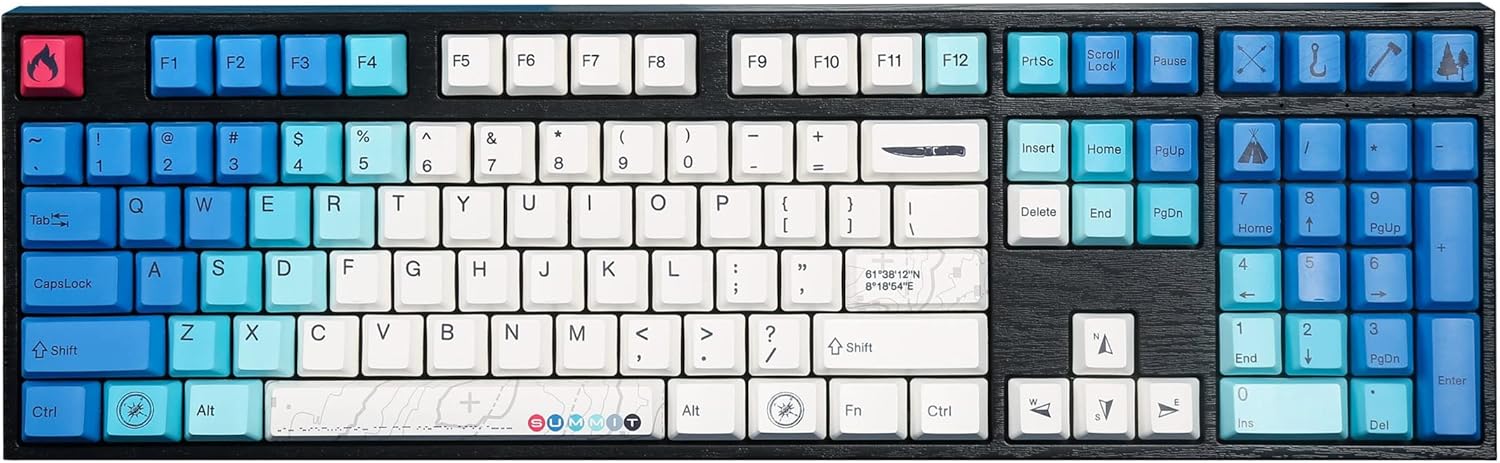
Image: The Varmilo MA Series V2 Summit R2 Mechanical Keyboard, showcasing its full layout and unique keycap design.
Setup
1. Unboxing
Neħħi bir-reqqa t-tastiera u l-aċċessorji kollha mill-imballaġġ. Kun żgur li l-oġġetti li ġejjin huma preżenti:
- Varmilo MA Series V2 Summit R2 Mechanical Keyboard
- USB-C Cable
- Puller tal-Keycap (jekk inkluż)
- Manwal għall-Utent (dan id-dokument)
2. Tqabbad it-Tastiera
- Sib il-port USB-C fuq wara tat-tastiera.
- Qabbad tarf wieħed tal-kejbil USB-C provdut mat-tastiera.
- Qabbad it-tarf l-ieħor tal-kejbil USB-C ma' port USB disponibbli fuq il-kompjuter tiegħek.
- It-tastiera hija plug-and-play u għandha tiġi rikonoxxuta awtomatikament mis-sistema operattiva tiegħek.
3. Aġġustament tal-Angolu tat-Tastiera
The Varmilo MA Series V2 features a double-section kickstand, allowing for two different typing angles. Gently flip out the desired sections of the kickstand located on the underside of the keyboard to adjust its height and angle for ergonomic comfort.

Immaġni: Side profile of the Varmilo keyboard, illustrating the adjustable kickstand in an extended position.
Istruzzjonijiet Operattivi
1. Funzjonijiet Bażiċi tat-Tastiera
The keyboard features a standard full-size (104-key) layout. All alphanumeric and standard function keys operate as expected. The Varmilo EC Ivy V2 switches provide a smooth and responsive typing experience.
2. Function (Fn) Key Combinations
The Fn key (typically located near the right Alt key) allows access to secondary functions printed on certain keycaps. Hold down the Fn key and press the desired function key simultaneously.
- Fn + F1-F12: Multimedia controls (e.g., volume, play/pause, stop).
- Fn + Tasti tal-Vleġġa: LED brightness or effect control (refer to specific keycap legends).
- Fn + Irbaħ: Ċavetta tal-illokkjar/ftuħ tal-Windows.

Immaġni: Close-up view of the right side of the Varmilo keyboard, highlighting the special function keys and their legends.
3. LED Backlighting Control
The keyboard features White LED backlighting. Use the Fn key combinations to adjust the brightness and switch between various lighting effects. Specific key legends will indicate the corresponding functions for LED control.
Manutenzjoni
1. Tindif tat-Tastiera
Biex iżżomm id-dehra u l-funzjonalità tat-tastiera:
- Skonnettja t-tastiera mill-kompjuter tiegħek qabel ma tnaddafha.
- Uża drapp ratba u mingħajr ħelu ftit dampLaħlaħ bl-ilma jew b'soluzzjoni ħafifa tat-tindif biex timsaħ il-keycaps u ċasing.
- Għat-trab u l-fdalijiet bejn il-keycaps, uża arja kkompressata.
- Avoid using harsh chemicals, abrasives, or solvents, as these can damage the PBT keycaps and finish.
2. Tneħħija u Sostituzzjoni tal-Għatu taċ-Ċwievet
The keyboard features durable Dye Sub PBT keycaps. If you need to remove keycaps for deep cleaning or customization:
- Use the provided keycap puller (if applicable) or a similar tool.
- Gently attach the keycap puller to the keycap and pull straight up to remove it. Avoid twisting or excessive force.
- Biex tpoġġiha lura, allinja l-għatu taċ-ċwievet maz-zokk tas-swiċċ u agħfas 'l isfel sew sakemm tikklikkja f'postu.

Image: A collection of individual Varmilo keycaps, including special design keycaps, demonstrating their PBT material and dye-sublimated legends.
Issolvi l-problemi
If you encounter issues with your Varmilo keyboard, please refer to the following common solutions:
- It-Tastiera Mhux Tirrispondi:
- Kun żgur li l-kejbil USB-C huwa konness sew kemm mat-tastiera kif ukoll mal-kompjuter.
- Ipprova qabbad it-tastiera ma' port USB differenti fuq il-kompjuter tiegħek.
- Ittestja t-tastiera fuq kompjuter ieħor biex teskludi problemi speċifiċi tas-sistema.
- Ibda mill-ġdid il-kompjuter tiegħek.
- LEDs Not Working or Incorrect:
- Ensure the LED brightness is not set to the lowest level using Fn key combinations.
- Check if any specific lighting modes are active that might turn off certain LEDs.
- Ċwievet Mhux Reġistrazzjoni:
- Remove the keycap and inspect the switch for any obstructions.
- Clean around the switch stem with compressed air.
Irrisettja l-Fabbrika
If issues persist, a factory reset may resolve them. Consult the Varmilo official website or support for specific reset procedures for your model, as these can vary.
Speċifikazzjonijiet
The following are the technical specifications for the Varmilo MA Series V2 Summit R2 Mechanical Keyboard:
| Karatteristika | Dettall |
|---|---|
| Brand | Varmilo |
| Mudell | MA Series V2 Summit R2 |
| Tqassim | Full-size (104 + 4 keys) |
| Tip ta' Swiċċ | Varmilo EC Ivy V2 Mechanical Switches |
| Materjal Keycap | Dye Sub PBT |
| Konnettività | USB-C |
| Backlighting | LED abjad |
| Materjal | Polybutylene Terephthalate, Silicone |
| Sors tal-Enerġija | Powered mill-USB |
| Apparati Kompatibbli | Kompjuter (permezz tal-USB-C) |
Garanzija u Appoġġ
Varmilo products are manufactured to high-quality standards. For information regarding warranty coverage, technical support, or service inquiries, please visit the official Varmilo webis-sit jew ikkuntattja l-appoġġ għall-klijenti tagħhom direttament. Żomm l-irċevuta tax-xiri tiegħek bħala prova tax-xiri għal talbiet ta' garanzija.
Official Varmilo Store: Varmilo Store on Amazon