
1. Introduzzjoni
Thank you for choosing the Qubo B-209 Senior Mobile Phone. This manual provides essential information for setting up, operating, and maintaining your device. Please read it carefully to ensure proper use and to maximize the phone's features.
Kontenut tal-Pakkett
- Qubo B-209 Mobile Phone
- Batterija Rechargeable Li-Ion
- Baċir tal-Iċċarġjar
- Cable USB
- Adapter tal-Enerġija
- Manwal għall-Utent (dan id-dokument)
2. Prodott Aktarview
The Qubo B-209 is designed for ease of use, featuring large buttons, a clear display, and essential functions for communication. Its key features include a dedicated SOS button for emergencies, a convenient charging dock, and a built-in flashlight.
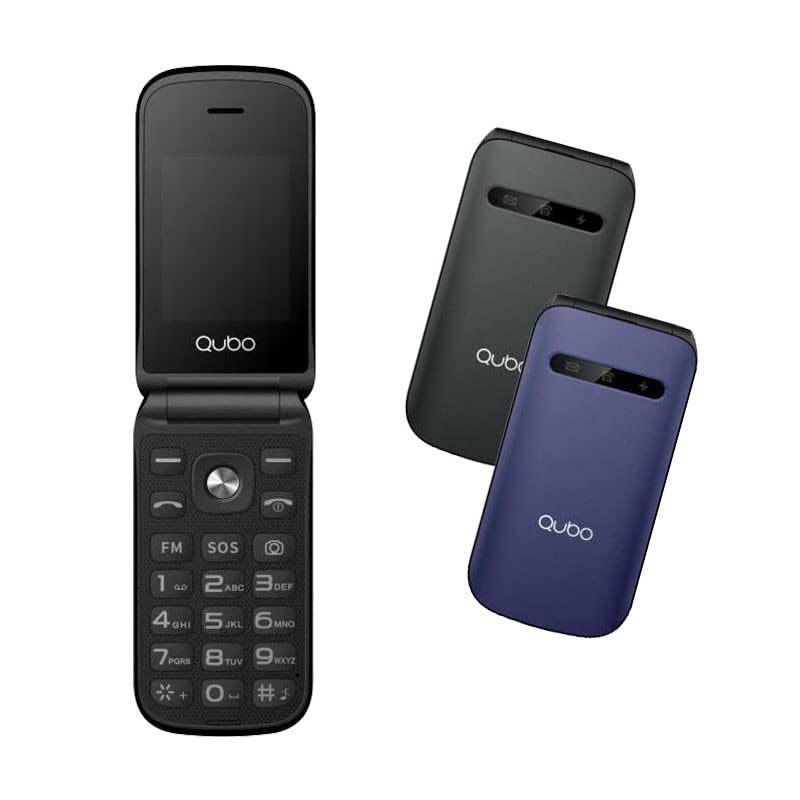
Stampa 1: Qubo B-209 Senior Mobile Phone with its charging dock. The phone features a blue casing, a large keypad, and a color display.
Karatteristiċi Ewlenin
- 2.4-inch QVGA TFT LCD Display: Skrin ċar u faċli biex jinqara.
- Tastiera Kbira: Ergonomic buttons for comfortable dialing and texting.
- Buttuna SOS: Dedicated emergency button for quick contact with pre-set numbers.
- Baċir tal-Iċċarġjar: Convenient desktop charger for easy power replenishment.
- Appoġġ għal SIM doppju: Uża żewġ SIM cards simultanjament.
- Radju FM: Isma' l-istazzjonijiet tar-radju favoriti tiegħek.
- Flashlight: Built-in LED light for convenience.
- Kamera ta' 0.3 MP: Basic camera functionality.
- Bluetooth 3.0: Għal konnettività mingħajr fili ma' apparati kompatibbli.
3. Setup
3.1 Installazzjoni tal-batterija
- Neħħi bil-mod il-qoxra ta' wara tat-telefon.
- Sib il-kompartiment tal-batterija.
- Insert the provided Li-Ion battery, ensuring the gold contacts align with the phone's terminals.
- Erġa' poġġi l-għatu ta' wara sakemm tikklikkja sew f'postu.
3.2 SIM Card(s) Installation
- With the back cover and battery removed, locate the SIM card slots. The Qubo B-209 supports Dual SIM.
- Carefully insert your SIM card(s) into the designated slot(s) with the gold contacts facing down and the cut corner aligned as shown in the diagram (refer to phone's internal markings).
- Kun żgur li l-karta(i) SIM huma mdaħħla sew.
- Erġa' installa l-batterija u l-għatu ta' wara.
3.3 Iċċarġjar tat-Telefon
Qabel l-ewwel użu, iċċarġja l-batterija tat-telefon kompletament.
- Użu tal-Baċir tal-Iċċarġjar:
- Connect the USB cable to the power adapter, then plug the adapter into a wall outlet.
- Connect the other end of the USB cable to the charging dock.
- Place the phone into the charging dock, ensuring the charging contacts on the phone align with those on the dock. The phone will indicate charging status on its screen.
- Iċċarġjar Dirett tal-USB:
- Connect the USB cable to the power adapter, then plug the adapter into a wall outlet.
- Connect the micro USB end of the cable directly to the micro USB port on the side or bottom of the phone.
A full charge typically takes approximately 2-3 hours. The battery indicator on the screen will show the charging progress.
4. Istruzzjonijiet Operattivi
4.1 Power On/Off
- Biex Tixgħel: Agħfas u żomm il- Qawwa/Tmiem is-Sejħa button (usually red) until the screen lights up.
- Biex Tifi: Agħfas u żomm il- Qawwa/Tmiem is-Sejħa button until the power-off options appear, then select "Power off" or confirm.
4.2 Tagħmel u Riċeviment Sejħiet
- Biex Tagħmel Sejħa:
- Daħħal in-numru tat-telefon billi tuża t-tastiera.
- Agħfas il- Ċempel button (usually green) to initiate the call.
- Biex Twieġeb Sejħa: Meta jdoqq it-telefon, agħfas il-buttuna Ċempel buttuna.
- Biex Intemm Sejħa: Agħfas il- Qawwa/Tmiem is-Sejħa buttuna.
4.3 Tibgħat u Tirċievi Messaġġi (SMS)
- Innaviga lejn il-menù "Messaġġi" mill-iskrin prinċipali.
- Agħżel "Ikteb messaġġ" jew "SMS Ġdid".
- Daħħal in-numru tat-telefon tar-riċevitur jew agħżel mill-kuntatti.
- Ittajpja l-messaġġ tiegħek billi tuża t-tastiera.
- Agħfas "Ibgħat" biex tittrażmetti l-messaġġ.
4.4 Buttuna ta' Emerġenza SOS
Il-buttuna SOS tinsab fuq wara tat-telefon. Din tippermettilek tikkuntattja malajr numri ta' emerġenza stabbiliti minn qabel.
- Setting up SOS Numbers:
- Go to "Settings" > "SOS Settings" or "Emergency Settings".
- Add up to 5 emergency contact numbers. These numbers will be called in sequence when the SOS button is activated.
- You can also enable an SOS message to be sent to these contacts.
- L-użu tal-Funzjoni SOS:
- F'każ ta' emerġenza, agħfas u żomm il-buttuna Buttuna SOS għal ftit sekondi.
- The phone will automatically call the pre-set emergency numbers one by one until an answer is received.
- If enabled, an emergency SMS message will also be sent.
Importanti: Ensure your SOS contacts are aware they are listed as emergency contacts and that their numbers are up-to-date.
4.5 Radju FM
- Innaviga lejn l-applikazzjoni "Radju FM" mill-menù prinċipali.
- Uża ċ-ċwievet tan-navigazzjoni biex tiskennja għall-istazzjonijiet jew biex tirranġa frekwenza manwalment.
- Adjust the volume using the side volume buttons (if available) or menu options.
4.6 Flashlight
The flashlight can be activated quickly.
- Locate the dedicated flashlight button on the side of the phone (if present) or access it via the menu.
- Press the button once to turn the flashlight on, and again to turn it off.
4.7 Kamera
- Aċċessa l-applikazzjoni "Kamera" mill-menù prinċipali.
- Ifrejmja x-xbieha tiegħek billi tuża l-iskrin bħala viewfinder
- Press the designated "Capture" or "OK" button to take a photo.
- Photos are saved to the phone's internal memory or an inserted T-Flash card.
5. Manutenzjoni
5.1 Tindif
- Uża drapp artab, niexef u mingħajr suf biex tnaddaf l-iskrin u l-qafas tat-telefon.
- Evita li tuża prodotti tat-tindif likwidi, aerosols, jew kimiċi ħarxa, għax dawn jistgħu jagħmlu ħsara lit-telefon.
- Ensure no moisture enters the charging port or other openings.
5.2 Kura tal-Batterija
- Do not expose the battery to extreme temperatures (hot or cold).
- Avoid fully discharging the battery frequently. Charge it regularly.
- Jekk it-telefon ma se jintużax għal perjodu twil ta' żmien, iċċarġja l-batterija sa madwar 50% u aħżinha f'post frisk u niexef.
5.3 Ħażna
- Store the phone in a dry environment, away from direct sunlight and excessive humidity.
- Keep the phone out of reach of children and pets.
6 Issolvi l-problemi
| Problema | Kawża Possibbli | Soluzzjoni |
|---|---|---|
| It-telefon ma jixgħelx. | Il-batterija hija eżawrita jew mhux installata sew. | Kun żgur li l-batterija tkun installata sew u kompletament iċċarġjata. |
| Ma nistax nagħmel jew nirċievi telefonati. | No network signal; SIM card not installed or activated; incorrect network settings. | Check signal strength. Ensure SIM card is properly inserted and activated. Contact your network provider if issues persist. |
| It-telefon mhux qed jiċċarġja. | Charging cable/adapter faulty; charging port/dock dirty or damaged; battery issue. | Check connections. Try a different outlet or charging method (dock vs. direct USB). Clean charging contacts. |
| Il-buttuna SOS mhux qed taħdem. | SOS numbers not set up; no network signal. | Verify SOS numbers are correctly configured in settings. Ensure the phone has network coverage. |
| Id-displej huwa vojt jew iffriżat. | Problema fis-softwer; batterija baxxa. | Restart the phone by holding the Power/End Call button. Charge the battery. |
7. Speċifikazzjonijiet
| Karatteristika | Dettall |
|---|---|
| Numru tal-Mudell | B-209 |
| Wiri | 2.4-inch QVGA TFT LCD |
| Chipset | M76261DA, ARM7 CPU, 260MHz |
| Memorja (RAM/ROM) | 32MB RAM, 32MB ROM |
| Konnettività | 2G GSM 850/900/1800 (GSM/GPRS), Bluetooth 3.0 |
| Batterija | 800 mAh Li-Ion |
| Kamera | 0.3 MP (Wara) |
| Appoġġ SIM | SIM doppju |
| Ħażna Esterna | T-Flash (up to 32MB) |
| Karatteristiċi | FM Radio, Flashlight, SOS Button, External Indicator (Messages, Calls, Charge) |
| Konnessjonijiet | Mikro USB, 3.5 mm Jack |
| Dimensjonijiet (Pakkett) | 15.3 x 8.1 x 6.9 ċm; 230 g |
| Sistema Operattiva | Symbian 9.1 |
8. Garanzija u Appoġġ
8.1 Garanzija tal-Manifattur
The Qubo B-209 Senior Mobile Phone comes with a garanzija ta' tliet snin mill-manifattur mid-data tax-xiri. Din il-garanzija tkopri difetti fil-materjali u l-abbilità taħt użu normali. Ma tkoprix ħsara kkawżata minn użu ħażin, inċidenti, modifiki mhux awtorizzati, jew xedd u kedd normali. Jekk jogħġbok żomm il-prova tax-xiri tiegħek għal talbiet ta' garanzija.
8.2 Appoġġ għall-Klijent
For technical assistance, troubleshooting beyond this manual, or warranty inquiries, please contact Qubo customer support. Refer to the packaging or the official Qubo webis-sit għall-aktar informazzjoni ta' kuntatt aġġornata.