
1. Introduzzjoni
This manual provides essential information for the safe and efficient use of the TRU COMPONENTS TC-9927144 Read/Write Module. Please read these instructions carefully before installation and operation, and retain them for future reference.
The TRU COMPONENTS TC-9927144 is a durable and robust electronic module designed for read and write operations in various applications. Its compact design and specific operating voltage make it suitable for integration into diverse electronic systems.
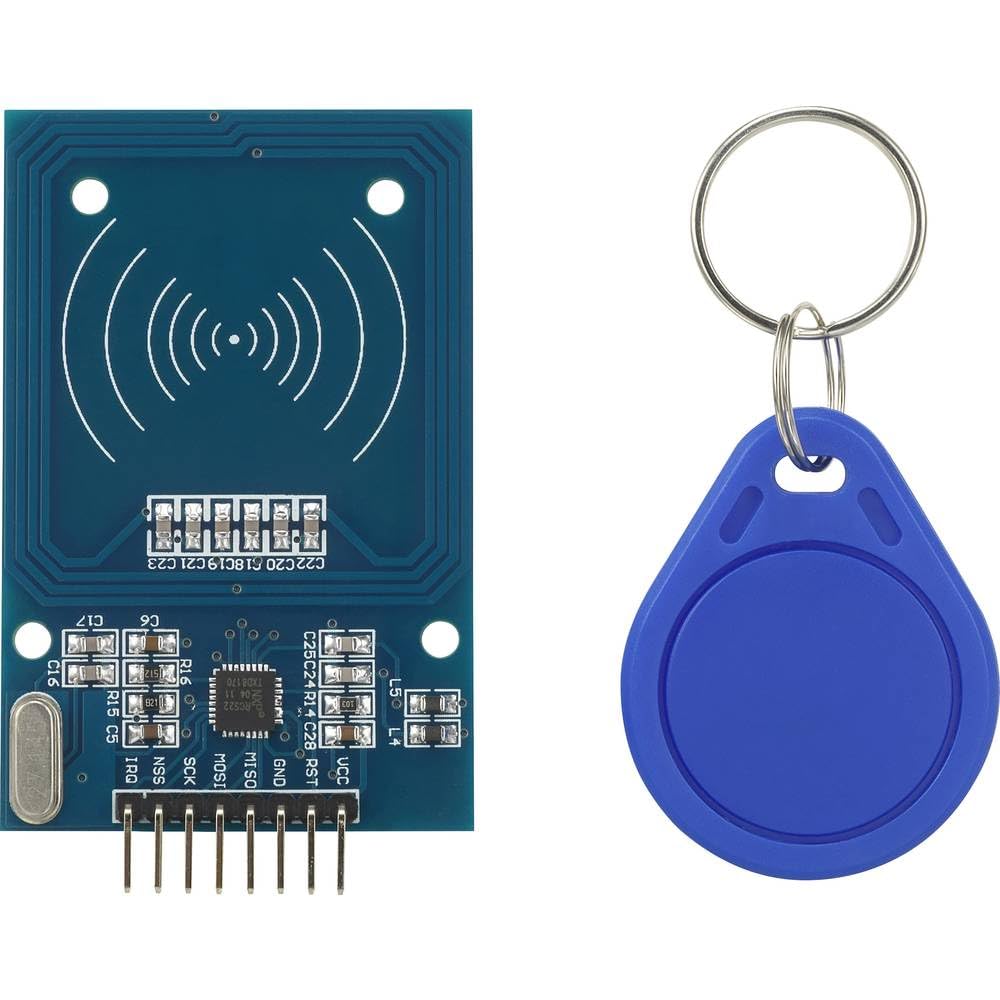
Image 1.1: TRU COMPONENTS TC-9927144 Read/Write Module. This image displays the compact form factor of the electronic module, highlighting its main components and connection points.
2. Informazzjoni dwar is-Sigurtà
Always observe the following safety precautions to prevent damage to the module or injury to personnel:
- Tiżgura l-provvista tal-enerġija voltage matches the module's specified operating voltage (3.3 VDC). Incorrect voltagjista' jikkawża ħsara permanenti.
- Do not expose the module to extreme temperatures, humidity, or corrosive environments.
- Handle the module with care to avoid electrostatic discharge (ESD) damage. Use appropriate ESD protection measures.
- Do not attempt to modify or repair the module. Refer all servicing to qualified personnel.
- Disconnect power before making any connections or disconnections to the module.
3. Prodott Aktarview
The TC-9927144 is a versatile read/write module constructed from durable plastic. Its primary function is to facilitate data transfer operations within an electronic system. The module is designed for easy integration and reliable performance.
Karatteristiċi ewlenin:
- Disinn kompatt u robust.
- Vol operattivtage: 3.3 VDC.
- Suitable for various read/write applications.
4. Setup
Follow these general steps for setting up the TC-9927144 module:
- Spakkjar: Carefully remove the module from its packaging. Inspect for any visible damage.
- Konnessjoni tal-Provvista tal-Enerġija: Connect the module to a stable 3.3 VDC power supply. Ensure correct polarity.
- Konnessjoni tal-Interface tad-Data: Connect the module's data interface pins to your host system (e.g., microcontroller, computer) according to your application's wiring diagram. Refer to your system's documentation for specific pin assignments.
- Immuntar: Secure the module in its intended location using appropriate mounting hardware, if applicable. Ensure it is protected from physical stress and environmental factors.
- Qawwa Inizjali: After all connections are secure, apply power to the module and the host system. Observe for any unusual behavior or indicator lights.
5. Istruzzjonijiet Operattivi
The operation of the TC-9927144 module is typically controlled by a host system (e.g., a microcontroller or computer) through its data interface. Specific operating procedures will depend on your application and the communication protocol used.
- Kontroll tas-Softwer: Develop or integrate software routines on your host system to send commands and receive data from the module.
- Read Operations: To read data, send the appropriate read command to the module. The module will then transmit the requested data back to the host system.
- Write Operations: To write data, send the write command followed by the data to be written. Confirm successful write operations if the protocol allows.
- Monitoraġġ tal-Istat: Monitor any status indicators or feedback from the module to ensure proper operation.
6. Manutenzjoni
The TRU COMPONENTS TC-9927144 module is designed for low maintenance. However, periodic checks can help ensure its longevity and reliable performance:
- Tindif: Żomm il-modulu ħieles mit-trab u l-fdalijiet. Uża drapp artab u niexef għat-tindif. Tużax prodotti tat-tindif likwidi jew solventi.
- Integrità tal-Konnessjoni: Iċċekkja perjodikament il-konnessjonijiet elettriċi kollha biex tiżgura li huma sikuri u ħielsa mill-korrużjoni.
- Kundizzjonijiet Ambjentali: Ensure the module remains within its specified operating environment (temperature, humidity) to prevent premature failure.
- Aġġornamenti tal-Firmware: If applicable and provided by the manufacturer, consider applying firmware updates to improve performance or address issues.
7 Issolvi l-problemi
If you encounter issues with your TC-9927144 module, consider the following troubleshooting steps:
- Ebda Qawwa:
- Verify the power supply is connected correctly and providing the specified 3.3 VDC.
- Check all power cables and connections for continuity and secure fit.
- Żbalji ta' Komunikazzjoni:
- Ensure data interface connections are correct and secure.
- Verify the communication protocol and settings (e.g., baud rate, parity) in your host system's software.
- Iċċekkja għal kwalunkwe interferenza minn apparat elettroniku ieħor.
- Incorrect Read/Write Operations:
- Review your software logic for sending commands and processing responses.
- Ensure the data being sent or received is in the correct format.
- Tisħin żejjed tal-Modulu:
- Aċċerta ruħek li jkun hemm ventilazzjoni adegwata madwar il-modulu.
- Ivverifika l-volum operattivtage is not exceeding 3.3 VDC.
If problems persist after attempting these steps, contact TRU Components support or a qualified technician.
8. Speċifikazzjonijiet
| Speċifikazzjoni | Valur |
|---|---|
| Manifattur | KOMPONENTI TRU |
| Numru tal-Mudell | TC-9927144 |
| Dimensjonijiet tal-Prodott (L x W x H) | 15 x 18 x 22 ċm |
| Materjal | Plastik |
| Vol Operattivtage | 3.3 VDC |
| Numru ta' Oġġetti fil-Pakkett | 1 |
| Sistema ta' Kejl | Metriku |
| Batteriji Inklużi | Nru |
| Batteriji Meħtieġa | Nru |
| Disponibbiltà ta' Spare Parts | Informazzjoni mhux disponibbli |
9. Garanzija u Appoġġ
TRU Components products are manufactured to high-quality standards. For specific warranty information, please refer to the documentation provided with your purchase or visit the official TRU Components websit. Żomm il-prova tax-xiri tiegħek għal talbiet ta' garanzija.
For technical support, troubleshooting assistance beyond this manual, or inquiries regarding spare parts, please contact TRU Components customer service. Contact details can typically be found on the product packaging or the manufacturer's websit.