
Lenovo G24-27
Manwal tal-Utent tal-Monitor tal-Logħob Lenovo G24-27
Model: G24-27 (Type 66CFGZC1EU)
1. Introduzzjoni
This manual provides detailed instructions for the setup, operation, and maintenance of your Lenovo G24-27 gaming monitor. Designed for competitive gaming, this 23.8-inch Full HD (1920x1080) IPS display offers a 144Hz refresh rate (overclockable to 165Hz) and a 0.5ms MPRT response time, complemented by AMD FreeSync Premium technology for a smooth gaming experience.
Please read this manual thoroughly before using your monitor to ensure proper installation and optimal performance.
2. Kontenut tal-Pakkett
Ivverifika li l-oġġetti kollha huma preżenti fil-pakkett tiegħek:
- Lenovo G24-27 Monitor Display Panel
- Stand tal-Monitor (Bażi u Għonq)
- Kejbil tal-Enerġija
- Cable HDMI
- DisplayPort Cable
- Dokumentazzjoni (Gwida ta' Bidu Mgħaġġel, Informazzjoni dwar is-Sigurtà)
3. Istruzzjonijiet ta' Setup
3.1 L-Immuntar tal-Istand tal-Monitor
Carefully remove the monitor components from the packaging. Place the display panel face down on a soft, clean surface to prevent scratches.
- Attach the stand neck to the display panel using the provided screws.
- Connect the stand base to the stand neck, securing it with the captive screw.
- Kun żgur li l-konnessjonijiet kollha huma sodi u stabbli.

Figura 3.1: Quddiem view of the Lenovo G24-27 monitor with stand assembled.
3.2 Kejbils tal-Konnessjoni
Connect the necessary cables to the rear of the monitor and your computer or other devices.
- Qawwa: Qabbad il-kejbil tal-enerġija mad-dħul tal-enerġija tal-monitor u mbagħad ma' sokit tal-enerġija.
- Video Input:
- Għal prestazzjoni ottimali, uża l-kejbil DisplayPort biex tikkonnettja mal-karta grafika tal-kompjuter tiegħek.
- Alternatively, use an HDMI cable to connect to your computer or other HDMI-compatible devices. The monitor supports 2 x HDMI 2.0 ports.
- Output Awdjo: Qabbad kelliema esterni jew headphones mal-port tal-ħruġ tal-awdjo ta' 3.5mm jekk tixtieq.
- Sigurtà: Utilize the Kensington Lock slot for physical security.

Figura 3.2: Wara view of the monitor with labeled ports for power, HDMI, DisplayPort, Audio Out, and Kensington Lock.
3.3 L-aġġustament tal-Monitor
L-istand tal-monitor jippermetti aġġustamenti ergonomiċi:
- Aġġustament Għoli: Imbotta jew iġbed il-pannell tal-monitor bil-mod 'il fuq jew 'l isfel biex tikseb ix-xewqa tiegħek viewing għoli.
- Aġġustament tal-inklinazzjoni: Tilt the monitor panel forward or backward to optimize your viewangolu tal-ing.
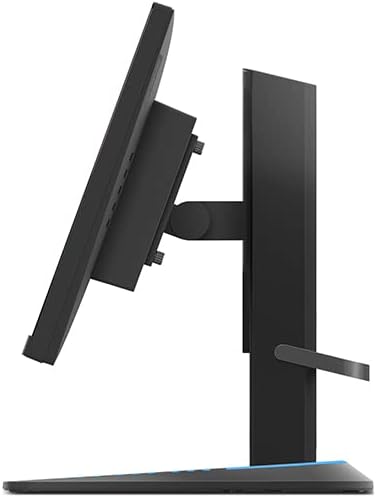
Figura 3.3: Ġenb view illustrating the monitor's tilt adjustment capability.
4. Istruzzjonijiet Operattivi
4.1 Tixgħel/Jitfi
Press the power button, usually located on the bottom right or rear of the monitor, to turn the monitor on or off. The power indicator light will illuminate when the monitor is active.
4.2 Menù tal-Wiri fuq l-Iskrin (OSD)
The OSD menu allows you to adjust various monitor settings. Access it using the buttons located on the monitor. Common settings include:
- Luminożità/Kuntrast: Aġġusta l-luminanza u d-distinzjoni tal-immaġni.
- Settings tal-Kulur: Immodifika t-temperatura tal-kulur, il-gamma, u l-livelli individwali tal-RGB.
- Għażla tal-Input: Ibdel manwalment bejn l-inputs HDMI u DisplayPort.
- Issettjar tal-Logħob: Enable/disable FreeSync, adjust response time, and set refresh rate.
- Modalità Stampa: Select predefined display modes (e.g., Standard, Gaming, Movie).
4.3 Lenovo Artery Software
For advanced control and customization, download and install the exclusive Lenovo Artery software from the official Lenovo support website. This software allows you to configure display settings directly from your operating system, enhancing your user experience.
4.4 Karatteristiċi tal-Logħob
- Rata Għolja ta' Aġġornar: The monitor supports a native 144Hz refresh rate, overclockable to 165Hz, for smoother motion in games. Ensure your graphics card and system settings are configured to utilize this refresh rate.
- Ħin ta' Rispons Mgħaġġel: With a 0.5ms Moving Picture Response Time (MPRT), ghosting and motion blur are significantly reduced.
- AMD FreeSync Premium: This technology synchronizes the monitor's refresh rate with your AMD graphics card's frame rate, eliminating screen tearing and stuttering. Ensure FreeSync is enabled in both the monitor's OSD and your graphics card's control panel.
- Panel IPS: The In-Plane Switching (IPS) panel provides wide viewing angles and accurate color reproduction (99% sRGB color gamut).
5. Manutenzjoni
5.1 Tindif tal-Monitor
Biex iżżomm id-dehra u l-prestazzjoni tal-monitor:
- Dejjem itfi l-monitor u aqla’ l-korda tal-enerġija qabel ma tnaddaf.
- Uża ċarruta ratba u mingħajr ħelu dampMaħsul bl-ilma jew b'tindif tal-iskrin li ma jobrox.
- Tisprejjax it-tindif direttament fuq l-iskrin.
- Avoid using benzene, thinner, ammonia-based cleaners, or abrasive materials, as these can damage the display surface.
5.2 Karatteristiċi ta' Kumdità għall-Għajnejn
The Lenovo G24-27 is TÜV Rheinland Eye Comfort certified, designed to reduce eye strain during prolonged use. This includes features like flicker-free technology and low blue light emission. Adjust brightness and contrast settings to a comfortable level for your environment.
6 Issolvi l-problemi
Jekk tiltaqa' ma' problemi bil-monitor tiegħek, irreferi għas-soluzzjonijiet komuni li ġejjin:
| Problema | Soluzzjoni Possibbli |
|---|---|
| L-ebda immaġni fuq l-iskrin |
|
| L-immaġni hija mċajpra jew distorta |
|
| Screen tearing or stuttering (in games) |
|
| Monitor not reaching 144Hz/165Hz |
|
7. Speċifikazzjonijiet
Key technical specifications for the Lenovo G24-27 monitor:
| Karatteristika | Dettall |
|---|---|
| Isem tal-Mudell | Lenovo G24-27 |
| Numru tal-Mudell | 66CFGZC1EU |
| Daqs tal-Iskrin | 23.8 Pulzier |
| Tip ta' Panel | IPS (Qlib fil-Pjan) |
| Riżoluzzjoni | 1920 x 1080 (Full HD) |
| Proporzjon ta' l-aspett | 16:9 |
| Riffriskar Rata | 144Hz (Overclockable to 165Hz) |
| Ħin ta' Rispons | 0.5ms MPRT (Moving Picture Response Time) |
| Proporzjon ta' Kuntrast | 3000:1 (Tipiku) |
| Luminożità | 350 nits (Tipiku) |
| Gamut tal-Kulur | 99% sRGB |
| Konnettività | 2 x HDMI 2.0, 1 x DisplayPort 1.4, 1 x Audio Out (3.5mm) |
| Ergonomija | Inklinazzjoni, Aġġustament tal-Għoli |
| Karatteristiċi Speċjali | AMD FreeSync Premium, TÜV Rheinland Eye Comfort, Lenovo Artery Software Support |
| Konsum tal-Enerġija (SDR) | 18.0 W |
| Konsum tal-Enerġija (HDR) | 35.0 W |
| Klassi tal-Effiċjenza tal-Enerġija | E (SDR), G (HDR) |
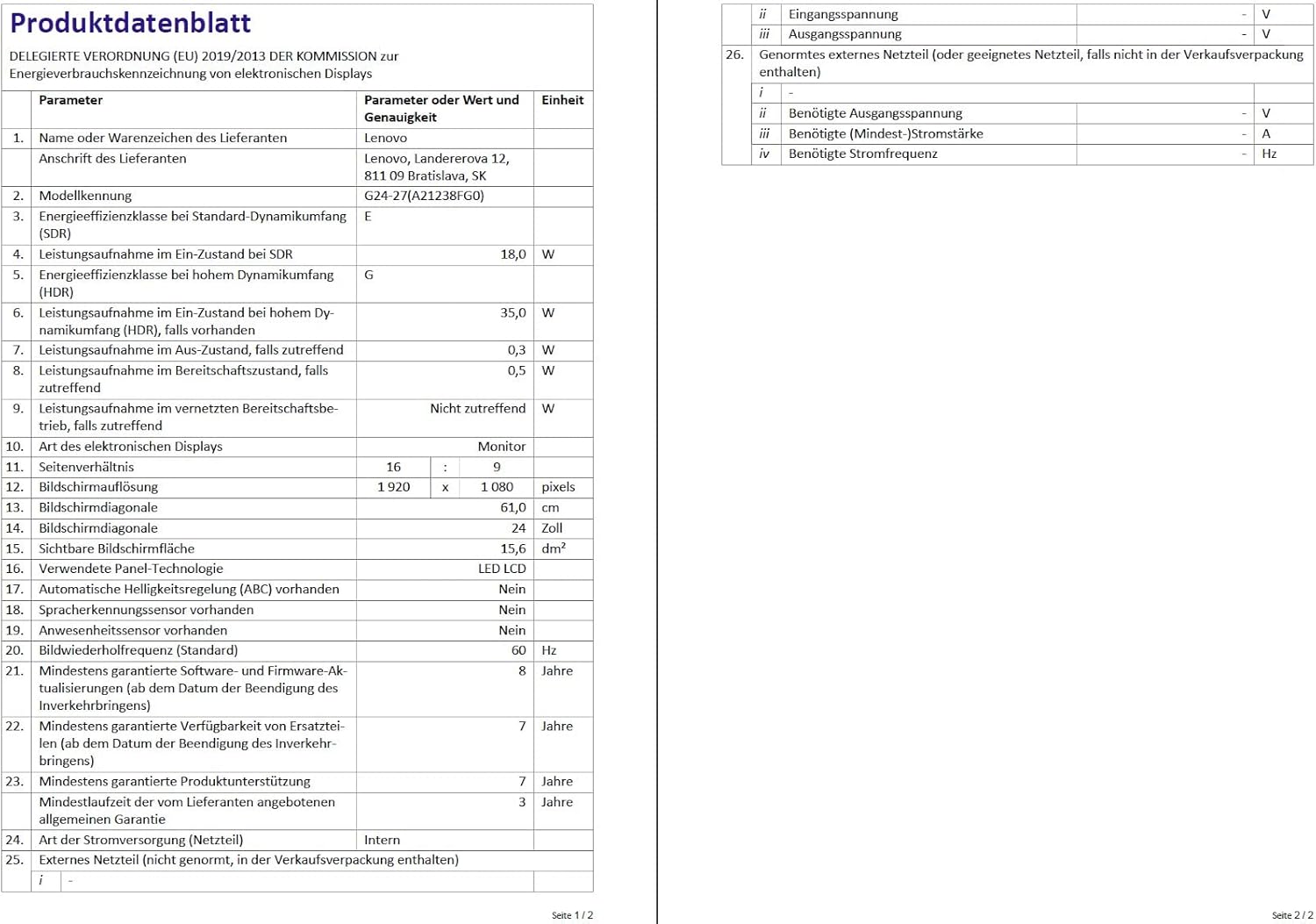
Figure 7.1: Energy efficiency label for the Lenovo G24-27 monitor. For more details, visit the official EU EPREL database: Link tad-Database tal-EPREL
8. Garanzija u Appoġġ
8.1 Garanzija tal-Manifattur
The Lenovo G24-27 monitor comes with a manufacturer's warranty of 36 xhur (3 years). Please refer to the warranty card included in your package or visit the official Lenovo support website for detailed terms and conditions. This warranty does not affect your statutory consumer rights.
8.2 Appoġġ Tekniku
For technical assistance, troubleshooting beyond this manual, or warranty claims, please contact Lenovo customer support. You can find contact information and additional resources on the official Lenovo support websit.
Appoġġ Lenovo Websit: https://support.lenovo.com/
Ask a question about this manual
Ask about setup, troubleshooting, compatibility, parts, safety, or missing instructions. Manuals+ will review the question and use this page’s manual context to help answer it.