
1. Introduzzjoni
The Redkey W12 Wireless Floor Cleaner is a versatile 3-in-1 appliance designed for efficient wet and dry cleaning of various hard floor surfaces. It integrates vacuuming, wiping, and drying functions into a single cordless unit, simplifying your cleaning routine. This manual provides essential information for the safe and effective use, maintenance, and troubleshooting of your Redkey W12.
2. Prodott Aktarview u Komponenti
Familiarize yourself with the main parts of your Redkey W12 floor cleaner and its accessories.
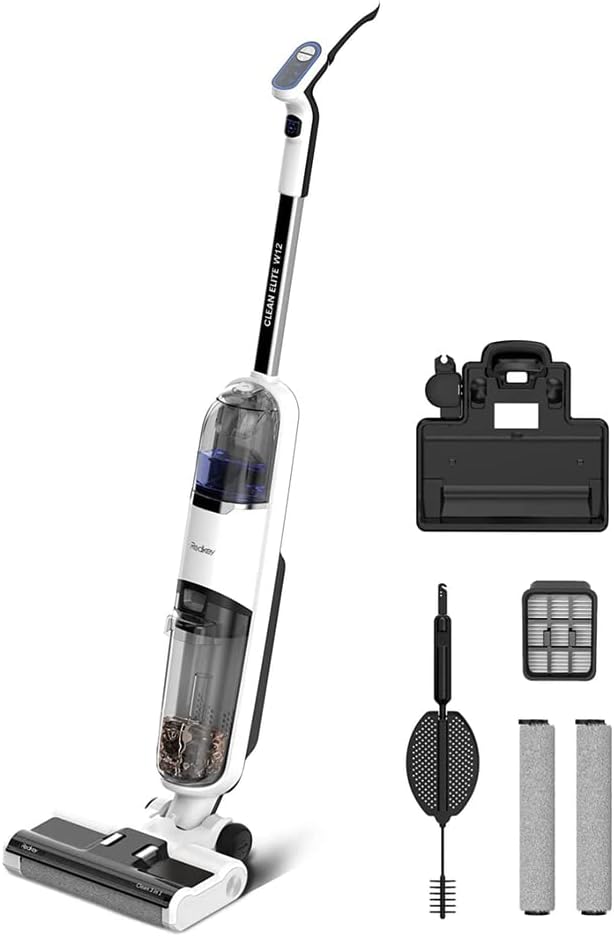
Figura 2.1: The Redkey W12 main unit shown with its charging base, cleaning tool, spare filters, and additional roller brushes.

Figura 2.2: Diagram illustrating the separate clean water tank (520ml) and dirty water tank (460ml), highlighting the dual-tank system.
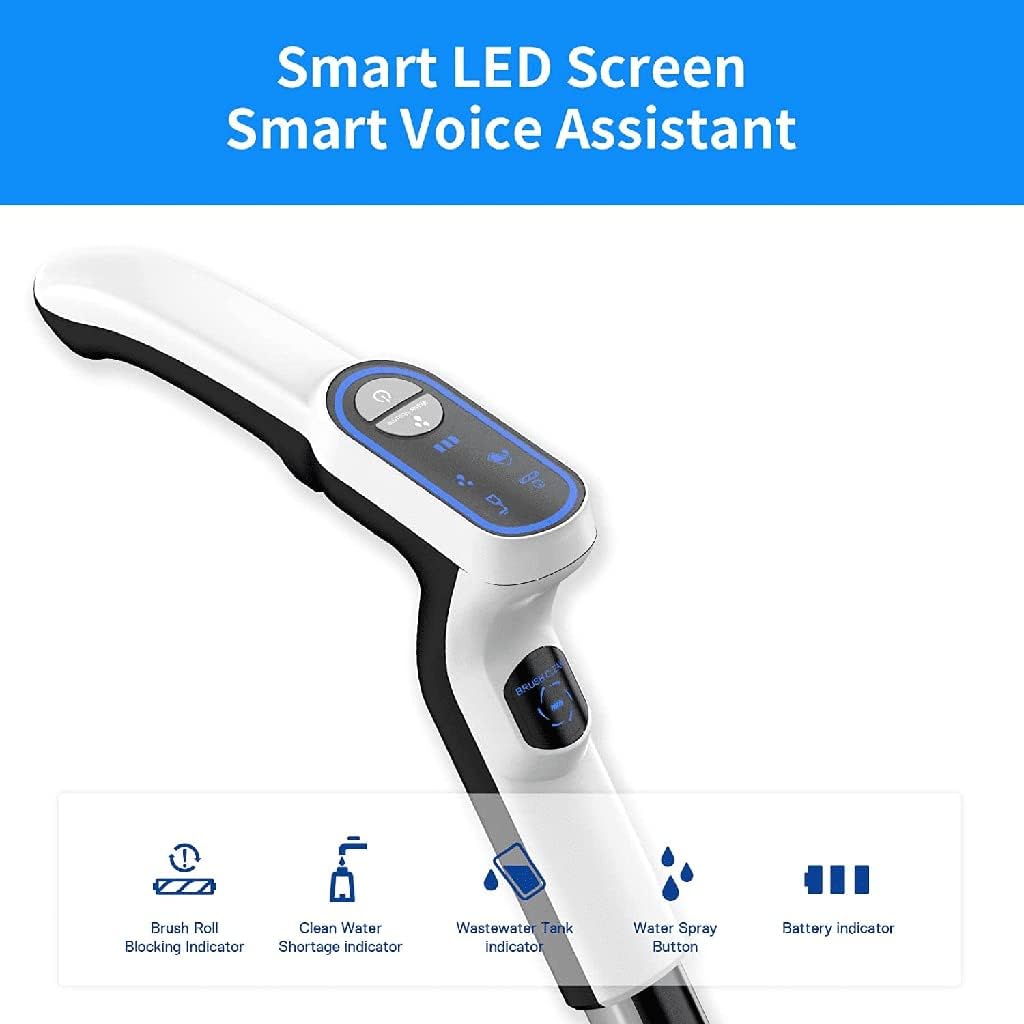
Figura 2.3: Close-up of the Redkey W12 handle displaying the smart LED screen with indicators for brush roll blocking, clean water shortage, wastewater tank full, water spray button, and battery level.
3. L-Ibda (Setup)
Follow these steps to prepare your Redkey W12 for its first use.
- Spakkjar: Carefully remove all components from the packaging. Verify that all parts listed in the product overview huma preżenti.
- Assemblea: Attach the handle to the main body of the cleaner until it clicks securely into place.
- Ħlas Inizjali: Place the Redkey W12 on its charging base. Connect the power adapter to the charging base and a power outlet. Allow the unit to fully charge before first use. The battery indicator on the LED screen will show charging status.
- Imla t-Tank tal-Ilma Nadif: Remove the clean water tank (upper tank) from the unit. Open the cap and fill it with clean tap water. For enhanced cleaning, a small amount of non-foaming floor cleaning solution suitable for wet vacuums can be added. Do not exceed the MAX fill line. Securely close the cap and reinsert the tank into the unit.
- Iċċekkja t-Tank tal-Ilma Maħmuġ: Ensure the dirty water tank (lower tank) is empty and properly installed before operation.
4. Istruzzjonijiet Operattivi
The Redkey W12 is designed for efficient 3-in-1 cleaning on various hard floor types.

Figura 4.1: The Redkey W12 in action, demonstrating its ability to vacuum, wash, and mop simultaneously on a wooden floor.
- Qawwa Mixgħul: Press the power button on the handle to turn on the unit. The LED screen will illuminate.
- Modalità tat-Tindif: The Redkey W12 operates in a combined vacuuming, wiping, and drying mode. Simply push the cleaner forward and pull it back over the desired area.
- Sprej tal-Ilma: Press the water spray button on the handle to dispense clean water onto the floor as needed for stubborn stains or heavier cleaning.
- Voice Reminders: The unit provides intelligent voice reminders for various statuses, such as low battery, full dirty water tank, or clean water shortage. Pay attention to these prompts.
- Ħajja tal-batterija: A fully charged battery provides approximately 45 minutes of continuous operation, sufficient for cleaning up to 200 square meters (2200 sqft).
- Uċuħ addattati: The Redkey W12 is suitable for sealed hard floors including tile, laminate, marble, and hardwood.
- Itfi: Agħfas il-buttuna tal-qawwa mill-ġdid biex itfi l-unità.

Figura 4.2: The Redkey W12 effectively picking up a variety of wet and dry debris from a wooden floor, leaving no residue.
5. Manutenzjoni u Tindif
Regular maintenance ensures optimal performance and extends the lifespan of your Redkey W12.
5.1 Funzjoni ta' Awto-Tindif
The Redkey W12 features an automatic self-cleaning function for the brush roll.
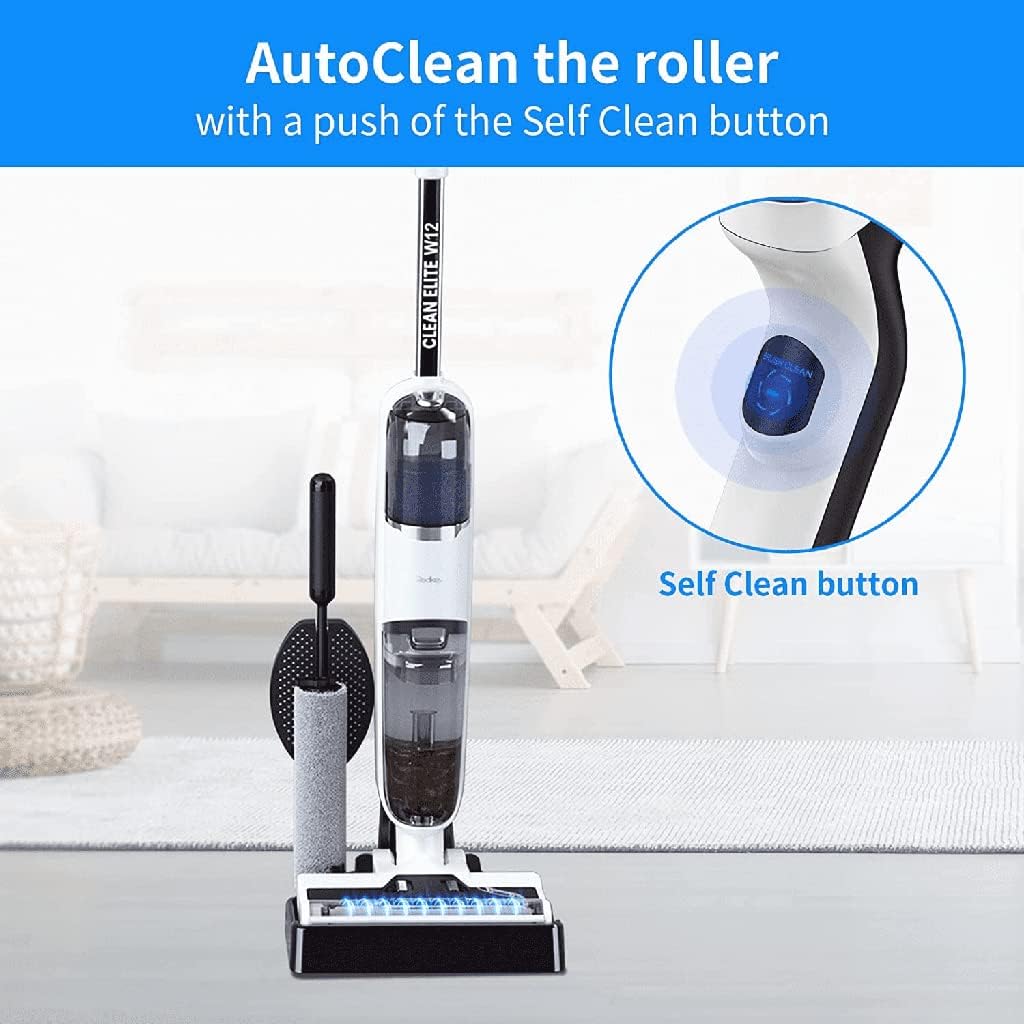
Figura 5.1: The 'Self Clean' button located on the handle, used to initiate the automatic cleaning cycle.

Figura 5.2: An illustration depicting the water flow during the self-cleaning process, flushing the brush roll.
- After cleaning, place the unit back on its charging base.
- Kun żgur li hemm biżżejjed ilma nadif fit-tank tal-ilma nadif.
- Press the 'Self Clean' button on the handle. The unit will automatically perform a cleaning cycle for the brush roll.
- Once the cycle is complete, empty the dirty water tank.
5.2 Manutenzjoni tat-Tank

Figura 5.3: Cross-section diagram showing the internal clean water tank and waste water tank within the Redkey W12.
- Tank tal-Ilma Maħmuġ: Always empty the dirty water tank after each use. Rinse it thoroughly with clean water to prevent odors and residue buildup.
- Tank tal-Ilma Nadif: Empty any remaining clean water if the unit will not be used for an extended period. Rinse and dry the tank.
5.3 Brush Roll and Filter Maintenance

Figura 5.4: Diagram illustrating the Redkey patent design for easy removal of the brush roll and its cover for cleaning or replacement.
- Tindif bir-Romblu tal-Pinzell: Even with the self-cleaning function, it is recommended to periodically remove the brush roll for manual cleaning, especially if hair or debris is tangled. The Redkey W12 comes with 3 roller brushes, allowing for rotation.
- Tindif tal-filtru: The filter located in the dirty water tank should be rinsed regularly under running water. Allow it to air dry completely before reinserting.
6 Issolvi l-problemi
This section addresses common issues you might encounter with your Redkey W12.
| Problema | Kawża Possibbli | Soluzzjoni |
|---|---|---|
| L-unità ma tixgħelx. | Batterija baxxa; L-unità mhux iċċarġjata. | Place the unit on the charging base and ensure it is fully charged. Check power connection. |
| L-ebda ilma ma jitqassam. | Clean water tank is empty; Water spray nozzle is blocked. | Refill the clean water tank. Check and clean the water spray nozzle. |
| Prestazzjoni ħażina ta' ġbid jew tindif. | Dirty water tank is full; Brush roll is tangled or dirty; Filter is clogged. | Empty the dirty water tank. Clean the brush roll and remove any tangled debris. Clean or replace the filter. |
| Unit stops with "Dirty water tank removed" or similar error. | Dirty water tank sensor malfunction; Tank not properly seated. | Ensure the dirty water tank is securely and correctly installed. If the issue persists, contact customer support as the sensor may require service. |
| Riħa spjaċevoli mill-unità. | It-tank tal-ilma maħmuġ jew ir-romblu tal-pinzell mhux imnaddaf sew. | Thoroughly clean the dirty water tank, brush roll, and filter. Run a self-cleaning cycle. |
7. Speċifikazzjonijiet Tekniċi
| Karatteristika | Speċifikazzjoni |
|---|---|
| Numru tal-Mudell | W12 |
| Funzjonijiet | 3-in-1 (Vacuum, Wipe, Dry) |
| Kapaċità tat-Tank tal-Ilma Nadif | 520 Millilitru |
| Kapaċità tat-Tank tal-Ilma Maħmuġ | 460 Millilitru |
| Qawwa / Wattage | 150 Watts |
| Voltage | 220 Volts |
| Livell ta' Storbju | 72 dB |
| Runtime | Sa 45 minuta |
| Piż tal-oġġett | 3.8 Kilogrammi |
| Dimensjonijiet tal-Prodott | 33 x 31 x 70 ċm |
| Karatteristiċi Speċjali | Cordless, Lightweight, Self-cleaning, Dual Tank Design |
| Tip ta 'filtru | Skartoċċ |
| Rakkomandazzjoni tal-wiċċ | Art iebes |
| Sors tal-Enerġija | Mħaddma bil-batterija |
8. Garanzija u Appoġġ
The Redkey W12 comes with a garanzija ta 'sena. For warranty claims, technical support, or service inquiries, please refer to the contact information provided with your purchase documentation or visit the official Redkey websit. Kun żgur li żżomm il-prova tax-xiri tiegħek għall-validazzjoni tal-garanzija.