
1. Introduzzjoni
Thank you for choosing the Rollei DF-S 1600 SE Film and Slide Scanner. This device is designed to digitize your precious film negatives and slides with high resolution, preserving your memories for years to come. This manual provides detailed instructions for the proper setup, operation, and maintenance of your scanner. Please read this manual thoroughly before using the device to ensure optimal performance and safety.
2. Istruzzjonijiet tas-Sigurtà
- Always use the provided power adapter. Using an incorrect adapter may damage the device and void the warranty.
- Do not expose the scanner to water or excessive moisture.
- Evita li tpoġġi l-iskaner fid-dawl tax-xemx dirett jew ħdejn sorsi ta’ sħana.
- Keep the scanner away from strong magnetic fields.
- Tippruvax tiżżarma jew issewwi l-iskaner int stess. Irreferi għal persunal tas-servizz kwalifikat.
- Clean the scanner with a soft, dry cloth. Do not use liquid cleaners or solvents.
- Kun żgur li jkun hemm ventilazzjoni xierqa madwar l-apparat waqt it-tħaddim.
3. Kontenut tal-Pakkett
Please check the contents of your package upon unpacking. If any items are missing or damaged, contact your retailer.
- Rollei DF-S 1600 SE Film and Slide Scanner
- Adapter tal-Enerġija
- Cable USB
- Film Holder for 135/126/110 mm Negatives
- Slide Holder for 135/126/110/8 mm Slides
- Pinzell tat-tindif
- Manwal għall-Utent (dan id-dokument)

Image: Included film and slide holders for different media types.
4. Prodott Aktarview
Familiarize yourself with the main components of your Rollei DF-S 1600 SE scanner.

Immaġni: Angolata view of the Rollei DF-S 1600 SE scanner, highlighting the display and film input.

Immaġni: Quddiem view of the scanner, showing the power button and film output slot.
- Display LCD: 3.5-inch TFT LCD color screen for previewing images and navigating menus.
- Buttuni tal-Kontroll: Buttons for navigation, capture, and menu access.
- Film/Slide Input Slot: Where film holders are inserted.
- Buttuna tal-Qawwa: Biex ixgħel/itfi l-apparat.
- Slot tal-Kard SD: For inserting an SD/SDHC/MMC memory card to save scanned images.
- Port USB: For connecting to a computer or power adapter.
- HDMI/TV Out Port: Għall-konnessjoni ma' display estern jew TV.
5. Setup
Follow these steps to set up your scanner for first use.
- Qabbad l-Enerġija: Connect the provided power adapter to the scanner's USB port and then to a power outlet. The scanner can also be powered via a computer's USB port.
- Daħħal il-Kard tal-Memorja: Insert an SD/SDHC/MMC memory card (not included) into the designated slot on the scanner. Ensure it is inserted correctly until it clicks into place.
- Qawwa Mixgħul: Press and hold the Power button until the LCD display turns on.
- Agħżel Lingwa: If prompted, use the navigation buttons to select your preferred language and confirm.
- Ipprepara l-Film/Slajd: Choose the appropriate film or slide holder for your media type. Carefully insert your negatives or slides into the holder. Ensure they are clean and free of dust.

Image: Preparing a film strip for insertion into the scanner using a film holder.
6. Istruzzjonijiet Operattivi
6.1 Scanning Negatives (135, 126, 110 mm)
- Insert the negative film strip into the appropriate negative film holder. Ensure the film is flat and correctly aligned.
- Insert the loaded film holder into the scanner's film input slot. Push it gently until it locks into position.
- On the scanner's LCD, select "Negative Film" as the media type.
- Use the navigation buttons to preview the image. Adjust exposure and color settings if necessary (refer to Section 6.3).
- Press the "Capture" button to scan the image. The scanned image will be saved to the memory card.
- Remove the film holder and advance the film to the next frame, or replace with a new film strip.
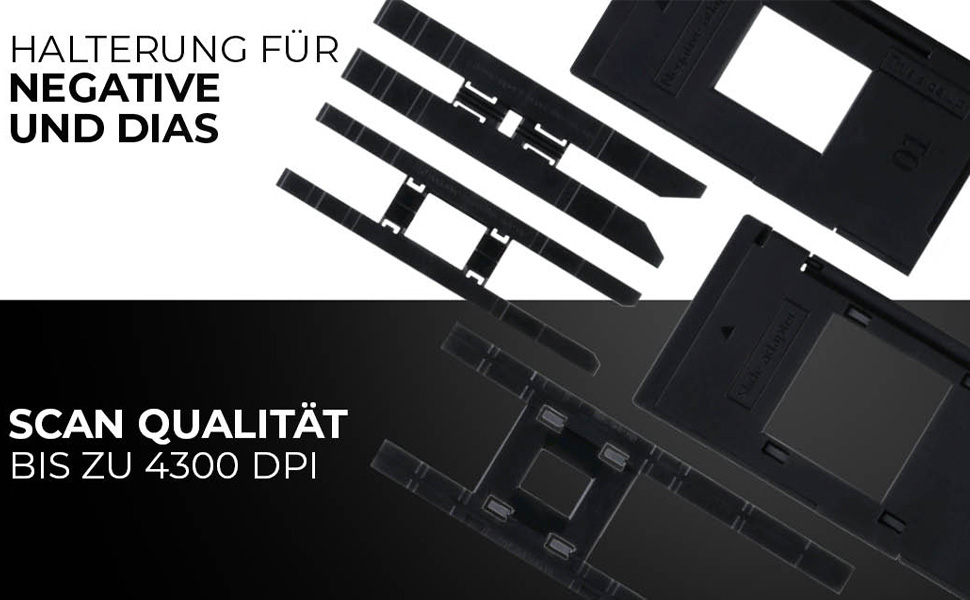
Image: Scanning a negative film strip with the Rollei DF-S 1600 SE.
6.2 Scanning Slides (135, 126, 110, 8 mm)
- Place your mounted slide into the appropriate slide holder. Ensure the slide is clean and correctly oriented.
- Insert the loaded slide holder into the scanner's film input slot.
- On the scanner's LCD, select "Slide" as the media type.
- Preview the image on the display. Adjust settings as needed (refer to Section 6.3).
- Press the "Capture" button to scan the image. The scanned image will be saved to the memory card.
- Remove the slide holder and replace with the next slide.

Image: Scanning a mounted slide with the Rollei DF-S 1600 SE.
6.3 Aġġustament tas-Settings
The Rollei DF-S 1600 SE offers 7 manual adjustment levels for optimal image results. Access the menu to adjust settings such as:
- Espożizzjoni: Aġġustament tal-luminożità.
- Bilanċ tal-Kulur: Adjust red, green, and blue channels.
- Riżoluzzjoni: Select scanning resolution (up to 16 MP interpolated, 4300 DPI optical).
- Tip ta' Film: Ensure the correct film type (color negative, black & white negative, slide) is selected for accurate color reproduction.
6.4 Connecting to PC/TV
- Konnessjoni USB (PC): Connect the scanner to your computer using the USB cable. The scanner will appear as a mass storage device, allowing you to transfer scanned images.
- HDMI/TV Connection: Use an HDMI cable (not included) to connect the scanner to a TV or external monitor. This allows for a larger view of your images during scanning or playback.
7. Manutenzjoni
Regular maintenance ensures the longevity and performance of your scanner.
- Tindif tal-Iskaner: Use the provided cleaning brush to gently remove dust from the film input slot and the internal light source. Do not use compressed air, as it may push dust further inside.
- Tindif ta' Detenturi ta' Film/Slajds: Wipe the holders with a soft, dry, lint-free cloth. Ensure they are free of dust and debris before inserting film or slides.
- Ħażna: When not in use, store the scanner in a cool, dry place, away from direct sunlight and dust.
8 Issolvi l-problemi
Jekk tiltaqa' ma' problemi, irreferi għat-tabella t'hawn taħt għal problemi u soluzzjonijiet komuni.
| Problema | Soluzzjoni Possibbli |
|---|---|
| L-iskaner ma jixgħelx. | Ensure the power adapter is securely connected to both the scanner and a working power outlet. Try a different USB port or power outlet. |
| Images appear blurry or dusty. | Clean the film/slides and the scanner's internal light source using the provided brush. Ensure film/slides are inserted correctly and flat. |
| Il-kuluri mhumiex korretti. | Verify that the correct film type (negative, slide) is selected in the scanner's menu. Adjust color balance settings manually. |
| Memory card error / Cannot save images. | Ensure the memory card is inserted correctly and is not full. Try formatting the card (this will erase all data) or use a different card. Check if the card is locked (write-protected). |
| Scanner freezes or is unresponsive. | Turn off the scanner, disconnect the power, wait a few seconds, then reconnect and power on again. |
9. Speċifikazzjonijiet
| Karatteristika | Valur |
|---|---|
| Brand | Rollei |
| Isem tal-Mudell | Rollei DF-S 1600 SE |
| Numru tal-Mudell tal-Oġġett | 20699 |
| Tip ta' Skaner | Skaner tal-Films |
| Riżoluzzjoni | 4300 DPI (Ottiku) |
| Teknoloġija tal-Konnettività | HDMI, USB |
| Piż tal-oġġett | 513 Gramm |
| Profond tal-Kulur | 2.8 megabits |
| Teknoloġija tas-Sensor Ottiku | CCD, CMOS |
| Rekwiżiti Minimi tas-Sistema | Windows, macOS |
| Tip tal-Midja | Negative, Slide, 110 mm Film, 8 mm/Super8 Film |
| Tip ta' Sors tad-Dawl | LED |
| Kodiċi Internazzjonali tal-Artiklu | 04048805206995 |
10. Garanzija u Appoġġ
Rollei is committed to providing high-quality products and customer satisfaction.
- Exchange Guarantee: Your Rollei DF-S 1600 SE scanner comes with an exchange guarantee for a full 24 months from the date of purchase.
- Free Return Shipping: Enjoy free return shipping within 14 days of purchase.
- Għajnuna u Appoġġ: Our expert team is available to assist you with any questions or issues.
- Informazzjoni ta' Kuntatt: You can reach us Monday-Friday from 10:00 AM to 4:00 PM at +49 40 270 750 277.