
1. Matulview
The COLOR MUSE Spectro 1 Pro is a mobile spectrophotometer designed for precise color measurement and matching across various surfaces. This device combines the functionalities of a colorimeter, spectrometer, and paint scanner, providing accurate readings for professionals in fields such as paint, coatings, printing, and textiles. It integrates with the Spectro by Variable App for seamless operation with iOS and Android devices.
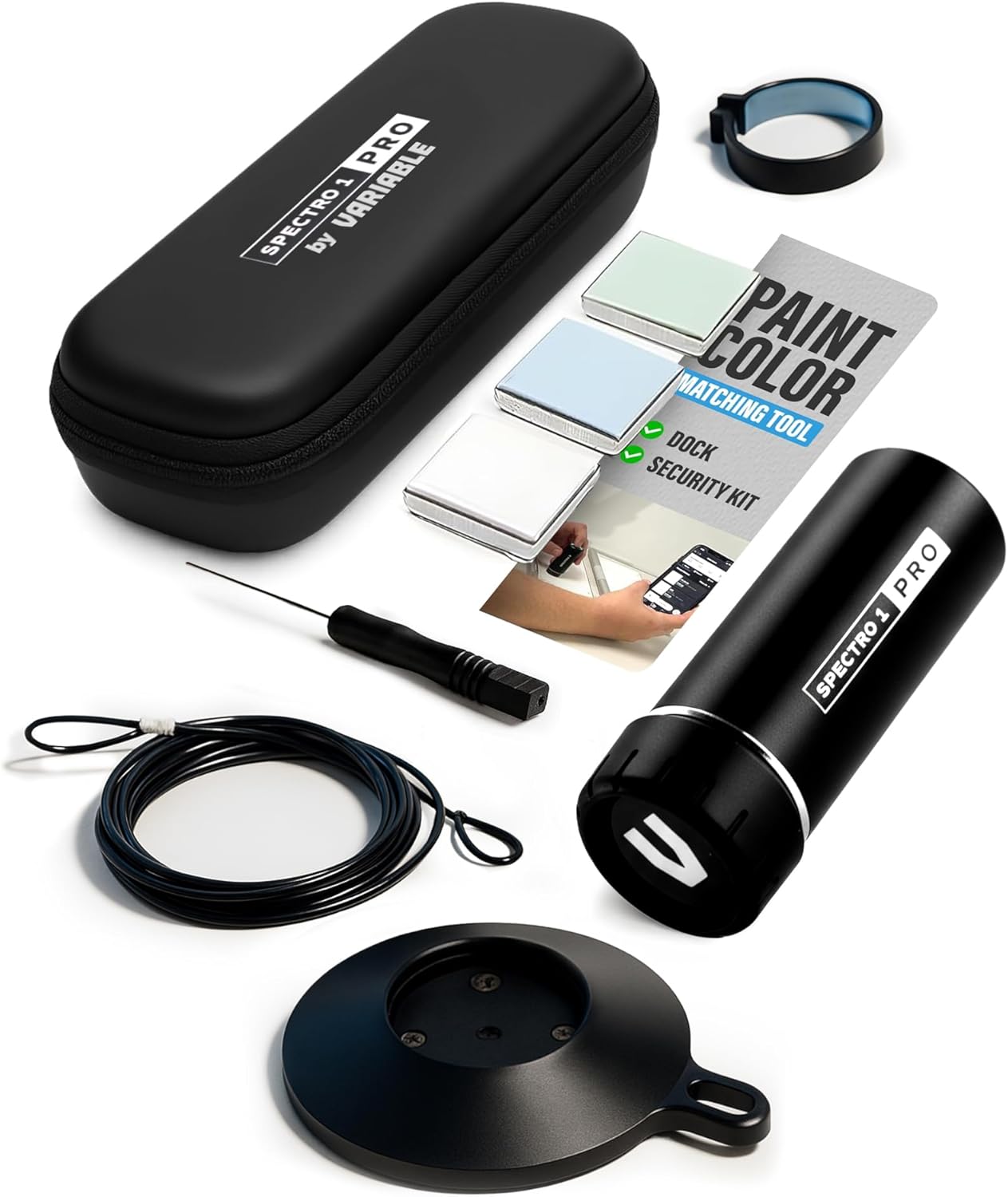
Figure 1: The COLOR MUSE Spectro 1 Pro Mobile Spectrophotometer.
2. X'inhu Inkluż
The Spectro 1 Pro with Dock & Security Kit package contains the following components:
- Spectro 1 Pro handheld color reader
- Baċir tal-Iċċarġjar
- Security Kit (including security cable and security ring)
- Calibration Tiles (white, light blue, green)
- Tornavit
- Cable tal-Iċċarġjar tal-USB

Figure 2: All components included in the Spectro 1 Pro with Dock & Security Kit.
3. Setup
3.1 Iċċarġjar tal-Apparat
Before initial use, fully charge your Spectro 1 Pro. Place the device into the charging dock and connect the USB charging cable to a power source. The device's indicator light will show charging status.
3.2 Installing the Spectro by Variable App
The Spectro 1 Pro operates in conjunction with the Spectro by Variable App. Download the app from the Apple App Store (for iOS) or Google Play Store (for Android). Follow the on-screen instructions to install and create an account.
3.3 Kalibrazzjoni Inizjali
For accurate measurements, calibrate the Spectro 1 Pro before its first use and periodically thereafter. Use the provided calibration tiles (white, light blue, green) and follow the calibration procedure within the Spectro by Variable App. This ensures consistent and reliable results.
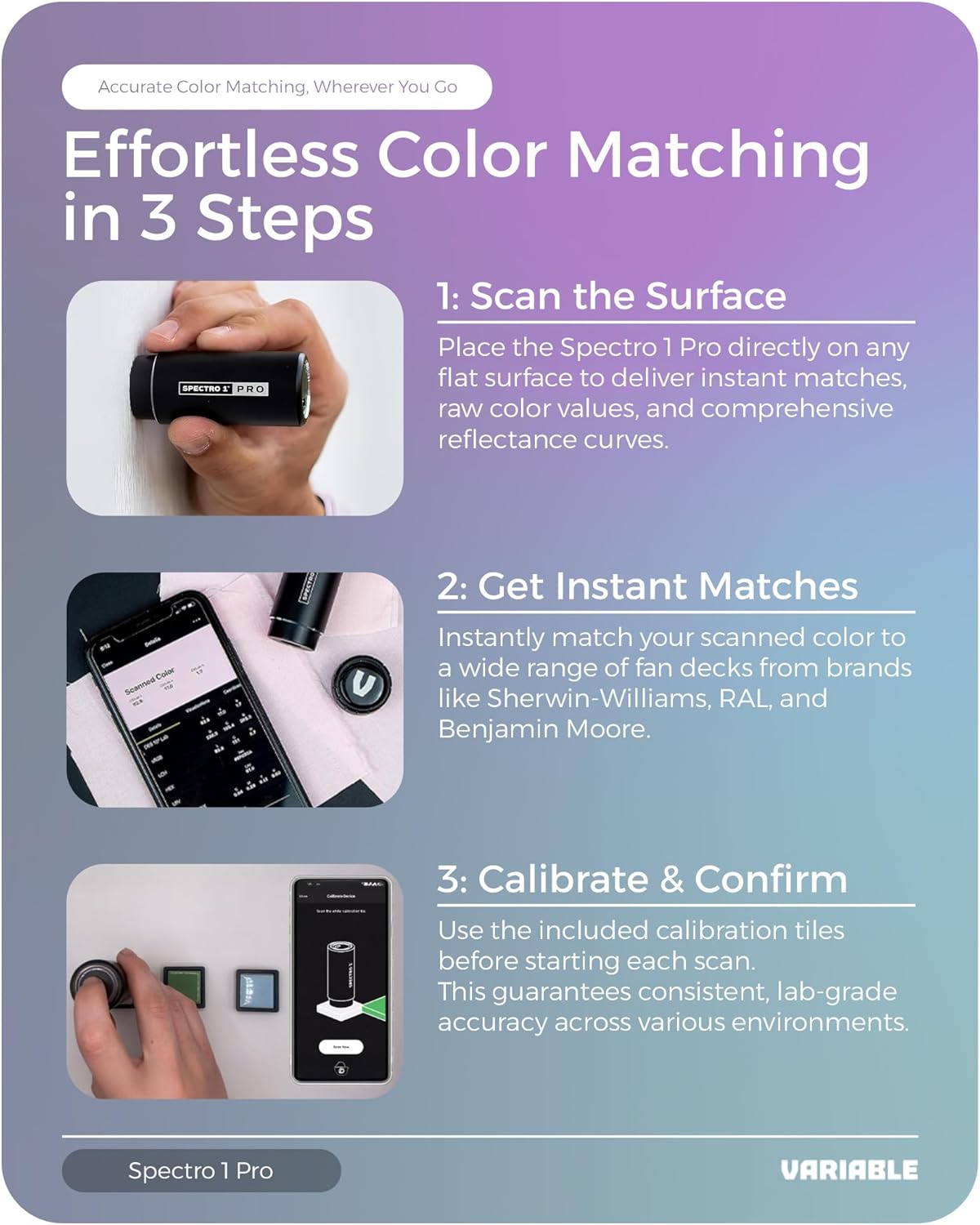
Figure 3: Calibrating the Spectro 1 Pro using the provided tiles and the mobile application.
4. Istruzzjonijiet Operattivi
4.1 Konnessjoni mal-App
Ensure Bluetooth is enabled on your smartphone or tablet. Open the Spectro by Variable App. The app will automatically detect and connect to your Spectro 1 Pro device. A successful connection will be indicated within the app interface.
4.2 Performing a Color Scan
- Place the Spectro 1 Pro directly onto the surface you wish to measure. Ensure the device is flat and stable on the surface.
- Initiate the scan through the Spectro by Variable App. The device will emit light and capture the color data.
- The app will display the measured color values, including raw color data and comprehensive reflectance curves.

Figure 4: Performing a color scan with the Spectro 1 Pro.
4.3 Color Matching and Analysis
After a scan, the app will instantly match your scanned color to a wide range of paint libraries and fan decks from various brands. You can view precise matches and detailed color data. The Spectro 1 Pro utilizes advanced algorithms and machine learning to tune reflectance measurements, providing laboratory-grade spectral data with exceptional speed and accuracy.

Figura 5: Viewing color matching results and data within the Spectro by Variable app.
4.4 Understanding the Technology
The Spectro 1 Pro incorporates an integrated sphere to include specular light during each measurement, ensuring comprehensive color data capture. It features eight full-spectrum LED lights that provide excellent diffused illumination under four different light temperatures (A, F2, D50, D65). An optical color sensor with narrow wavelength filters accurately measures the visible spectrum from 400-700 nm.
Video 1: An animated demonstration of the internal technology of the Spectro 1 Pro, showing its integrated sphere, LED illumination, and spectral measurement capabilities.
4.5 Versatile Compatibility
The Spectro 1 Pro is compatible with PC-based software for extended functionality and supports Variable Cloud for managing color libraries globally. It also offers subscription access to Pantone and Variable Quality Control Module for advanced professional use.

Figure 6: The Spectro 1 Pro's versatile compatibility features, including PC software integration and cloud support.
5. Manutenzjoni
5.1 Tindif tal-Apparat
Keep the measurement aperture clean to ensure accurate readings. Use a soft, lint-free cloth to gently wipe the lens and the surrounding area. Avoid using abrasive cleaners or solvents that could damage the device.
5.2 Ħażna tal-Apparat
When not in use, store the Spectro 1 Pro in its charging dock or the provided security kit case to protect it from dust, moisture, and physical damage. Store in a cool, dry place away from direct sunlight.
5.3 Kura tal-Batterija
The device contains a Lithium Ion battery. For optimal battery life, avoid fully discharging the battery frequently. Charge the device regularly, especially if it will be stored for an extended period.
6 Issolvi l-problemi
| Problema | Kawża Possibbli | Soluzzjoni |
|---|---|---|
| L-apparat ma jixgħelx | Batterija baxxa | Charge the device using the provided USB cable and dock. |
| Ma tistax tikkonnettja mal-app | Bluetooth off, device out of range, or app issue | Ensure Bluetooth is on, device is close to your phone/tablet, restart the app, or restart the device. |
| Qari mhux eżatt | Dirty lens, uncalibrated device, or improper scanning technique | Clean the measurement aperture, perform calibration, ensure device is flat on the surface during scan. |
| L-app tiġġarraf jew tiffriża | Software glitch or outdated app version | Restart the app. If the issue persists, check for app updates in your device's app store. |
7. Speċifikazzjonijiet
The Spectro 1 Pro is engineered for high precision and reliability:
- Repeatability (Short Term): 0.05 ΔE00
- Inter-Instrument Agreement (32 Ceramic Tiles): 0.3 ΔE00 Average / 0.5 ΔE00 Max
- Optical Geometry: Diffused / 0
- Specular Included: Iva
- Illumination Types: A, F2, D50, D65
- Observers: 2 Degree & 10 Degree
- Measurement Size: 8mm Dijametru
- Illuminate Life: 500+ Hours / 1,000,000+ Scans
- Kapaċità tal-batterija: 200 mAh (~250 Scans) Per Recharge
- Spectral Interval / Range: 10 nm / 400 - 700 nm
- Sors tad-Dawl: Full Spectrum LEDs
- Ħin tal-Kejl: 1.5 Sekondi
- Piż tal-oġġett: 8 uqija
- Dimensjonijiet tal-Prodott: 8 x 2.5 x 2 pulzieri
- Tip taċ-Ċellula tal-Batterija: Jonju tal-litju
- Numru tal-Mudell: 9215SCI

Figure 7: The Spectro 1 Pro demonstrating precision in color scanning on a red surface.
8. Garanzija u Appoġġ
8.1 Informazzjoni dwar Garanzija
The Spectro 1 Pro comes with a manufacturer's warranty covering defects in materials and workmanship. Please refer to the warranty card included in your product packaging or visit the COLOR MUSE official websit għal termini u kundizzjonijiet dettaljati tal-garanzija.
8.2 Appoġġ għall-Klijent
For technical assistance, troubleshooting, or any questions regarding your Spectro 1 Pro, please contact COLOR MUSE customer support. Contact information can be found on the official COLOR MUSE website or within the Spectro by Variable App.