
Introduzzjoni
This manual provides detailed instructions for the safe installation, operation, and maintenance of your bimar Wi-Fi Ceiling Fan, Model 1 (Ø 132). Please read this manual thoroughly before using the product and retain it for future reference.
Użu Intenzjonat: This high-performance ceiling fan is designed for ventilation in indoor domestic environments. Any other use is considered improper and potentially hazardous. The manufacturer cannot be held responsible for any damages resulting from improper use or repairs performed by unqualified personnel.
Istruzzjonijiet Importanti dwar is-Sigurtà
Biex tnaqqas ir-riskju ta’ nar, xokk elettriku, jew korriment lil persuni, osserva dan li ġej:
- Aqra l-istruzzjonijiet kollha qabel ma tinstalla l-fann.
- L-installazzjoni għandha titwettaq minn elettriċista kwalifikat skont il-kodiċijiet elettriċi lokali u nazzjonali kollha.
- Kun żgur li s-sit tal-installazzjoni jista' jsostni l-piż tal-fann (madwar 6.2 kg).
- Dejjem skonnettja l-enerġija mis-circuit breaker prinċipali qabel l-installazzjoni jew is-servizz.
- Tħaddimx il-fann b'korda tal-enerġija jew plagg bil-ħsara.
- Keep hands, hair, and clothing away from moving blades.
- Do not insert any objects into the fan blades while it is operating.
- Dan l-apparat mhuwiex maħsub għall-użu minn persuni (inklużi tfal) b’kapaċitajiet fiżiċi, sensorji jew mentali mnaqqsa, jew nuqqas ta’ esperjenza u għarfien, sakemm ma jkunux ingħataw superviżjoni jew istruzzjoni dwar l-użu tal-apparat minn persuna responsabbli għas-sigurtà tagħhom.
- It-tfal għandhom ikunu sorveljati biex jiżguraw li ma jilagħbux bl-apparat.
X'hemm fil-Kaxxa
Your bimar Wi-Fi Ceiling Fan package includes the following components:
- bimar Wi-Fi Ceiling Fan unit (with 3 blades)
- Kontroll mill-bogħod
- Mounting hardware (screws, brackets, etc.)
- Manwal ta 'Istruzzjoni (dan id-dokument)

Image: The bimar Wi-Fi Ceiling Fan, featuring three light-colored wooden blades and a brushed metal motor housing and downrod.
Setup u Installazzjoni
1. Installazzjoni tal-fann
Installazzjoni professjonali minn elettriċista kwalifikat hija rakkomandata ħafna. Ensure the ceiling structure can safely support the fan's weight and that all wiring complies with local electrical codes.
- Ipprepara l-post tal-immuntar: Turn off power at the circuit breaker. Securely attach the mounting bracket to a ceiling joist or a fan-rated outlet box.
- Assemble the Downrod and Motor: Waħħal id-downrod mal-housing tal-mutur tal-fann.
- Hang il-Fan: Erfa' l-assemblaġġ tal-fann bir-reqqa u dendlu mill-bracket tal-immuntar.
- Wajer il-Fan: Connect the electrical wires (live, neutral, ground) from the ceiling to the fan's wiring, following the wiring diagram provided in the separate installation guide (if applicable).
- Waħħal ix-xfafar: Securely fasten the three blades to the motor housing.
- Sikura l-kanupew: Raise the canopy to cover the wiring and mounting bracket, securing it in place.

Immaġni: Ġenb view of the bimar ceiling fan, illustrating the angle of the light wood blades and the connection to the downrod.
2. Wi-Fi and App Connection
The bimar Wi-Fi Ceiling Fan is compatible with the Bimar Live Smart app for advanced control and scheduling.
- Niżżel l-App: Fittex għal "Bimar Live Smart" in your smartphone's app store (iOS or Android) and install it.
- Oħloq Kont: Iftaħ l-app u segwi l-istruzzjonijiet fuq l-iskrin biex toħloq kont ta' utent ġdid jew idħol jekk diġà għandek wieħed.
- Żid Apparat: Power on the ceiling fan. In the Bimar Live Smart app, tap "Add Device" or the "+" icon. Select "Ceiling Fan" or the appropriate device type.
- Qabbad mal-Wi-Fi: Follow the app's instructions to put the fan into pairing mode (usually by pressing a button on the fan or remote for a few seconds). Connect the fan to your home 2.4GHz Wi-Fi network.
- Name the Device: Once connected, you can name your fan for easy identification within the app.

Image: A modern living room featuring the bimar ceiling fan installed, with a smartphone displaying the Bimar Live Smart app interface, indicating Wi-Fi and voice control capabilities.
Istruzzjonijiet Operattivi
Your bimar Wi-Fi Ceiling Fan offers multiple control options for convenience.
1. Operazzjoni ta 'Kontroll mill-Bogħod
The included remote control allows direct access to all fan functions.
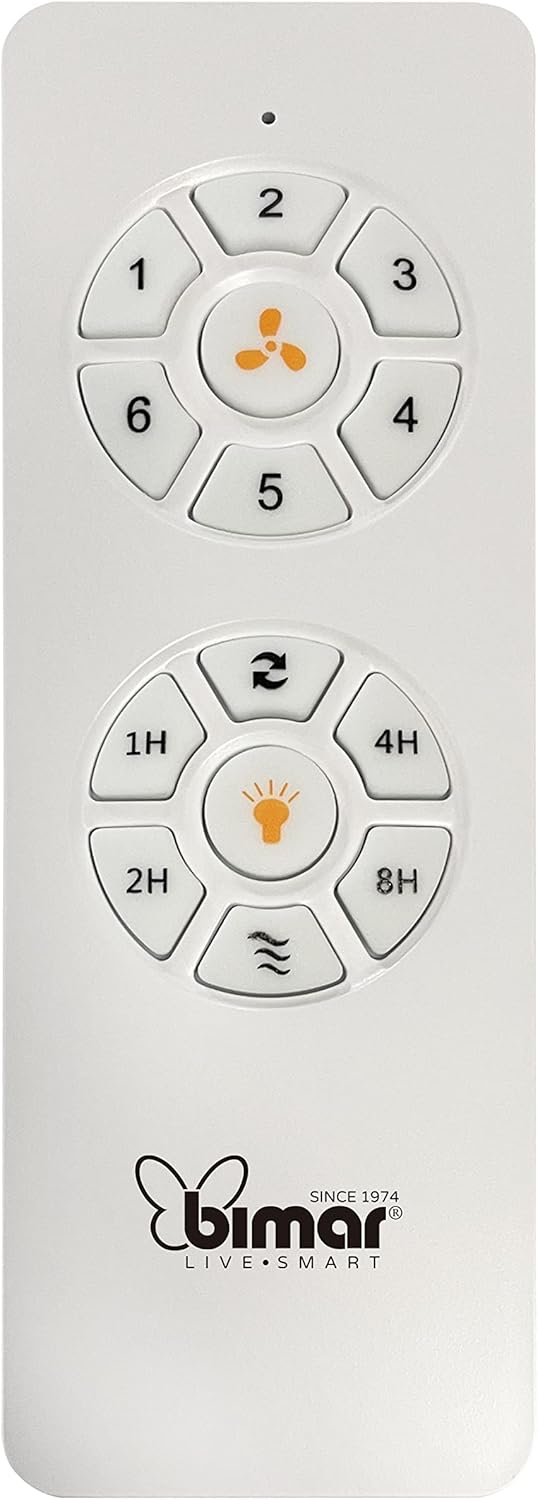
Image: The white remote control for the bimar ceiling fan, showing buttons for fan speed (1-6), fan on/off, timer (1H, 2H, 4H, 8H), mode selection, and reverse function.
- Power On/Off: Agħfas il-buttuna tal-ikona tal-fann biex tixgħel jew titfi l-fann.
- Aġġustament tal-veloċità: Use buttons 1-6 to select one of the six available fan speeds.
- Funzjoni Timer: Press 1H, 2H, 4H, or 8H to set the fan to automatically turn off after the selected duration.
- Għażla tal-Modalità: Use the mode button (often represented by waves or arrows) to cycle through Normal, Natural, Sleep, and Breeze modes.
- Modalità Sajf/Xitwa: The reverse button (often two arrows forming a circle) changes the blade rotation direction.
2. App Control (Bimar Live Smart)
Once connected to the Bimar Live Smart app, you can access enhanced features:
- Operazzjoni mill-bogħod: Control all fan functions from anywhere with an internet connection.
- Skedar: Program daily and weekly on/off times for automated operation.
- Timer: Adjust the timer from 1 to 8 hours.
- Mode and Speed Selection: Easily switch between the 6 speeds and 4 operating modes.
3. Kontroll tal-Vuċi
The bimar Wi-Fi Ceiling Fan is compatible with popular voice assistants like Amazon Alexa and Google Assistant. After connecting the fan to the Bimar Live Smart app, link your Bimar account to your voice assistant app (e.g., Alexa app or Google Home app).
Exampil-Kmandi tal-Vuċi:
- "Alexa, turn on the ceiling fan."
- "Hey Google, set ceiling fan speed to 3."
- "Alexa, turn off the ceiling fan in 1 hour."
4. Operating Modes and Speeds
- 6 Ventilation Speeds: Adjust the airflow intensity to your preference.
- Modalità Normali: Fluss tal-arja konsistenti fil-veloċità magħżula.
- Modalità Naturali: Simulates natural breezes by varying fan speed.
- Modalità Sleep: Operates at a lower, quieter speed for undisturbed rest.
- Modalità Breeze: Provides a gentle, intermittent airflow.
5. Summer/Winter Function
The reversible blade function allows for year-round use:
- Modalità tas-Sajf (Rotazzjoni kontra l-arloġġ): Joħloq fluss tal-arja 'l isfel, u jiġġenera riħ frisk.
- Modalità tax-Xitwa (Rotazzjoni lejn l-arloġġ): Creates an upward airflow, circulating warm air trapped near the ceiling, improving heating efficiency.

Image: A diagram illustrating the airflow patterns for summer (indirect ventilation, pushing air upwards) and winter (direct ventilation, pulling air downwards) modes of a ceiling fan.
Manutenzjoni
Manutenzjoni regolari tiżgura prestazzjoni ottimali u lonġevità tal-fann tas-saqaf tiegħek.
- Tindif: Before cleaning, ensure the fan is turned off and power is disconnected at the circuit breaker. Use a soft, damp cloth to wipe down the blades and motor housing. Do not use abrasive cleaners or solvents.
- Spezzjoni tax-xafra: Periodically check the blades for any signs of damage or warping. Ensure all blade screws are tight.
- Lubrikazzjoni tal-Mutur: The fan's DC motor is designed for maintenance-free operation and does not require lubrication.
- Issikka l-Qfieli: Over time, some fasteners may become loose. Check and tighten all screws and connections annually.

Immaġni: Close-up view of the bimar ceiling fan's brushed metal motor housing and the attachment points for the light wood blades, highlighting areas for cleaning and inspection.
Issolvi l-problemi
| Problema | Kawża Possibbli | Soluzzjoni |
|---|---|---|
| Fan ma jibda | No power supply; Remote control battery low; Incorrect wiring. | Check circuit breaker and wall switch. Replace remote batteries. Verify wiring connections (consult electrician). |
| Fan wobbles | Xfafar jew ħardwer tal-immuntar maħlul; Xfafar mhux ibbilanċjati. | Ensure all blade screws and mounting screws are tight. Use a balancing kit (not included) if necessary. |
| Il-kontroll mill-bogħod ma jaħdimx | Low battery; Obstruction between remote and receiver; Remote not paired. | Replace remote batteries. Ensure clear line of sight. Refer to pairing instructions in the full manual. |
| Kwistjonijiet ta 'konnessjoni Wi-Fi | Password tal-Wi-Fi mhux korretta; Router 'il bogħod wisq; Netwerk ta' 5GHz magħżul. | Verify Wi-Fi password. Move router closer or use a Wi-Fi extender. Ensure you are connecting to a 2.4GHz network. Reset fan and re-attempt pairing. |
| Il-fann huwa storbjuż | Loose screws; Blades hitting an obstruction; Motor issue. | Check and tighten all screws. Ensure nothing is obstructing the blades. If noise persists, contact customer support. |
Speċifikazzjonijiet
| Karatteristika | Dettall |
|---|---|
| Brand | bimar |
| Numru tal-Mudell | 1 |
| Dimensjonijiet tal-Prodott | 132 x 132 x 27.5 ċm (Dijametru x Dijametru x Għoli) |
| Piż | 6.2 kg |
| Numru ta' Xfafar | 3 |
| Materjal | Injam |
| Kulur | Black (Note: Blades are light wood finish as shown in images) |
| Tip ta' Mutur | DC (Brushless, energy-saving) |
| Konsum tal-Enerġija | 35W |
| Metodi ta' Kontroll | Remote Control, Bimar Live Smart App, Voice Control (Amazon Alexa, Google Assistant) |
| Veloċitajiet tal-fann | 6 |
| Modi Operattivi | Normal, Natural, Sleep, Breeze |
| Timer | 1 sa 8 siegħa |
| Karatteristiċi Addizzjonali | Silent operation, Summer/Winter mode (reversible blades) |
| Sors tal-Enerġija | Elettriku |
| Tip ta' Installazzjoni | Muntatura tal-Limitu |

Image: The three light wood fan blades, detached and laid flat, showcasinid-disinn u n-nisġa tagħhom.


Immaġni: Tnejn views of the bimar ceiling fan, illustrating different downrod lengths: one with a 25 cm downrod and another with a 13 cm downrod, affecting the overall height of the fan.
Garanzija u Appoġġ
For warranty information, technical support, or service inquiries, please refer to the warranty card included with your product or visit the official bimar websit. Żomm il-prova tax-xiri tiegħek għal talbiet ta' garanzija.
Manifattur: Bimar S.r.l.
Kuntatt: Jekk jogħġbok żur the bimar store on Amazon or the official bimar websit għad-dettalji tal-kuntatt.