
Keychron K3D1
Manwal tal-Utent tat-Tastiera Mekkanika Keychron K3 Verżjoni 2
Model: K3D1
Prodott Overview
Il-Keychron K3 Verżjoni 2 hija tastiera mekkanika ultra-rqiqa, b'tqassim ta' 75% (84 ċwievet) iddisinjata għall-versatilità u l-prestazzjoni. Toffri kemm konnettività Bluetooth 5.1 mingħajr fili kif ukoll konnettività USB-C bil-fili, li tagħmilha kompatibbli ma' apparati macOS u Windows. Tinkludi low-pro li tista' tiġi skambjata bis-sħana.file Keychron Optical Red Switches, this keyboard provides a precise linear typing experience with white LED backlighting.

Figura 1: Minn fuq għal isfel view of the Keychron K3 Version 2 keyboard, showcasing its 75% layout with 84 keys and white backlighting.
Setup u Konnettività
The Keychron K3 Version 2 offers flexible connectivity options to suit various setups.
Konnessjoni bla fili Bluetooth 5.1
- Kun żgur li t-tastiera hija ċċarġjata jew konnessa permezz tal-USB-C.
- Locate the mode switch on the side of the keyboard and set it to "Bluetooth".
- On your device (laptop, PC, tablet, or phone), enable Bluetooth and search for available devices.
- Select "Keychron K3" from the list of devices.
- The keyboard can connect to up to 3 devices simultaneously. Use the Fn + 1, Fn + 2, or Fn + 3 keys to switch between paired devices.
Konnessjoni bil-Wired USB-C
- Qabbad il-kejbil USB-C għal USB-A pprovdut mit-tastiera mal-port USB tal-kompjuter tiegħek.
- Set the mode switch on the side of the keyboard to "Cable".
- The keyboard will automatically be recognized by your device.

Figure 2: Illustration showing the Keychron K3 connecting wirelessly via Bluetooth 5.1 to a laptop, tablet, and smartphone, highlighting its multi-device compatibility.
Istruzzjonijiet Operattivi
Key Layout and Compatibility
The 75% layout with 84 keys provides a compact design while retaining essential function keys. The keyboard is fully compatible with both macOS and Windows operating systems. It includes extra keycaps for both systems to ensure proper labeling.
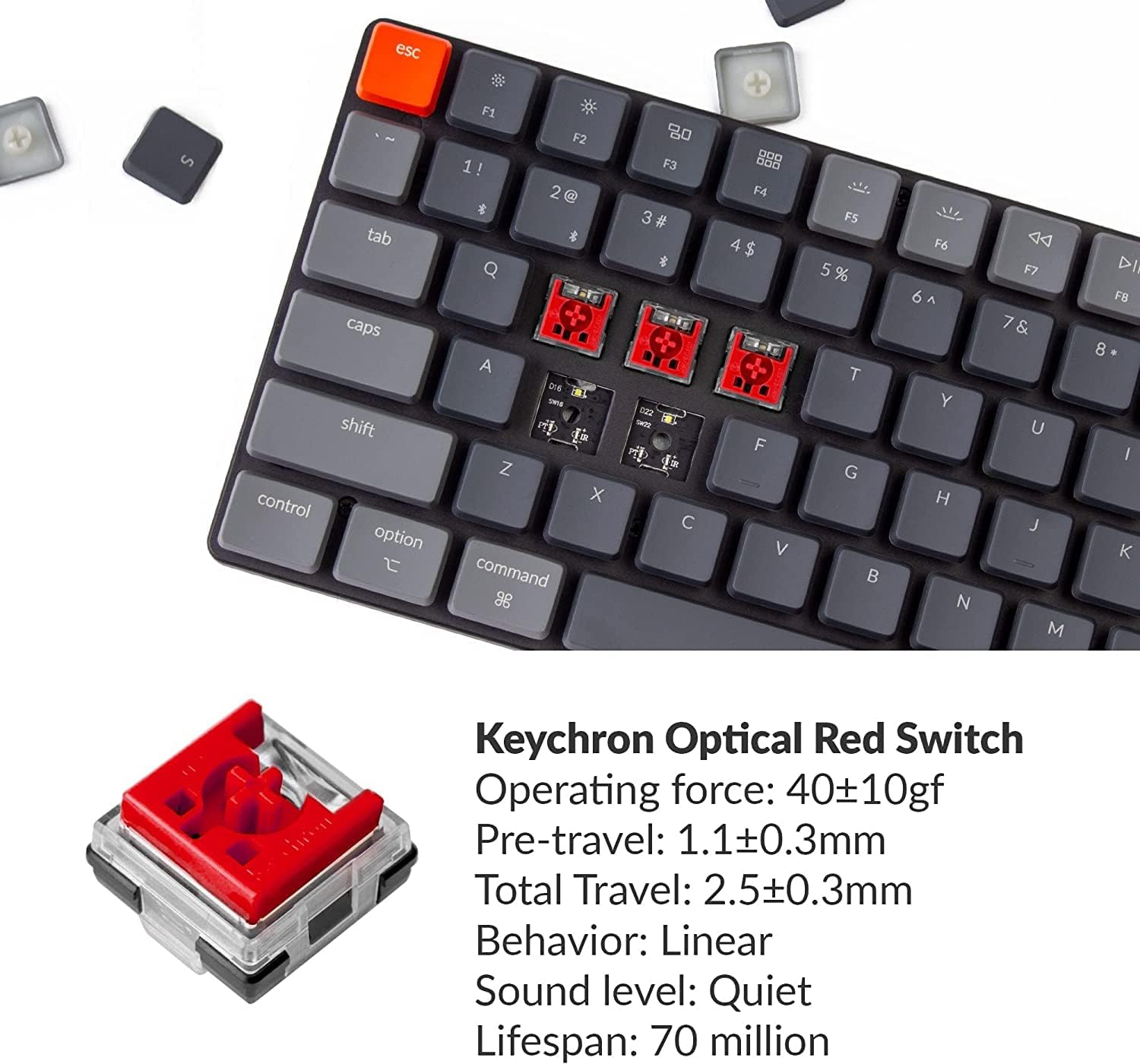
Figure 3: The tenkeyless design of the Keychron K3, demonstrating how it saves desk space and provides more room for mouse movement.
Swiċċijiet Hot-Swappable
The K3 features hot-swappable low-profile Keychron Optical Red Switches, allowing users to easily change switches without soldering. This enables customization of the typing experience, whether you prefer linear, clicky, or tactile feedback.

Figura 4: Close-up view of the Keychron K3 showcasing its hot-swappable low-profile optical switches, with a keycap puller demonstrating the ease of removal.
Backlight LED abjad
The keyboard is equipped with a white LED backlight. Users can switch between static white or flashing light modes to suit their preference.
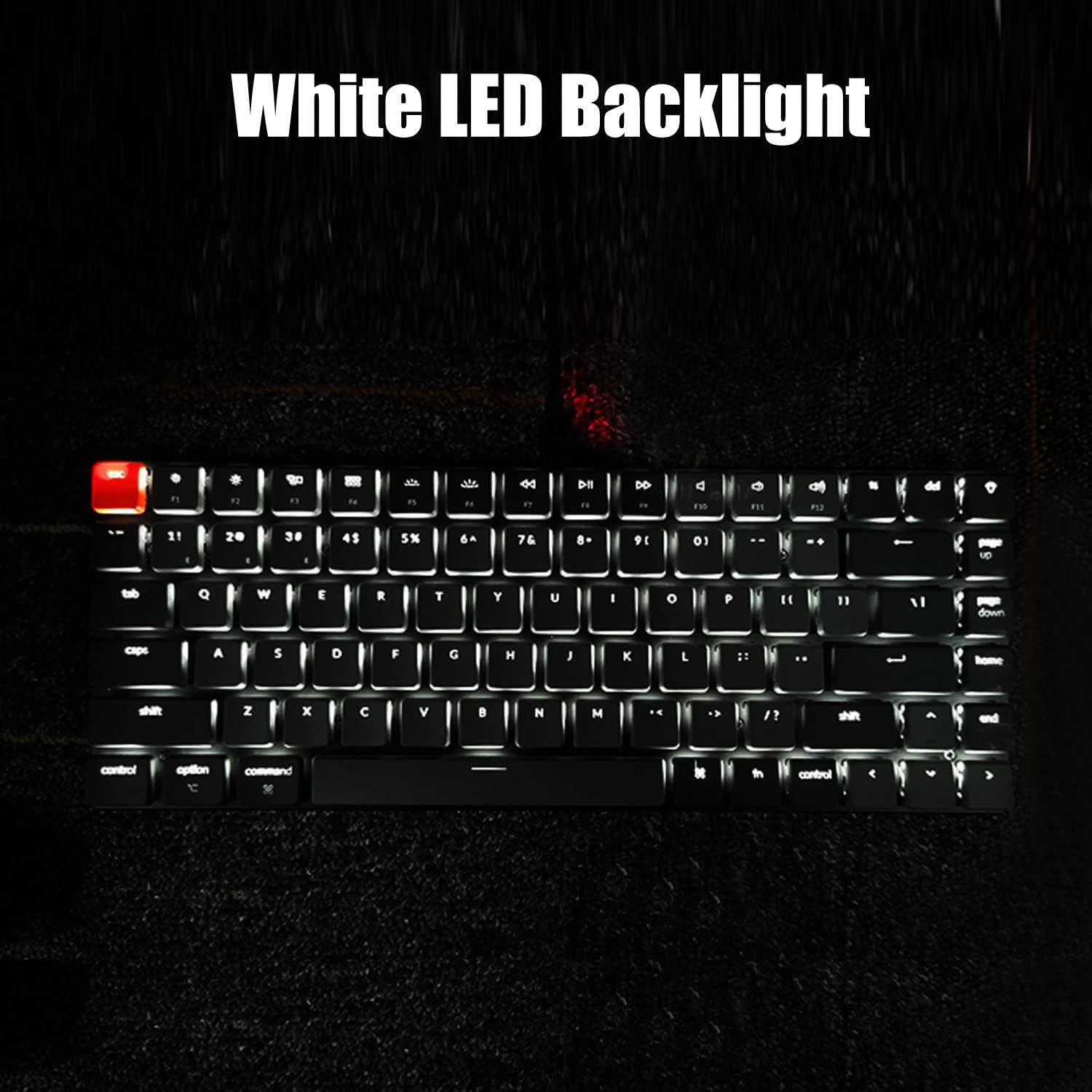
Figure 5: The Keychron K3 keyboard illuminated with its white LED backlight, enhancing visibility in low-light conditions.
Disinn Ergonomiku
The K3's design incorporates ergonomics with two keyboard stands that provide a comfortable typing angle (6-9 degrees), reducing wrist strain. Its streamlined aluminum body ensures durability and a lightweight profile.

Figura 6: Ġenb view of the Keychron K3 demonstrating its adjustable typing angle (6-9 degrees) for improved ergonomics.
Manutenzjoni
Tindif
- Uża drapp artab u niexef biex timsaħ il-wiċċ tat-tastiera.
- For deeper cleaning, remove keycaps using the provided keycap puller and use compressed air to clear debris from beneath the keys.
Sostituzzjoni tal-Iswiċċ
Biex tissostitwixxi swiċċ:
- Gently pull the keycap off using the keycap puller.
- Use the switch puller to carefully remove the optical switch from the keyboard.
- Align the pins of the new optical switch with the holes on the PCB and press firmly until it clicks into place.
- Erġa' waħħal il-għatu taċ-ċwievet.
Note: This keyboard is NOT compatible with conventional MX style mechanical switches.
Issolvi l-problemi
Kwistjonijiet ta' Konnettività
- If experiencing input delay or disconnections in Bluetooth mode, ensure the keyboard is within range of your device and there are no significant obstructions.
- Ipprova erġa' qabbad it-tastiera mat-tagħmir tiegħek.
- Switch to wired mode via USB-C to rule out Bluetooth interference.
Ħajja tal-batterija
- The keyboard has a built-in 1550 mAh rechargeable Li-polymer battery, offering up to 34 hours of working time.
- If battery life seems shorter than expected, ensure the backlight is not set to maximum brightness constantly, as this consumes more power.
- The keyboard enters a deep sleep mode after 5 minutes of inactivity to conserve battery. Press any key to wake it up.
Speċifikazzjonijiet
| Karatteristika | Dettall |
|---|---|
| Numru tal-Mudell | K3D1 |
| Tqassim | 75% (84 Ċwievet) |
| Konnettività | Bluetooth 5.1, USB-C bil-wajer |
| Tip ta' Swiċċ | Baxx-Profile Keychron Optical Red Switch (Hot-Swappable) |
| Operating Force (Optical Red) | 40±10gf |
| Pre-travel (Optical Red) | 1.1±0.3mm |
| Total Travel (Optical Red) | 2.5±0.3mm |
| Lifespan (Optical Red) | 70 miljun keystrokes |
| Dawl ta' wara | White LED (Static or Flashing) |
| Batterija | 1550 mAh Li-polimeru |
| Ħin tax-Xogħol | Sa 34 sigħat |
| Dimensjonijiet | 12.91 x 6.22 x 1.54 pulzieri |
| Piż | 1.74 liri |
| Manifattur | Keychron |
X'hemm fil-Kaxxa
- Cable USB
- Keycap Puller
Vidjo Uffiċjali tal-Prodott
Video 1: An official product video demonstrating the features and benefits of the Keychron K3 mechanical keyboard, including its ultra-slim design, hot-swappable switches, and multi-device connectivity. This video highlights the keyboard's versatility for both work and gaming environments.
Garanzija u Appoġġ
For detailed warranty information and customer support, please refer to the official Keychron webis-sit jew il-manwal tal-utent PDF ipprovdut mal-prodott tiegħek.
- Niżżel il-Manwal tal-Utent (PDF)
- Protection Plans are available for purchase separately:
- Pjan ta' Protezzjoni ta' Sentejn
- Pjan ta' Protezzjoni ta' Sentejn
- Complete Protect (pjan ta' kull xahar)
Ask a question about this manual
Ask about setup, troubleshooting, compatibility, parts, safety, or missing instructions. Manuals+ will review the question and use this page’s manual context to help answer it.