
Introduzzjoni
Thank you for choosing the Redkey R2 Robot Vacuum Cleaner. This manual provides important information on the safe use, operation, and maintenance of your new robot vacuum. Please read this manual thoroughly before using the product and retain it for future reference.
Informazzjoni Importanti dwar is-Sigurtà
Biex tnaqqas ir-riskju ta' korriment jew ħsara, aqra dawn l-istruzzjonijiet ta' sigurtà bir-reqqa u żommhom fil-qrib meta tkun qed twaqqaf, tuża, u żżomm ir-robot tiegħek.
- Always operate the robot according to the instructions in this manual.
- Tħallix lit-tfal jilagħbu bir-robot.
- Kun żgur li l-volt tal-adapter tal-enerġijatage huwa kompatibbli mal-provvista tal-enerġija lokali tiegħek.
- Tużax ir-robot f'ambjenti mxarrbin jew ħdejn l-ilma.
- Keep the robot away from heat sources and open flames.
- Tużax ir-robot biex tiġbor debris kbir, likwidi, jew oġġetti li qed jaqbdu.
- Naddaf il-pniezel u l-filtri regolarment biex iżżomm prestazzjoni ottimali.
- Unplug the robot from the charging station before cleaning or maintenance.
- Uża biss twaħħil u aċċessorji speċifikati mill-manifattur.
Kontenut tal-Pakkett
Please check the contents of your package against the list below. If any items are missing or damaged, please contact customer support.

An illustration showing all components included in the Redkey R2 package. Each component is numbered for easy identification.
- Redkey R2 Robot Vacuum Cleaner
- Stazzjon ta 'ċċarġjar
- Ċraret tal-mopp
- Detentur tal-mopp
- Tank tal-Ilma
- Adapter tal-Enerġija
- Pinzell tat-tindif
- Xkupilji tal-Ġnub
- Remote Control Battery (Lithium-ion)
- Kontroll mill-bogħod
- Manwal għall-Utent
Prodott Overview
Robot Vacuum

A minn fuq għal isfel view of the Redkey R2 Robot Vacuum Cleaner, showcasing its sleek black design and compact form factor. A smartphone screen displaying the control app is shown in the foreground.
- Korp Prinċipali: Contains the motor, dustbin, water tank, and navigation sensors.
- Qoxra ta' fuq: Provides access to the dustbin.
- Buttuna tal-Qawwa: For manual operation.
- Kuntatti tal-Iċċarġjar: For docking with the charging station.
- Xkupilji tal-ġenb: Sweep debris into the suction path.
- Pinzell Prinċipali: Collects dust and debris.
- Roti: Ippermetti l-moviment fuq diversi uċuħ.
- Sensers: Anti-drop, anti-collision, and carpet detection sensors.
Stazzjon ta 'ċċarġjar

The Redkey R2 Robot Vacuum Cleaner automatically returning to its charging station, illustrating the charging process.
- Kuntatti tal-Iċċarġjar: Qabbad mal-kuntatti tal-iċċarġjar tar-robot.
- Indikatur tal-Enerġija: Juri l-istatus tal-iċċarġjar.
- Port tal-Enerġija: Tqabbad mal-adapter tal-enerġija.
Gwida ta' Setup
1. Żpakkjar u Tqegħid
- Remove all packaging materials from the robot and charging station.
- Place the charging station against a wall in an open, uncluttered area. Ensure there is at least 0.5 meters (1.6 feet) of clear space on either side and 1.5 meters (4.9 feet) in front of the charging station.
- Qabbad l-adapter tal-enerġija mal-istazzjon tal-iċċarġjar u daħħalha f'sokit tal-ħajt.
2. Iċċarġjar Inizjali
Before first use, fully charge the robot. You can place the robot manually onto the charging station, ensuring the charging contacts align.
The Redkey R2 Robot Vacuum Cleaner automatically returning to its charging station, illustrating the charging process.
The indicator light on the robot will show charging status. A full charge typically takes approximately 2 hours, providing up to 110 minutes of cleaning time.

An image illustrating the Redkey R2 Robot Vacuum Cleaner's battery life, indicating up to 110 minutes of operation on a full charge.
Istruzzjonijiet Operattivi
1. Modi ta 'tindif
The Redkey R2 offers multiple cleaning modes to suit different needs:
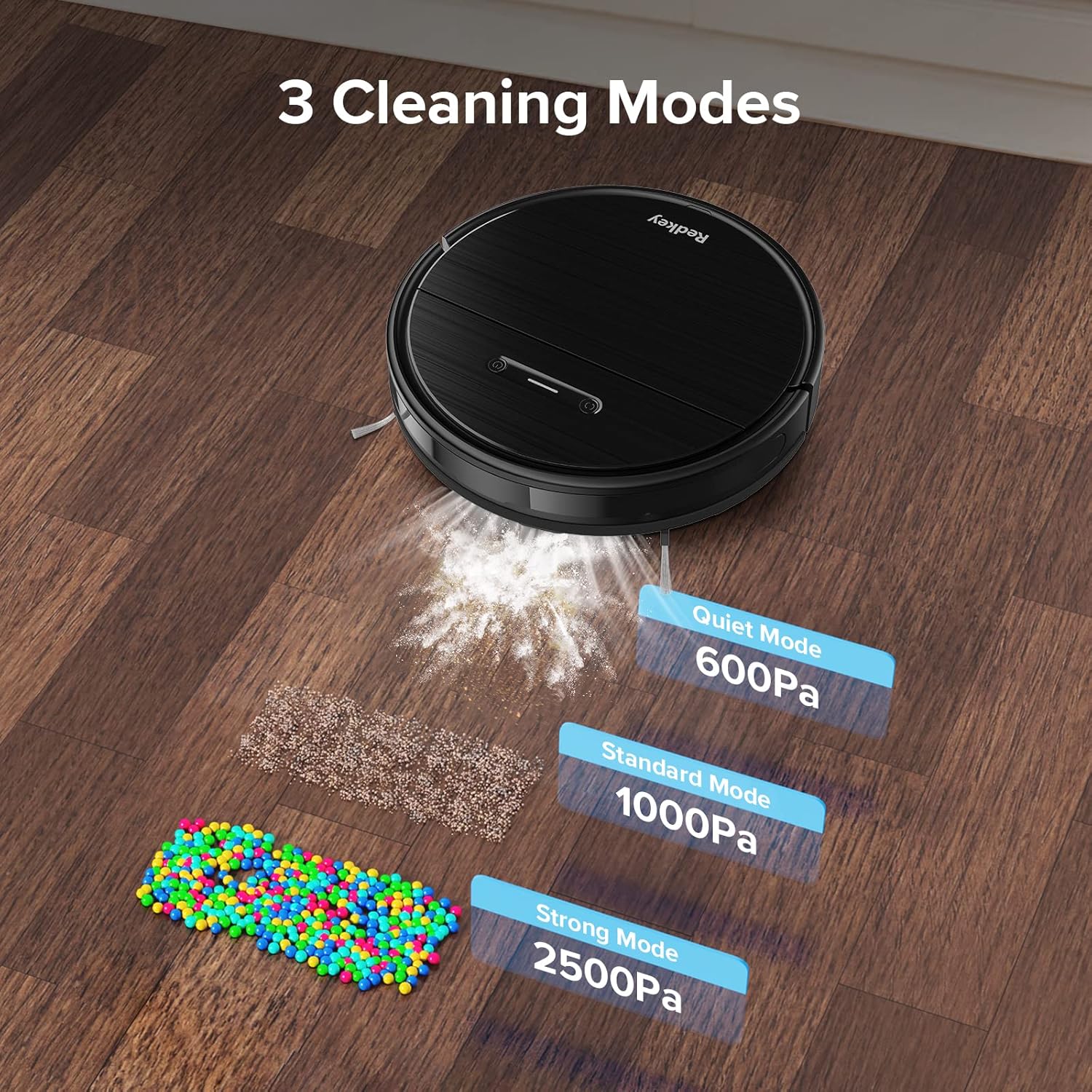
An image depicting the three cleaning modes of the Redkey R2: Quiet Mode (600Pa), Standard Mode (1000Pa), and Strong Mode (2500Pa), with visual representations of debris being vacuumed.
- Quiet Mode (600Pa): For light cleaning and minimal noise.
- Standard Mode (1000Pa): Default mode for everyday cleaning.
- Strong Mode (2500Pa): Għal tindif fil-fond u ħmieġ iebes.
2. Tibda Ċiklu ta' Tindif
You can start a cleaning cycle using the robot's button, the remote control, or the mobile app.
L-użu tal-Buttuna tar-Robot:
Press the power button on the robot to start or pause cleaning.
L-użu tal-Kontroll mill-bogħod:

A hand holding the Redkey R2 remote control, with the robot vacuum blurred in the background, demonstrating remote operation.
Use the directional buttons to steer the robot, and the mode selection buttons to choose a cleaning mode or start/stop cleaning.
Bl-użu tal-App Mobile:
The Redkey R2 is compatible with a dedicated mobile application (2.4 GHz WiFi required). Download the app from your smartphone's app store.
A smartphone screen displaying the Redkey R2 control app interface, showing options like Dock & Charge, Manual, Edge, Spot, Scheduled Cleanup, and Cleaning History.
The app allows for advanced control, including:
- Dock & Charge: Send the robot back to its charging station.
- Kontroll manwali: Idderieġi r-robot manwalment.
- Tindif tax-Xfer: Clean along walls and edges.
- Tindif tal-Post: Focus on a specific dirty area.
- Scheduled Cleanup: Set cleaning schedules for specific times and days.
- Storja tat-Tindif: View rekords tat-tindif tal-passat.

A close-up of the Redkey R2 mobile app interface, specifically showing the 'Scheduled cleanup' settings, allowing users to set start times and repeat days.
3. Funzjoni tat-Tqaxxir
To use the mopping function, fill the water tank and attach the mop cloth holder with a clean mop cloth.

The Redkey R2 Robot Vacuum Cleaner on a hard floor, with an illustration of water level settings (Low, Medium, High) for its mopping function.
The app allows you to adjust the water level for mopping (Low, Medium, High) based on your floor type and cleaning needs.
4. Carpet Detection and Supercharging
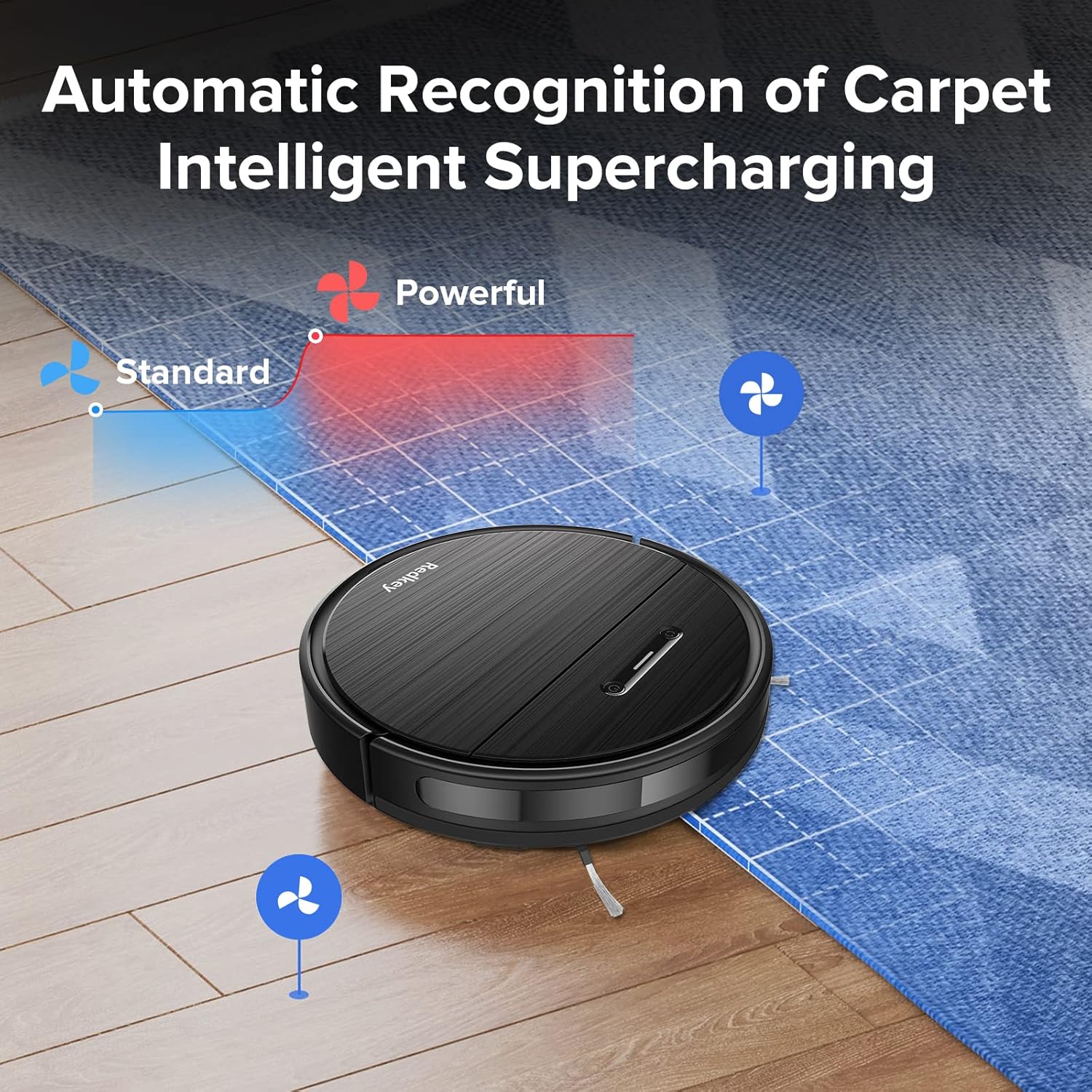
The Redkey R2 features intelligent carpet detection. When the robot detects a carpet, it automatically increases its suction power for a deeper clean.

The Redkey R2 Robot Vacuum Cleaner transitioning from a hard floor to a carpet, with an overlay illustrating how suction power automatically increases from 'Standard' to 'Powerful' upon carpet detection.
Manutenzjoni u Kura
Regular maintenance ensures optimal performance and extends the lifespan of your Redkey R2 robot vacuum.
1. Tindif tal-landa taż-żibel u l-filtru
Empty the dustbin after each cleaning cycle. Clean the filter regularly by tapping off debris or rinsing with water (ensure it's completely dry before re-inserting).
2. Main Brush Cleaning
Remove the main brush cover and lift out the main brush. Use the cleaning tool (included) to remove hair and debris tangled around the brush.
3. Tindif tal-Pinzell tal-Ġenb
Check the side brushes for tangled hair or debris. If damaged, replace them.
4. Tindif tas-Sensor
Imsaħ is-sensuri kontra l-waqgħa, is-sensuri kontra l-ħabtiet, u l-kuntatti tal-iċċarġjar b'ċarruta nadifa u niexfa biex tiżgura li jaħdmu sew.
5. Manutenzjoni tat-Tank tal-Ilma u tad-Drapp tal-Mopp
After mopping, empty any remaining water from the tank and clean the mop cloth. Mop cloths can be hand-washed or machine-washed.
Issolvi l-problemi
If you encounter issues with your Redkey R2, please refer to the following common problems and solutions:
| Problema | Kawża Possibbli | Soluzzjoni |
|---|---|---|
| Robot ma jixgħelx. | Batterija baxxa; Mitfi l-iswiċċ tal-enerġija. | Iċċarġja r-robot; Kun żgur li s-swiċċ tal-enerġija jkun mixgħul. |
| Ir-robot ma jistax isib l-istazzjon tal-iċċarġjar. | Charging station obstructed; Too far from station. | Neħħi l-ostakli madwar l-istazzjon; Poġġi r-robot manwalment eqreb. |
| Il-qawwa tal-ġbid hija dgħajfa. | Il-kontenitur tat-trab huwa mimli; il-filtru huwa mblukkat; ix-xkupilja prinċipali mħabbta. | Vojta l-kontenitur tat-trab; Naddaf/ibdel il-filtru; Naddaf ix-xkupilja prinċipali. |
| Ir-robot jeħel spiss. | Wisq ostakli; Sensuri maħmuġin. | Clear floor of cables/small objects; Clean sensors. |
| Problemi bil-konnessjoni tal-app. | Incorrect WiFi (not 2.4GHz); Router too far. | Ensure 2.4GHz WiFi; Move robot closer to router; Restart app/robot. |
Speċifikazzjonijiet
| Karatteristika | Dettall |
|---|---|
| Numru tal-Mudell | R2 (MWEU-10031790001-R2) |
| Brand | Redkey |
| Kulur | Iswed Eleganti |
| Qawwa tal-ġbid | Sa 2600 Pa |
| Livell ta' Storbju | ≤70 dB |
| Ħajja tal-batterija | Sa 110 minuta |
| Ħin tal-Iċċarġjar | Appross. 2 sigħat |
| Voltage | 12 Volts |
| Kompożizzjoni tal-batterija | Lithium-ion |
| Tip ta' Kontroll | Remote Control, App Control, Manual Control |
| Konnettività | 2.4 GHz WiFi (for app) |
| Materjal | Plastic ABS |
| Piż tal-oġġett | 5.36 Kilogrammi |
| Dimensjonijiet tal-Pakkett | 48.2 x 42.6 x 14.6 ċm |
| Rakkomandazzjoni tal-wiċċ | Hardwood, Tile, Carpet |
Garanzija u Appoġġ
Redkey products come with a standard manufacturer's warranty. Please refer to the warranty card included in your package for specific terms and conditions.
For technical support, troubleshooting assistance, or to inquire about replacement parts, please contact Redkey customer service. Contact information can typically be found on the official Redkey webis-sit jew fuq il-karta tal-garanzija.
Nota: L-informazzjoni dwar id-disponibbiltà tal-ispare parts mhijiex ipprovduta fid-dettalji tal-prodott.