
Shargeek STM2E-1
Manwal tal-Utent tal-Ċarġer Portabbli Slim Shargeek STORM2
Mudell: STM2E-1
Introduzzjoni
This manual provides comprehensive instructions for the safe and efficient use of your Shargeek STORM2 Slim Portable Charger. Please read this manual thoroughly before operating the device and retain it for future reference.
The Shargeek STORM2 Slim is a high-capacity portable power bank featuring a unique transparent design and an IPS display screen. It offers 130W max output with 100W USB-C and 30W USB-A ports, suitable for charging various devices including laptops, tablets, and smartphones.

Image: The Shargeek STORM2 Slim portable charger, showcasing its transparent design that reveals internal components and the included yellow USB-C to USB-C cables.
Karatteristiċi tal-Prodott
- Disinn trasparenti: The see-through casing reveals the internal battery and circuit layout, highlighting the device's engineering.
- IPS Display Screen: A clear screen provides real-time information on battery life, output distribution, temperature, operation hours, and active ports.
- Kapaċità Għolja: 20000mAh battery capacity, capable of multiple charges for various devices.
- Iċċarġjar veloċi: Features a 100W USB-C PD port and a 30W USB-A port, supporting 130W max output for rapid charging.
- Kompatibilità Universali: Charges laptops, phones, tablets, and other devices with USB-C or USB ports.

Immaġni: Dettaljata view of the Shargeek STORM2 Slim's IPS LCD screen, showing various data points such as input/output wattage, voltage, current, battery level, and temperatures.
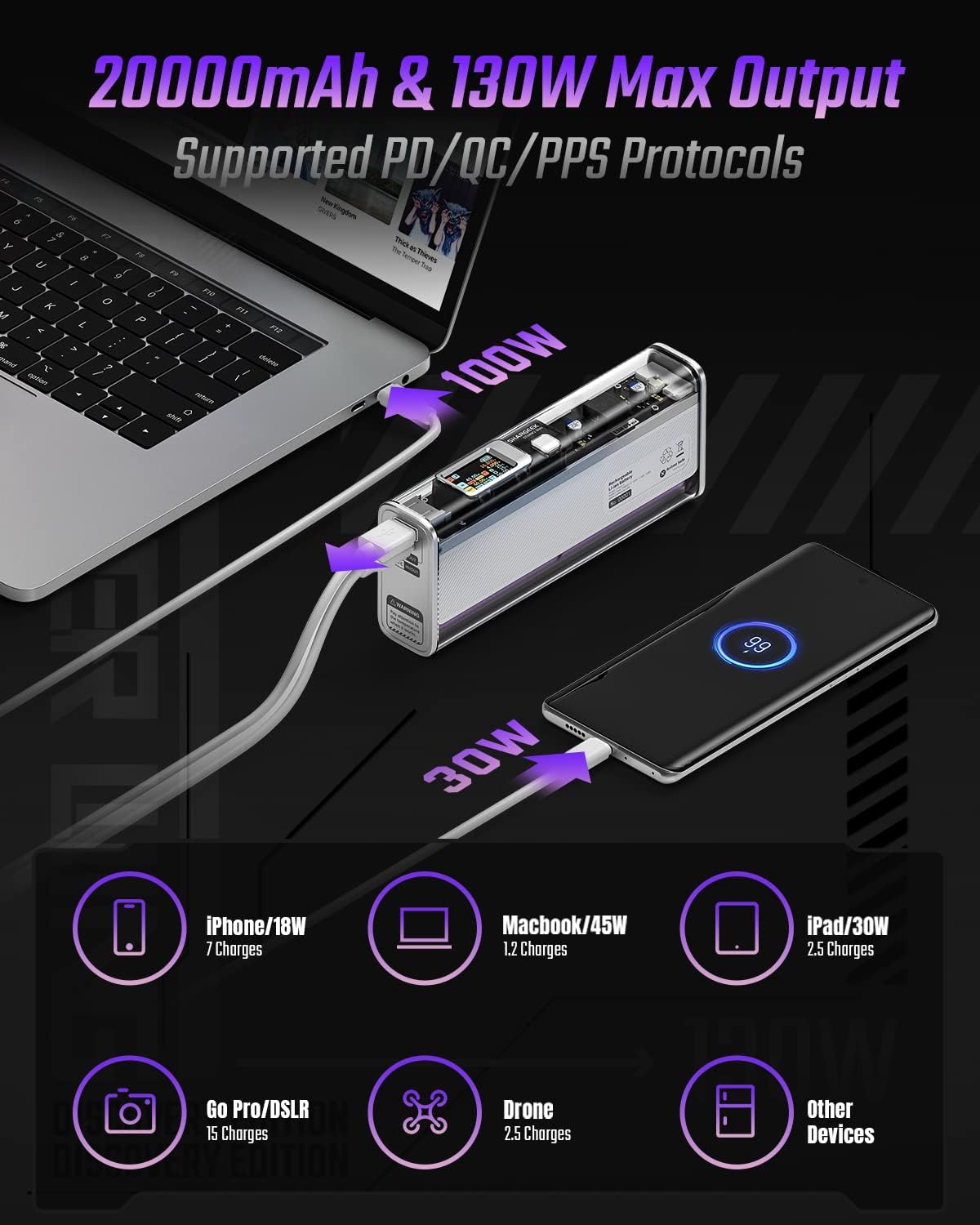
Image: The Shargeek STORM2 Slim connected via USB-C to a laptop for 100W charging and via USB-A to a smartphone for 30W charging, demonstrating its dual-port capability.
Twaqqif u l-Ewwel Użu
Kontenut tal-Pakkett:
- Shargeek STORM2 Slim Portable Charger
- USB-C għal USB-C Cable
- Manwal għall-Utent (dan id-dokument)
Iċċarġjar inizjali:
- Before first use, fully charge your STORM2 Slim.
- Connect the provided USB-C to USB-C cable to the USB-C port on the STORM2 Slim.
- Connect the other end of the cable to a compatible USB-C power adapter (not included) with a minimum of 100W output for fastest charging.
- The IPS screen will display charging status and battery percentage. The device is fully charged when the screen indicates 100%.
- A full recharge typically takes approximately 90 minutes with a 100W power adapter.
Istruzzjonijiet Operattivi
Apparat li jiċċarġja:
- Identify the appropriate charging cable for your device (USB-C to USB-C or USB-A to device-specific cable).
- Connect one end of the cable to your device and the other end to the corresponding port (USB-C or USB-A) on the STORM2 Slim.
- The IPS screen will automatically activate and display the charging output (watts, volts, amps) for the connected device(s).
- The STORM2 Slim can charge two devices simultaneously using both the USB-C and USB-A ports.
Understanding the IPS Screen:
The IPS screen provides detailed real-time information. Use the physical button on the side of the power bank to navigate through different display modes or access settings.
- Input/Output Dashboard: Shows power input (IN) when charging the power bank and power output (OUT) when charging devices, including wattage, voltage, and current for each port.
- Livell tal-batterija: Juri l-bqija tal-batterija perċentwalitage and a visual icon.
- Voltage & Kurrent: Detailed readings for the internal battery cells.
- Temperatura: Shows the internal circuit board and battery temperatures.
- Ħin ta' Tmexxija: A resettable timer indicating the duration of current operation.
To access menus: Long-press the button. Biex tinnaviga: Short-press. Biex tagħżel: Long-press.
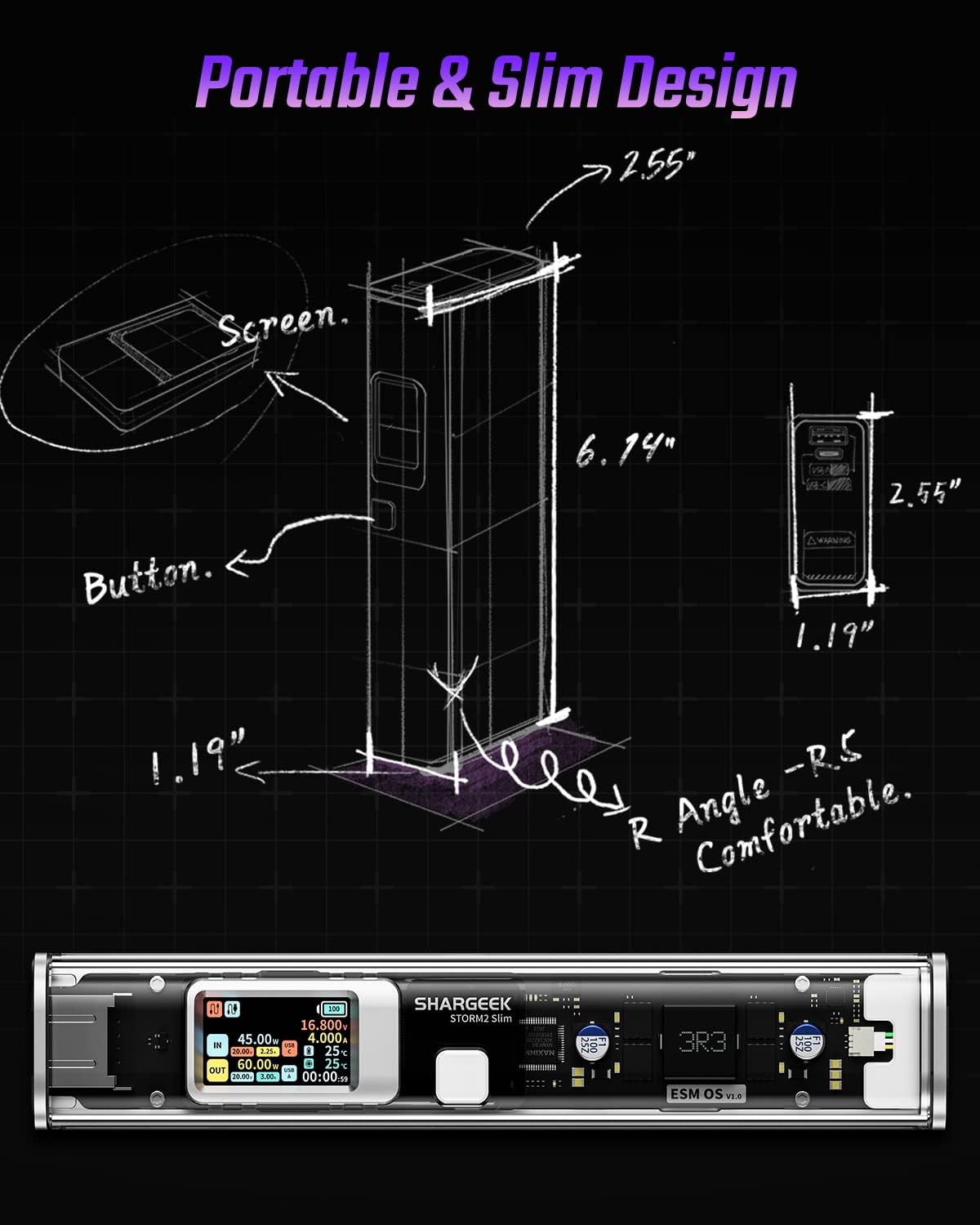
Image: A technical drawing illustrating the dimensions of the Shargeek STORM2 Slim and pointing out the screen and button locations.
Manutenzjoni
- Tindif: Uża drapp artab u niexef biex tnaddaf il-barra tal-power bank. Evita li tuża kimiċi ħarxa jew materjali li joborxu.
- Ħażna: Aħżen l-apparat f'post frisk u niexef 'il bogħod mix-xemx diretta, temperaturi estremi, u umdità għolja.
- Kura tal-batterija: To prolong battery life, avoid fully discharging the power bank frequently. Recharge it when the battery level is low. If storing for extended periods, charge it to approximately 50-70% every 3-6 months.
- Evita Qtar: While designed with an aluminum alloy frame for durability, avoid dropping the device as it may damage internal components or the transparent casing.
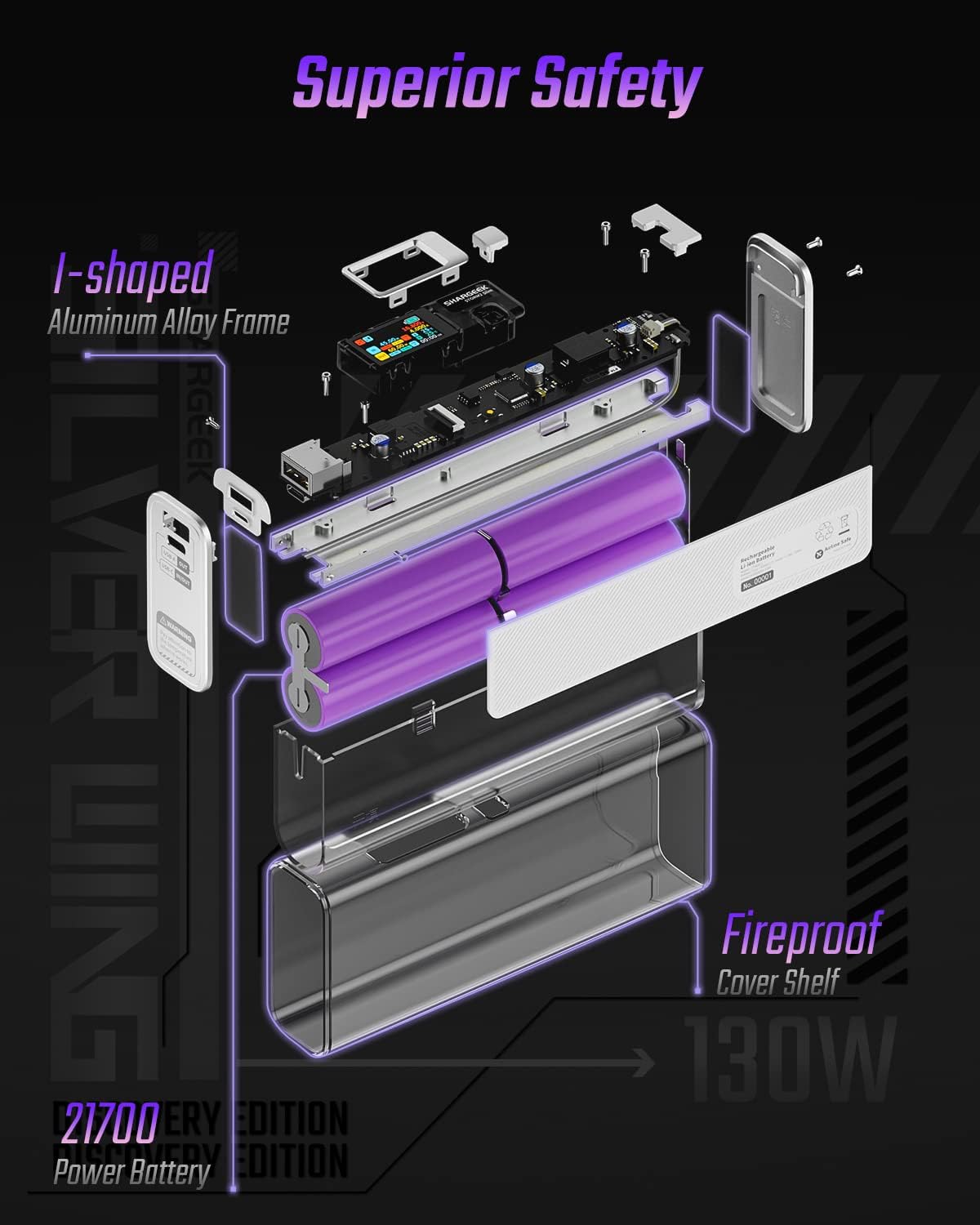
Image: An exploded diagram of the Shargeek STORM2 Slim, illustrating its internal structure including the I-shaped aluminum alloy frame, fireproof cover shelf, and 21700 power batteries, highlighting its robust construction.
Issolvi l-problemi
| Problema | Kawża Possibbli | Soluzzjoni |
|---|---|---|
| L-apparat mhux qed jiċċarġja mill-power bank. | Low power bank battery; incompatible cable; device not properly connected; device requires more power than available. | Recharge the STORM2 Slim. Ensure cable is fully inserted and compatible. Check device power requirements against power bank output. Try a different cable or port. |
| Il-power bank mhux qed jiċċarġja. | Charging cable or adapter faulty; power bank port damaged. | Try a different USB-C cable and power adapter. Ensure the adapter meets the recommended power output (e.g., 100W). If problem persists, contact support. |
| IPS screen is blank or unresponsive. | Power bank is off; temporary software glitch. | Press the button to activate the screen. If unresponsive, try connecting a device to charge or connecting the power bank to a charger to see if it activates. If problem persists, contact support. |
| Iċċarġjar bil-mod. | Cable not supporting fast charging; device not supporting fast charging; multiple devices connected. | Ensure you are using a high-quality USB-C PD cable. Verify your device supports fast charging. Charging multiple devices simultaneously may reduce individual charging speeds. |
Speċifikazzjonijiet
- Numru tal-Mudell: STM2E-1
- Kapaċità tal-batterija: 20000mAh
- Output Max: 130W
- Output USB-C: Twassil ta' Qawwa Sa 100W (PD)
- Output USB-A: Sa 30W
- Input: USB-C (up to 100W PD)
- Wiri: Skrin IPS
- Dimensjonijiet: 3 x 6.5 x 15.59 ċm (madwar 1.18 x 2.56 x 6.14 pulzieri)
- Piż: Madwar 689 g (1.52 lbs)
- Tip ta 'batterija: Jonju tal-litju
Garanzija u Appoġġ
Informazzjoni dwar il-garanzija:
Shargeek products are covered by a limited warranty against defects in materials and workmanship. Please refer to the warranty card included with your purchase or visit the official Shargeek websit għal termini u kundizzjonijiet dettaljati tal-garanzija.
Appoġġ għall-Klijent:
For technical assistance, troubleshooting, or warranty claims, please contact Shargeek customer support through their official webis-sit jew l-informazzjoni ta' kuntatt ipprovduta fuq l-imballaġġ tal-prodott tiegħek.
Official Shargeek Store Link: Shargeek Official Store
Informazzjoni dwar is-Sigurtà
- Tesponix l-apparat għall-ilma, umdità, jew temperaturi estremi.
- Tiżżarmax, timmodifikax, jew tippruvax issewwi l-apparat int stess. Dan jannulla l-garanzija u jista' jikkawża ħsara jew korriment.
- Żomm fejn ma jintlaħaqx mit-tfal.
- Use only certified and compatible charging cables and adapters.
- Evita li twaqqa’ jew tissuġġetta l-apparat għal impatti qawwija.
- Dispose of the device responsibly according to local regulations for electronic waste.
Ask a question about this manual
Ask about setup, troubleshooting, compatibility, parts, safety, or missing instructions. Manuals+ will review the question and use this page’s manual context to help answer it.